
Proscenic 850T Mini
Contents
Proscenic WiFi Robot Vacuum and Mop User Manual
Model: 850T Mini
1. Introduction
The Proscenic 850T Mini is a versatile 3-in-1 robot vacuum cleaner designed to sweep, vacuum, and mop your floors efficiently. It features advanced gyro navigation, powerful suction, and smart controls to provide a hands-free cleaning experience. This manual provides detailed instructions for setting up, operating, and maintaining your robot vacuum to ensure optimal performance and longevity.

Image: The Proscenic 850T Mini robot vacuum, its charging base, remote control, boundary strip, and various cleaning accessories including mop pads and side brushes.

Image: A visual representation of the robot vacuum's 3-in-1 capability, highlighting its 3 suction levels, 3 water flow levels, 250ml dustbin, and 200ml water tank.
2. What's in the Box
Please check the contents of your package to ensure all items are present and in good condition:

Image: An exploded view showing all components: Robot Vacuum, Charging Base, Roller Brush, User Manual, Mop Pad, 2-in-1 Dustbin & Water Tank, Side Brush*2, HEPA Filter, Cleaning Brush, Adapter, Remote Control, Boundary Strip, and additional gift items (Mop Pad, Side Brush*2, HEPA Filter).
- Proscenic 850T Mini Robot Vacuum
- Charging Base
- Power Adapter
- Remote Control (requires 3 AAA batteries, included)
- 2-in-1 Dustbin and Water Tank
- Mop Pad (x2)
- Side Brushes (x4)
- HEPA Filter (x2)
- Roller Brush
- Cleaning Brush
- Boundary Strip
- User Manual
3. Setup Guide
3.1 Charging Base Placement
Place the charging base against a wall in an open, uncluttered area. Ensure there is at least 1 meter (3 feet) of clear space to the front and 0.5 meters (1.5 feet) to each side of the charging base. Plug the power adapter into the charging base and then into a wall outlet. Ensure the charging base is connected to power.

Image: The robot vacuum automatically returning to its charging base when its battery is low.
3.2 Initial Charging
Before first use, fully charge the robot vacuum. Place the robot on the charging base, ensuring the charging contacts align. The indicator light on the robot will show charging status. A full charge typically takes approximately 5 hours.
3.3 App Connection (Optional)
For smart control features, download the ProscenicHome app from your mobile app store. Follow the in-app instructions to connect your robot vacuum to your home Wi-Fi network. This enables scheduling, mode selection, and monitoring from your smartphone.

Image: A smartphone displaying the ProscenicHome app, showing controls for cleaning schedule, suction level, and water flow, with the robot vacuum cleaning in the background.
4. Operating Instructions
4.1 Cleaning Modes
The Proscenic 850T Mini offers multiple cleaning modes to suit different needs:
- Zigzag Clean: The robot cleans in an efficient zigzag pattern, covering the entire area systematically.
- Auto Clean: The robot automatically selects the best cleaning path based on its environment.
- Spot Clean: Concentrates cleaning on a specific dirty area in a spiral pattern.
- Edge Clean: Cleans along walls and furniture edges.
- Mop Mode: Engages the mopping function for hard floors. Ensure the water tank is filled and mop pad is attached.

Image: A floor plan illustrating various cleaning modes such as Mop Mode, Auto Clean, Edge Clean, Spot Clean, Schedule Clean, and Manual Clean.
4.2 Control Methods
You can control your robot vacuum using the following methods:
- App Control: Use the ProscenicHome app to schedule cleanings, adjust suction and water levels, set No-Go zones, and monitor cleaning progress.
- Voice Control: Integrate with smart home assistants like Siri, Google Home, or Amazon Alexa for convenient voice commands.
- Remote Control: Use the included remote control for basic functions such as starting/stopping cleaning, directing the robot, and changing modes.

Image: The robot vacuum with icons representing App Control, Voice Control, and Remote Control options.
5. Key Features
5.1 Powerful Suction & Modes
The robot vacuum delivers up to 3,000 Pa of suction power, effectively picking up pet hair, dust, and debris. It offers three power modes: Max, Standard, and Quiet, allowing you to adjust suction based on your cleaning needs and noise preference.
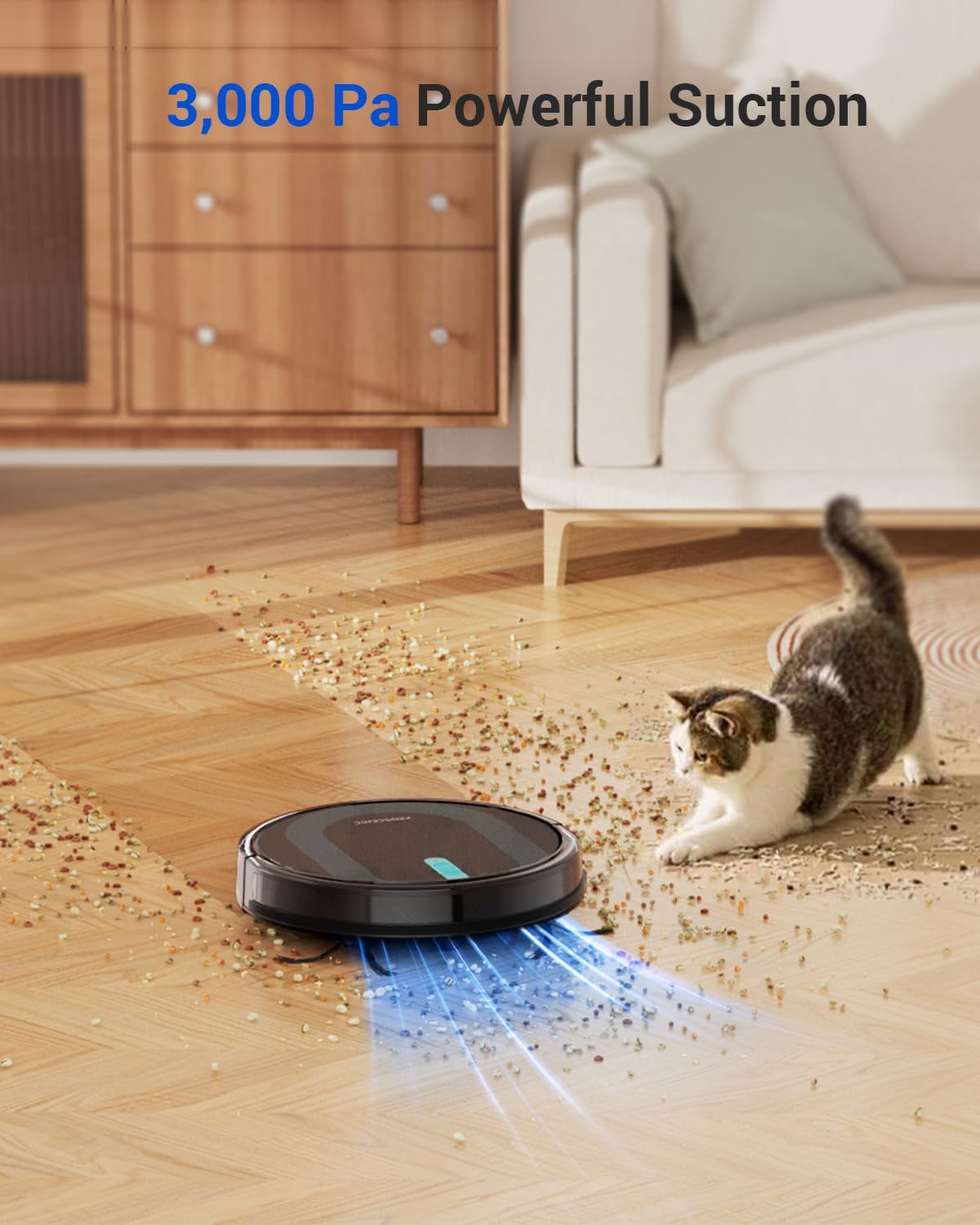
Image: The robot vacuum actively cleaning a floor covered in debris, illustrating its 3,000 Pa suction power.
5.2 Intelligent Gyro Navigation
Equipped with advanced gyro navigation, the robot maps cleaning routes in real-time, ensuring precise and efficient coverage of your home. This systematic approach avoids random paths, leading to more thorough cleaning.

Image: A top-down view showing the robot vacuum following an efficient zigzag route compared to an inefficient random path, highlighting its upgraded intelligent navigation.
5.3 Smart Carpet Boost
The robot automatically detects carpets and increases suction power to ensure deeper cleaning on carpeted surfaces. When it moves back to hard floors, the suction returns to its normal level, optimizing battery life.

Image: The robot vacuum moving from a hard floor onto a carpet, with an indicator showing the suction boost for carpet cleaning.
5.4 Slim Design & Quiet Operation
With a slim profile of 2.87 inches, the 850T Mini can easily navigate under furniture and in tight spaces. Its optimized design ensures quiet operation, maintaining a low noise level of approximately 60dB, allowing for undisturbed daily activities.

Image: The robot vacuum operating quietly under a couch, demonstrating its slim design and low noise level (60dB).
5.5 Intelligent Sensors
The robot is equipped with sensitive sensors for intelligent obstacle detection and collision avoidance, protecting your furniture and the robot itself. Anti-fall sensors prevent it from falling down stairs.

Image: A diagram of the robot vacuum's underside, pointing out its anti-fall sensors, anti-collision sensors, roller brush for sweeping and vacuuming, and side brushes for corners and edges.
6. Maintenance
Regular maintenance is crucial for the optimal performance and longevity of your robot vacuum. Always turn off the robot and disconnect it from the charging base before performing any maintenance.
6.1 Emptying the Dustbin
Empty the dustbin after each cleaning cycle or when the dustbin full indicator lights up. Press the dustbin release button, pull out the dustbin, and dispose of the collected debris.

Image: A person demonstrating how to remove and empty the dustbin from the robot vacuum.
6.2 Cleaning Filters
The robot uses a 3-layer HEPA filter system. Clean the primary filter and sponge filter regularly with the cleaning brush. The HEPA filter can be gently tapped to remove dust. Replace filters every 3-6 months depending on usage.

Image: A person rinsing the filter component of the robot vacuum under a faucet, indicating it is washable.
6.3 Cleaning Brushes
Remove the main roller brush and side brushes. Use the cleaning tool to cut and remove any hair or debris tangled around the brushes. Reinstall them securely.
6.4 Cleaning Sensors and Charging Contacts
Wipe the anti-drop sensors, anti-collision sensors, and charging contacts on both the robot and the charging base with a clean, dry cloth to ensure proper function.
7. Troubleshooting
If you encounter issues with your robot vacuum, please refer to the following common problems and solutions:
| Problem | Possible Cause | Solution |
|---|---|---|
| Robot does not turn on or charge. | Battery low; charging contacts dirty; power adapter not connected. | Place robot on charging base; clean charging contacts; ensure power adapter is plugged in. |
| Robot gets stuck frequently. | Obstacles in path; cliff sensors dirty. | Clear obstacles; clean cliff sensors; use boundary strip for restricted areas. |
| Poor cleaning performance. | Dustbin full; brushes tangled; filter clogged. | Empty dustbin; clean/replace brushes; clean/replace filter. |
| Robot cannot connect to Wi-Fi. | Incorrect Wi-Fi password; router too far; 5GHz network. | Verify password; move router closer; ensure 2.4GHz Wi-Fi network is used. |
For more complex issues or if the problem persists, please contact customer support.
8. Specifications
| Feature | Detail |
|---|---|
| Brand | Proscenic |
| Model Name | 850T Mini |
| Suction Power | 3000 Pa |
| Product Dimensions | 13"L x 13.01"W x 2.89"H |
| Battery Life | Up to 100 minutes (approx. 1290 sqft) |
| Dustbin Capacity | 250 ml |
| Water Tank Capacity | 200 ml |
| Filter Type | Foam (HEPA system) |
| Noise Level | Approx. 60 dB |
| Navigation Type | Gyro Navigation |
| Control Methods | App, Voice (Siri, Google Home, Alexa), Remote Control |
| Special Features | Anti-Fall, Cordless, Easy-Empty Dirt Container, Edge Cleaning, No-Go Zone, Smart Carpet Boost |
9. Warranty and Support
Proscenic is committed to providing high-quality products and excellent customer service.
9.1 Warranty Information
Your Proscenic 850T Mini comes with a warranty of up to 24 months from the date of purchase. This warranty covers manufacturing defects and malfunctions under normal use. Please retain your proof of purchase for warranty claims.
9.2 Money-Back Service
Proscenic offers a 30-day money-back service from the date of purchase. If you are not satisfied with your product within this period, you may be eligible for a full refund.
9.3 Customer Support
For any questions, technical assistance, or warranty claims, please contact our 24/7 Rapid Responding Service Team. Contact details can be found on the official Proscenic website or in the ProscenicHome app.

Image: Icons representing Proscenic's service policy, including 24/7 rapid responding service, 30-day money-back service, up to 24-month warranty, and fast shipping from local warehouses.
Documents and downloads
Ask a question about this manual
Ask about setup, troubleshooting, compatibility, parts, safety, or missing instructions. Manuals+ will review the question and use this page’s manual context to help answer it.