Introduction
Welcome to the user manual for your new RUSHAR M820-EEA Android 14 Tablet. This guide provides detailed instructions on setting up, operating, maintaining, and troubleshooting your device. Please read this manual thoroughly to ensure optimal performance and longevity of your tablet.
Product Overview
The RUSHAR M820-EEA is a versatile 10.1-inch Android 14 tablet designed for both productivity and entertainment. It features an Octa-Core processor, ample memory, and comprehensive connectivity options.
Key Features
- Operating System: Android 14 (GMS Certified)
- Processor: Octa-Core 2.0 GHz
- Memory: 36GB RAM (12GB + 24GB virtual)
- Storage: 128GB ROM, expandable up to 1TB via microSD card
- Display: 10.1-inch IPS FHD (1920x1080)
- Connectivity: Dual 4G LTE SIM, 5G WiFi, Bluetooth 5.0
- Cameras: 13MP Rear, 8MP Front
- Battery: 8000 mAh
- Accessories: Includes keyboard, mouse, and protective case
Package Contents
Your RUSHAR M820-EEA tablet package includes the following items:
- RUSHAR M820-EEA Tablet
- Bluetooth Keyboard
- Wireless Mouse
- Protective Case
- Charger
- USB-C Cable
- OTG Adapter
- Headphones
- User Manual

Figure 1: RUSHAR M820-EEA Tablet and its accessories.

Figure 2: Tablet used with keyboard and mouse for a laptop-like experience.
Device Layout
Familiarize yourself with the physical components of your tablet.

Figure 3: Side view of the tablet highlighting ports and buttons.
- Power Button: Located on the side, used to turn the tablet on/off or wake/sleep the screen.
- Volume Buttons: Adjust the audio volume.
- USB-C Port: For charging and data transfer.
- 3.5mm Audio Jack: For connecting headphones.
- SIM/MicroSD Card Slot: Insert your 4G LTE SIM card(s) and/or a microSD card for expanded storage.
- Front Camera: For video calls and selfies.
- Rear Camera: For taking photos and videos.
- Speakers: Stereo speakers for audio output.
Setup Guide
1. Initial Charging
Before first use, fully charge your tablet. Connect the provided USB-C cable to the tablet's USB-C port and the charger to a power outlet. The charging indicator will show the charging status.

Figure 4: Charging the tablet.
2. Powering On/Off
- To Power On: Press and hold the Power button until the RUSHAR logo appears.
- To Power Off: Press and hold the Power button until the power options menu appears, then select "Power off".
- To Sleep/Wake: Briefly press the Power button.
3. Initial Android Setup
Upon first startup, follow the on-screen prompts to configure your tablet:
- Select your preferred language.
- Connect to a Wi-Fi network.
- Sign in with your Google account or create a new one.
- Review and accept Google services terms.
- Set up screen lock (PIN, pattern, or password).
4. Inserting SIM and MicroSD Cards
Locate the SIM/microSD card slot on the side of the tablet. Use the provided SIM ejector tool to open the tray. Carefully place your 4G LTE SIM card(s) and/or microSD card into the tray, ensuring correct orientation, then reinsert the tray into the tablet.
5. Connecting Bluetooth Accessories
To connect the included Bluetooth keyboard and mouse:
- Turn on the Bluetooth accessory and put it into pairing mode (refer to the accessory's specific instructions).
- On your tablet, go to Settings > Connected devices > Bluetooth.
- Toggle Bluetooth On.
- Select the accessory from the list of available devices and follow any on-screen pairing prompts.
Operating Instructions
Basic Navigation
The tablet uses standard Android touch gestures:
- Tap: Select an item or open an app.
- Swipe: Scroll through screens or lists.
- Pinch: Zoom in or out on images and web pages.
- Long Press: Access contextual menus or move icons.
Connectivity (Wi-Fi & 4G LTE)
Your tablet supports both 5G Wi-Fi and Dual 4G LTE SIM for internet access.
- Wi-Fi: Go to Settings > Network & internet > Wi-Fi. Turn Wi-Fi on and select your desired network.
- Mobile Data (4G LTE): Ensure a 4G LTE SIM card is inserted. Go to Settings > Network & internet > Mobile network and enable mobile data.

Figure 5: Tablet showing active connectivity options.
Using Cameras
Open the Camera app to take photos or record videos. Switch between the 13MP rear camera and the 8MP front camera as needed.
Multitasking with Split Screen
Android 14 allows you to run two apps side-by-side using split-screen mode. To activate:
- Open the first app.
- Swipe up from the bottom of the screen to access recent apps.
- Tap the app icon at the top of the first app's card and select "Split top".
- Choose a second app from your recent apps or app drawer to fill the other half of the screen.

Figure 6: Tablet in split-screen mode.
Android 14 and GMS
Your tablet runs on Android 14, offering enhanced privacy, security, and control over your data. It is GMS (Google Mobile Services) certified, providing full access to Google Play Store and Google apps like Chrome, Gmail, YouTube, and Maps.
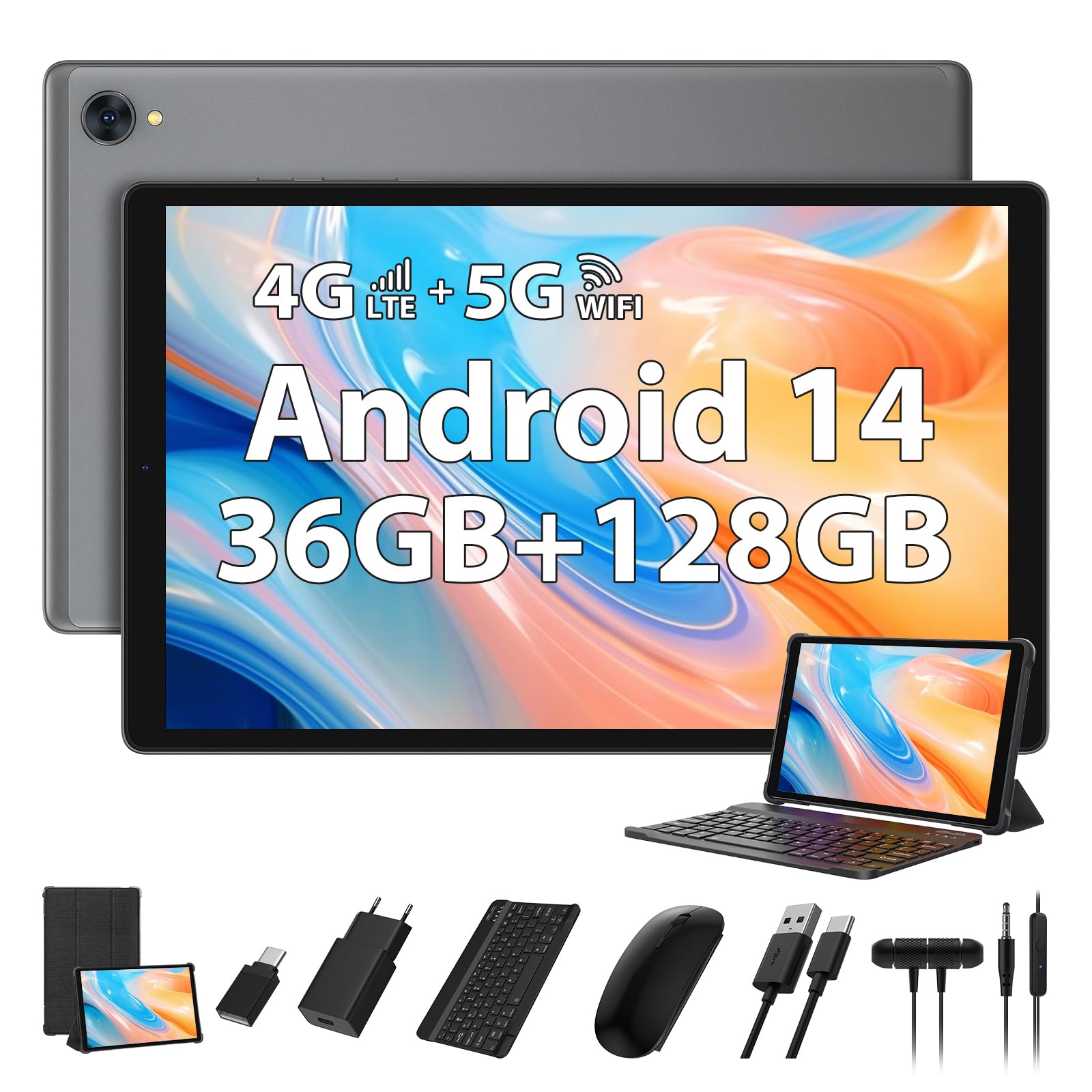
Figure 7: Android 14 interface with various applications.
Storage Management
With 128GB internal storage and support for up to 1TB microSD card, you have ample space for apps, photos, videos, and documents. Regularly check your storage usage in Settings > Storage to manage files and free up space.

Figure 8: Overview of tablet features including storage and connectivity.
Maintenance
Cleaning the Device
Use a soft, lint-free cloth to clean the screen and body of the tablet. Avoid using harsh chemicals or abrasive materials, which can damage the surface. For stubborn smudges, slightly dampen the cloth with water or a screen cleaner designed for electronics.
Battery Care
- Avoid exposing the tablet to extreme temperatures (hot or cold), as this can degrade battery life.
- Do not leave the tablet charging for extended periods after it has reached 100%.
- For optimal battery health, try to keep the charge level between 20% and 80%.
Software Updates
Regularly check for and install software updates to ensure your tablet has the latest features, security patches, and performance improvements. Go to Settings > System > System update.
Storage Optimization
To maintain optimal performance, periodically clear unnecessary files and uninstall unused apps. You can use the built-in storage management tools in Android to identify and remove large files or cached data.
Troubleshooting
Tablet Not Powering On
- Ensure the tablet is sufficiently charged. Connect it to the charger for at least 30 minutes.
- Press and hold the Power button for 10-15 seconds to force a restart.
Wi-Fi or 4G LTE Connectivity Issues
- Toggle Wi-Fi or Mobile Data off and on again in Settings.
- Restart your router (for Wi-Fi) or ensure your SIM card is properly inserted and has an active plan (for 4G LTE).
- Forget the Wi-Fi network and reconnect.
Slow Performance
- Close unused apps running in the background.
- Clear app caches in Settings > Apps > [App Name] > Storage & cache.
- Free up internal storage by deleting unnecessary files or moving them to a microSD card.
- Restart the tablet.
Bluetooth Pairing Problems
- Ensure both the tablet and the Bluetooth accessory are in pairing mode and within range.
- Turn Bluetooth off and on again on the tablet.
- Remove previously paired devices from the tablet's Bluetooth settings and try pairing again.
Factory Reset (Last Resort)
If you encounter persistent issues, a factory reset can resolve many software-related problems. Warning: This will erase all data on your tablet. Back up important data before proceeding. Go to Settings > System > Reset options > Erase all data (factory reset).
Specifications
| Feature | Detail |
|---|---|
| Brand | RUSHAR |
| Model Number | M820-EEA |
| Operating System | Android 14 |
| Processor | Octa-Core, 2.0 GHz |
| RAM | 36 GB (12 GB physical + 24 GB virtual) |
| Internal Storage (ROM) | 128 GB |
| Expandable Storage | Up to 1 TB via MicroSD card |
| Screen Size | 10.1 inches |
| Display Resolution | 1920x1080 (FHD IPS) |
| Rear Camera | 13 MP |
| Front Camera | 8 MP |
| Battery Capacity | 8000 mAh (Lithium-polymer) |
| Wi-Fi Connectivity | 5G Wi-Fi (802.11g) |
| Cellular Connectivity | Dual 4G LTE SIM |
| Bluetooth | Bluetooth 5.0 |
| Ports | USB-C, 3.5mm Audio Jack |
| Dimensions (L x W x H) | 28 x 18 x 2 cm |
| Weight | 1.19 kg |
Warranty and Support
RUSHAR is committed to customer satisfaction. If you have any questions, concerns, or require technical assistance with your M820-EEA tablet, please contact RUSHAR customer service. Our representatives aim to respond within 24 hours.
Please refer to your purchase documentation for specific warranty terms and conditions.