
1. Introduction
The Retevis RT97S is an advanced GMRS repeater designed to extend the range of two-way radio communications. This upgraded version of the RT97 offers full duplex operation, compatibility with Raspberry Pi for enhanced networking, and a portable design suitable for various environments. This manual provides essential information for the proper setup, operation, and maintenance of your RT97S repeater.

Image 1.1: The Retevis RT97S GMRS Repeater main unit, showcasing its compact and robust design.
2. Product Overview and Key Features
The RT97S GMRS Repeater is engineered for reliable and extended communication. Key features include:
- Full Duplex Operation: Allows simultaneous transmission and reception, reducing communication delays.
- Raspberry Pi Compatibility: Features a DB-9 female connector for direct connection to a microphone and compatibility with Raspberry Pi, enabling interconnection of multiple RT97S units for extended range.
- GMRS Radio Base Station: Comes with 8 default GMRS channels, compatible with various Retevis GMRS radios.
- Extended Communication Range: Ideal for connecting emergency calls beyond the direct range of walkie-talkies, suitable for schools, outdoor activities, remote areas, farms, and towns.
- Built-in Duplexer: Utilizes a single antenna for both transmitting and receiving signals.
- Durable Construction: All-aluminum alloy shell provides resistance to impacts and efficient heat dissipation for long-term use.
- Compact and Portable: Designed for mobile or simple fixed installations, can be used in vehicles or mounted on structures.
- LCD Screen: Provides clear display of operational status and channel information.

Image 2.1: Illustration of the built-in duplexer enabling simultaneous transmit and receive functions.

Image 2.2: The RT97S repeater demonstrating its compact and portable design for easy transport.
3. Package Contents
Upon unpacking your Retevis RT97S GMRS Repeater, please verify that all the following items are included:
- 1 x RT97S GMRS Base Station
- 1 x Charger
- 1 x Power Supply
- 1 x Data Cable
- 1 x English User's Manual (this document)
Note: The antenna is not included in the package and must be purchased separately.

Image 3.1: All components included in the RT97S GMRS Repeater package.
4. Setup Instructions
Follow these steps to set up your Retevis RT97S GMRS Repeater for optimal performance.
4.1 Power Connection
- Connect the power supply to the repeater's power input port.
- Plug the power supply into a suitable power source (wall outlet, car power, or solar charging system). The repeater does not have a separate on/off switch; it powers on automatically when connected.

Image 4.1: Powering the RT97S repeater using a wall outlet, car adapter, or solar panel.
4.2 Antenna Connection
- Connect your GMRS antenna (not included) to the antenna port on the repeater. Ensure a secure connection.
- Position the antenna in a location that provides clear line-of-sight for maximum range and minimal interference.
4.3 Raspberry Pi and Microphone Connectivity (Optional)
The RT97S features a DB-9 female connector for advanced applications:
- Microphone Connection: A compatible microphone can be directly connected to the DB-9 port.
- Raspberry Pi Integration: Connect a Raspberry Pi (additional components not included) to the DB-9 port to enable interconnection of multiple RT97S repeaters. This setup can significantly extend communication distance by creating a network of repeaters.
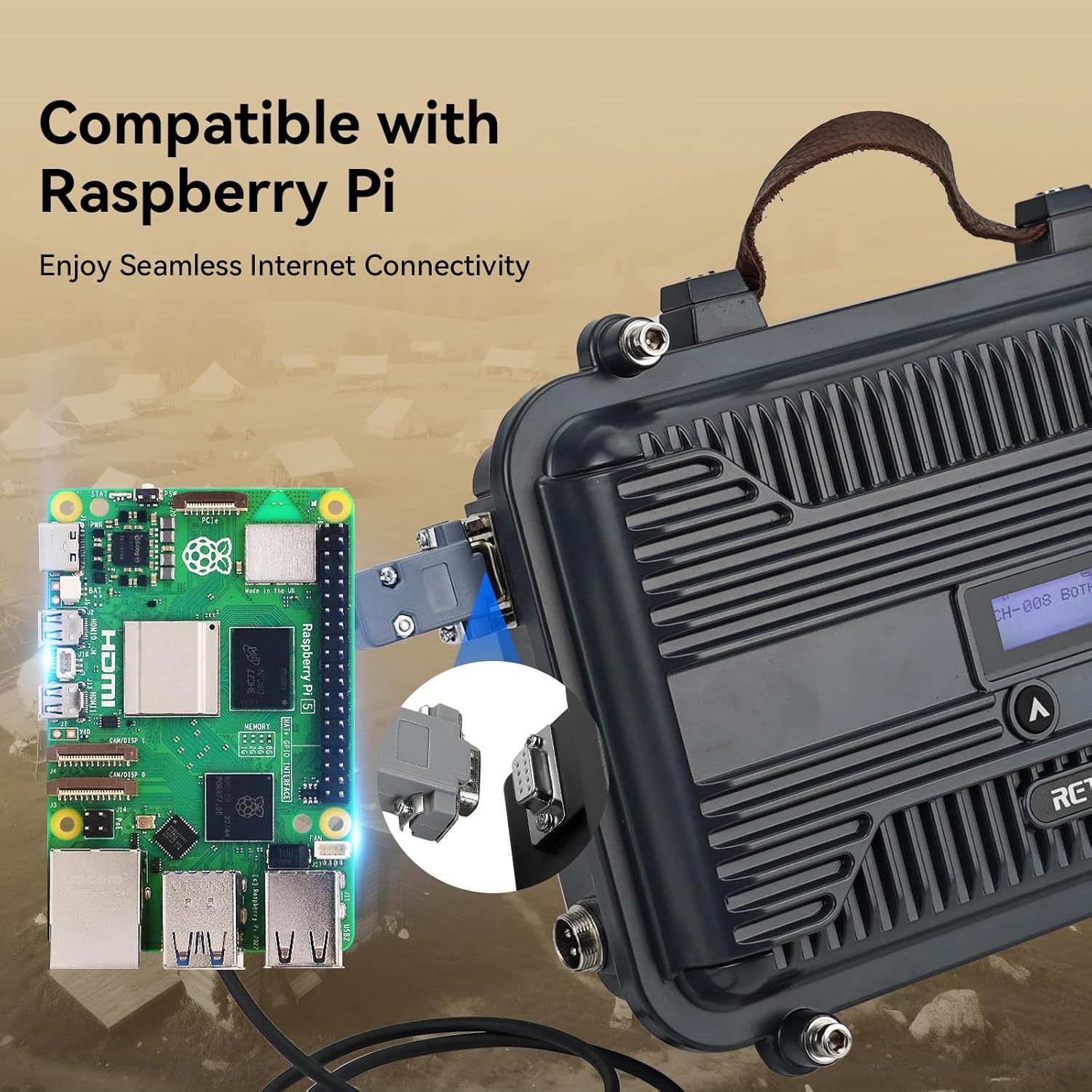
Image 4.2: The RT97S repeater demonstrating compatibility with Raspberry Pi for advanced networking.
4.4 Installation Options
The compact design of the RT97S allows for flexible installation:
- Mobile Installation: Can be placed in a vehicle as a substitute for an on-board transceiver.
- Fixed Installation: Can be mounted on a roof, wall, or other suitable structure to serve as a base station.

Image 4.3: Various installation scenarios for the RT97S repeater, including mobile and fixed setups.
5. Operating Instructions
The RT97S is designed for user-friendly operation with its intuitive controls and LCD screen.
5.1 Channel Switching
- To switch between the 8 default GMRS channels, long press the button located on the front panel for three seconds.
- The LCD screen will display the current channel. Use the up/down buttons to navigate through available channels.
5.2 Volume Adjustment
To adjust the volume, briefly press the button on the front panel. Use the up/down buttons to increase or decrease the volume level.
5.3 LCD Screen Information
The LCD screen provides real-time information about the repeater's status, including the active channel and operational mode.

Image 5.1: The LCD screen and control buttons for user-friendly operation.
6. Maintenance
Proper maintenance ensures the longevity and reliable performance of your RT97S GMRS Repeater.
- Cleaning: Use a soft, dry cloth to clean the exterior of the repeater. Avoid using harsh chemicals or abrasive materials.
- Environmental Conditions: While the aluminum alloy shell is durable, avoid exposing the repeater to extreme temperatures, direct sunlight for prolonged periods, or excessive moisture. The device is not water-resistant.
- Connections: Periodically check all cable connections (power, antenna, data) to ensure they are secure and free from damage.
- Heat Dissipation: Ensure the repeater's heat dissipation fins are not obstructed to maintain optimal operating temperature.
7. Troubleshooting
If you encounter issues with your RT97S GMRS Repeater, refer to the following common troubleshooting steps:
| Problem | Possible Cause | Solution |
|---|---|---|
| Repeater does not power on. | No power connection or faulty power supply. | Ensure the power supply is securely connected to both the repeater and a working power outlet. Check the power supply for damage. |
| No signal reception/transmission. | Antenna not connected, incorrect channel, or out of range. | Verify the antenna is properly connected. Check that your radios are on the correct GMRS channel. Ensure radios are within the repeater's operational range. |
| Poor communication quality. | Antenna placement, interference, or duplexer power loss. | Adjust antenna position for better line-of-sight. Minimize sources of electrical interference. Be aware of potential power losses due to the built-in duplexer. |
| Cannot switch channels or adjust volume. | Incorrect button press duration. | For channel switching, long press the button for three seconds. For volume adjustment, briefly press the button. |
If the problem persists after attempting these solutions, please contact Retevis customer support for further assistance.
8. Specifications
Detailed technical specifications for the Retevis RT97S GMRS Repeater:
- Model Number: RT97S
- Item Weight: 7.26 pounds (approx. 3.29 kg)
- Product Dimensions: 2.8"D x 8.3"W x 10.25"H (approx. 7.1cm D x 21.1cm W x 26.0cm H)
- Display Type: LCD
- Color: Black
- Number of Channels: 8 (default GMRS channels)
- Special Features: DB-9 female connector, Full duplex
- Frequency Range: GMRS
- Voltage: 12 Volts (DC)
- Water Resistance Level: Not Water Resistant
- Compatible Devices: Raspberry Pi

Image 8.1: Physical dimensions and key connection points of the RT97S repeater.
9. Warranty and Support
Retevis provides comprehensive warranty and support for the RT97S GMRS Repeater:
- Warranty Period:
- 2-year warranty for the radio body.
- 1-year warranty for accessories.
- Return Policy: 30 days no-reason return.
- Post-Warranty Service: Maintenance services are still offered beyond the warranty period; buyers are responsible for associated costs.
- Customer Support: For any inquiries or support needs, please contact Retevis via Amazon email. Responses are typically provided within 12 hours.


