Introduction
The BEITONG Asura 3S Gaming Controller is a versatile wireless gamepad designed for an enhanced gaming experience across multiple platforms including PC, Switch, iOS, and Android. It features advanced technologies such as Hall Effect triggers, adjustable joysticks, and mechanical keys, providing precision and durability for various game genres.
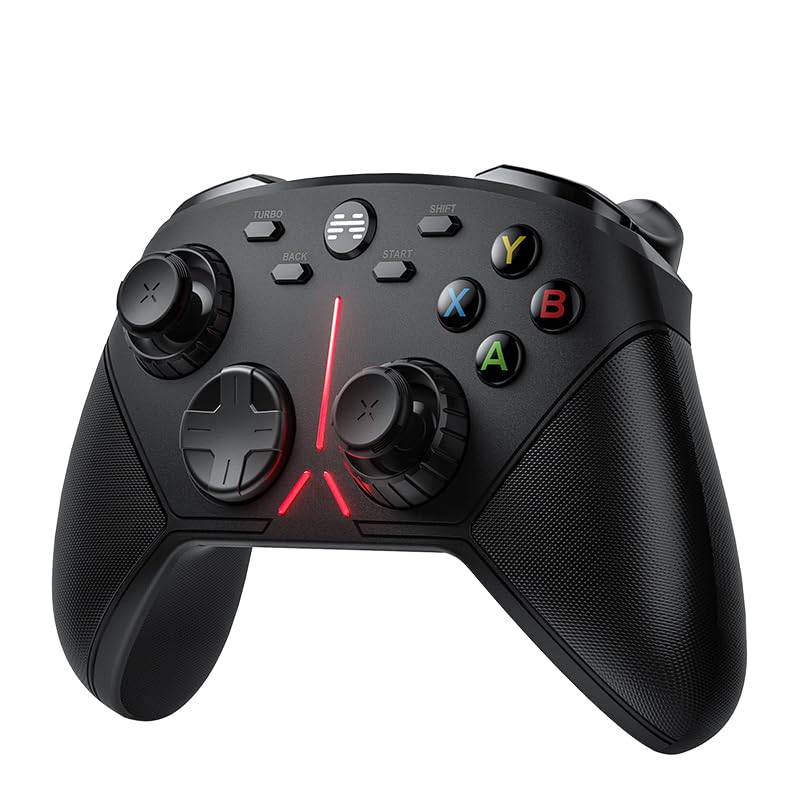
Figure 1: Front view of the BEITONG Asura 3S Gaming Controller, showcasing its ergonomic design and illuminated accents.
Product Features
- Connectivity & Multi-platform: Utilizes stable 2.4GHz wireless technology for low latency. Compatible with PC (Windows 7/8/10/11). Note: Does not support Xbox, Xbox 360/One, Mac, iOS, or PS4/5.
- Sensitivity-Adjustable Anti-wear Joystick: Features a self-developed system allowing physical adjustment of joystick sensitivity via a radial dial around each thumbstick. This enables on-the-fly sensitivity changes without software, ideal for FPS games.
- Switchable Hall Effect Trigger: Hall triggers offer a 0.7mm stroke, 35% faster response than traditional triggers. Includes 3-gear trigger locks (Micro, Mid, Full) to adapt to various game types like racing, shooting, and sports.
- 6-Axis Gyro Motion: Built-in gyro sensor provides quick response for motion-sensing games, enhancing immersive control.
- Mechanical Keys & 950mAh Battery: Upgraded mechanical buttons offer frictionless operation and extended durability. A large capacity 950mAh rechargeable battery ensures prolonged gaming sessions.
- Button Customization: Configurable LB, RB, M1, M2 buttons and rear paddles allow for efficient operation and one-click activation of complex commands.
- Counterweight Adjust & Using Texture: Removable handle cases allow for adding 7g and 15g counterweights to adjust the controller's weight for different gaming preferences. Features metallic paint matte texture with smooth curves and anti-slip laser etching.
- Additional D-Pad Replaceable: Includes an additional diamond texture concave D-pad for replacement, catering to different gaming styles.
- Turbo Function: Allows for rapid, repeated input of buttons (ABXY, LB, RB, LT, RT) by holding the Turbo button and the desired action button.
- SHIFT Key Exchange Function: The SHIFT key enables the exchange of functions between the left stick and the D-pad, adapting to different game operation habits. Avoid accidental presses if not needed.
- Software Support Macro Programmable: Compatible with BEITONG Gaming Hall software for macro programming, allowing users to save and activate complex skill combos with one click.

Figure 2: Illustration of the joystick sensitivity adjustment feature, showing the physical knob and its effect on control.

Figure 3: Detailed view of the Hall Sensor Triggers and the three adjustable trigger lock positions for customized gameplay.
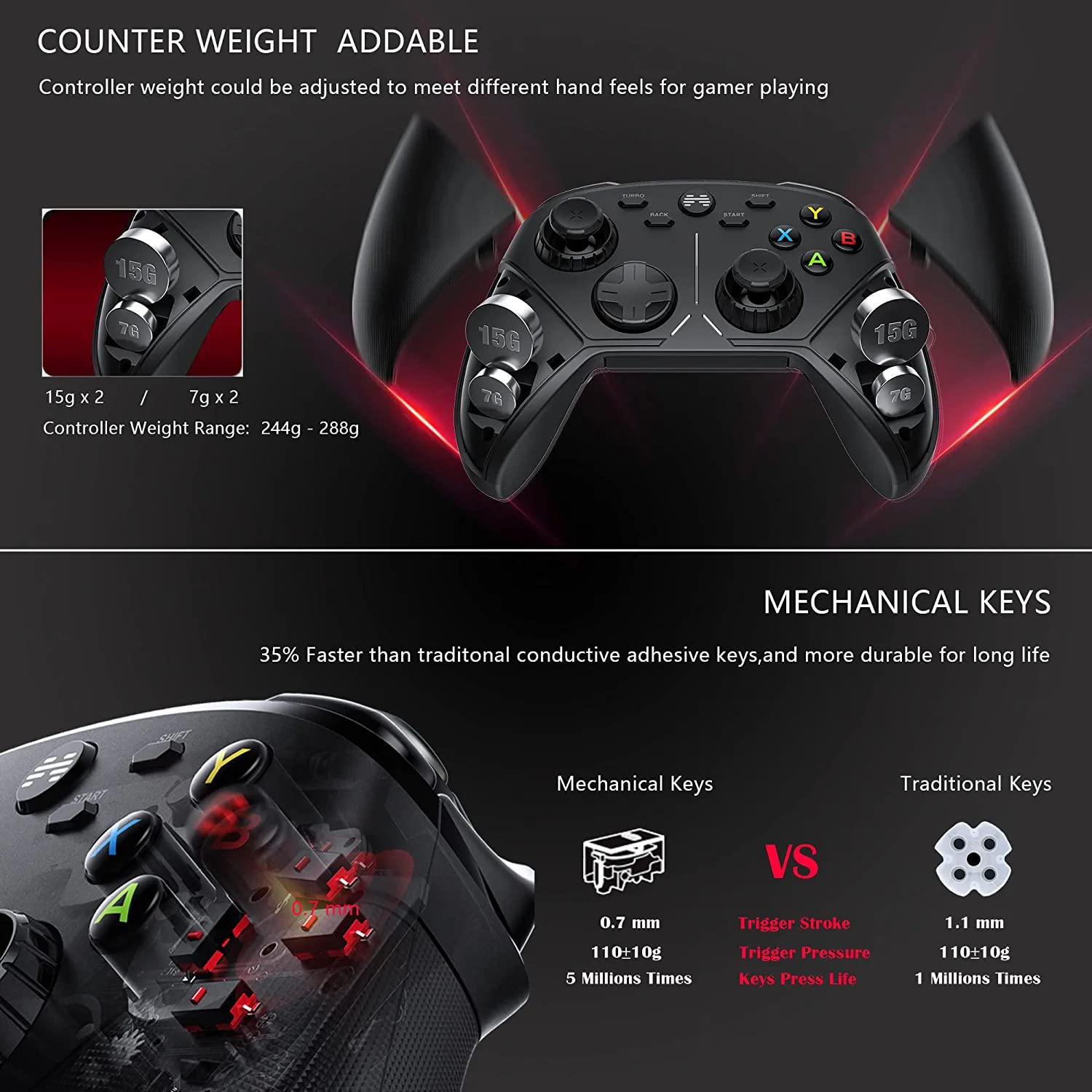
Figure 4: Comparison of mechanical keys to traditional keys, highlighting durability and responsiveness. Also shows the counterweight compartments.

Figure 5: Display of the two D-pad options (Gyro Type and Concave) and the patented anti-wear technology applied to the joysticks.

Figure 6: Explanation of the Turbo function for rapid button presses and the SHIFT key for swapping left stick and D-pad functions.
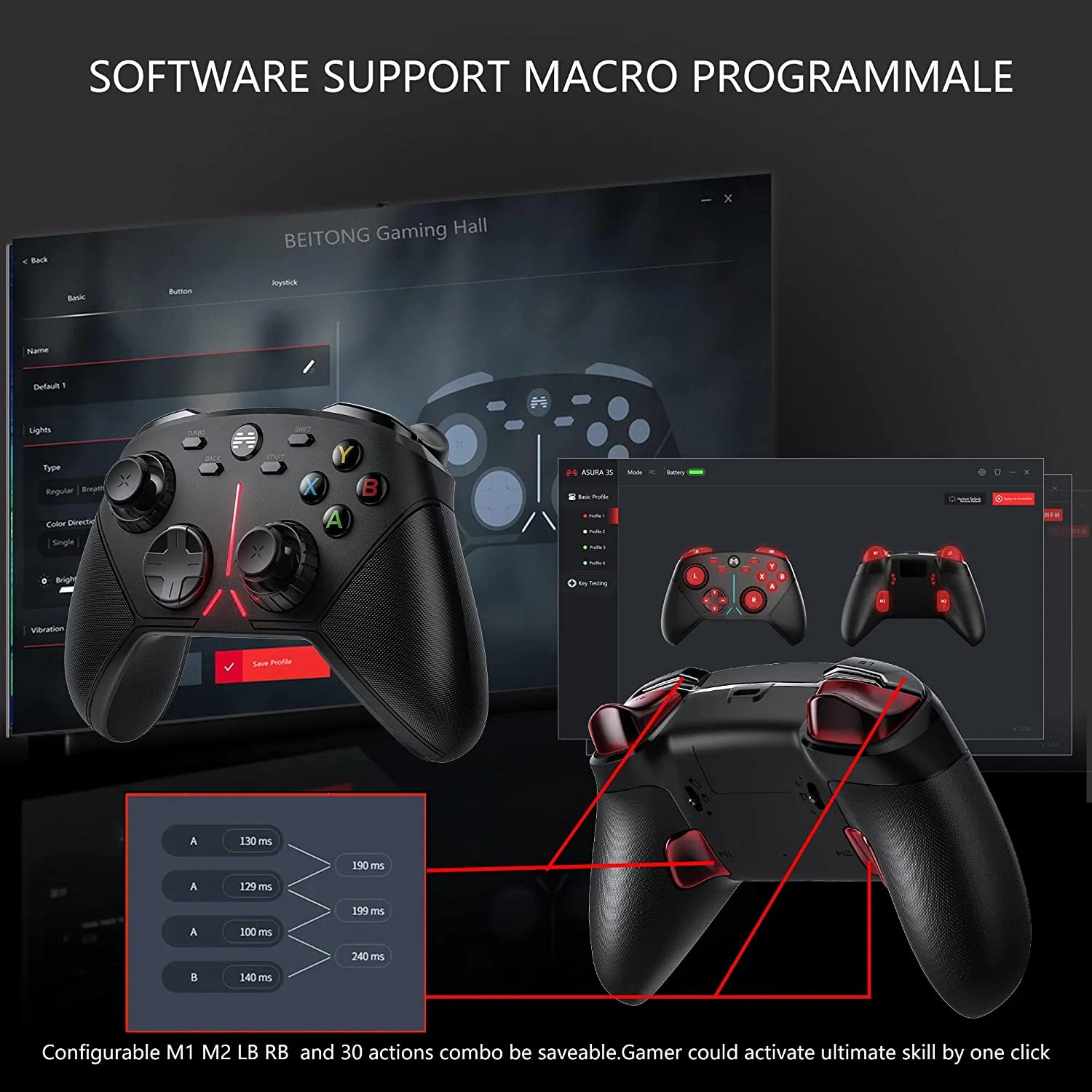
Figure 7: The BEITONG Gaming Hall software interface, demonstrating its capability for macro programming and profile management.
Package Contents
Upon opening your BEITONG Asura 3S Gaming Controller package, please verify that all the following items are included:
- BEITONG Asura 3S Game Controller
- 2.4GHz Wireless Receiver (USB Dongle)
- USB Charging Cable
- Round D-Pad Replacement
- Four (4) Counterweights (2x 7g, 2x 15g)
- User Manual (this document)
Setup
1. Initial Charging
Before first use, fully charge the controller using the provided USB cable. Connect the small end of the USB cable to the controller's charging port and the larger end to a USB power source (e.g., PC USB port, USB wall adapter).
2. Connecting to PC (Windows)
- Insert the 2.4GHz wireless receiver (USB dongle) into an available USB port on your PC.
- Turn on the BEITONG Asura 3S controller. The controller should automatically connect to the receiver. An indicator light on the controller will confirm successful connection.
- The controller is plug-and-play for Windows 7/8/10/11. No additional drivers are typically required.
Important Note: This controller uses 2.4GHz wireless technology and does NOT support Bluetooth connectivity. It is not compatible with Xbox consoles (360/One), Mac, iOS, or PlayStation consoles (PS4/5).
3. Installing Counterweights (Optional)
The controller's weight can be adjusted for personal preference. To install counterweights:
- Gently remove the side covers on the controller handles.
- Insert the desired 7g or 15g counterweights into the designated slots.
- Replace the side covers, ensuring they snap securely into place.
4. Replacing the D-Pad (Optional)
To change the D-pad:
- Carefully pry off the currently installed D-pad.
- Align the replacement D-pad (Round or Concave) with the D-pad slot and press firmly until it clicks into place.
Operating Instructions
1. Joystick Sensitivity Adjustment
The sensitivity of both joysticks can be adjusted physically. Rotate the radial dial located around the base of each thumbstick to increase or decrease sensitivity on the fly. This allows for precise control adjustments during gameplay without pausing or accessing software.
2. Hall Effect Trigger Locks
The Hall Effect triggers feature three adjustable lock positions:
- Micro: Shortest travel, ideal for rapid firing in shooting games.
- Mid: Medium travel, suitable for general action games.
- Full: Full travel, best for racing games or scenarios requiring precise analog input.
Adjust the trigger lock switch on the underside of the controller to select the desired travel distance for each trigger independently.
3. 6-Axis Gyro Motion Control
For games that support motion control, the built-in 6-axis gyro sensor allows you to control in-game actions by tilting and rotating the controller. Ensure the game supports this feature for optimal use.
4. Button Customization and Macros
The controller features configurable LB, RB, M1, and M2 buttons, as well as rear paddles. These can be remapped to other functions or assigned to complex macros using the BEITONG Gaming Hall software. This software allows you to create and save custom profiles for different games.
To utilize macro programming:
- Download and install the BEITONG Gaming Hall software from the official BEITONG website.
- Connect your controller to the PC.
- Launch the software and follow the on-screen instructions to customize button mappings and create macros.
- Save your profiles to the controller or software for quick access.
5. Turbo Function Activation
To activate the Turbo function for a specific button (ABXY, LB, RB, LT, RT):
- Press and hold the TURBO button.
- While holding TURBO, press the desired action button (e.g., 'A' button).
- Release both buttons. Now, holding down the action button will result in rapid, repeated inputs.
To deactivate Turbo for a button, repeat the process: hold TURBO and press the action button again.
6. SHIFT Key Function
The SHIFT key allows you to swap the input functions between the left joystick and the D-pad. This can be useful for games where you prefer D-pad movement over joystick movement, or vice-versa, without changing game settings.
Press the SHIFT button to toggle this function. Press it again to revert to the default configuration. Exercise caution to avoid accidental activation during critical gameplay moments.
Maintenance
To ensure the longevity and optimal performance of your BEITONG Asura 3S Gaming Controller, follow these maintenance guidelines:
- Cleaning: Use a soft, dry cloth to wipe down the controller regularly. For stubborn dirt, slightly dampen the cloth with water or a mild electronic cleaner. Avoid using harsh chemicals or abrasive materials.
- Storage: Store the controller in a cool, dry place away from direct sunlight, extreme temperatures, and excessive humidity.
- Battery Care: Avoid fully discharging the battery frequently. If storing for an extended period, charge the battery to about 50% to prolong its lifespan.
- Handling: Do not drop the controller or subject it to strong impacts. Avoid pulling on the USB cable excessively when disconnecting.
Troubleshooting
| Problem | Possible Cause | Solution |
|---|---|---|
| Controller not connecting to PC. | 2.4GHz receiver not properly inserted or recognized. Controller not powered on. Out of range. | Ensure the USB receiver is fully inserted into a working USB port. Turn on the controller. Move the controller closer to the receiver. Try a different USB port. |
| Input lag or unstable connection. | Interference from other wireless devices. Low battery. | Ensure no other strong 2.4GHz signals are interfering. Charge the controller fully. Try moving the receiver to a front USB port or using a USB extension cable to bring it closer. |
| Joystick sensitivity feels off. | Sensitivity dial setting is incorrect for current game/preference. | Physically adjust the radial dial around the joystick until desired sensitivity is achieved. |
| Triggers not responding as expected. | Trigger lock setting is too restrictive or too loose. | Adjust the 3-gear trigger lock switch on the underside of the controller to a suitable position (Micro, Mid, Full). |
| Controller not charging. | USB cable faulty. USB port not providing power. | Try a different USB cable. Use a different USB port or a wall adapter. Ensure the cable is securely connected to both the controller and the power source. |
| Buttons or D-pad unresponsive. | Physical damage or debris. Software issue. | Ensure no debris is lodged under the buttons. Try resetting the controller (if a reset button is available, otherwise power cycle). If using custom mappings, check the BEITONG Gaming Hall software. |
Specifications
- Model Number: BTP-2650S
- Connectivity: 2.4GHz Wireless (USB Receiver)
- Battery: 950mAh Lithium Ion (included)
- Dimensions: 6.5 x 4.1 x 2.5 inches (16.5 x 10.4 x 6.35 cm)
- Weight: 1.32 Pounds (0.6 kg) - adjustable with counterweights
- Manufacturer: BEITONG
- First Available Date: January 30, 2024
- Compatibility: PC (Windows 7/8/10/11)
Warranty and Support
BEITONG is committed to providing high-quality products and customer satisfaction. For any technical issues or inquiries regarding your BEITONG Asura 3S Gaming Controller, the BEITONG technology team is available to provide support.
Please refer to the official BEITONG website or your purchase documentation for specific warranty terms and contact information for technical support.


