
1. Introduction
This manual provides essential information for the installation, operation, and maintenance of your Tongsheng TSDZ2B 36V 250W 2024 Electric Bicycle Conversion Kit. Please read these instructions carefully before proceeding with installation or use to ensure proper function and safety. This kit is designed to convert a standard bicycle into an electric-assist bicycle, enhancing your riding experience with pedal-assist technology.
2. Product Overview
2.1 Key Features
- 2024 Version Enhancements: The 2024 TSDZ2B version includes an additional 1T4 cable and an improved communication protocol, supporting a wider range of displays.
- Mid-Drive Motor with Torque Sensor: The TSDZ2B 36V 250W 2024 mid-drive motor features an integrated torque sensor, providing a maximum torque of 80 Nm and an efficiency of ≥80%. This ensures a seamless transition between manual pedaling and electric assist, mimicking the feel of a traditional bicycle.
- Dual Clutch System: The dual clutch replaces the single clutch, reducing resistance during unassisted riding and providing a lighter cycling experience. The original reduction shaft's one-way bearings, which are vulnerable parts, have been replaced with a new integrated component to extend motor lifespan.
- EKD01 Bluetooth Multi-language Display: The 2.4-inch EKD01 Bluetooth display supports English, French, German, Italian, Dutch, and Czech. It features a Type-C charging port and a resettable ODO. Bluetooth functionality provides real-time synchronization of time, current readings, and distances. Live navigation requires a paid subscription.

Image: Comparison of the TSDZ2B 2024 Version (left) and 2022 Version (right), highlighting the new display options and 1T4 cable included with the 2024 model.
2.2 Package Contents
The Tongsheng TSDZ2B 36V 250W 2024 Electric Bicycle Conversion Kit includes the following components:
- Tongsheng Mid-Drive Motor (1 set)
- EKD01 Bluetooth Display
- Brake Levers
- 1T4 Cable
- Speed Sensor
- Thumb Throttle
- Crank Arms
- Washers
- Wrench
- Motor Extension Cord
- Cable Ties
- Installation Manual

Image: A visual representation of all components included in the Tongsheng TSDZ2B conversion kit, such as the motor, display, brake levers, cables, and tools.
3. Installation Guide
3.1 Compatibility Requirements
The kit is compatible with most standard bicycles featuring a 68-73 mm bottom bracket shell and an inner diameter of 34-36 mm. It is suitable for bicycles equipped with disc brakes, V-brakes, and a chain drive system. Please refer to the product page for detailed bottom bracket size verification before installation.
3.2 General Installation Steps
A detailed installation manual is included in your package. The general steps involve:
- Remove the existing bottom bracket and crankset from your bicycle.
- Install the Tongsheng mid-drive motor into the bottom bracket shell.
- Attach the crank arms and chainring to the motor.
- Mount the EKD01 display on the handlebars.
- Install the brake levers and speed sensor.
- Connect all components using the provided cables, following the wiring diagram.
- Secure all cables with cable ties.
- Install your chosen battery (sold separately) and connect it to the motor system.

Image: A detailed wiring diagram illustrating how to connect the motor, battery, display, speed sensor, and brake levers for the Tongsheng TSDZ2B conversion kit.
4. Operating Instructions
4.1 EKD01 Display Functions
The EKD01 Bluetooth display provides various functions to control and monitor your e-bike system:
- Power On/Off: Press and hold the power button to turn the system on or off.
- Assist Level Adjustment: Use the '+' and '-' buttons to cycle through different levels of pedal assist (e.g., 3, 5, 9 levels).
- Information Display: View real-time data such as speed, battery level, distance (ODO/TRIP), time, and power output.
- ODO Reset: The ODO (odometer) can be reset via the display settings.
- Bluetooth Connectivity: Connect to a compatible smartphone app for real-time data synchronization and potential navigation features (live navigation may require a paid subscription).
- Type-C Charging Port: Use the integrated Type-C port to charge external devices.

Image: A close-up view of the EKD01 Bluetooth display mounted on handlebars, showing its multi-language interface, various data points, and control buttons.
4.2 Torque Sensor Operation
The integrated torque sensor measures your pedaling force and provides proportional motor assistance. This results in a natural and intuitive riding experience. The harder you pedal, the more assistance the motor provides. When you stop pedaling, the motor assistance will cease.
5. Maintenance
Regular maintenance ensures the longevity and optimal performance of your e-bike conversion kit:
- Cleanliness: Keep the motor, display, and electrical connections clean and free from dirt and moisture. Use a damp cloth for cleaning; avoid high-pressure washing.
- Cable Inspection: Periodically check all cables and connectors for wear, damage, or loose connections. Ensure they are securely fastened.
- Fastener Check: Verify that all bolts and fasteners on the motor and mounting brackets are tight.
- Battery Care: Follow the manufacturer's instructions for your specific battery model regarding charging, storage, and temperature conditions.
- Professional Service: For complex issues or internal motor maintenance, consult a qualified e-bike technician.
6. Troubleshooting
If you encounter issues with your e-bike kit, consider the following common troubleshooting steps:
- No Power to Display: Check battery connection, ensure the battery is charged, and inspect the main power cable for damage.
- Motor Not Assisting: Verify that the pedal-assist level is not set to zero. Check the torque sensor connection and ensure it is clean. Ensure brake levers are not engaged, as they may cut motor power.
- Inaccurate Speed Reading: Inspect the speed sensor and magnet for proper alignment and ensure they are clean.
- Unusual Noises: Discontinue use and inspect the motor and crankset for any loose parts or obstructions.
- Error Codes: Refer to the EKD01 display manual for specific error code interpretations and recommended actions.
If problems persist after basic troubleshooting, please contact customer support.
7. Specifications
| Feature | Specification |
|---|---|
| Brand | Varstrom |
| Model Number | f38ae066-dfce-464d-bdb9-b6b0c3dd72ab |
| Motor Type | Mid-Drive Motor with Torque Sensor |
| Power Output | 250 Watts |
| Voltage | 36V |
| Max Torque | 80 Nm |
| Efficiency | ≥80% |
| Bottom Bracket Compatibility | 68-73 mm shell, 34-36 mm inner diameter |
| Chainring | Integrated 42-tooth |
| Display | EKD01 Bluetooth Multi-language (2.4-inch) |
| Display Languages | English, French, German, Italian, Dutch, Czech |
| Display Features | Type-C charging port, resettable ODO, real-time data sync |
| Brake Type Compatibility | Disc brakes, V-brakes |
| Drive System Compatibility | Chain drive |
| Item Weight | 3.5 Kilograms |
| Frame Material | Aluminum (for compatible bikes) |
| Wheel Material | Aluminum (for compatible bikes) |
| Model Year | 2022 (as per specifications, product is 2024 version) |
7.1 Battery Options (Sold Separately)
The kit requires a 36V battery, which is not included. Various battery options are compatible, typically mounted on the downtube or rear rack. Examples include:
- Downtube Battery: 36V 13Ah, 17.4Ah, 21Ah (approx. 3.5-4KG, 5-8 hours charge time)
- Max Downtube Battery: 36V 20Ah, 25Ah (approx. 4.8KG, 5-6 hours charge time)
- Rear Rack Battery: 36V 22.5Ah (approx. 7.26KG, 5 hours charge time)
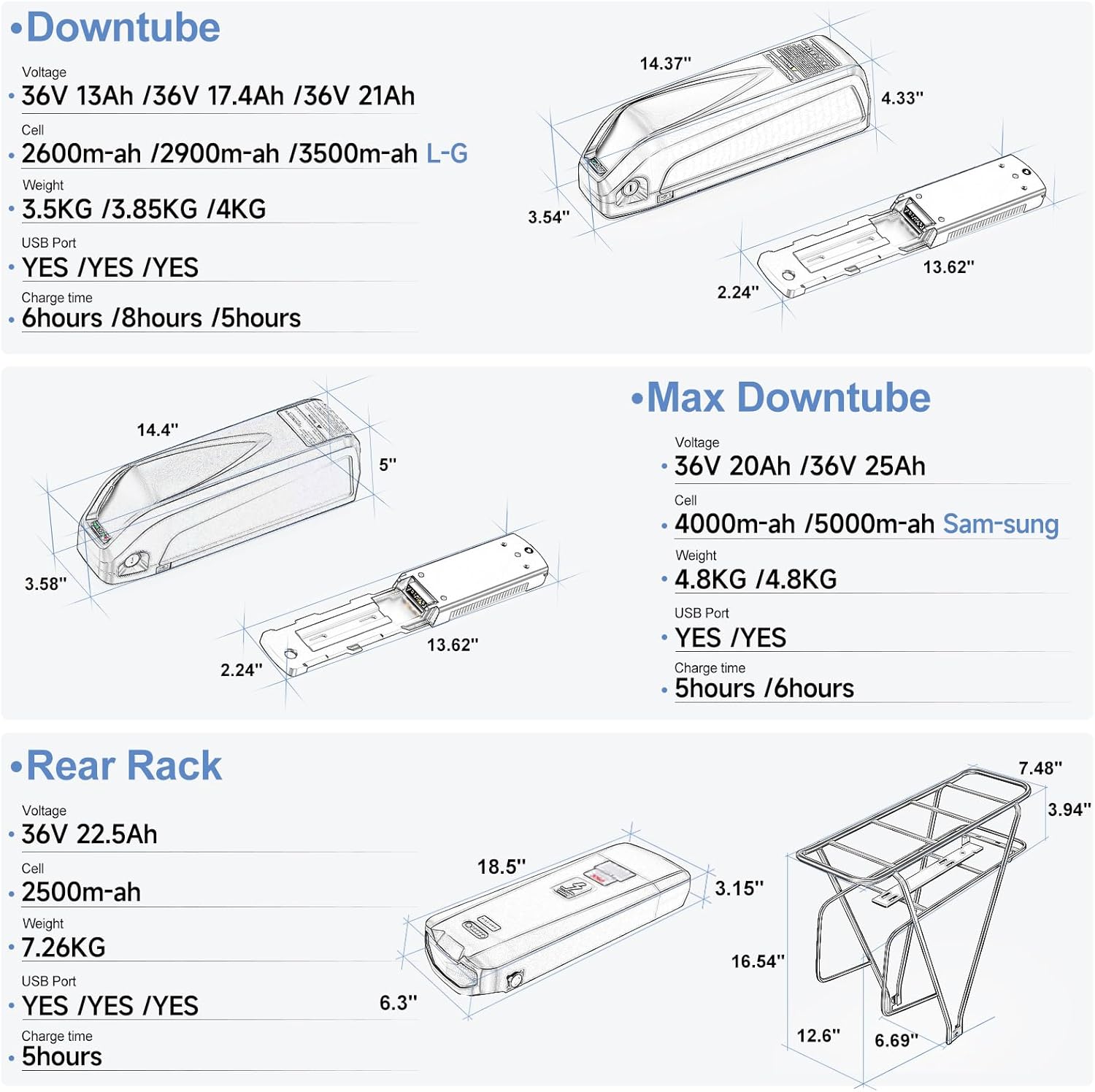
Image: Technical diagrams illustrating different battery types (downtube, max downtube, rear rack) with their dimensions, voltage, capacity, weight, and charging times.
8. Warranty and Support
Varstrom provides comprehensive customer support for your Tongsheng TSDZ2B conversion kit.
- Technical Support: Technical support is available in the UK and Poland.
- Online Support: 24-hour online support is provided for after-sales service.
For any inquiries or assistance, please refer to the contact information provided with your purchase or visit the Varstrom official website.
