Introduction
Thank you for choosing the ANCTOR Loft Bed. This manual provides essential information for the safe assembly, operation, and maintenance of your new loft bed. Please read all instructions carefully before beginning assembly and retain this manual for future reference.
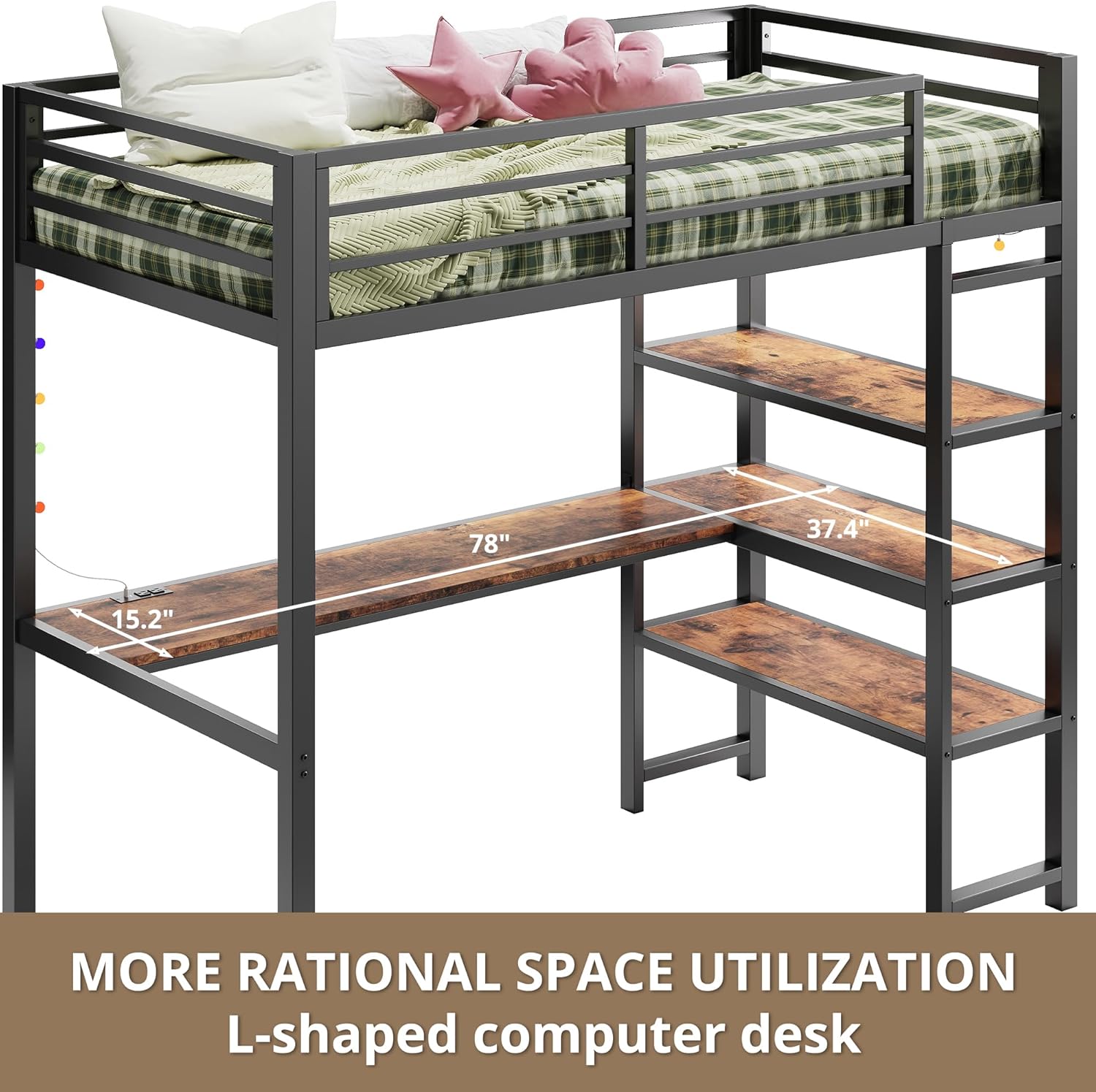
This twin-size loft bed features an integrated L-shaped desk, three storage shelves, a built-in power outlet with USB ports, and LED lighting. Its heavy-duty metal frame is designed for stability and space-saving efficiency.
Safety Information
Your safety is paramount. Please adhere to the following safety guidelines:
- Mattress Thickness: For your child's safety, the surface of the mattress on the upper bed must be at least 5 inches (127 mm) below the top edge of the guardrail. Recommended mattress thickness is 4-6 inches.
- Anti-Tipping Kit: Always secure the bed to the wall using the provided anti-tip nails. This prevents accidental tipping and ensures maximum stability.
- Weight Capacity: The loft bed is scientifically measured to hold up to 400 pounds. Do not exceed this weight limit.
- Assembly: Ensure all parts are correctly assembled and all fasteners are tightened before use. Regularly check and re-tighten fasteners as needed.
- Supervision: Children using the loft bed should be supervised, especially during initial use.
- Clearance: Be mindful of ceiling height and ceiling fans when placing the loft bed.

Product Overview
The ANCTOR Loft Bed is designed to optimize space in smaller rooms, providing a comfortable sleeping area above a functional workspace and storage solution.
Key Features:
- Heavy-Duty Metal Frame: Constructed from thickened square tubing for enhanced stability and durability.
- L-Shaped Desk: Integrated spacious desk area for work, study, or creative activities.
- Integrated Shelves: Three open storage shelves on the right side provide ample space for books, files, decorations, and other essentials.
- Built-in Power Outlet: Features two standard AC outlets and two USB ports for convenient charging of electronic devices. Includes a 6.5-foot power cord.
- LED Lighted: Comes with small colorful lights to enhance the room's ambiance.
- Space-Saving Design: Maximizes vertical space, ideal for compact living areas.


Setup and Assembly
The ANCTOR Loft Bed is designed for quick installation. Each part is labeled, and all necessary hardware and tools are included. Clear instructions are provided to guide you through the assembly process.
Before You Begin:
- Unpack all components and verify against the parts list in the included assembly guide.
- Ensure you have sufficient space for assembly.
- It is recommended to have two people for assembly to ensure safety and ease of construction.
- Keep children and pets away from the assembly area to prevent accidents.
Assembly Steps:
- Follow the step-by-step instructions provided in the separate assembly manual.
- Identify each part by its label and use the corresponding hardware.
- Tighten all bolts and screws securely, but do not overtighten.
- Once assembled, attach the anti-tipping kit to the wall as instructed to prevent accidental tipping.

Operating Instructions
Using the Power Outlet:
The integrated power outlet provides convenient access to power for your electronic devices.
- Plug the 6.5-foot power cord from the bed's power outlet into a standard wall outlet.
- You can then use the two AC outlets for devices like laptops or lamps.
- The two USB ports (5V/2A) are suitable for charging smartphones, tablets, and other USB-powered devices.
- Avoid overloading the outlets. Refer to the power outlet's specifications for maximum wattage.

Using the LED Lights:
The colorful LED lights can be used to create a pleasant ambiance in your space.
- The lights are pre-installed along the bed frame.
- Use the provided remote control to turn the lights on/off, change colors, and adjust brightness or modes.
- Ensure the light string is securely attached and not obstructing any pathways.

Maintenance
Regular maintenance will help prolong the life and appearance of your ANCTOR Loft Bed.
- Cleaning: Wipe down metal and wood surfaces with a soft, damp cloth. Avoid harsh chemicals or abrasive cleaners.
- Fasteners: Periodically check all bolts, screws, and connections to ensure they are tight. Re-tighten if necessary.
- Anti-Tipping Kit: Verify that the anti-tipping kit remains securely fastened to the wall.
- Weight Distribution: Distribute weight evenly on the bed and shelves to prevent stress on the frame.
Troubleshooting
If you encounter any issues with your loft bed, refer to the following common solutions:
| Problem | Possible Cause | Solution |
|---|---|---|
| Bed wobbles or feels unstable. | Loose fasteners; Anti-tipping kit not installed or loose. | Check and tighten all bolts and screws. Ensure the anti-tipping kit is properly installed and secured to a wall stud. |
| Power outlet not working. | Power cord not plugged in; Wall outlet issue; Overload. | Ensure the bed's power cord is fully plugged into a working wall outlet. Test the wall outlet with another device. Unplug some devices if overloaded. |
| LED lights not turning on. | Remote battery dead; Loose connection; Power issue. | Check the remote control battery. Ensure the light string is properly connected to its power source. Verify the main power outlet is working. |
Specifications
| Feature | Detail |
|---|---|
| Brand | ANCTOR |
| Model Number | HK-BFT-06 |
| Product Dimensions (L x W x H) | 78 x 40.4 x 72 inches |
| Item Weight | 121 pounds |
| Material | Iron |
| Color | Brown |
| Weight Capacity (Bed) | Up to 400 pounds |
| Weight Capacity (Shelves) | 88 pounds per shelf |
| Power Outlet | 2 AC Outlets (110V/12A), 2 USB Ports (5V/2A) |
| Power Cord Length | 6.5 feet |
Official Product Video
Watch the official product video for a visual guide to the ANCTOR Loft Bed's features and benefits.
Warranty and Support
For warranty information, replacement parts, or further assistance, please contact ANCTOR customer support. Refer to your purchase documentation for specific warranty terms and contact details.
You can also visit the official ANCTOR Store for more product information and support resources: ANCTOR Store on Amazon


