
This user manual provides essential information for setting up, operating, maintaining, and troubleshooting your realme 12 Pro 5G smartphone. Please read this manual thoroughly to ensure proper use and to maximize the device's capabilities.
1. Setup
1.1 Package Contents
Verify that all items are present in your product package:
- realme 12 Pro 5G Smartphone
- Charger
- USB Cable
- SIM Ejector Tool
- Quick Start Guide (this document)

Image: Front and back view of the realme 12 Pro 5G smartphone, showcasing its design.

Image: Side view of the realme 12 Pro 5G smartphone, highlighting its slim profile.

Image: Close-up of the realme 12 Pro 5G's rear camera module, featuring a luxury watch-inspired design.
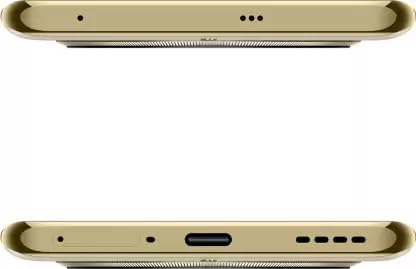
Image: Top and bottom views of the realme 12 Pro 5G, detailing the placement of ports, microphones, and speakers.
1.2 Inserting SIM Card
- Locate the SIM card tray on the side of your device.
- Insert the SIM ejector tool into the small hole next to the tray and press firmly until the tray pops out.
- Place your Nano-SIM card(s) into the tray with the gold contacts facing down. Ensure proper orientation.
- Carefully push the tray back into the device until it clicks into place.
1.3 Initial Power On
- Press and hold the Power button (usually on the right side) until the realme logo appears.
- Follow the on-screen instructions to complete the initial setup, including language selection, Wi-Fi connection, and Google account setup.
2. Operating Your Device
2.1 Basic Navigation
- Power Button: Press to turn the screen on/off. Press and hold to power off or restart.
- Volume Buttons: Adjust media volume, ringtone volume, and alarm volume.
- Touchscreen Gestures: Swipe up for home, swipe from the sides for back, swipe up and hold for recent apps.
2.2 Camera Functions
The realme 12 Pro 5G features a sophisticated camera system designed for high-quality photography.
- 50 MP Sony IMX882 OIS Camera: The main camera offers optical image stabilization (OIS) for clear, steady shots.
- 2X Flagship Telephoto Portrait Camera: Provides 2x optical zoom and 4x lossless zoom for detailed portraits and distant subjects.
- Cinematic Portrait Blur: Enhances portrait photography with professional-looking background blur.
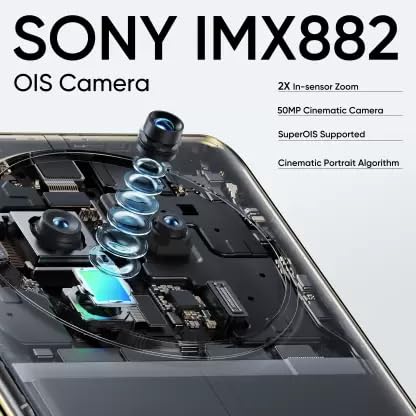
Image: Detailed diagram illustrating the components of the Sony IMX882 OIS Camera system.

Image: Diagram showing the optical elements of the 2X Flagship Telephoto Portrait Camera.
2.3 Display Features
Experience vibrant visuals on the 120Hz Curved Vision Display.
- 120Hz Refresh Rate: Provides smooth scrolling and fluid animations.
- Curved Design: Offers an immersive viewing experience.
- ProXDR for Vivid Photos: Enhances photo display quality.
- 2160Hz PWM Dimming: Reduces eye strain in low-light conditions.
- Double-Reinforced Glass: Offers enhanced durability.

Image: The realme 12 Pro 5G's 120Hz Curved Vision Display, highlighting its features.
2.4 Performance and Connectivity
The device is powered by a robust processor and offers comprehensive connectivity options.
- Snapdragon 6 Gen 1 5G Processor: An efficient 4nm, 8-core CPU architecture with Adreno 710 GPU for smooth performance and 5G connectivity.
- RAM: 8GB RAM for efficient multitasking.
- Storage: 256GB internal storage for apps, photos, and videos.
- Connectivity: Supports Cellular, Bluetooth, USB, and Wi-Fi.

Image: Diagram illustrating the Snapdragon 6 Gen 1 5G Chipset and its architecture.
2.5 Key Features Overview
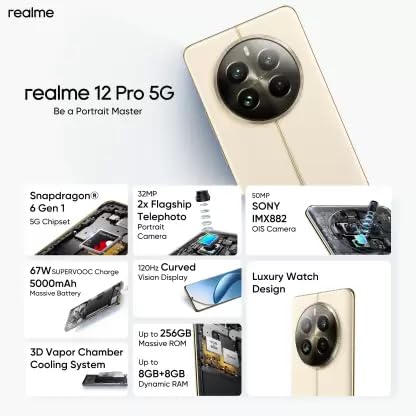
Image: A visual summary of the realme 12 Pro 5G's key features, including processor, camera, display, battery, and design.
3. Maintenance and Care
- Cleaning: Use a soft, lint-free cloth to clean the screen and body. Avoid harsh chemicals.
- Battery Care: Avoid extreme temperatures. Do not let the battery fully discharge frequently. Use the provided charger for optimal battery health.
- Software Updates: Regularly check for and install system updates to ensure optimal performance and security.
- Storage Management: Periodically clear unnecessary files and apps to maintain device speed.
4. Troubleshooting
Refer to the table below for common issues and their potential solutions.
| Issue | Possible Solution |
|---|---|
| Device does not power on | Ensure the battery is charged. Connect the charger and wait a few minutes before attempting to power on again. |
| Screen is unresponsive | Restart the device by holding the Power button. If unresponsive, force restart (refer to device-specific instructions, usually Power + Volume Down). |
| Poor network signal | Check SIM card insertion. Move to an area with better network coverage. Restart the device. |
| Battery drains quickly | Close background apps. Reduce screen brightness. Disable unnecessary features like GPS or Bluetooth when not in use. Check for rogue apps consuming power. |
| Apps crashing or freezing | Clear app cache/data. Update the app to the latest version. Reinstall the app. Ensure sufficient free storage. |
5. Specifications
Detailed technical specifications for the realme 12 Pro 5G smartphone.
| Feature | Detail |
|---|---|
| Model Number | 12 PRO 5G |
| Operating System | Android 14 |
| Processor | Snapdragon 6 Gen 1 5G |
| RAM | 8 GB |
| Internal Storage | 256 GB |
| Main Camera | 50 MP Sony IMX882 OIS Camera |
| Telephoto Camera | 2X Flagship Telephoto Portrait Camera |
| Display | 120Hz Curved Vision Display, 2412 x 1080 Resolution |
| Battery Capacity | 5000 Milliamp Hours (Lithium Ion) |
| Connectivity | Cellular, Bluetooth, USB, Wi-Fi |
| Audio Jack | USB (Type-C) |
| Dimensions (LxWxH) | 16.13 x 7.39 x 0.82 cm |
| Weight | 196 g |
| Color | Beige |
| Manufacturer | Realme |
| Country of Origin | India |
6. Warranty Information
Your realme 12 Pro 5G smartphone comes with a limited manufacturer's warranty. The warranty period and terms may vary by region and purchase date. Please retain your proof of purchase for warranty claims.
For detailed warranty terms and conditions, please visit the official realme website or contact realme customer support. Warranty typically covers manufacturing defects but does not cover damage caused by misuse, accidents, or unauthorized repairs.
7. Support
For further assistance, technical support, or service inquiries, please refer to the following resources:
- Official realme Website: www.realme.com (Check for your regional website for specific support options).
- Customer Service: Refer to the contact information provided in your region's realme support page or the documentation included with your device.
- Online FAQs: Many common questions are answered in the FAQ section of the realme support website.