
Introduction
This manual provides comprehensive instructions for the Volam 2-in-1 Wireless CarPlay & Android Auto Adapter, Model RC22/HFL-JPB. This device enables wireless connectivity for Apple CarPlay and Android Auto in vehicles equipped with factory-wired CarPlay/Android Auto functionality. Please read this manual thoroughly before use to ensure proper installation and operation.
Safety Information
- Do not attempt to disassemble or modify the device. This may cause damage and void the warranty.
- Keep the device away from water, moisture, and extreme temperatures.
- Ensure the device is securely connected to prevent accidental disconnection during driving.
- Operate your vehicle responsibly. Do not interact with the device in a way that distracts you from driving.
Package Contents
- 1 x Volam 2-in-1 Wireless CarPlay & Android Auto Adapter
- 1 x User Manual
Compatibility
This adapter is compatible with vehicles that have factory-installed wired Apple CarPlay or Android Auto functionality. It supports iPhone devices running iOS 7.1 and above, and Android devices running Android 11 and above. The adapter includes both USB-A and USB-C connectors for broad vehicle compatibility (Model Year: 2015 to 2024).
Setup Instructions
Follow these steps for initial setup:
- Connect the Adapter: Insert the Volam wireless adapter into the vehicle's USB data port that supports wired CarPlay or Android Auto. Use the appropriate USB-A or USB-C connector.

Image: The Volam adapter plugged into a car's USB port, with the car's infotainment system showing the CarPlay interface.
- Enable Wi-Fi and Bluetooth on Your Phone: On your smartphone, navigate to your settings and ensure both Wi-Fi and Bluetooth are turned on. Do not connect to any Wi-Fi network at this stage.
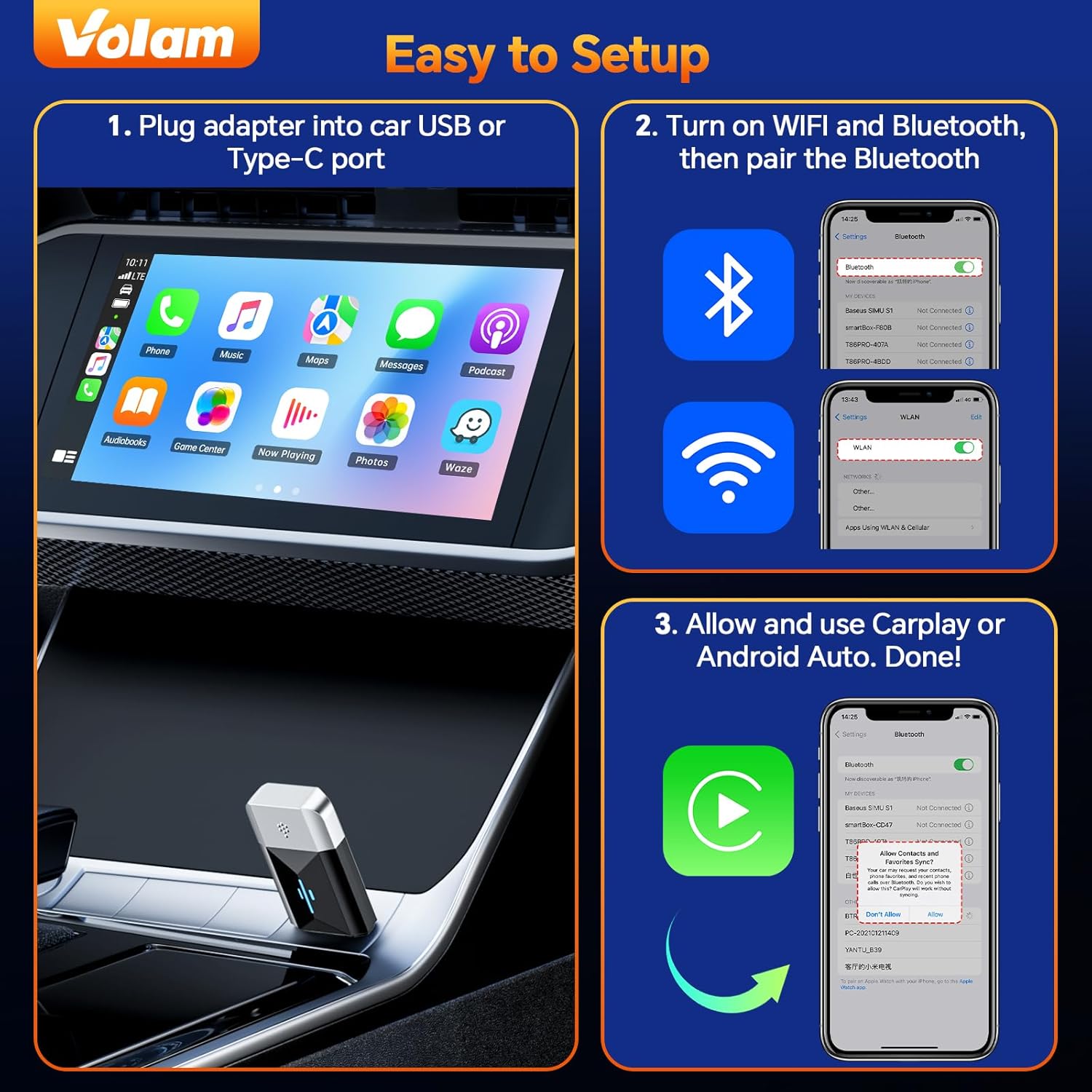
Image: A smartphone displaying its Wi-Fi and Bluetooth settings, indicating both are active and ready for pairing.
- Pair Bluetooth: On your phone's Bluetooth settings, search for the adapter's Bluetooth name (e.g., "SmartBox-XXXX" or similar, as displayed on your car screen or phone). Select it to pair.
- Confirm Connection: Once paired, your phone will prompt you to allow CarPlay or Android Auto. Confirm the connection. The car's infotainment system should then display the wireless CarPlay or Android Auto interface.

Image: A car's dashboard screen displaying the Apple CarPlay interface, indicating a successful connection.
After the first successful connection, the device will automatically connect to your phone when you start your car, provided Bluetooth and Wi-Fi are enabled on your phone.
Operating Instructions
Once connected, the Volam adapter provides a wireless link to your car's infotainment system, allowing you to use Apple CarPlay or Android Auto wirelessly. All functions, including navigation, music playback, calls, and voice assistants (Siri/Google Assistant), will operate as they would with a wired connection.
- Automatic Connection: The adapter will automatically connect to your previously paired phone when the car starts.
- Interface Control: Use your car's touchscreen, steering wheel controls, or rotary knobs to navigate the CarPlay/Android Auto interface.
- Audio: Audio will be routed through your car's sound system.
- Charging: The adapter features a pass-through USB port, allowing you to charge other devices while the adapter is in use.
Maintenance
- Keep the device clean and free from dust. Use a soft, dry cloth for cleaning.
- Avoid exposing the device to direct sunlight for extended periods.
- Store the device in a cool, dry place when not in use.
Troubleshooting
| Problem | Solution |
|---|---|
| Device does not connect automatically. | Ensure Bluetooth and Wi-Fi are enabled on your phone. Check if the adapter is properly plugged into the car's USB data port. Try restarting your phone and the car's infotainment system. |
| Connection is unstable or frequently disconnects. | Ensure there are no other devices interfering with Bluetooth/Wi-Fi signals. Try unplugging and replugging the adapter. Check for firmware updates (OTA updates are supported). |
| CarPlay/Android Auto does not launch. | Verify your car supports wired CarPlay/Android Auto. Ensure your phone's operating system meets the minimum requirements (iOS 7.1+, Android 11+). Try forgetting the Bluetooth connection on your phone and re-pairing. |
| Audio quality issues. | Check your phone's volume and the car's audio settings. Ensure no other audio sources are active. |
If issues persist, please refer to the "Warranty and Support" section for contact information.
Specifications
- Model: RC22/HFL-JPB
- Connectivity: 5GHz Wi-Fi, Bluetooth
- Input: USB Type-A, USB Type-C (2-in-1 adapter included)
- Dimensions: 41 x 20 x 10 mm (1.61 x 0.79 x 0.39 inches)
- Weight: 30 grams
- Compatibility: Vehicles with factory wired CarPlay/Android Auto (2015-2024 models), iOS 7.1+, Android 11+
- Features: Plug & Play, OTA Updates, Dual-core 5G Chip

Image: A diagram illustrating the compact size and dimensions of the Volam wireless adapter.
Warranty and Support
The Volam Wireless CarPlay & Android Auto Adapter comes with a 1-year quality warranty. For any questions, technical assistance, or warranty claims, please contact Volam customer support through the Amazon platform. Our support team aims to provide a response within 24 hours.
For the latest information and firmware updates, please visit the official Volam store on Amazon or contact support.