
Della 9000 BTU - 115V - 24 SEER2 (Model: 048-TP-9K1V-23S-I+O)
DELLA Hyper Heat 9,000 BTU Mini Split Instruction Manual
Brand: Della | Model: 9000 BTU - 115V - 24 SEER2 (048-TP-9K1V-23S-I+O)
1. Important Safety Information
Please read all instructions carefully before installation and operation. Failure to follow these instructions may result in property damage, personal injury, or death.
- This system mandates professional installation. It is not a DIY mini split AC.
- Line set vacuuming is required during installation.
- No refrigerant adjustment is needed if the tube is under 25 ft; over 25 ft requires adjustment according to the manual.
- Ensure proper electrical connections. Maximum fuse size is 20A.
- This product may contain chemicals known to the State of California to cause cancer and birth defects or other reproductive harm (Proposition 65 warning).
2. Product Overview & Components
The DELLA Hyper Heat Mini Split system provides efficient cooling and heating for spaces up to 400 sq. ft. It features a durable and stylish indoor unit and a robust outdoor unit, designed for optimal performance and energy savings.

Figure 2.1: Main Components of the DELLA Mini Split System
Included Components:
| Item No. | Component |
|---|---|
| 1 | Indoor Unit |
| 2 | Outdoor Unit |
| 3 | Refrigerant Pipe (16.4ft pre-flared and insulated copper line set) |
| 4 | Drain Lines (6.56ft drainage extension) |
| 5 | Remote Control |
| 6 | Rubber Feet |
| 7 | Insulation Foam |
| 8 | Mounting Plate |
| 9 | 2 AAA Batteries |
| 10 | Drain Elbow |
| 11 | Wall Sleeve |
| 12 | Plasticine Putty |
| 13 | Screws |
| 14 | Anchors |
| 15 | Wall Cap |
| 16 | Plastic Wrap |
| 17 | Communication Cable |
| 18 | Bracket Template |
3. Setup & Installation
Installation of the DELLA Mini Split AC unit requires specialized knowledge and tools. It is strongly recommended that installation be performed by a certified HVAC professional to ensure proper function, safety, and warranty validity.
Key Installation Considerations:
- Site Selection: Choose a location for both indoor and outdoor units that allows for proper airflow, drainage, and accessibility for maintenance.
- Mounting: Securely mount the indoor unit to a wall using the provided mounting plate and the outdoor unit on a stable surface or wall bracket.
- Line Set Connection: Connect the pre-flared and insulated copper line set between the indoor and outdoor units. Ensure all connections are tight to prevent refrigerant leaks.
- Vacuuming: A vacuum pump must be used to evacuate the air and moisture from the refrigerant lines before releasing refrigerant. This is a critical step for system efficiency and longevity.
- Electrical Wiring: Connect the power supply and communication cable according to local electrical codes and the wiring diagram in the full user manual.
- Drainage: Ensure the drainage hose from the indoor unit is properly sloped to allow for continuous condensate removal.
For detailed step-by-step installation instructions, please refer to the comprehensive User Manual available for download from the product page or the manufacturer's website.
4. Operating Instructions
The DELLA Mini Split offers multiple ways to control your comfort, including a remote control, a mobile app, and voice commands.
Remote Control Operation:

Figure 4.1: Remote Control Layout and Functions
- On/Off: Power the unit on or off.
- Mode: Cycle through 6 modes: Cooling, Heating, Dry, Auto, Dehumidifying, and Fan.
- Temp Up/Down: Adjust the desired temperature.
- Fan Speed: Select from 7 wind speeds (Quiet, Low, Mid Low, Mid, Mid High, High, Turbo).
- Swing: Control vertical and horizontal airflow direction (4D airflow).
- ECO Mode: Activates energy-saving operation.
- Sleep Mode: Adjusts temperature automatically for comfortable sleep.
- Timer: Set a schedule for the unit to turn on or off automatically.
- I Feel Mode: Senses the temperature at the remote's location for precise comfort.
Della+ App & WiFi Connectivity:
Control your mini split from anywhere using the free Della+ app on your smartphone. The unit supports WiFi connectivity for seamless remote management.

Figure 4.2: Della+ App Interface for Comprehensive Control
- Remote Control: Adjust settings, change modes, and set schedules from your phone.
- Smart Geo Location: The app can automatically turn your AC unit on or off based on your location, providing hands-free control while driving.
- Schedules & Timer: Create custom schedules for daily or weekly operation to optimize energy usage.
Voice Control Compatibility:
The DELLA Mini Split seamlessly integrates with Amazon Alexa and Google Assistant, allowing for convenient voice commands.
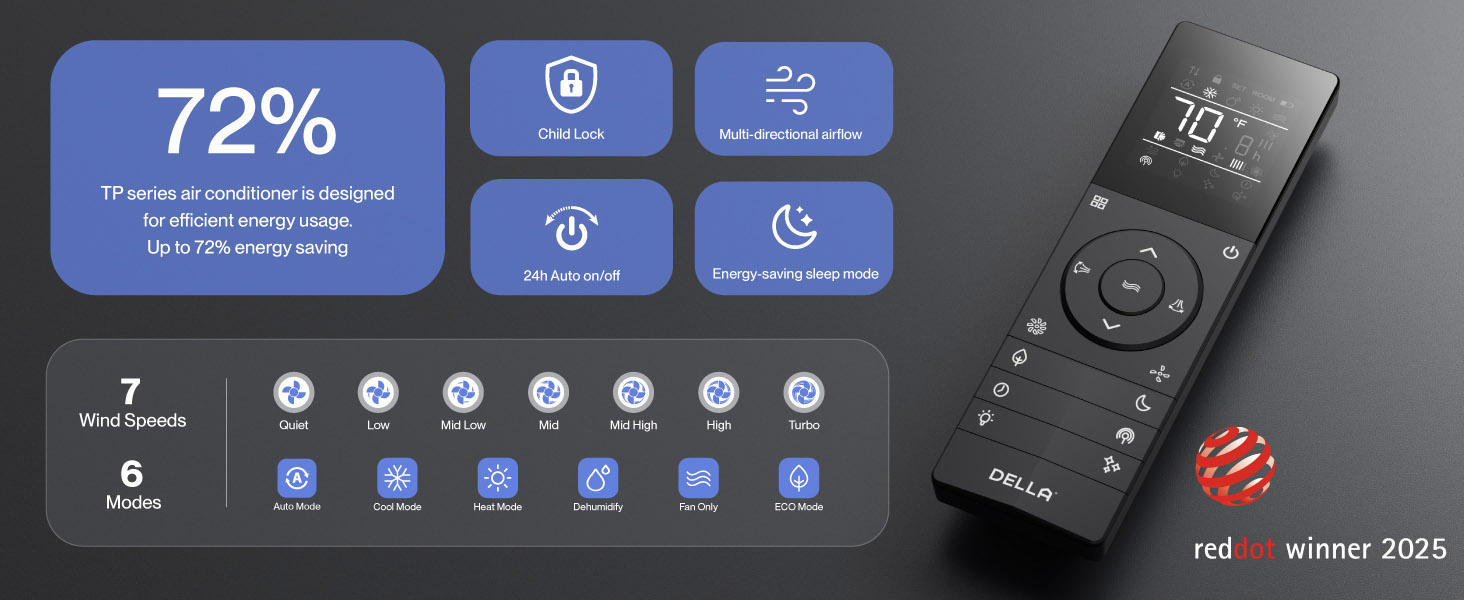
Figure 4.3: Voice Control Integration with Smart Home Devices
Simply use voice commands like "Alexa, turn on the air conditioner" to control your unit.
5. Maintenance
Regular maintenance ensures optimal performance and longevity of your DELLA Mini Split system.
- Filter Cleaning: Regularly clean the air filters in the indoor unit to maintain air quality and efficiency. Refer to the full manual for frequency and procedure.
- PureClean Technology: The unit features PureClean tech that helps stop dust buildup and defrosts your indoor unit, contributing to cleaner air and advanced sterilization.
- Gold Plated FIN Technology: The gold plated FIN technology in the outdoor unit prevents freezing and rust corrosion, enhancing durability and boosting heat efficiency, even in extreme temperatures down to -13°F (-25°C).

Figure 5.1: PureClean Technology for Cleaner Air

Figure 5.2: Gold Plated FIN Technology for Enhanced Durability
6. Troubleshooting
If you encounter issues with your DELLA Mini Split, refer to the following common troubleshooting tips. For more detailed solutions, consult the full user manual.
- Unit Not Turning On: Check power supply, circuit breaker, and ensure the remote control batteries are not depleted.
- Insufficient Cooling/Heating: Verify correct mode selection, temperature setting, and ensure air filters are clean. Check for obstructions around indoor and outdoor units.
- Unusual Noises: Some operational noises are normal (e.g., refrigerant flow). If noises are loud or unusual, consult the manual or contact support.
- Wi-Fi Connection Issues: If the unit occasionally loses connection with Wi-Fi, try resetting the unit by cycling power at the breaker. Ensure your Wi-Fi network is stable.
- Error Codes: If an error code appears on the display, note the code and refer to the troubleshooting section in the comprehensive user manual for specific instructions.
If problems persist after attempting these solutions, please contact DELLA customer support.
7. Specifications
Key technical specifications for the DELLA Hyper Heat 9,000 BTU Mini Split.

Figure 7.1: Product Dimensions and Key Specifications
| Specification | Value |
|---|---|
| Model Number | 048-TP-9K1V-23S-I+O |
| Cooling Capacity | 9000 BTU/h (0.75 Tons) |
| Heating Capacity | 10000 BTU/h |
| Power Supply | 115V~/60Hz/1PH |
| Max Input Power | 730 watts |
| Air Flow Volume | 554 m³/h |
| Max. Fuse Size | 20A |
| SEER2 Rating | 24 |
| HSPF2 Rating | 10 |
| Operating Temperature (Heating) | Functional up to -13°F (-25°C) |
| Noise Level (Indoor Unit) | As low as 30 dB(A) |
| Recommended Room Size | Up to 400 sq. ft. |
| Certifications | Energy Star, ETL listed, AHRI certified |

Figure 7.2: Energy Efficiency Comparison (24 SEER2)
8. Warranty & Support
DELLA is committed to providing exceptional product quality and customer service.
Lifetime Warranty:
The DELLA Hyper Heat Mini Split is backed by a lifetime warranty, offering unmatched support and peace of mind. This warranty covers manufacturing defects and ensures long-term reliability without additional costs.

Figure 8.1: Lifetime Coverage and Support
Customer Support:
For any inquiries, technical assistance, or warranty claims, please contact DELLA customer support:
- Phone Support: Available Monday - Friday, 6 AM - 4 PM PST.
- Live Chat: Available 24/7 for immediate assistance.

Figure 8.2: Della Customer Support Options
You can also find the full User Manual (PDF) and User Guide (PDF) for this product at the following links:
Related documents9000 BTU - 115V - 24 SEER2 (Model: 048-TP-9K1V-23S-I+O)


Ask a question about this manual
Ask about setup, troubleshooting, compatibility, parts, safety, or missing instructions. Manuals+ will review the question and use this page’s manual context to help answer it.