
Labebe HY2330021
Labebe Kids Learning Tower User Manual
Model: HY2330021 | Brand: Labebe
1. Introduction
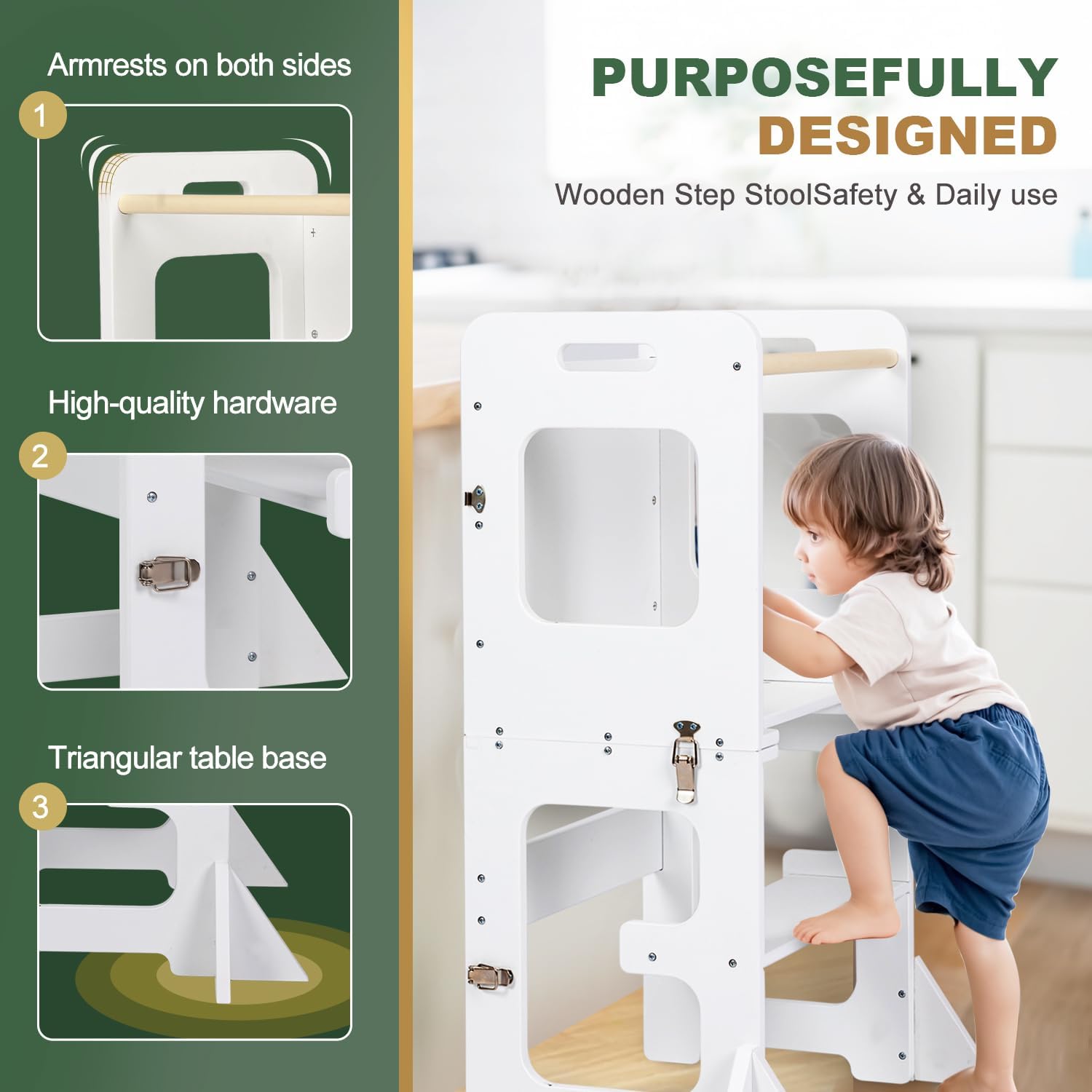
The Labebe Kids Learning Tower is a versatile and safe wooden step stool designed to promote independence and engagement for children aged 18 months and older. This innovative 2-in-1 design allows it to function as a stable learning tower, bringing children to counter height for various activities, and easily converts into a table with chairs for play, meals, or creative tasks. Crafted from high-quality MDF wood, it ensures durability and stability for daily use.

2. Safety Information
Please read and follow all safety instructions carefully to ensure the safe use of the Labebe Learning Tower. Adult supervision is always required when children are using the product.
- Always ensure the tower is placed on a flat, stable surface.
- Do not exceed the maximum weight capacity of 50 kg (110 lbs).
- Ensure all buckles and locks are securely fastened when the tower is in use or converted to a table.
- Keep children's fingers and clothing clear of moving parts during conversion.
- Regularly inspect the product for any loose parts, damage, or wear. Discontinue use if any damage is found.

3. Parts List
Please check that all components are present before beginning assembly:
- Main Frame (x1)
- Adjustable Step/Platform (x1)
- Safety Rail/Armrest (x1)
- Blackboard Panel (x1)
- Connecting Hardware (screws, buckles, hinges)
4. Setup and Assembly
The Labebe Learning Tower requires minimal assembly. Follow the step-by-step instructions provided in the packaging to ensure correct and secure setup. It is recommended to assemble the product with two adults.
- Unpack all components and verify against the parts list.
- Attach the adjustable step/platform to the main frame using the provided hardware.
- Secure the safety rail/armrest to the top section of the tower.
- Install the blackboard panel as indicated in the instructions.
- Ensure all screws and fasteners are tightened securely before first use.

5. Operating Instructions
5.1 Converting the Learning Tower
The Labebe Learning Tower can be easily converted between a standing tower and a table with chairs. Always ensure the area is clear before conversion.
- To convert from Tower to Table: Unlock the side buckles located on the main frame. Carefully fold the top section of the tower downwards until it forms a flat table surface. Securely lock the two side panels to ensure the table is stable.
- To convert from Table to Tower: Unlock the side panels. Lift the top section upwards until it forms the standing tower configuration. Securely lock the side buckles to ensure the tower is stable for use.

5.2 Multifunctional Uses
This versatile product offers multiple functionalities to support your child's development and daily activities:
- Standing Tower: Allows children to safely reach kitchen counters, bathroom sinks, or other elevated surfaces, fostering participation in household tasks.
- Table & Chairs: Converts into a sturdy table with integrated seating, perfect for drawing, reading, eating snacks, or playing.
- Drawing Board: The integrated blackboard panel provides a creative space for children to draw and express themselves.

6. Maintenance and Care
Proper care will extend the life of your Labebe Learning Tower:
- Clean the wooden surfaces with a soft, damp cloth.
- Avoid using abrasive cleaners, harsh chemicals, or solvents, as these can damage the finish.
- For the blackboard, use standard chalk and wipe clean with a damp cloth or blackboard eraser.
- Periodically check all screws, bolts, and buckles to ensure they remain tight. Retighten if necessary.
- Store the product in a dry environment, away from direct sunlight or extreme temperatures.
7. Troubleshooting
If you encounter any issues with your Labebe Learning Tower, please refer to the following common problems and solutions:
| Problem | Possible Cause | Solution |
|---|---|---|
| Tower feels unstable or wobbly. | Loose hardware; uneven surface; not fully locked. | Ensure all screws and buckles are tightened. Place on a flat, level surface. Verify that the conversion locks are fully engaged. |
| Difficulty converting between tower and table. | Buckles not fully unlocked; obstruction. | Ensure all locking buckles are completely disengaged. Check for any obstructions or debris in the folding mechanism. Apply gentle, even pressure during conversion. |
| Blackboard not erasing cleanly. | Using incorrect markers; residue buildup. | Only use standard chalk on the blackboard. Clean with a damp cloth or specialized blackboard cleaner to remove residue. |
8. Specifications
| Feature | Detail |
|---|---|
| Model Number | HY2330021 |
| Material | High-quality MDF Wood |
| Color | Pure White |
| Dimensions (Tower) | Approx. 42 x 30 x 80 cm (16.5 x 11.8 x 31.5 inches) |
| Dimensions (Table) | Approx. 60 x 40.5 x 42 cm (23.6 x 16 x 16.5 inches) |
| Weight Capacity | Up to 50 kg (110 lbs) |
| Product Weight | Approx. 7.54 kg (16.6 lbs) |
| Recommended Age | 18 Months and Up |

9. Warranty and Support
Labebe products are manufactured with high-quality materials and undergo strict quality control. This product comes with a standard manufacturer's warranty against defects in materials and workmanship.
For warranty claims, technical support, or any questions regarding your Labebe Learning Tower, please contact our customer service team through the retailer's platform or visit the official Labebe website for contact information. Please have your model number (HY2330021) and purchase details ready when contacting support.
Related documentsHY2330021

Ask a question about this manual
Ask about setup, troubleshooting, compatibility, parts, safety, or missing instructions. Manuals+ will review the question and use this page’s manual context to help answer it.