
BOOMJOY mop
BOOMJOY Self Wringing Mop Instruction Manual
Model: mop
Product Overview
The BOOMJOY Self Wringing Mop is designed for efficient and convenient floor cleaning across various surfaces. It features an upgraded 55-inch long handle, a self-wringing mechanism to protect hands from dirty water, and comes with two high-quality microfiber washable heads. An integrated non-scratch scrub pad assists in removing stubborn stains without damaging floors.

Image: The BOOMJOY Self Wringing Mop, featuring its main mop head attached to the handle and two additional microfiber refill heads.
Setup Instructions
Follow these steps to assemble your BOOMJOY Self Wringing Mop:
- Assemble the Handle: The 55-inch long handle consists of multiple threaded sections. Screw these sections together firmly until the handle is fully extended and secure.
- Attach the Mop Head: Align the mop head with the bottom of the assembled handle. Twist the mop head onto the handle's threaded connection until it is securely fastened. Ensure it is tight to prevent wobbling during use.
- Prepare for First Use: Before initial use, it is recommended to rinse the microfiber mop head under clean water to remove any manufacturing residue.
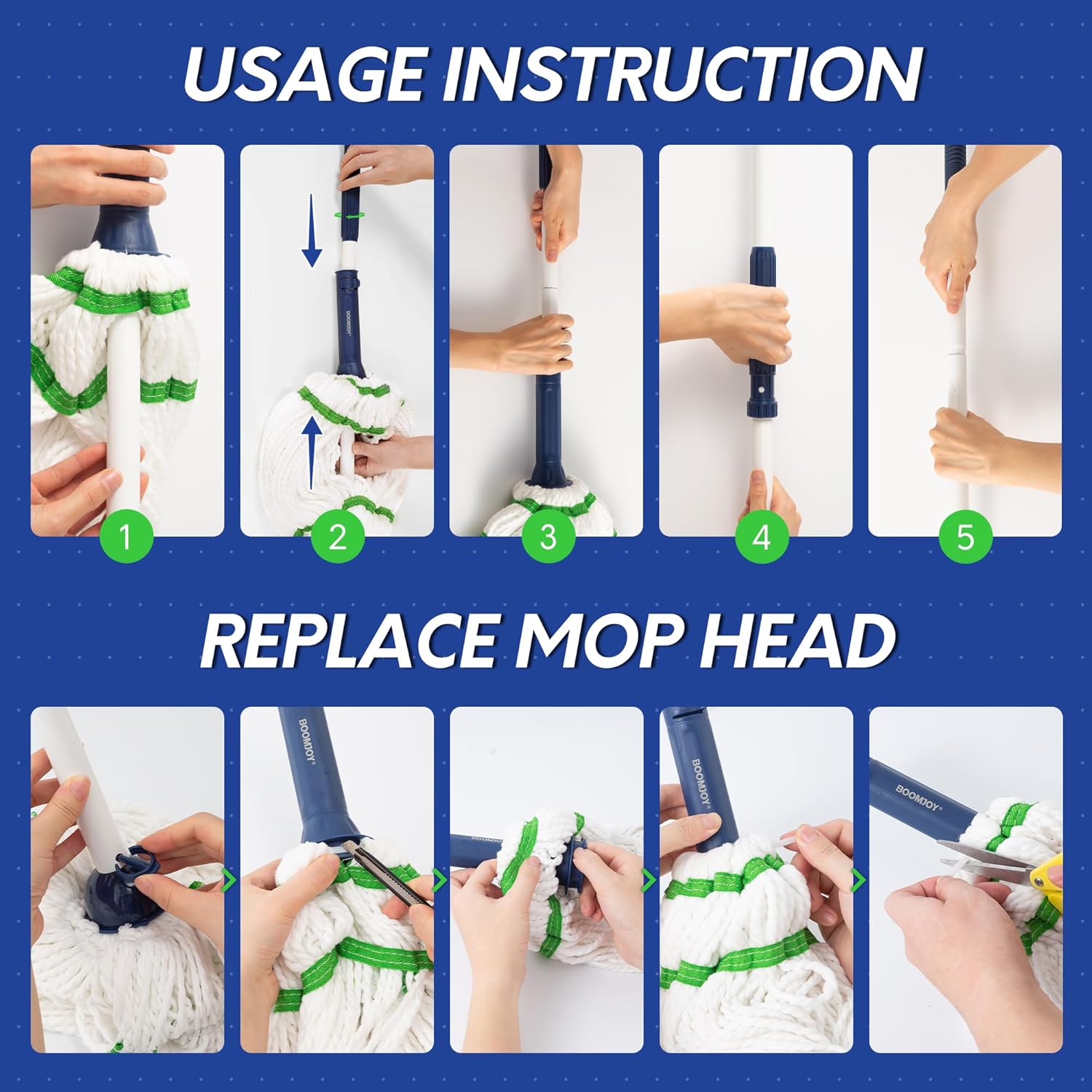
Image: Visual instructions demonstrating the assembly of the mop handle and the process for replacing the microfiber mop head.
Operating Instructions
The BOOMJOY Self Wringing Mop is designed for ease of use and effective cleaning.
Using the Self-Wringing Mechanism:
- To wring out excess water, hold the mop handle upright.
- Twist the lower part of the handle (the blue section with the BOOMJOY logo) in the direction indicated by the arrows (usually clockwise) while holding the upper part of the handle steady. This action will twist the microfiber head, expelling water.
- Continue twisting until the desired level of dampness is achieved for your floor type.

Image: A detailed view of the self-wringing function, illustrating how the mop head twists to release water.
General Mopping:
- Dip the mop head into your cleaning solution or water.
- Use the self-wringing mechanism to achieve the appropriate dampness for your floor type. For delicate surfaces like hardwood, ensure the mop is well-wrung to be damp, not wet.
- Mop the floor using a back-and-forth or figure-eight motion.
- The integrated non-scratch scrub pad (green section on the mop head) can be used to gently scrub away stubborn spots without damaging the floor surface.

Image: A person demonstrating the use of the BOOMJOY mop with its extended handle, designed to reduce bending.
Suitable Surfaces:
This mop is suitable for cleaning a variety of hard floor surfaces, including:
- Wood
- Hardwood
- Tiles
- Laminate
- Vinyl
- Marble
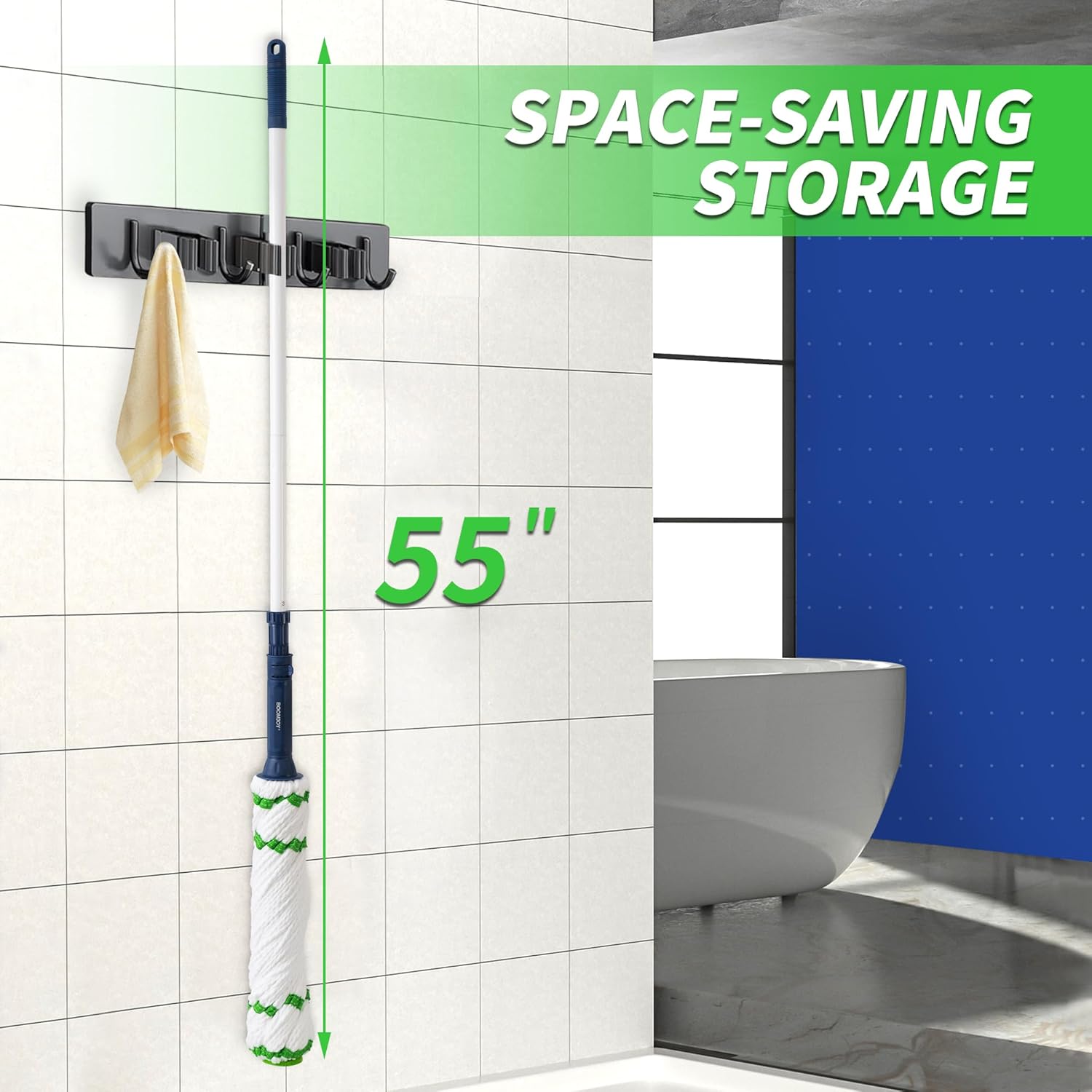
Image: Visual representation of various floor types, including tiles, laminate, vinyl, hardwood, and wooden floors, indicating their compatibility with the mop.

Image: A close-up view highlighting the non-scratch scrub pad integrated into the mop head, designed for effective stain removal.
Maintenance
Proper maintenance ensures the longevity and effectiveness of your BOOMJOY mop.
Cleaning the Microfiber Mop Head:
- After each use, rinse the mop head thoroughly under running water to remove dirt and debris.
- For deeper cleaning, the microfiber mop heads are washable. It is recommended to hand wash them with mild detergent.
- Allow the mop head to air dry completely before storing to prevent mildew and odors.
Replacing the Mop Head:
The mop heads are attached using a unique system. To replace a worn or dirty mop head:
- Locate the zip ties securing the microfiber strands to the mop head base. There is typically one at the top and one at the bottom.
- Carefully cut the existing zip ties using scissors or a utility knife.
- Remove the old mop head.
- Position the new microfiber mop head onto the base.
- Thread new zip ties through the designated loops on the mop head and around the base, securing them tightly. Ensure all microfiber strands are evenly distributed and secured.
Note: This process may require some time and precision to ensure the mop head is properly re-secured.
Storage:
The mop's design allows for space-saving storage. After cleaning and drying, the mop can be hung on a wall hook using the integrated hanging loop on the handle.

Image: The BOOMJOY mop shown hanging vertically on a wall, illustrating its space-saving storage capability.
Troubleshooting
| Problem | Possible Cause | Solution |
|---|---|---|
| Mop head not wringing effectively. | Insufficient twisting force; mop head not properly attached. | Ensure you are twisting the handle firmly in the correct direction. Check that the mop head is securely fastened to the handle. |
| Difficulty attaching/detaching mop head. | Unfamiliarity with the zip tie attachment system. | Refer to the "Replacing the Mop Head" section in Maintenance. The mop heads are secured by zip ties that need to be cut and replaced. This is not a quick-release system. |
| Mop head leaves streaks. | Mop head is too dirty or too wet; incorrect cleaning solution. | Clean the mop head thoroughly. Wring out more water before mopping. Use an appropriate cleaning solution for your floor type. |
| Handle feels loose or wobbly. | Handle sections not screwed together tightly. | Ensure all threaded sections of the handle are screwed together firmly. |
Specifications
- Brand: BOOMJOY
- Model Number: mop
- Number of Items: 2 (Mop + 1 Refill Head)
- Handle Length: Approximately 55 inches (fully extended)
- Handle Material: Iron
- Head Material: Microfiber
- Color: Blue (handle accents)
- Item Weight: 2.23 pounds
- Package Dimensions: 13.39 x 8.07 x 3.82 inches
- Surface Recommendation: Floor (Wood, Hardwood, Tiles, Laminate, Vinyl, Marble)
- Batteries Required: No
Warranty and Support
For specific warranty information and customer support, please refer to the product packaging or contact BOOMJOY customer service directly. Keep your purchase receipt as proof of purchase.
For further assistance, you may visit the official BOOMJOY store on Amazon: BOOMJOY Store
Ask a question about this manual
Ask about setup, troubleshooting, compatibility, parts, safety, or missing instructions. Manuals+ will review the question and use this page’s manual context to help answer it.