1. Introduction
Thank you for choosing the LIWAN 2K Battery Powered Wireless Security Camera. This manual provides essential information for the proper setup, operation, and maintenance of your new security system. Designed for both indoor and outdoor use, these cameras offer 2K resolution, color night vision, PIR detection, and flexible storage options to enhance your home security.
2. Product Components
Your LIWAN security camera package includes the following:
- LIWAN 2K Battery Powered Wireless Security Camera(s)
- Mounting Brackets (for camera and solar panel)
- USB-C Charging Cable
- Mounting Screws and Wall Anchors
- Solar Panel (optional, for continuous charging)

Figure 2.1: Two LIWAN 2K Battery Powered Wireless Security Cameras, showcasing their waterproof design.
3. Setup Guide
3.1 Initial Camera Charge
Before first use, it is recommended to fully charge the camera using the provided USB-C cable for 5-6 hours. This ensures optimal battery performance.

Figure 3.1: The camera features a long-lasting 5200mAh rechargeable battery.
3.2 App Download and Pairing
Download the Ubox app from your device's app store (Google Play or App Store). Follow the in-app instructions to register an account and add your new camera.

Figure 3.2: Easy to Connect & Install - App setup process.
To begin pairing, long-press the power button on the camera for 3 seconds until the blue light blinks, indicating it's in distribution mode. Ensure your phone's Bluetooth is enabled.
Video 3.1: LIWAN Bluetooth Distribution Network Operation Video. This video demonstrates how to power on the camera, enter distribution mode, and connect it to the Ubox app via Bluetooth.
3.3 Wi-Fi Connection
The camera supports 2.4GHz Wi-Fi only. It is not compatible with 5GHz networks. Ensure your phone is connected to a 2.4GHz network during setup.

Figure 3.3: The camera is designed to work exclusively with 2.4GHz Wi-Fi networks for broader signal coverage.
4. Operating Instructions
4.1 Video Quality and Night Vision
The camera records in 2K resolution, providing clear and detailed images. It features both color night vision (with spotlight) and infrared night vision (without spotlight) for optimal visibility in low-light conditions.

Figure 4.1: Experience enhanced clarity with 2K Full HD, 3.0 megapixel resolution.

Figure 4.2: Smart night vision allows you to see daytime colors even in extremely low light conditions.
4.2 PIR Detection and Real-time Alerts
The integrated PIR (Passive Infrared) sensor accurately detects human motion, minimizing false alarms. Upon detection, you will receive instant notifications on your phone, accompanied by options for a siren, spotlight, or message alert.

Figure 4.3: The smart PIR sensor effectively filters false alarms for improved accuracy.

Figure 4.4: AI Human Detection triggers recording and instant notifications when a person or moving object is recognized.
4.3 Two-Way Audio
Communicate directly with anyone near your camera using the built-in microphone and speaker. This feature allows for real-time conversations through the app.

Figure 4.5: Two-way voice allows real-time calls, enabling you to "visit home" whenever you like.
Note: When testing the two-way voice function, it is recommended to separate the cell phone and the device by more than 10 meters to avoid interference and noise.
4.4 Storage Options
Your camera supports two storage methods:
- Free 30-Day Cloud Storage: Access your recordings securely in the cloud.
- Local Storage: Supports up to 128GB memory card (not included).
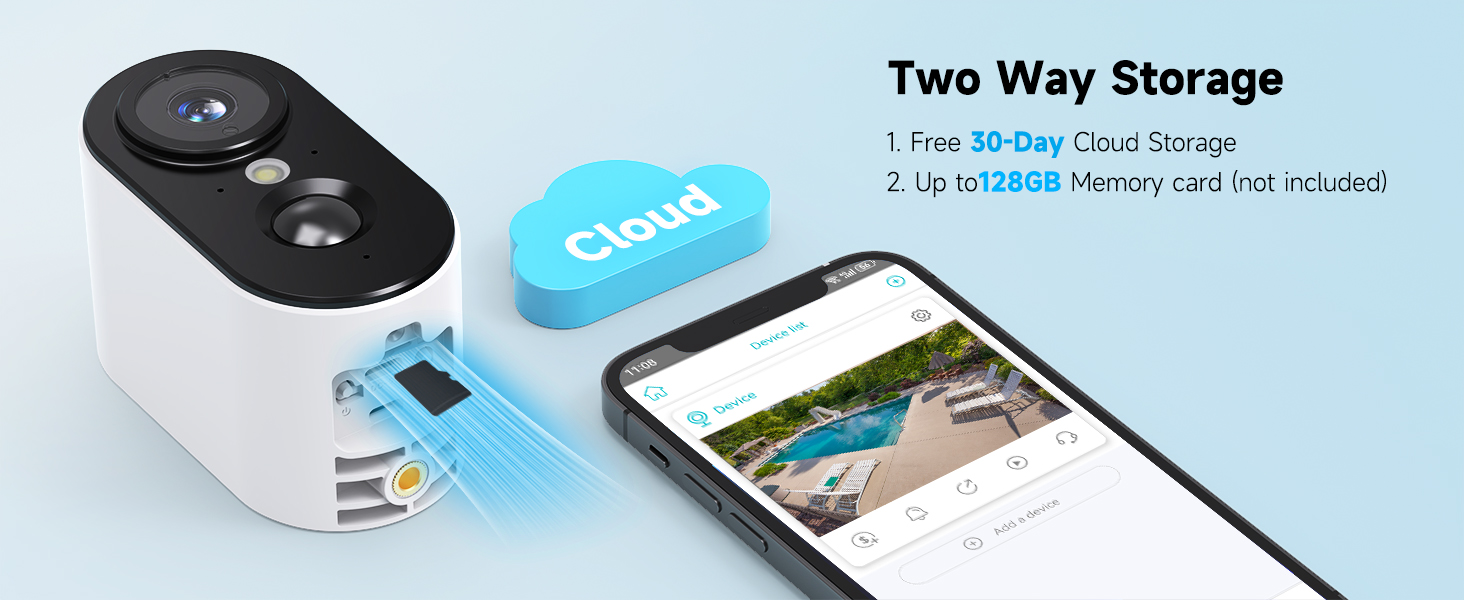
Figure 4.6: Flexible two-way storage options for your recordings.
4.5 Multi-User Sharing
Share camera access with your family's accounts through the app, allowing multiple users to view real-time footage and captured moments.

Figure 4.7: Share the camera with your family's accounts to capture moments and check real-time situations.
5. Installation
The LIWAN security camera is designed for versatile placement, suitable for various indoor and outdoor environments. It is IP65 water-resistant, ensuring stable and reliable performance in different temperatures.

Figure 5.1: Outdoor-IP65 Waterproof design allows placement anywhere without fear of the elements.

Figure 5.2: Protect every corner of your home 24/7 with versatile installation options.
5.1 Mounting the Camera and Solar Panel
Use the provided mounting brackets, screws, and wall anchors to secure the camera and solar panel to a desired surface. The solar panel can be mounted separately from the camera to ensure optimal sunlight exposure.
Video 5.1: LIWAN Security Camera Installation Video. This video provides a step-by-step guide on how to install the camera and its solar panel.
After adjusting the angle of the device, secure the camera with one hand and rotate the fixing bracket with the other to tighten it in place.
6. Maintenance
To ensure the longevity and optimal performance of your LIWAN security camera:
- Battery Life: The 5200mAh battery is designed for long-lasting performance (1-5 months on one charge, depending on activity). For continuous power, connect the camera to the solar panel.
- Cleaning: Regularly clean the camera lens and PIR sensor to ensure clear images and accurate detection. Use a soft, dry cloth.
- Firmware Updates: Check the Ubox app periodically for firmware updates to ensure your camera has the latest features and security enhancements.
7. Troubleshooting
If you encounter issues with your LIWAN security camera, consider the following:
- No Connection/Offline: Ensure your Wi-Fi network is 2.4GHz. The camera is not compatible with 5GHz Wi-Fi. Check Wi-Fi signal strength at the camera's location.
- Frequent False Alerts: Adjust the PIR detection sensitivity settings in the Ubox app (High, Medium, Low). Lowering sensitivity can reduce alerts from environmental factors like wind or small animals.
- Poor Battery Life: Ensure the camera is placed in an area with sufficient sunlight if using the solar panel. High activity levels or frequent live view access can drain the battery faster. Ensure the initial charge was complete.
- Two-Way Audio Interference: Maintain a distance of more than 10 meters between your phone and the camera when using two-way audio to prevent feedback.
- Resetting the Device: If issues persist, you may need to reset the camera. Refer to the app's instructions or contact support for guidance on resetting.
8. Specifications
| Feature | Detail |
|---|---|
| Brand | LIWAN |
| Model Number | wifi camera |
| Wireless Communication Technology | Wi-Fi (2.4GHz only) |
| Video Capture Resolution | 1080p, 2K |
| Night Vision Range | 33 Feet |
| Battery Power | 5200 Milliampere Hour (mAh) |
| Alert Type | Motion Only |
| Mounting Type | Wall Mount |
| Product Dimensions | 3.3 x 4 x 6.5 inches |
| Item Weight | 1.28 pounds |
| Local Storage | Up to 128GB (SD card not included) |
9. Warranty and Support
For any product-related inquiries, technical support, or warranty information, please contact LIWAN customer service through the Ubox app's 'Contact Us' section or visit the official LIWAN store on Amazon.
Your product is verified by Transparency, ensuring each item has a unique code for authenticity.


