
1. Safety Information
Always follow basic safety precautions when installing and operating electrical appliances to reduce the risk of fire, electric shock, and personal injury.
- WARNING: To avoid possible electrical shock, turn off the electricity at the main fuse box or circuit breaker panel before you begin fan installation or before servicing the fan.
- All wiring must be in accordance with national and local electrical codes. Electrical installation should be performed by a qualified licensed electrician.
- The fan must be mounted with a minimum of 7 feet (2.1 meters) clearance from the trailing edge of the blades to the floor.
- Ensure the mounting structure is strong enough to support the weight of the fan (approximately 13 pounds or 5.9 kg).
- Do not operate the fan with damaged blades or any visible defects.
- Do not insert objects into the path of the fan blades while the fan is operating.
2. Package Contents
Verify that all components listed below are included in your package. If any parts are missing or damaged, please contact KENSID customer service.
- Remote Control
- Light Kit
- DC Motor Assembly
- LED Light Module
- 5 Double-sided Wooden Fan Blades
- Mounting Hardware (screws, wire nuts, etc.)
- Instruction Manual
3. Specifications
| Feature | Specification |
|---|---|
| Brand | KENSID |
| Model Number | KS42SH-5014BK |
| Size | 52 inch |
| Color | White |
| Material | Double-sided Wooden Blade |
| Motor Type | DC Motor |
| Number of Speeds | 6 |
| Light Type | Dimmable LED |
| Color Temperature | 3000K, 4500K, 6000K (Adjustable) |
| Brightness | 10% to 100% Dimmable |
| Control Method | Remote Control |
| Voltage | 120 volts |
| Wattage | 35 watts (Fan), 22 watts (LED Light) |
| Indoor/Outdoor Usage | Indoor, Outdoor |
| Mounting Type | Flush Mount |
| Item Weight | 13 pounds (5.9 kg) |
For detailed dimensions, refer to the diagram below:

4. Installation Instructions
The KENSID ceiling fan is designed for relatively easy installation, with most complex procedures pre-completed. Installation typically takes about 60 minutes. A detailed installation manual is included in your package. Please refer to it for step-by-step guidance.
4.1 Pre-Installation Checklist
- Ensure power is OFF at the circuit breaker.
- Gather necessary tools: screwdriver, wire strippers, ladder, etc.
- Confirm the mounting location can support the fan's weight.
4.2 Mounting the Fan
Follow the instructions in the provided manual for securely mounting the fan to your ceiling. The fan features a solid suction top plate for strong bearing capacity.

4.3 Wiring Connections
Connect the fan's wiring to your household electrical system according to the wiring diagram in the manual. Ensure all connections are secure and insulated.
4.4 Attaching Blades and Light Kit
Attach the five double-sided wooden blades to the motor assembly. Install the LED light kit as per the manual's instructions.

5. Operating Instructions
Your KENSID ceiling fan is operated using the included multi-function remote control. Ensure 2 AAA batteries (not included) are installed in the remote.
5.1 Remote Control Functions
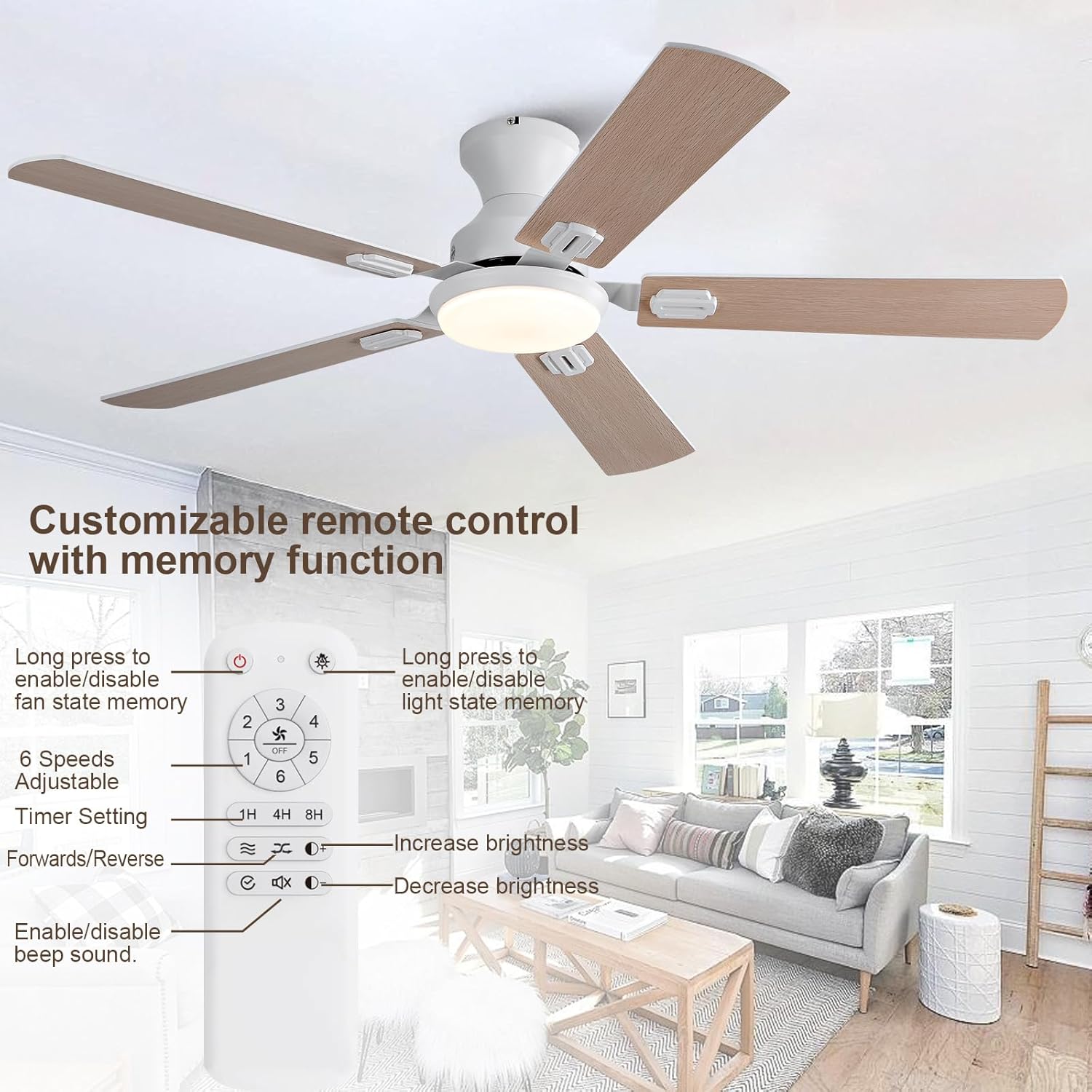
- Power On/Off: Press the power button to turn the fan and light on or off.
- Fan Speed: Select from 6 adjustable fan speeds (1-6) to suit your comfort level.
- Timer Setting: Set the fan to turn off automatically after 1, 4, or 8 hours.
- Light On/Off: Toggle the light on or off.
- Brightness Adjustment: Use the brightness increase/decrease buttons to adjust the LED light from 10% to 100%.
- Color Temperature: Cycle through three color temperature options: 3000K (Warm Light), 4500K (Natural Light), and 6000K (Cold White Light).
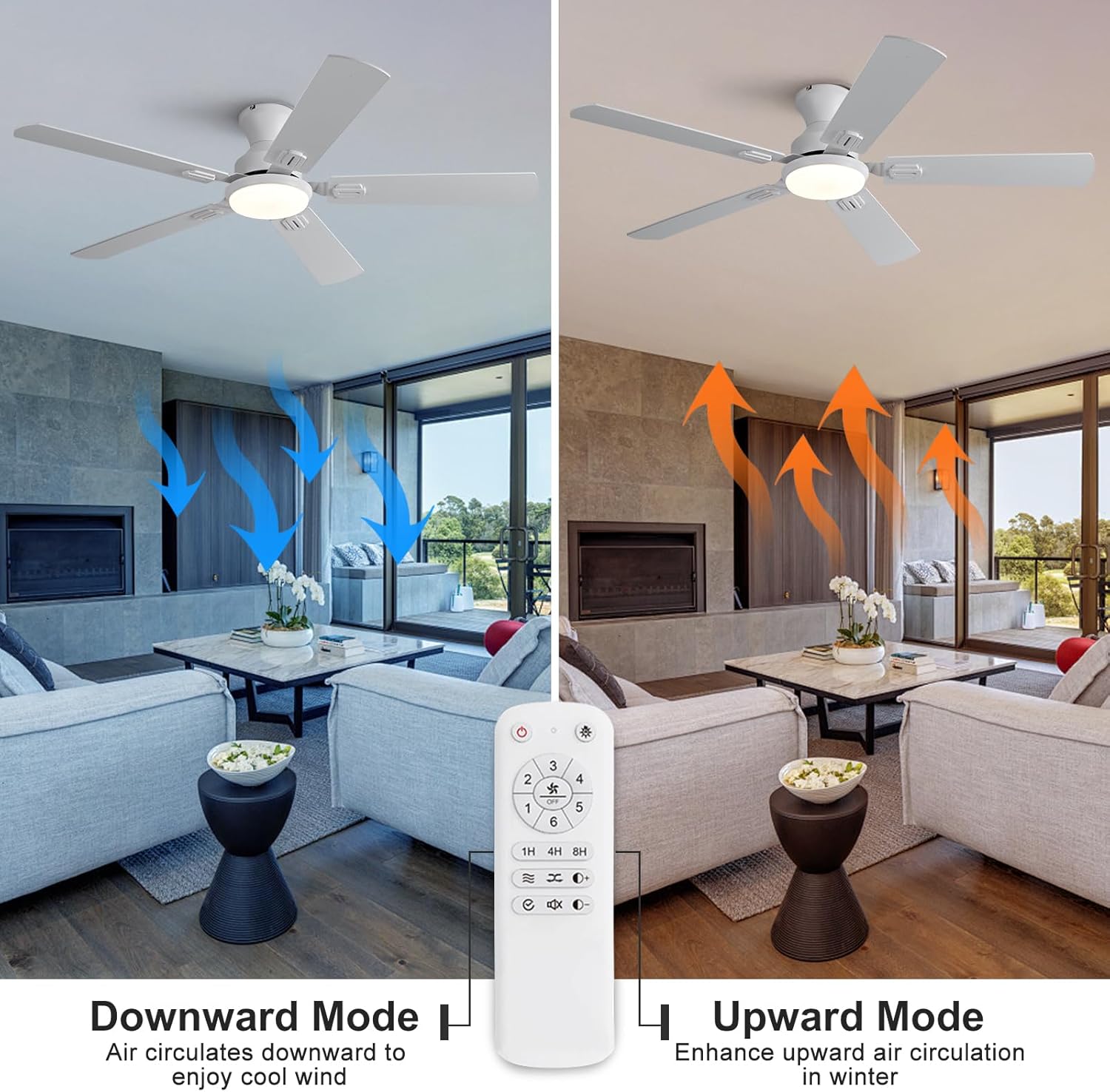
- Forward/Reverse Function: Change the direction of blade rotation for summer (downward airflow for cooling) or winter (upward airflow for enhanced heat circulation).
- Memory Function: Long-pressing 'ALL OFF' activates/deactivates fan speed and status memory. Long-pressing 'LIGHT ON/OFF' enables/disables light state memory. When active, the fan and light will resume their previous settings upon power-on.
- Beeper Sound: The remote control has a sound prompt function that can be enabled or disabled.


5.2 Ultra-Quiet Operation
The KENSID ceiling fan is designed for ultra-quiet operation, ensuring a comfortable and peaceful environment, even at higher speeds.

5.3 Official Product Video
Watch this video for a visual guide on the features and operation of the KENSID Flush Mount Ceiling Fan with Light.
6. Maintenance
Regular maintenance ensures the longevity and optimal performance of your KENSID ceiling fan.
- Cleaning: To clean the fan, wipe with a soft, damp cloth. Do not use abrasive cleaners or solvents. Ensure power is off before cleaning.
- Blade Inspection: Periodically check the fan blades for any signs of damage or warping. Replace damaged blades immediately.
- Tighten Screws: Over time, screws may loosen. Periodically check and tighten all screws on the fan housing and blade attachments.
- Light Source: The LED light module is designed for long life. If the light source is broken, contact KENSID customer service for a replacement.
7. Troubleshooting
If you encounter issues with your KENSID ceiling fan, refer to the following common problems and solutions:
| Problem | Possible Cause | Solution |
|---|---|---|
| Fan does not start | No power, loose wiring, remote control issue. | Check circuit breaker. Ensure all wiring connections are secure. Replace remote batteries. Re-pair remote if necessary (refer to full manual). |
| Light does not work | Loose wiring, LED module failure, remote control issue. | Check wiring to the light kit. Ensure remote batteries are fresh. If LED module is faulty, contact customer service. |
| Fan wobbles | Loose blades, unbalanced blades, loose mounting. | Ensure all blade screws are tight. Use the included balancing kit if needed. Verify mounting bracket is securely fastened to the ceiling. |
| Remote control not responding | Dead batteries, remote out of range, interference. | Replace AAA batteries. Ensure you are within range. Minimize interference from other electronic devices. |
| Fan makes excessive noise | Loose screws, motor issue, blades hitting an obstruction. | Check and tighten all screws. Ensure no obstructions are in the fan's path. If motor noise persists, contact customer service. |
For further assistance, please refer to the comprehensive troubleshooting section in your full instruction manual or contact KENSID customer support.
8. Warranty and Support
KENSID provides a 12-month lifetime warranty for every customer who purchases this KENSID Ceiling Fan with Light and Remote Control.
- If you encounter any problems using or installing the fan, please contact us.
- If your light source is broken, contact us, and we will issue you a new one.
- For any after-sales problems, our support team is available to assist you promptly.
Please retain your proof of purchase for warranty claims.