
1. Important Safety Information
Please read and understand this entire manual before attempting to assemble, operate, or install the product. Failure to follow these instructions could result in electric shock, fire, or serious personal injury.
- Ensure all electrical connections comply with local codes, ordinances, and the National Electrical Code (NEC).
- Consult a qualified electrician if you are unfamiliar with electrical wiring.
- Before installation, disconnect power by turning off the circuit breakers at the main fuse box.
- Use only replacement parts specified by the manufacturer.
- Do not bend the blade holders during installation, balancing, or cleaning.
- Ensure the installation site allows the fan blades to rotate without obstruction.
- The fan must be mounted with a minimum of 7 feet (2.1 meters) clearance from the floor to the trailing edge of the blades.
2. What's in the Box
Carefully unpack your ceiling fan and inspect the contents. Ensure all items are present and undamaged. If any parts are missing or damaged, contact customer service immediately.
- Remote Control
- Light Kit
- DC Motor
- LED Light
- 5 Double-sided Wooden Fan Blades
- Mounting Hardware
- Installation Manual

Image: Key components of the KENSID ceiling fan, highlighting the solid suction top plate for strong bearing capacity, the quiet reversible DC motor, the 5 double-sided wooden blades, and the energy-saving 17W LED light.
3. Setup and Installation
The installation process for this ceiling fan is designed to be straightforward. Most complex procedures are pre-completed. Refer to the detailed installation video and instructions below for guidance.
3.1 Installation Video Guide
Video: A step-by-step guide demonstrating the unpacking and installation process for the KENSID Flush Mount Ceiling Fan. This video covers assembling the motor, attaching the blades, connecting the light kit, and mounting the fan to the ceiling.
3.2 General Installation Steps
- Unpack Components: Carefully remove all parts from the packaging.
- Prepare Mounting Bracket: Secure the mounting bracket to the ceiling junction box. Ensure it is firmly attached and can support the fan's weight.
- Assemble Fan Blades: Attach the fan blades to the motor housing using the provided screws. The blades are double-sided, allowing you to choose your preferred finish.
- Wire Connections: Connect the fan's electrical wires to the household wiring according to the wiring diagram in the manual. Use wire nuts to secure connections.
- Mount Fan: Lift the fan assembly and attach it to the mounting bracket.
- Install Light Kit: Connect the light kit wiring and secure the LED light module to the fan.
- Final Checks: Ensure all connections are secure and the fan is properly mounted before restoring power.

Image: Essential tools for ceiling fan installation, including a drill, screwdriver, ladder, pliers, and electrical tape, emphasizing the ease of installation with a detailed manual.
4. Operating Instructions
Your KENSID ceiling fan comes with a multi-function remote control for convenient operation of both the fan and the integrated LED light.
4.1 Remote Control Functions
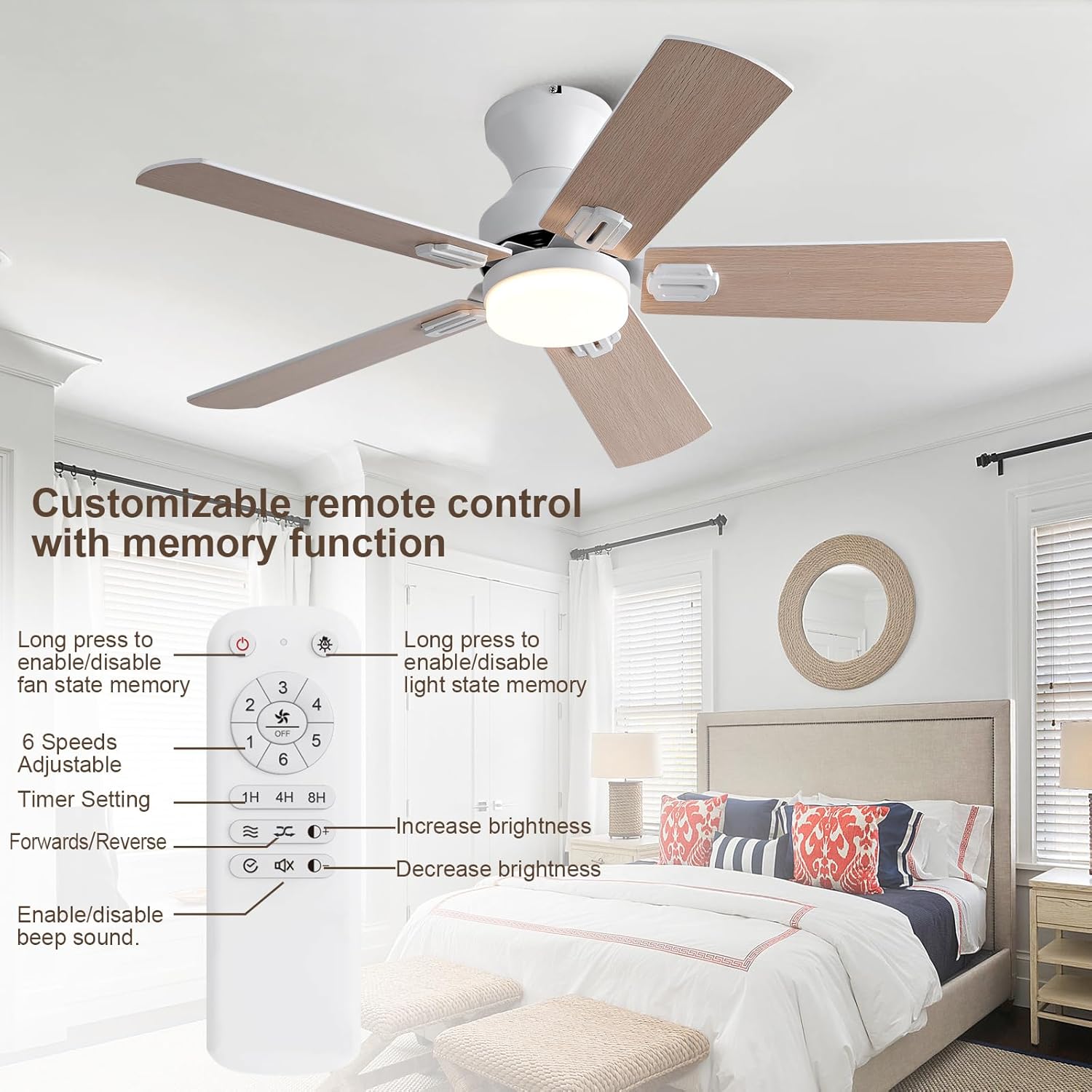
Image: A detailed view of the remote control, showing buttons for fan speed (1-6), timer settings (1H, 4H, 8H), forward/reverse mode, light on/off, and brightness adjustment. It also highlights memory functions for fan state and light state.
- Fan Speed Control: Select from 6 adjustable fan speeds (1-6) to customize airflow.
- Timer Settings: Set the fan to turn off automatically after 1, 4, or 8 hours.
- Forward/Reverse Function: Change the direction of blade rotation for seasonal use.
- Light On/Off: Toggle the LED light on or off.
- Brightness Adjustment: Increase or decrease the light brightness from 10% to 100%.
- Memory Function: Long-press the "ALL OFF" button to activate/deactivate fan speed and status memory. Long-press "LIGHT ON/OFF" to enable/disable light state memory. This allows the fan and light to resume their previous settings without remote input.
- Sound Prompt: Enable or disable the sound prompt function for button presses.
4.2 Dimmable LED Light and Color Temperature

Image: The fan's integrated LED light offers dimmable brightness from 10% to 100% and three color temperature options: 3000K (Warm Light), 4500K (Natural Light), and 6000K (Cold White Light).
The integrated LED light offers adjustable brightness from 10% to 100% and three color temperature options (3000K Warm Light, 4500K Natural Light, 6000K Cold White Light) to suit various moods and settings.
4.3 Reversible DC Motor for Seasonal Use
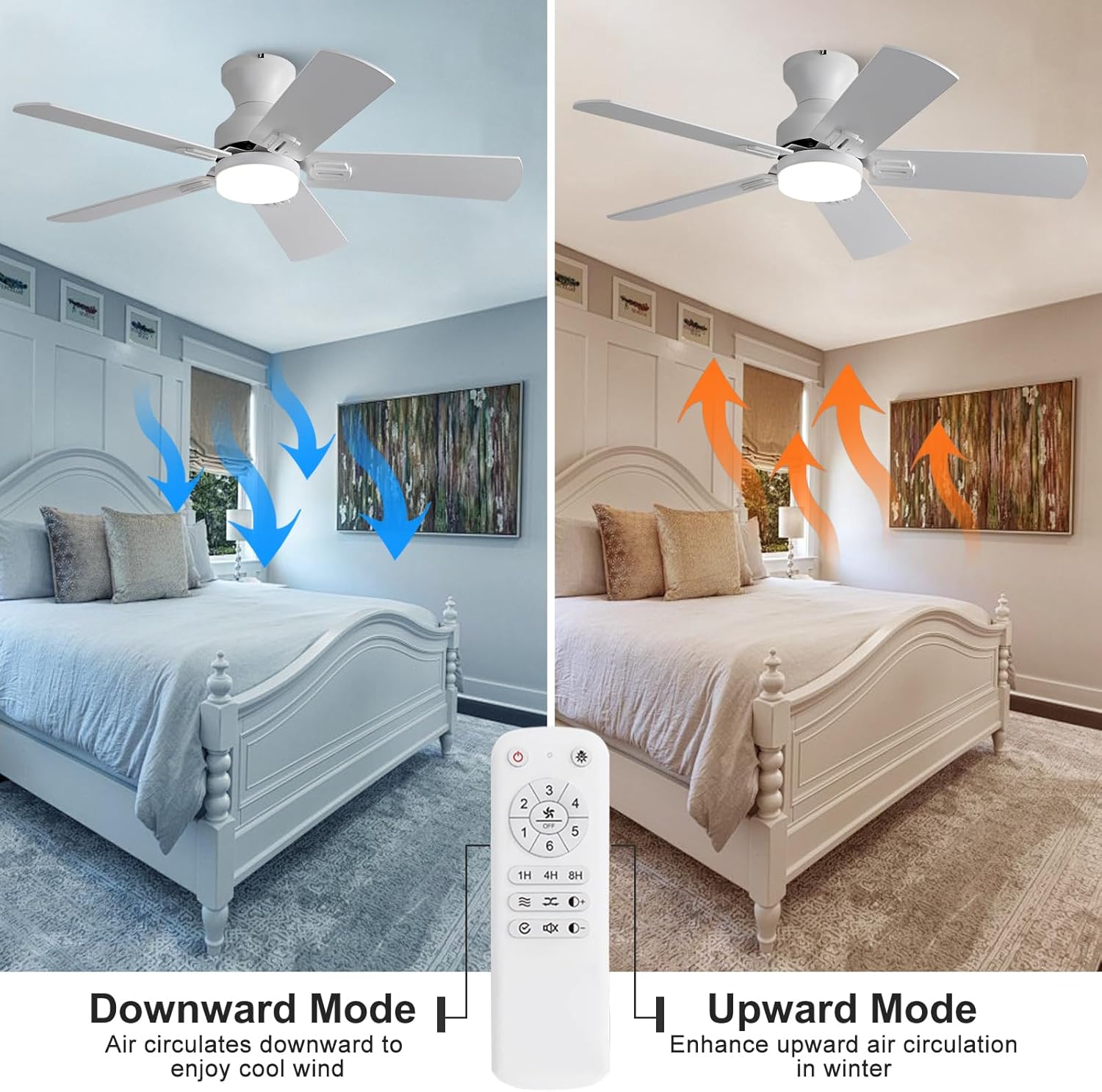
Image: Visual representation of the fan's reversible function: downward mode for cooling during summer and upward mode to enhance air circulation and heating efficiency in winter.
The fan features a reversible DC motor, allowing you to change the direction of the blades. In summer mode (downward airflow), the fan creates a cooling breeze. In winter mode (upward airflow), it helps circulate warm air trapped near the ceiling, improving heating efficiency.
4.4 Ultra-Quiet Operation

Image: A noise level comparison chart showing the KENSID fan operating at approximately 30dB, comparable to a library, ensuring a comfortable and quiet environment.
The fan is designed for ultra-quiet operation, providing a comfortable and peaceful environment without disruptive noise.
5. Maintenance
Regular maintenance ensures optimal performance and longevity of your ceiling fan.
- Cleaning: Periodically clean the fan blades and motor housing with a soft, damp cloth. Do not use abrasive cleaners or solvents.
- Tighten Screws: Check all screws and connections annually to ensure they are secure. Loose screws can cause wobbling or noise.
- Blade Balance: If the fan wobbles, ensure all blades are securely attached and balanced. A balancing kit (not included) can be used if necessary.
- Light Source: The LED light module is designed for long life. If replacement is needed, contact customer service for compatible parts.
6. Troubleshooting
If you experience issues with your KENSID ceiling fan, refer to the following common problems and solutions:
| Problem | Possible Cause | Solution |
|---|---|---|
| Fan does not start | No power to the fan; Loose wire connections; Remote control battery low. | Check circuit breaker; Ensure all wires are securely connected; Replace remote control battery. |
| Fan wobbles | Loose blade screws; Unbalanced blades; Loose mounting bracket. | Tighten all blade screws; Use a balancing kit; Ensure mounting bracket is secure. |
| Light does not work | Loose light kit wiring; Faulty LED module; Remote control issue. | Check light kit connections; Contact customer service for replacement LED; Check remote battery. |
| Remote control not working | Battery low or incorrectly installed; Remote not paired. | Replace battery, ensure correct polarity; Refer to remote pairing instructions in the full manual. |
If you encounter a problem not listed here or if the suggested solutions do not resolve the issue, please contact KENSID customer service for further assistance.
7. Specifications
Detailed technical specifications for the KENSID 42 Inch Flush Mount Ceiling Fan.

Image: Dimensions of the 42-inch ceiling fan, indicating a 9.8-inch height, alongside a table detailing product name, rated voltage, motor power, control method, lamp configuration, material, F/R function, speeds, overall height, and fan blade type.
| Feature | Detail |
|---|---|
| Brand | KENSID |
| Model Number | KS42SH-5014BK |
| Color | White |
| Electric Fan Design | Ceiling Fan |
| Power Source | DC |
| Style | Modern Ceiling Fan with Light |
| Product Dimensions | 42"D x 10"W x 42"H |
| Room Type | Bedroom, Classroom, Home Office, Library, Living Room |
| Recommended Uses | Air Circulation, Cooling |
| Mounting Type | Ceiling Mount, Flush Mount |
| Controller Type | Remote Control |
| Wattage | 20 watts |
| Voltage | 120 Volts |
| Indoor/Outdoor Usage | Indoor, Outdoor |
| Material | Double-sided Wooden Blade Ceiling Fan with Light |
| Number of Blades | 5 |
| Light Type | Dimmable LED (3000K, 4500K, 6000K) |
| Fan Speeds | 6 Speed DC Motor |
| Special Features | Adjustable 3 Color LED Lights, Lighting Memory, 6 Speed Remote Control, 5 Double-sided Wooden Fan Blades, DC Ceiling fan has Forward and Reverse Function |
8. Warranty and Support
KENSID provides a 12-month Lifetime Warranty for every customer who purchases this ceiling fan. This warranty covers manufacturing defects and issues with the light source.
- If you encounter any problems during the use or installation of the fan, please contact KENSID customer service.
- If your light source is broken, contact us for a new replacement.
- For any after-sales problems, our team is available to assist you promptly.
For support, please visit the KENSID store on Amazon or contact us directly through the platform.
Visit the KENSID Store