Introduction
This manual provides essential information for the proper identification and use of your EasyKeys replacement key for CompX Chicago WL1084 locking bags. It is crucial to verify the correct lock code to ensure compatibility and functionality.
Identifying Your Lock Code
Before ordering or using your replacement key, you must accurately identify the lock code. The lock code is specific to your lock and determines the correct key cut. Incorrect identification will result in a non-functional key.
This image illustrates common locations where you can find your lock code. Look for the code directly on your existing key, on the face of the lock cylinder, on a label positioned inside or behind the lock mechanism, or on a label affixed to the cabinet or door where the lock is installed.
The lock code can typically be found in one of the following locations:
- On the Key: The code may be stamped directly onto your original key.
- On the Lock Face: The code might be engraved or printed on the visible face of the lock cylinder.
- On a Label Inside/Behind the Lock: For some locks, the code is on a sticker or label located within the lock mechanism or on the inside of the drawer/door it secures.
- On the Cabinet/Door Label: Occasionally, the code is on a label on the furniture or fixture itself.
Important Notes:
- Lock codes are manufacturer-specific. Always order by the manufacturer (CompX Chicago) to ensure compatibility.
- Key cuts differ significantly between brands, even if codes appear similar.

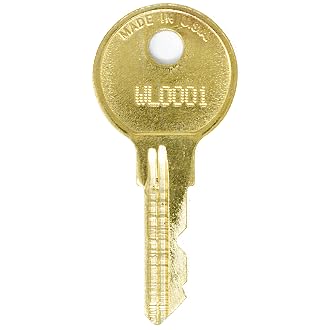
This image displays a typical EasyKeys replacement key. The unique cut pattern on the key blade corresponds to a specific lock code, ensuring it operates only the intended lock.
Key Usage
To operate your CompX Chicago WL1084 locking bag:
- Insert the replacement key fully into the lock cylinder.
- Turn the key clockwise to unlock the mechanism.
- Turn the key counter-clockwise to lock the mechanism.
- Remove the key after locking or unlocking.
Maintenance
Proper maintenance can extend the life of your key and lock:
- Keep the key clean and free from dirt or debris.
- Avoid using excessive force when inserting or turning the key.
- Store the key in a dry place to prevent corrosion.
- If the lock mechanism becomes stiff, apply a small amount of graphite lubricant (do not use oil-based lubricants).
Troubleshooting
If you encounter issues with your replacement key:
- Key does not insert fully: Check for obstructions in the lock cylinder or damage to the key blade. Ensure the key is oriented correctly.
- Key turns but does not unlock: Verify that the lock code on your key matches the lock. The lock mechanism itself may be damaged or jammed.
- Key is difficult to turn: Apply a small amount of graphite lubricant into the lock cylinder. Do not force the key, as this can cause damage.
- Key breaks in lock: This typically indicates excessive force was used or the key was defective. Contact support for assistance.
Specifications
| Feature | Detail |
|---|---|
| Brand | EasyKeys |
| Model Name | WL1084 |
| Manufacturer | CompX Chicago |
| Lock Type | Cam |
| Material | Brass |
| Special Features | Custom Cut Key, Durable |
| Item Dimensions (L x W x H) | 0.5 x 0.5 x 1 inches |
| Item Weight | 4 ounces |
| Included Components | Key |
Support
For further assistance, questions, or to report issues with your EasyKeys replacement key, please contact EasyKeys customer support. Ensure you have your lock code and purchase details available when contacting support.
Visit the EasyKeys Store for more information.