1. Introduction
The Wurkkos WK05 is a compact, high-performance penlight designed for various applications, from everyday carry (EDC) to professional use. It features a 519A LED, delivering a maximum output of 900 lumens and a beam distance of up to 141 meters. With a Color Rendering Index (CRI) of 90+, it ensures accurate color reproduction.
Constructed from 6061 aircraft-grade aluminum, the WK05 is built for durability, offering impact resistance and an IP68 waterproof rating. Its dual-switch design provides intuitive control over multiple lighting modes.
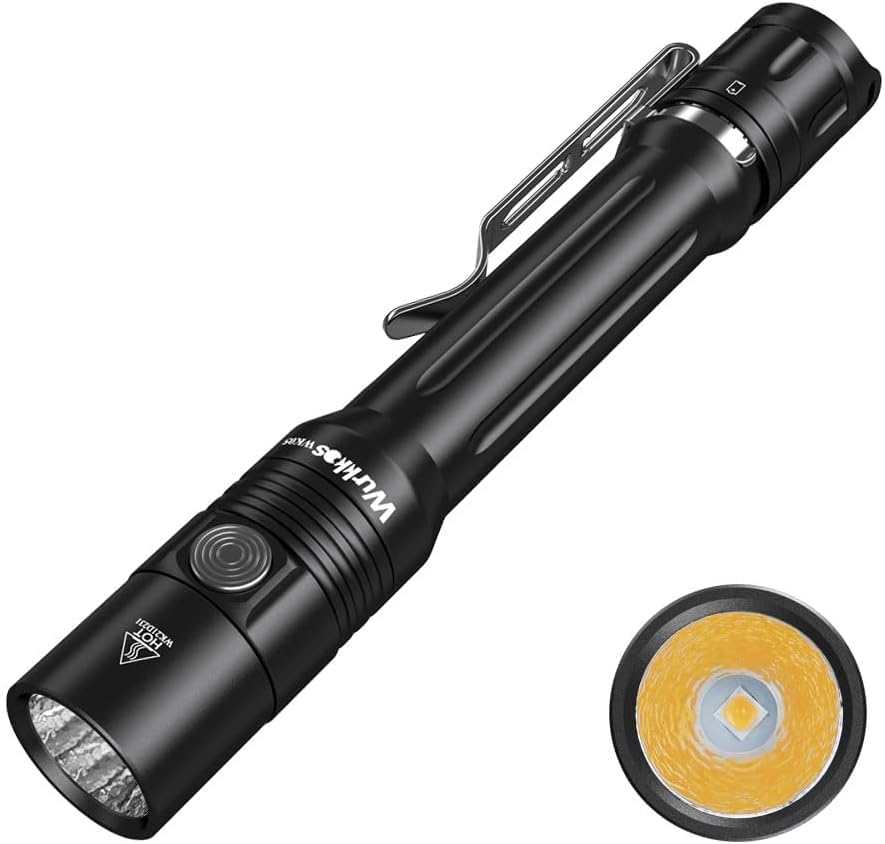
Figure 1: Wurkkos WK05 Pen Light Flashlight.
2. Safety Instructions
- Do not shine the flashlight directly into eyes. The powerful beam can cause temporary vision impairment.
- Keep out of reach of children.
- Ensure batteries are inserted with correct polarity to prevent damage to the flashlight or batteries.
- Do not mix old and new batteries, or different types of batteries.
- If the flashlight will not be used for an extended period, remove the batteries to prevent leakage.
- Avoid disassembling the flashlight head, as this may damage the LED or internal components and void the warranty.
3. Package Contents
Verify that all items are present in your package:
- Wurkkos WK05 Pen Light Flashlight
- 2 x Lithium Ion batteries (included)
- Belt Clip
- Bulb (pre-installed)
- Light kit (pre-installed)
4. Product Overview
The Wurkkos WK05 features a robust design with key components for optimal performance and user experience.

Figure 2: Wurkkos WK05 Exploded View and Key Features.
The flashlight body is precision-machined from 6061 aluminum, ensuring durability and a comfortable grip. It includes a stainless steel pocket clip for secure carrying. The tail switch is designed for tactical operation, while a side switch allows for easy mode changes.

Figure 3: Compact Size and Portability of the WK05.
5. Setup
5.1 Battery Installation
The Wurkkos WK05 is designed to operate with two 14500 Lithium-ion batteries (included with this model) or two AA batteries (not included). For optimal performance and to achieve the maximum 900 lumens, 14500 Lithium-ion batteries are recommended.
- Unscrew the tail cap of the flashlight by turning it counter-clockwise.
- Insert the two 14500 Lithium-ion batteries (or AA batteries) into the battery compartment with the positive (+) end facing towards the flashlight head.
- Screw the tail cap back on clockwise until it is securely tightened.
6. Operation
The WK05 features a dual-switch interface for intuitive control.

Figure 4: Dual Switch Operation of the WK05.
6.1 Tail Switch (On/Off)
- Full Press: Press the tail switch completely to turn the flashlight ON or OFF.
- Half Press: While OFF, a half-press provides momentary illumination. Release to turn off.
- Memory Function: The tail switch retains the last used brightness level (Low, Medium, High) when turned off and on.
6.2 Side Switch (Mode Selection)
Once the flashlight is ON via the tail switch, use the side switch to change modes:
- Single Click: Cycles through brightness levels: Low (10LM) → Medium (100LM) → High (500LM).
- Double Click: Activates Turbo (900LM) mode. Double-click again to return to the previously used mode.
- Triple Click: Activates Strobe mode.
- From Strobe: Double-click to cycle through special modes: SOS → Beacon → Burst Flash.
- Long Press (from OFF): Press and hold the side switch to activate Eco (1LM) mode.

Figure 5: Simple Operation and Mode Cycling.
7. Maintenance
7.1 Cleaning
Clean the flashlight body with a soft, damp cloth. For stubborn dirt, a mild soap solution can be used. Avoid harsh chemicals or abrasive materials that could damage the finish.
7.2 O-Ring Care
Regularly inspect the O-rings for wear and tear. Lubricate them with silicone grease to maintain the IP68 waterproof rating. Replace damaged O-rings promptly.
7.3 Battery Care
If using rechargeable Lithium-ion batteries, ensure they are charged using a compatible charger. Do not overcharge or completely discharge batteries. Store batteries in a cool, dry place.
8. Troubleshooting
| Problem | Possible Cause | Solution |
|---|---|---|
| Flashlight does not turn on. | Batteries are depleted or incorrectly inserted. | Replace or recharge batteries. Ensure correct polarity (+/-). |
| Light is dim or flickers. | Low battery power or loose connections. | Replace or recharge batteries. Tighten tail cap and ensure battery contacts are clean. |
| Cannot change modes. | Side switch malfunction or tail cap not fully tightened. | Ensure the tail cap is fully tightened. If issue persists, contact support. |
| Water ingress. | Damaged or improperly seated O-rings. | Inspect and lubricate O-rings. Replace if damaged. Ensure tail cap is securely tightened. |
9. Specifications

Figure 6: Wurkkos WK05 Product Parameters.
| Feature | Detail |
|---|---|
| Model | WK05 |
| Light Source | Nichia 519A LED |
| Max Output | 900 Lumens (with 14500 Li-ion batteries) |
| Max Beam Distance | 141 meters |
| Color Temperature | 5000K (Neutral White) |
| Color Rendering Index (CRI) | 90+ |
| Power Source | 2 x 14500 Lithium-ion batteries (included) or 2 x AA batteries (not included) |
| Material | 6061 Aircraft-grade Aluminum |
| Water Resistance | IP68 (submersible up to 2 meters) |
| Impact Resistance | 1.5 meters |
| Dimensions | 151.5mm (Length) x 22.5mm (Diameter) |
| Weight | 70g (excluding batteries) |
9.1 Color Rendering Index (CRI)
The WK05's high CRI 90+ LED ensures that colors appear more natural and vibrant, making it ideal for tasks requiring accurate color perception.

Figure 7: CRI Comparison.
10. Warranty and Support
Wurkkos products are manufactured to high-quality standards. For warranty information or technical support, please refer to the official Wurkkos website or contact their customer service directly. Keep your purchase receipt as proof of purchase for warranty claims.
For further assistance, please visit the Wurkkos Store on Amazon.


