
1. Introduction
Welcome to the user manual for your Sena S1 Road Cycling Helmet. This smart helmet integrates advanced communication and safety features into a sleek, aerodynamic design. It is engineered to enhance your cycling experience by providing hands-free communication, audio entertainment, and improved visibility.
The S1 helmet features Sena's Mesh Intercom technology for seamless rider-to-rider communication, integrated speakers and microphone for clear audio, Bluetooth 5.2 for smartphone connectivity, and an integrated LED taillight for increased safety. Please read this manual thoroughly to understand all features and ensure proper use and maintenance of your helmet.
2. Safety Information
Your safety is paramount. Always wear your helmet correctly and ensure it is properly fitted before every ride. This helmet is designed to provide protection in the event of an impact, but no helmet can protect against all possible impacts. Always ride within your abilities and obey all traffic laws.
- Proper Fit: Ensure the helmet fits snugly and comfortably. The chin strap should be securely fastened. Refer to the 'Fitting the Helmet' section for detailed instructions.
- Visibility: The integrated LED taillight is designed to increase your visibility to others. Always use appropriate lighting for your riding conditions, especially at night or in low light.
- Awareness: While the integrated speakers allow for audio, they are designed to keep your ears open to ambient sounds, such as traffic. Always remain aware of your surroundings.
- Charging: Use only the provided USB-C cable for charging. Do not attempt to charge the helmet if it is wet or damaged.
- Cleaning: Clean the helmet and electronic components as instructed in the 'Maintenance' section to prevent damage.
3. Package Contents
Verify that all items are included in your package:
- S1 Helmet
- Head Liner
- Helmet Pouch
- USB-C Power & Data Cable
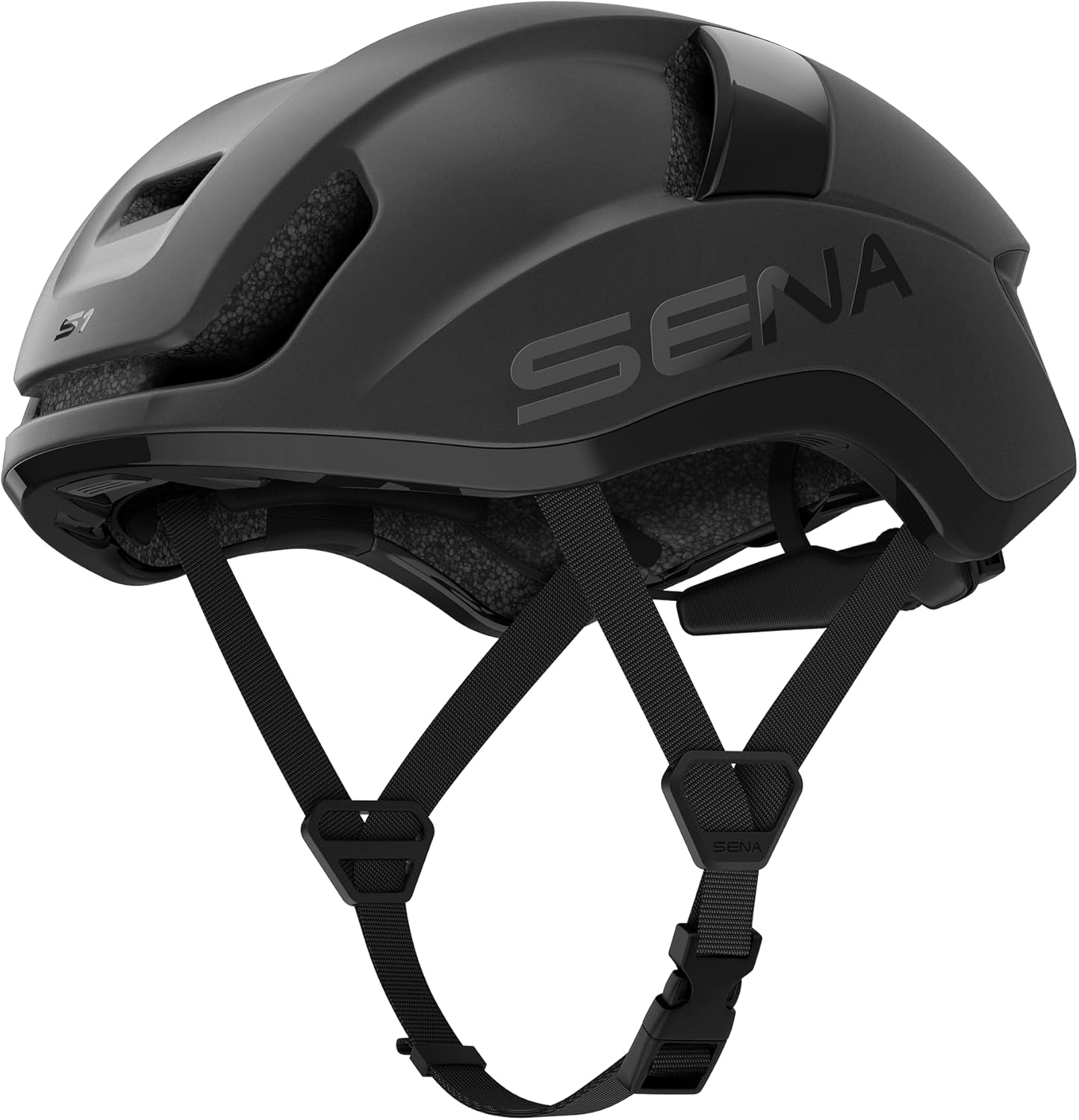
Figure 3.1: The Sena S1 Road Cycling Helmet, showcasing its sleek design and integrated features.
4. Product Overview
4.1 Key Features
- Mesh Intercom for rider to rider communication
- Built-in speakers and microphone
- Smartphone connectivity via Bluetooth 5.2
- Integrated LED taillight for increased rider visibility
- Voice command controls

Figure 4.1: Overview of the Sena S1 helmet's smart features.
4.2 Components
The Sena S1 helmet integrates its electronic components seamlessly into the helmet structure:
- Integrated Speakers: Located above the ears, these speakers deliver audio without obstructing ambient sounds.
- Built-in Microphone: Positioned for clear voice capture, enabling hands-free communication and voice commands.
- LED Taillight: Located at the rear of the helmet, providing enhanced visibility.
- Control Buttons: Ergonomically placed buttons for easy operation of all functions.
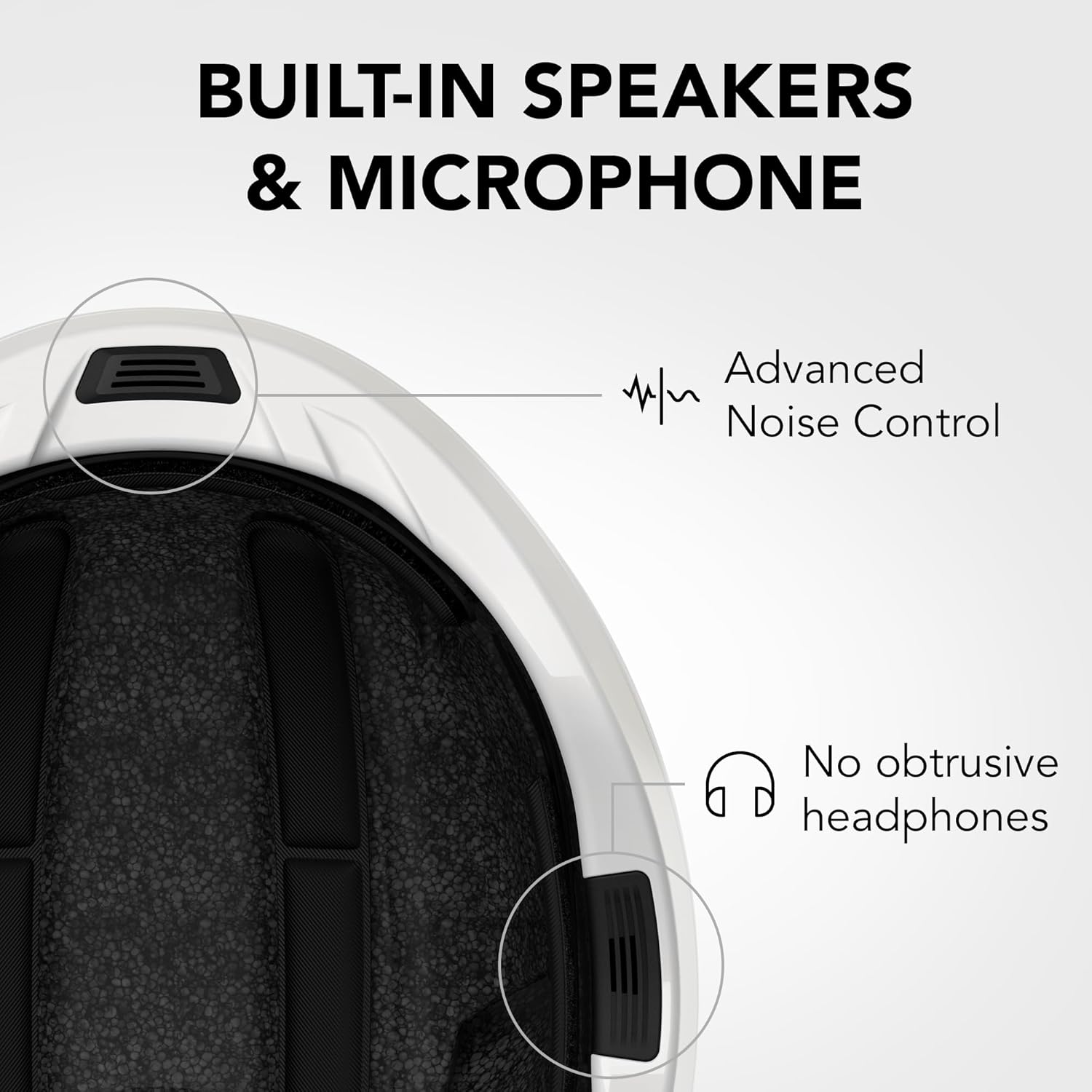
Figure 4.2: Detail of the built-in speakers and microphone, designed for clear audio and noise control.

Figure 4.3: The integrated taillight enhances safety with multiple illumination modes.
5. Setup
5.1 Charging the Helmet
Before first use, fully charge your Sena S1 helmet. Connect the supplied USB-C cable to the charging port on the helmet and to a USB power source (e.g., computer USB port or wall adapter). The LED indicator will show charging status.
5.2 Fitting the Helmet
A properly fitted helmet is crucial for safety and comfort. Place the helmet on your head and adjust the rear retention system using the dial until it feels snug. Adjust the side straps so they form a 'V' shape just below your ears. Fasten the chin strap securely, ensuring it is tight enough that the helmet does not move excessively when you shake your head, but not so tight as to cause discomfort.
5.3 Bluetooth Pairing
To connect your S1 helmet to your smartphone:
- Turn on the S1 helmet.
- Activate Bluetooth on your smartphone.
- Put the helmet into pairing mode (refer to the helmet's quick start guide for specific button presses).
- Select 'Sena S1' from the list of available devices on your smartphone.
- Once paired, you can use your phone's features through the helmet.

Figure 5.1: Manage your helmet settings and features conveniently through the Sena Cycling App on your smartphone.
6. Operating
6.1 Power On/Off
- Power On: Press and hold the main button for approximately 3 seconds until you hear an audible prompt.
- Power Off: Press and hold the main button for approximately 5 seconds until you hear an audible prompt.
6.2 Volume Control
Use the volume up (+) and volume down (-) buttons located on the helmet to adjust the audio level.
6.3 Mesh Intercom Communication
The S1 helmet utilizes Mesh Intercom for seamless group communication. This allows multiple riders to connect and communicate hands-free within a range of up to 0.8 miles (1200 meters).
- Starting Mesh Intercom: The Mesh Intercom is typically active by default when the helmet is powered on.
- Joining a Group: Riders with Sena Mesh-enabled devices (e.g., R1 EVO, R2 EVO, M1 EVO) can automatically join the Mesh network when in range.

Figure 6.1: Mesh 2.0 Intercom allows communication with multiple riders, enhancing group rides.

Figure 6.2: Seamless group communication and smartphone integration are core to the S1 experience.
6.4 Phone Calls & Music
Once paired with your smartphone, you can manage calls and music directly from your helmet:
- Answering/Ending Calls: Press the main button once to answer an incoming call or end an ongoing call.
- Playing/Pausing Music: Press the main button once to play or pause music.
- Next/Previous Track: Use the volume buttons with a long press to skip tracks (refer to quick start guide for specific long press actions).
6.5 LED Taillight Operation
The integrated LED taillight can be controlled to suit your visibility needs:
- Modes: Cycle through various modes such as solid on, day flash, and night flash.
- Activation: Use the dedicated taillight button on the helmet to change modes.
Video 6.1: An official product video demonstrating the key features and functionality of the Sena S1 Mesh Intercom Smart Road Cycling Helmet, including its aerodynamic design, integrated audio, and communication capabilities.
7. Maintenance
Proper care will extend the life and performance of your Sena S1 helmet:
- Cleaning the Shell: Use a soft, damp cloth and mild soap to clean the exterior of the helmet. Avoid harsh chemicals or abrasive materials.
- Cleaning the Liner: The head liner is removable and can be hand-washed with mild soap and water. Allow it to air dry completely before reinserting.
- Electronic Components: Do not submerge the helmet in water. If the electronic components get wet, power off the helmet immediately and allow it to dry thoroughly before attempting to use or charge it.
- Storage: Store the helmet in a cool, dry place away from direct sunlight and extreme temperatures. Use the provided helmet pouch for protection.
- Battery Care: For optimal battery life, avoid fully discharging the battery frequently. Charge the helmet regularly, even if not in use for extended periods.
8. Troubleshooting
If you encounter issues with your Sena S1 helmet, refer to the table below for common problems and solutions:
| Problem | Possible Cause | Solution |
|---|---|---|
| Helmet does not power on | Low battery; System error | Charge the helmet fully; Perform a factory reset (refer to Sena app or online manual for instructions). |
| No audio from speakers | Volume too low; Not connected to device; Speaker malfunction | Increase volume; Re-pair with smartphone; Contact customer support if issue persists. |
| Intercom not working | Out of range; Mesh Intercom off; Interference | Move closer to other riders; Ensure Mesh Intercom is active; Move away from sources of strong electromagnetic interference. |
| LED taillight not functioning | Low battery; Light mode off; Malfunction | Charge the helmet; Cycle through light modes; Contact customer support. |
For more detailed troubleshooting or issues not listed here, please visit the official Sena support website or contact their customer service.
9. Specifications
Key technical specifications for the Sena S1 Road Cycling Helmet:
| Attribute | Detail |
|---|---|
| Brand | Sena |
| Model Name | S1 |
| Model Number | S1-MB00M |
| Color | Matte Black |
| Size | Medium |
| Outer Material | Polycarbonate (PC) |
| Inner Material | Expanded Polystyrene |
| Item Weight | 340 Grams |
| Item Dimensions (LxWxH) | 10.83 x 8.27 x 5.91 inches |
| Bluetooth Version | 5.2 |
| Mesh Intercom Range | Up to 0.8 miles (1200 meters) |
| UPC | 885465020042 |
10. Warranty and Support
10.1 Warranty Information
The Sena S1 Road Cycling Helmet comes with the following warranty:
- Electronics: 2 years
- Helmet Integrity: 2 years
Please retain your proof of purchase for warranty claims. The warranty covers defects in materials and workmanship under normal use. It does not cover damage caused by misuse, accidents, unauthorized modifications, or normal wear and tear.
10.2 Customer Support
For further assistance, technical support, or warranty inquiries, please visit the official Sena website or contact their customer service department. You can often find FAQs, firmware updates, and additional resources online.
Sena Official Website: www.sena.com


