
Hobbywing 30112005
Contents
Xerun XR10 Justock ESC (G3S) User Manual
Model: 30112005
Introduction
Thank you for purchasing the HOBBYWING Xerun XR10 Justock G3S Brushless Electronic Speed Controller. This manual provides essential information for the proper installation, operation, and maintenance of your ESC. The XR10 Justock G3S is designed for 1/10 on-road and off-road zero-timing (blinky) competitions, offering precise control and powerful performance.

Image: The Hobbywing Xerun XR10 Justock G3S Electronic Speed Controller, showcasing its compact design with integrated cooling fan and wiring.
Safety Information
Adhering to the following safety guidelines is crucial for preventing damage to your equipment and ensuring safe operation:
- Ensure all wires and connections are well insulated before connecting the ESC to related devices, as a short circuit will damage your ESC.
- Ensure all devices are well connected to prevent poor connections that may cause your vehicle to lose control or other unpredictable issues like device damage.
- Carefully check the power devices and the car frame manual to ensure the power pairing is reasonable. Avoid incorrect pairing to prevent overloading the motor and damaging the ESC.
- Use a soldering iron with a power of at least 50W to solder all input/output wires and connectors.
- Stop using the ESC when its outer temperature exceeds 90°C/194°F; otherwise, your ESC will be damaged and may also damage your motor.
- Always disconnect and remove batteries after use, as the ESC will continue to consume current if it’s still connected to batteries (even if the ESC is turned off). Long-time contact will cause batteries to completely discharge and result in damage to batteries, ESC, or both. This will not be covered under warranty.
Key Features
- Precise Control & Powerful Performance: Optimized for 1/10 on-road and off-road zero-timing (blinky) competitions.
- Built-in Polarity Protection: Protects against damage from accidental reverse battery connection.
- Built-in Data Logging: Records minimum voltage, maximum current, maximum RPM, maximum ESC temperature, and maximum motor temperature for performance analysis.
- Integrated Capacitor Module: Eliminates the need for external capacitors, saving space and simplifying layout.
- Powerful Built-in BEC: Provides up to 8A output current at 6V or 7.4V, ensuring stable power for high-torque servos.
- Wireless Connectivity: Connects to the HW Link mobile app via an optional OTA Bluetooth module for real-time data monitoring and analysis.
- Multi RPM Limit Selection: Supports 79 RPM limits (10000-88000RPM), programmable via LCD programming box or OTA module to meet various competition requirements.
- Freewheeling Feature: Reduces ESC temperature and improves vehicle deceleration and cornering control when throttle input is off.
- Optimized Parameters: Increased to 15 adjustable parameters for tailored competition needs.
- Compatibility: Supports 2S LiPo cells and Sensorless/Sensored Brushless Motors.
Setup and Installation
Proper installation is key to the performance and longevity of your ESC. Follow these general guidelines:
- Mounting the ESC: Securely mount the ESC in your vehicle using double-sided tape or screws, ensuring adequate airflow for cooling.
- Motor Connection: Connect the three motor wires (A, B, C) from the ESC to the corresponding motor terminals. Ensure correct phasing for proper motor rotation.
- Battery Connection: Connect the battery input wires (red for positive, black for negative) to your battery pack. Ensure correct polarity to prevent damage.
- Receiver Connection: Plug the ESC's throttle cable into the throttle channel (usually channel 2) of your receiver.
- Switch Installation: Mount the power switch in an accessible location on your vehicle.

Image: Top view of the ESC showing the integrated fan and connection points, along with the separate power switch and its wiring.

Image: A detailed view of the ESC, highlighting the power switch and its connection to the main unit, illustrating the compact design.
Operating Instructions
Before operating your vehicle, ensure all connections are secure and the battery is fully charged.
- Power On: Turn on your transmitter first, then turn on the ESC by pressing the power switch.
- Throttle Calibration: Perform throttle calibration as per your transmitter and ESC manual to ensure proper throttle response.
- Operation: Control your vehicle using the transmitter. Monitor the ESC and motor temperatures during operation.
- Power Off: Always turn off the ESC first, then turn off your transmitter. Disconnect the battery from the ESC immediately after use.
Maintenance
Regular maintenance helps extend the lifespan of your ESC and ensures optimal performance.
- Cleaning: Periodically clean the ESC and cooling fan to remove dirt and debris. Use a soft brush or compressed air.
- Inspection: Regularly inspect all wires and connectors for signs of wear, damage, or corrosion. Replace any damaged components.
- Temperature Monitoring: Always monitor the ESC and motor temperatures during and after operation. Excessive heat can indicate an issue.
- Firmware Updates: Check the Hobbywing website for available firmware updates to ensure your ESC has the latest features and performance enhancements.
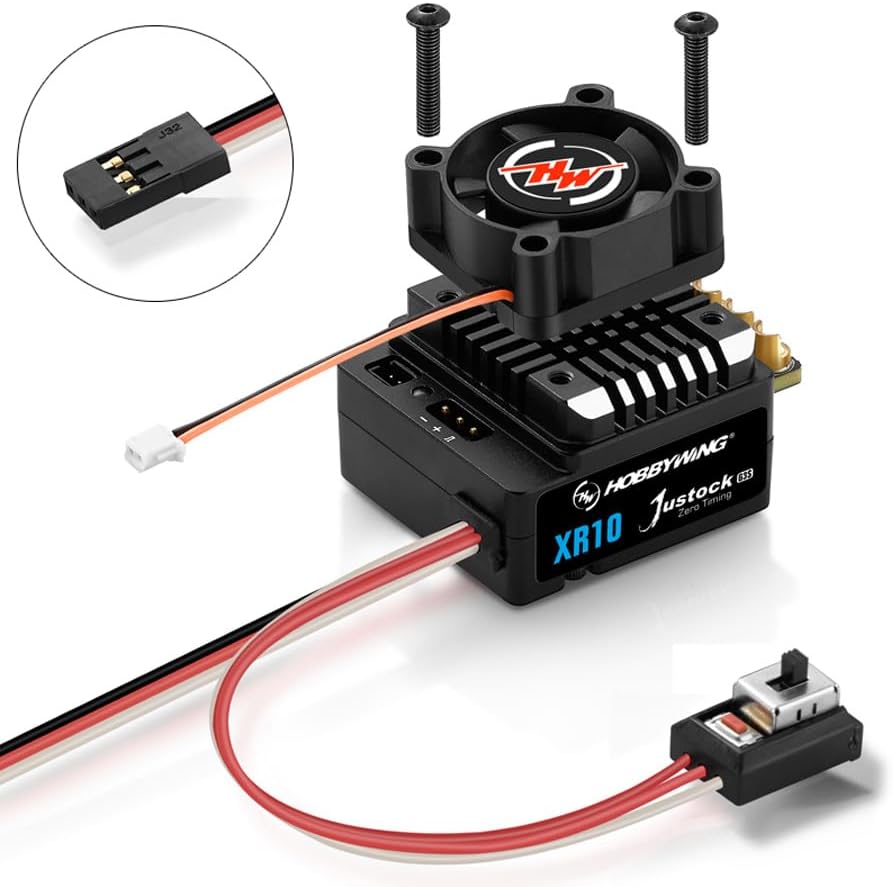
Image: The ESC with its cooling fan detached, illustrating the internal structure and mounting screws for maintenance or replacement.
Troubleshooting
If you encounter issues with your ESC, consider the following common troubleshooting steps:
- No Power: Check battery connections, ensure the battery is charged, and verify the power switch is functioning correctly.
- Motor Not Responding: Re-calibrate the throttle range. Check motor and ESC wire connections. Ensure the motor is not locked up.
- Overheating: Verify proper gearing for your motor and vehicle. Ensure adequate airflow to the ESC and motor. Check for short circuits or excessive load.
- Erratic Behavior: Check for loose connections or interference. Re-bind your transmitter and receiver. Ensure ESC parameters are correctly set.
- No Reverse (if applicable): Note that some ESCs, especially competition-oriented ones like the Justock G3S, may require programming to enable reverse functionality. Refer to the programming guide for details.
Specifications
| Attribute | Value |
|---|---|
| Product Dimensions | 4.2 x 2.8 x 1.9 inches |
| Item Weight | 3.87 ounces |
| Country of Origin | China |
| ASIN | B0CTD4CTH3 |
| Item Model Number | 30112005 |
| Manufacturer Recommended Age | 13 years and up |
| Manufacturer | Hobbywing Technology |
| LiPo Cells | 2S LiPo (Only 2S) |
| Motor Type | Sensorless/Sensored Brushless Motor |
| BEC Output | 6V/7.4V @ 4A (Switch-mode) |
| Motor Limit | 10.5T 3650 Motor |
| Cooling Fan | Powered by Built-in ESC |
What's in the Box
- (1) Justock G3S ESC
- (1) Manual
Warranty and Support
For warranty information and technical support, please refer to the official Hobbywing website or contact Hobbywing customer service directly. Keep your purchase receipt as proof of purchase for warranty claims. Always follow the instructions provided in this manual to ensure proper use and to avoid voiding your warranty.
Hobbywing Technology: www.hobbywing.com
Ask a question about this manual
Ask about setup, troubleshooting, compatibility, parts, safety, or missing instructions. Manuals+ will review the question and use this page’s manual context to help answer it.