
BMW Motorrad CRN1
BMW Motorrad ConnectedRide Navigator GPS 2024 User Manual
Model: CRN1
1. Introduction
The BMW Motorrad ConnectedRide Navigator is an advanced GPS device designed to enhance your motorcycle riding experience. It integrates seamlessly with your BMW motorcycle's systems, offering intuitive navigation, real-time updates, and smartphone connectivity. This manual provides essential information for setting up, operating, and maintaining your ConnectedRide Navigator.
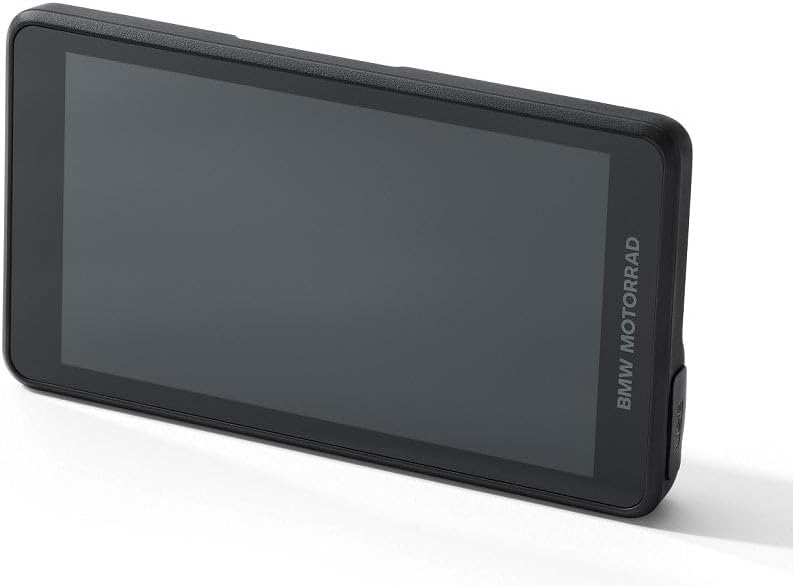
Image 1.1: The BMW Motorrad ConnectedRide Navigator device, showcasing its sleek design and display.
2. Safety Information
Always prioritize safety when operating your motorcycle. Do not attempt to adjust settings or interact with the navigator in a way that distracts you from the road. Ensure the device is securely mounted before riding. Keep the device away from extreme temperatures and moisture. Refer to your motorcycle's owner's manual for additional safety guidelines.
3. Package Contents
Please check that all items are present in the package:
- ConnectedRide Navigator Unit
- Screwdriver (for SIM card installation)
- USB-A to USB-C charging/data cable (x1)
- USB-C to USB-C charging/data cable (x1)
4. Setup
4.1 Compatibility Requirements
The BMW Motorrad ConnectedRide Navigator is compatible with all BMW motorcycles built from 2014 onwards, provided they have a multi-controller and navigation preparation installed or retrofitted as part of Original BMW Motorrad Accessories. Please note that Tourer models R 1200RT, R 1250 RT, K 1600 GT, K 1600 GTL, K 1600 B, and K 1600 Grand America are excluded from compatibility.
4.1.1 Docking Station Compatibility
Ensure your motorcycle's navigation preparation docking station is compatible with the ConnectedRide Navigator.

Image 4.1: Examples of incompatible in-dashboard style docking stations (marked with X) and semi-compatible 4-button advanced cradles. The 4-button cradle can provide power and mount, but its buttons will not function with the ConnectedRide Navigator.

Image 4.2: Examples of compatible lockable and standard navigation preparation docking stations (marked with checkmark).
4.2 Physical Installation
The ConnectedRide Navigator is designed for handlebar mounting. Securely attach the navigator to your motorcycle's compatible docking station. Ensure it clicks into place firmly to prevent dislodgement during riding.

Image 4.3: The ConnectedRide Navigator mounted on a motorcycle, showing its integration with the dashboard.
4.3 SIM Card Installation (Optional)
For real-time traffic information and online data connectivity without a WiFi hotspot, you can install a customer-provided SIM card. Use the included screwdriver to open the SIM card slot and insert the card as directed by the device's on-screen instructions.
4.4 Initial Charging
Before first use, ensure the navigator is fully charged. It can be charged via the BMW on-board network when mounted, or using the provided USB-C cables with up to 2.4 A charging current.
5. Operating the Device
5.1 Powering On/Off
Press and hold the power button (location typically on the side or top edge) to power the device on or off. The device will also power on automatically when connected to the motorcycle's power supply.
5.2 Display and User Interface
The navigator features a very bright 5.5-inch touchscreen display, ensuring optimal readability even in direct sunlight. The graphic design and user interaction are harmonized with BMW Motorrad TFT screens, allowing seamless integration into the operating concept of your motorcycle.

Image 5.1: The ConnectedRide Navigator displaying a detailed map with navigation instructions, integrated with the motorcycle's dashboard.
5.3 Multi-Controller Operation
The device is primarily operated via the motorcycle's multi-controller, providing a safe and convenient way to interact with the navigator without removing your hands from the handlebars. Familiarize yourself with the multi-controller's functions as described in your motorcycle's manual.
5.4 Connectivity and Synchronization
- BMW ID and Cloud Synchronization: Log in with your personal MyBMW account to connect the device to the BMW Cloud. This synchronizes all routes, recordings, and route planning between the navigator and the BMW Motorrad app, making them accessible anytime, anywhere. Routes planned on any device (BMW app, PC browser) will be immediately available on your navigator.
- Online Data Connection: The navigator can go online via a WiFi hotspot (e.g., from your smartphone) or a customer-installed SIM card for real-time traffic information and map updates. This is possible even while riding.
- Bluetooth Connectivity: Connect your smartphone, rider and passenger helmets, and BMW Motorrad ConnectedRide Smartglasses to the navigator via Bluetooth for enhanced functionality.
5.5 Navigation Features
- Route Planning: Plan individual routes directly on the device or synchronize them from the BMW Motorrad app or other planning portals via the BMW Cloud.
- Map Data: The device comes with North America map type. Maps are kept up to date through online updates.
- Real-time Traffic: Access up-to-date traffic information when connected to the internet.
5.6 Smartphone Integration and Media Control
The ConnectedRide Navigator offers seamless smartphone integration, allowing central operation and coordination of all smartphone functions and media applications (e.g., Spotify) and telephone functions. You can control the master volume for all sources or adjust individual volumes for each source. Personal contacts stored on your smartphone can be used directly for telephone and routing functions.
6. Updates and Maintenance
6.1 Software and Map Updates
The navigator was developed in-house by BMW Motorrad, allowing direct delivery of updates. Updates for functions and maps are actively indicated on the device. They are installed directly on the ConnectedRide Navigator via an online data connection (WLAN or customer-installed SIM card), eliminating the need to connect to a computer.
6.2 Charging
The navigator charges via the BMW on-board network when mounted. For standalone charging, use the included USB-C cables with a suitable power adapter (not included) to achieve up to 2.4 A charging current.
6.3 Cleaning
To clean the display and device exterior, use a soft, lint-free cloth. For stubborn marks, slightly dampen the cloth with water. Avoid using abrasive cleaners, solvents, or aerosol sprays, as these can damage the device.
7. Troubleshooting
- Device not powering on: Ensure the device is fully charged or properly connected to the motorcycle's power supply. Check the mounting connection for secure contact.
- No GPS signal: Ensure the device has a clear view of the sky. Move to an open area away from tall buildings or dense foliage.
- No internet connection: Verify your WiFi hotspot is active and providing internet access, or check your SIM card installation and data plan.
- Bluetooth connectivity issues: Ensure both devices are in pairing mode and within range. Try restarting both the navigator and the Bluetooth device.
- Screen unresponsive: Try restarting the device. If the issue persists, ensure the screen is clean and free of debris.
- Updates not installing: Ensure a stable internet connection. Check for sufficient battery charge before initiating updates.
8. Specifications
| Brand | BMW Motorrad |
| Model Name | CRN1 |
| Display Size | 5.5 Inches |
| Voice Command | Touchscreen |
| Vehicle Service Type | Motorcycle |
| Special Features | Bluetooth, Touchscreen, Waterproof |
| Connectivity Technology | Bluetooth |
| Map Type | North America |
| Audio Output Mode | Stereo |
| Mounting Type | Handlebar Mount |
| First Available Date | Jan. 26 2024 |
9. Warranty and Support
For warranty information and technical support, please refer to the documentation provided with your purchase or visit the official BMW Motorrad website. You can also contact BMW Motorrad customer service for assistance with your ConnectedRide Navigator.
Related documentsCRN1

Ask a question about this manual
Ask about setup, troubleshooting, compatibility, parts, safety, or missing instructions. Manuals+ will review the question and use this page’s manual context to help answer it.