
1. Overview
The KitchenAid KF8 Fully Automatic Espresso Machine is designed to deliver a wide range of personalized espresso beverages at home. This machine allows for customization of recipes based on strength, length, and temperature, ensuring a quality coffee experience tailored to individual preferences.

Figure 1: The KitchenAid KF8 Fully Automatic Espresso Machine in operation, preparing two lattes.
Key features include a removable bean hopper for easy bean exchange, a 'Clean Me' indicator for maintenance alerts, and a dual-drink delivery system with automatic milk frothing and heating for both dairy and plant-based milk options. Its durable, metal-clad construction ensures longevity and reliability.
2. What's in the Box
Upon unpacking, ensure all components are present:
- (1) 2.2 L Water Tank
- (1) Removable Bean Hopper
- (1) Milk Tube
- (2) Cleaning Tablets (for brew unit)
- (1) Water Filter
3. Setup
3.1 Initial Power-On and Language Selection
Plug in the espresso machine. The 5-inch color touchscreen will guide you through the initial setup process, including language selection.
3.2 Water Tank and Filter Installation
Remove the water tank, install the provided water filter, and fill the tank with fresh water. Reinsert the water tank into the machine. The machine is designed to integrate the water tank seamlessly for a complete unit appearance.
3.3 Adding Coffee Beans
Open the lid to access the bean hopper. Pour your preferred whole coffee beans into the hopper. The removable design of the bean hopper allows for easy refilling or swapping of different bean types.

Figure 2: The removable bean hopper, designed for easy refilling and swapping of coffee beans.
4. Operating Instructions
4.1 Selecting and Customizing Drinks
The touchscreen offers over 40 pre-set recipe options, including Espresso, Americano, Latte, and Cappuccino. Navigate through the menu to select your desired drink.

Figure 3: The intuitive 5-inch touchscreen display, showing various coffee selections.
You can personalize each drink by adjusting:
- Strength: Adjust the intensity of the coffee.
- Length: Control the volume of the beverage.
- Temperature: Set your preferred drink temperature.
- Coffee to Milk Ratio: Fine-tune the balance for milk-based drinks.
4.2 Using the Milk Attachment
Fill the included milk container with your preferred milk (dairy or plant-based). Connect the milk tube to the machine. The dual-drink delivery system automatically froths and heats the milk to perfection.
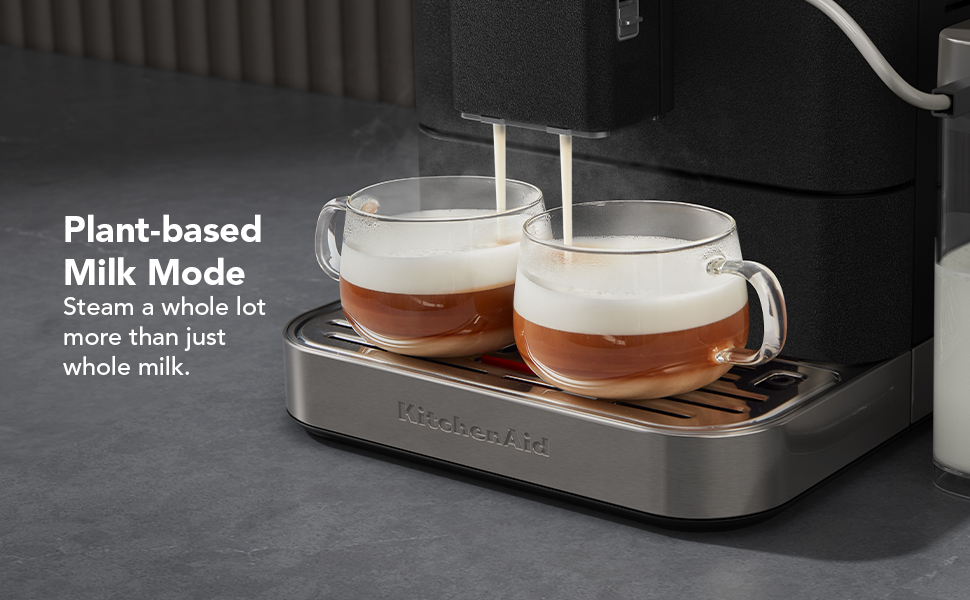
Figure 4: The machine preparing two lattes, demonstrating the dual-drink delivery and milk frothing capabilities.
4.3 User Profiles
Save your customized drink recipes to one of the available user profiles for quick access. The machine supports multiple profiles, allowing each user to store their favorite settings.
5. Maintenance
Regular cleaning and descaling are crucial for maintaining optimal performance and longevity of your espresso machine. The machine features automatic clean alerts and programmable cleaning cycles.

Figure 5: The 'Clean Me' indicator light, signaling when a cleaning cycle is required.
5.1 Milk System Rinsing and Cleaning
After preparing milk-based drinks, the machine will prompt you to rinse the milk system. Follow the on-screen instructions to connect the milk tube to the drip tray and initiate the rinse cycle. For deeper cleaning, a dedicated deep milk cleaning cycle is available.
5.2 Brew Unit Rinsing and Descaling
The machine performs automatic brew unit rinses. For descaling, follow the step-by-step instructions displayed on the touchscreen. This process typically involves using descaling tablets (included) and running a specific cycle to remove mineral buildup.
5.3 Emptying Trays
Regularly empty the coffee puck tray and the drip tray. The machine will alert you when these need attention. Water accumulation in the drip tray is normal due to internal rinse cycles.
5.4 Water Filter Replacement
The machine will notify you when it's time to replace the water filter, ensuring continued water quality for your beverages.
6. Troubleshooting
- Machine not starting/filling: Ensure the water tank is properly seated and filled, and the water filter is correctly installed. Follow any on-screen prompts.
- Water in drip tray: This is normal. The machine performs internal rinse cycles to maintain cleanliness. Empty the drip tray regularly when indicated.
- Milk frothing issues: Ensure the milk system hose is clean and properly connected to both the machine and the milk container. Perform a milk system rinse or deep clean if necessary.
- Coffee taste is off: Adjust grind settings, coffee strength, or try different coffee beans. Ensure the machine is regularly descaled and cleaned.
7. Specifications
| Brand | KitchenAid |
| Model Number | KES8558BK |
| Color | Cast Iron Black |
| Product Dimensions | 18.5"D x 10.2"W x 14.3"H |
| Item Weight | 40.4 pounds |
| Capacity | 2.2 Liters (Water Tank) |
| Coffee Input Type | Whole Bean |
| Human Interface Input | Buttons, Touchscreen |
| Special Features | Auto Clean Function, Auto Shut-Off, Integrated Coffee Grinder, Programmable, Removable Tank |
8. Warranty and Support
For warranty information, product registration, or technical support, please refer to the official KitchenAid website or contact KitchenAid customer service directly. Keep your purchase receipt for warranty claims.
9. Official Product Video
Video 1: An official overview of the KitchenAid KF8 Fully Automatic Espresso Machine, highlighting its features and ease of use.


