1. Product Overview
The Hudson S10011 Mailbox Replacement Key is designed to provide a functional replacement for lost or damaged keys for Hudson and Salsbury (GCODE) mailbox locks within the S10001-S10175 series. This key is custom cut on an HL1 key blank to match the specific lock code of your mailbox.
2. Key Identification and Setup
To ensure you have the correct replacement key, it is crucial to identify the lock code of your mailbox. The lock code is a unique identifier that determines the specific cut of the key required for your lock.
- Locating the Lock Code: The lock code is typically stamped on your original key. If the original key is lost, the code can often be found on the face of the lock cylinder itself.
- Matching the Key: Verify that the code on your new replacement key matches the code found on your lock or original key. This product is specifically for the S10011 code.
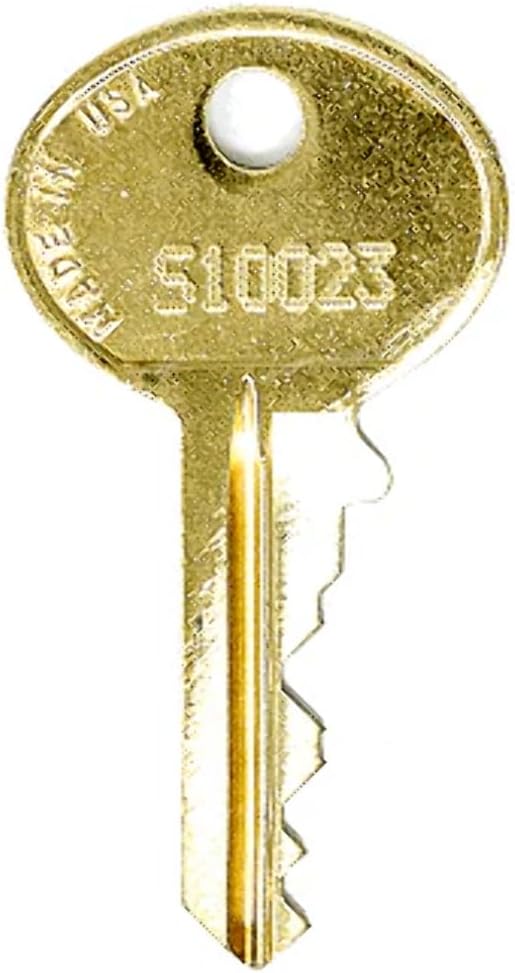
Figure 1: Example of a Hudson replacement key. Note that the specific key code (e.g., S10023 shown in this example image) must match your lock's code. This product is for the S10011 code.
3. Operating Instructions
Using your Hudson S10011 replacement key is straightforward:
- Insert the Key: Gently insert the key into the mailbox lock cylinder. Do not force the key.
- Turn to Unlock/Lock: Once fully inserted, turn the key clockwise or counter-clockwise (depending on your lock mechanism) to unlock or lock the mailbox.
- Remove the Key: After the desired action (unlocking or locking) is complete, turn the key back to its original position and gently pull it out.
4. Maintenance
Proper care will extend the life of your replacement key:
- Keep Clean: Periodically wipe the key with a dry cloth to remove dirt or debris.
- Avoid Bending: Do not apply excessive force or attempt to bend the key, as this can damage its structure and render it unusable.
- Storage: Store the key in a dry place, away from extreme temperatures or corrosive substances.
5. Troubleshooting
If you encounter issues with your replacement key, consider the following:
- Key Does Not Insert Fully:
- Check for obstructions in the lock cylinder.
- Ensure the key is oriented correctly.
- Key Inserts but Does Not Turn:
- Verify that the lock code on the key precisely matches the lock. A mismatch is the most common reason for this issue.
- The lock mechanism might be jammed or corroded. Consider applying a small amount of graphite lubricant to the lock.
- Key Feels Loose or Wobbly:
- This could indicate wear on either the key or the lock. If the key is new, the lock might be worn out.
If troubleshooting steps do not resolve the issue, contact the seller or a professional locksmith.
6. Specifications
| Item Weight | 0.247 ounces |
| Manufacturer | Hudson |
| ASIN | B0CTCYBBSY |
| Date First Available | January 26, 2024 |
| Key Blank Type | HL1 |
| Key Series Compatibility | S10001-S10175 |
7. Support and Contact Information
For further assistance, questions, or if you require a different key code, please contact the seller, EasyKeys Inc., through the platform where the purchase was made. Provide your order details and the specific lock code you require.
As this is a replacement key, warranty information typically pertains to the accuracy of the key cut matching the specified code. Please refer to the seller's return and refund policy for details regarding defective or incorrect items.


