
1. Introduction
Thank you for choosing the Metz 55MUD7000Y 55-inch UHD Google TV. This television is designed to provide an exceptional viewing experience with its 4K UHD resolution, Direct LED panel, and smart functionalities powered by Google TV. This manual will guide you through the setup, operation, maintenance, and troubleshooting of your new TV. Please read these instructions carefully before using the product and retain them for future reference.
The Metz 55MUD7000Y offers vibrant colors, high contrast, and supports all HDR formats for an immersive visual experience. With integrated Google Assistant, you can easily control your TV and smart home devices using voice commands. Access a wide range of applications and streaming services through the Google TV operating system.
2. Safety Information
Always follow basic safety precautions when using this television to reduce the risk of fire, electric shock, and injury.
- Do not expose the TV to rain or moisture.
- Do not open the TV casing; refer all servicing to qualified personnel.
- Ensure proper ventilation around the TV.
- Keep the TV away from direct sunlight and heat sources.
- Use only the power cord supplied with the TV.
3. Setup
3.1 Unpacking
Carefully remove the TV from its packaging. Ensure all accessories are present: remote control, batteries, power cord, and stand components.
3.2 Stand Installation
- Place the TV screen-down on a soft, flat surface to prevent scratches.
- Attach the stand bases to the designated slots on the bottom of the TV.
- Secure the stand bases with the provided screws.
3.3 Wall Mounting (Optional)
If you choose to wall-mount your TV, ensure you use a VESA-compatible wall mount kit (not included) and follow the instructions provided with the wall mount. Consult a professional for installation if you are unsure.

The Metz 55MUD7000Y TV mounted on a dark wall in a contemporary living room setting, demonstrating its aesthetic integration.

The Metz 55MUD7000Y TV mounted on a light-colored wall in a bright, modern living space, illustrating its versatility in different home environments.
3.4 Connecting Power
Connect the power cord to the TV's power input and then plug it into a wall outlet. The TV operates on 110-240 V ~ 50/60 Hz.
3.5 Initial Setup Wizard
Upon first power-on, the TV will guide you through the initial setup process, including language selection, network connection (Wi-Fi or Ethernet), Google account login, and channel scanning.
4. Operating Your TV
4.1 Remote Control
The included remote control allows you to navigate the TV's interface, adjust settings, and access smart features. Insert two AAA batteries (not included) into the remote control, ensuring correct polarity.

Front view of the Metz 55MUD7000Y TV with its remote control placed next to it, showing the TV's display and the remote's layout.
4.2 Google TV Interface
Your Metz TV runs on the Google TV operating system, providing a personalized experience with content recommendations, easy access to streaming apps, and Google Assistant integration.
- Home Screen: Displays recommended content, installed apps, and input sources.
- Apps: Access a wide range of applications from the Google Play Store, including Netflix, Prime Video, Disney+, and more.
- Google Assistant: Press the Google Assistant button on your remote to use voice commands for searching content, controlling smart devices, and getting information.
4.3 Connectivity
The TV offers various connectivity options:
- HDMI: Connect external devices like Blu-ray players, game consoles, or set-top boxes.
- USB: Connect USB storage devices to play media files. The TV has 2 USB ports.
- Wi-Fi & Ethernet: Connect to your home network for internet access and streaming.
- Bluetooth: Pair with compatible Bluetooth devices such as headphones or soundbars.
- Tuner: Integrated DVB-C/T2/S2/Analog tuner supports various broadcast standards and HEVC (H.265) video encoding.
5. Maintenance
5.1 Cleaning
To clean the screen, gently wipe it with a soft, lint-free cloth. For stubborn marks, use a screen-cleaning solution specifically designed for TVs. Do not spray liquid directly onto the screen.
Clean the TV casing with a soft, dry cloth. Avoid using abrasive cleaners or solvents.
5.2 Software Updates
Your Google TV will periodically check for and install software updates automatically when connected to the internet. You can also manually check for updates in the TV's settings menu.
6. Troubleshooting
If you encounter issues with your TV, refer to the following common problems and solutions:
| Problem | Possible Solution |
|---|---|
| No power | Check if the power cord is securely plugged into the TV and the wall outlet. Try a different outlet. |
| No picture, but sound is present | Check the input source. Ensure all cables are connected correctly. |
| No sound, but picture is present | Check the volume level and mute settings. Verify audio output settings in the TV menu. |
| Remote control not working | Replace the batteries. Ensure there are no obstructions between the remote and the TV. |
| Cannot connect to Wi-Fi | Restart your router. Check Wi-Fi password. Ensure the TV is within range of the router. |
7. Specifications
The Metz 55MUD7000Y is a 55-inch UHD Smart TV with the following technical specifications:
- Model: 55MUD7000Y
- Screen Size: 55 inches (139 cm)
- Display Technology: Direct LED
- Resolution: 3840 x 2160 (4K UHD)
- Aspect Ratio: 16:9
- Refresh Rate: 60 Hz
- Operating System: Google TV
- HDR Support: Yes (all formats)
- Audio Output: 2 x 10 W speakers
- Audio Technologies: Dolby Digital Plus, DTS Studio Sound Surround
- Connectivity: HDMI, USB (2 ports), Wi-Fi, Bluetooth, Ethernet
- Tuner: DVB-C/T2/S2/Analog, HEVC (H.265) compatible
- Power Supply: 110-240 V ~ 50/60 Hz
- Energy Consumption (SDR): 76 W
- Special Features: Auto Volume Leveller, Frameless Design, Bezel-less Design, Low Blue Light Filter
- Dimensions (with stand): 23.7D x 122.5W x 78.2H cm
- Included Components: Television, remote control, user manual

Front view of the Metz 55MUD7000Y 55-inch UHD Google TV, showcasing its slim bezel design and vibrant display.

Angled side view of the Metz 55MUD7000Y TV, highlighting its thin profile and modern stand.
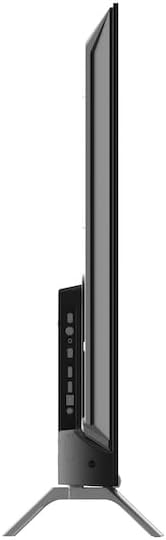
Detailed side profile of the Metz 55MUD7000Y TV, showing the depth of the screen and the placement of ports on the side.
8. Warranty and Support
For warranty information, please refer to the warranty card included with your product or contact Metz customer support. Information regarding spare parts availability and guaranteed software updates is not available at this time.
For further assistance, technical support, or service inquiries, please visit the official Metz website or contact their customer service department.


