
DYNASONIC S90 2Micros
DYNASONIC S90 Portable Bluetooth Speaker User Manual
Model: S90 2Mikros
Brand: DYNASONIC
Introduction
Welcome to the user manual for your new DYNASONIC S90 Portable Bluetooth Speaker. This speaker is engineered to deliver powerful, clear audio with an 80W stereo surround sound experience. It features TWS (True Wireless Stereo) technology for connecting two speakers, vibrant LED lights that sync with music, IPX7 waterproof rating for outdoor use, and a large capacity battery for extended playback. This guide will help you understand all features and ensure optimal performance.

Image: The DYNASONIC S90 speaker with its two included microphones, showcasing its sleek design and LED light strip.
Product Overview
Key Features:
- Powerful Stereo Sound: 80W output with excellent treble quality and defined bass tones.
- TWS Technology: Connect two S90 speakers for a synchronized, immersive audio experience.
- Colorful LED Lights: Multiple modes and colors that pulse with the music, perfect for parties.
- IPX7 Waterproof: Designed to withstand splashes, making it ideal for outdoor environments, pools, and beaches.
- Long-lasting Battery: High-capacity internal battery for extended music playback.
- Versatile Connectivity: Bluetooth, USB, Micro SD, and AUX input for various devices.
Included Components:
- DYNASONIC S90 Bluetooth Speaker
- 2 Karaoke Microphones
- Charging Cable
- User Manual

Image: The DYNASONIC S90 speaker shown alongside its two included karaoke microphones.
Setup
1. Charging the Speaker:
Before first use, fully charge the speaker. Connect the provided charging cable to the speaker's charging port and a suitable power source. The LED indicator will show charging status and turn off when fully charged.
2. Powering On/Off:
Press and hold the Power button (⏻) on the control panel to turn the speaker on or off.
3. Bluetooth Pairing:
- Turn on the speaker. It will automatically enter Bluetooth pairing mode, indicated by a flashing LED.
- On your device (smartphone, tablet, laptop), enable Bluetooth and search for available devices.
- Select "DYNASONIC S90" from the list.
- Once connected, the speaker will emit a confirmation sound, and the LED will stop flashing.
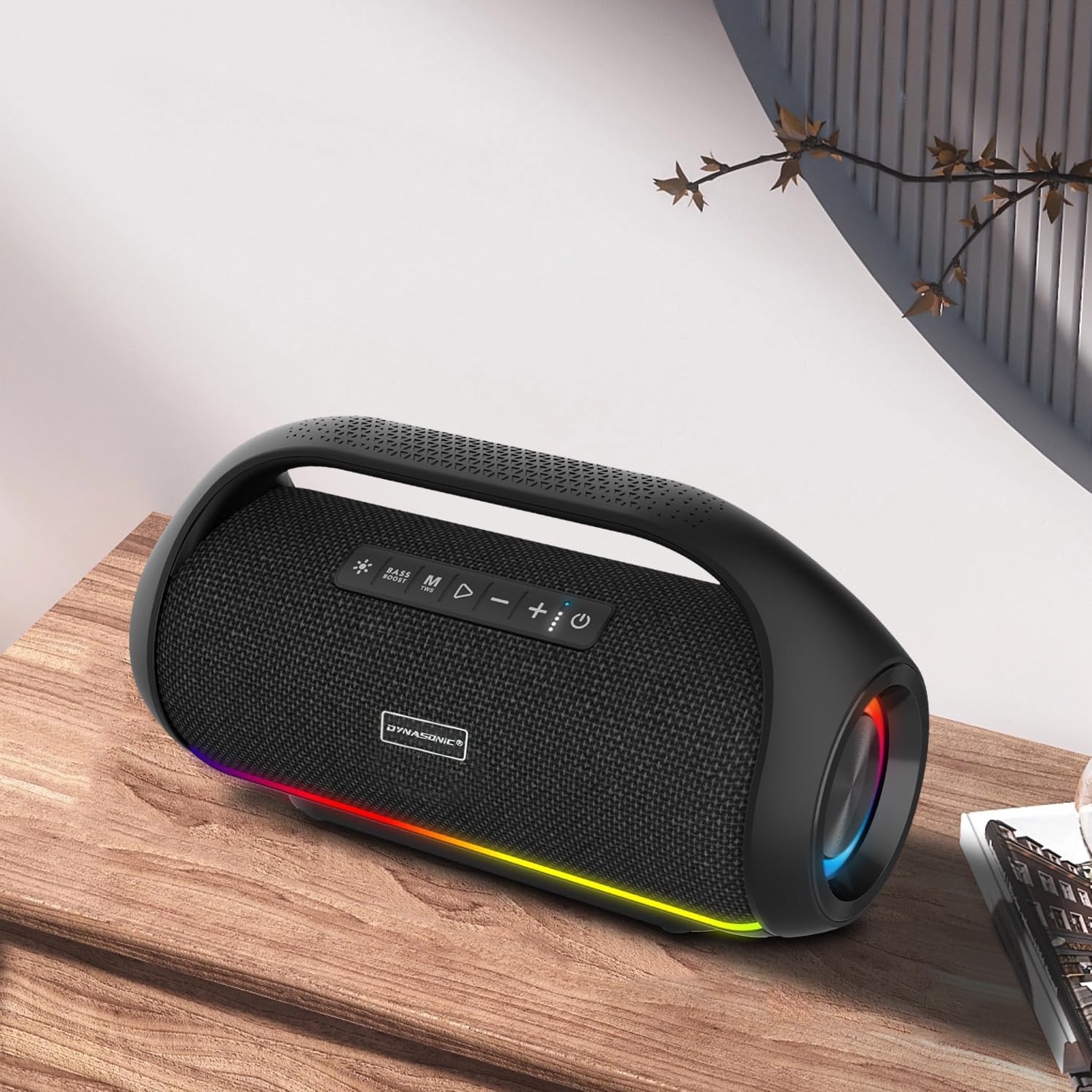
Image: The DYNASONIC S90 speaker wirelessly connected to a smartphone via Bluetooth.
4. TWS (True Wireless Stereo) Pairing:
To connect two DYNASONIC S90 speakers for stereo sound:
- Ensure both speakers are powered on and not connected to any Bluetooth device.
- On one speaker (this will be the primary speaker), press the TWS button (often indicated by a chain link icon or similar).
- The primary speaker will search for the secondary speaker. Once connected, both speakers will emit a confirmation sound.
- Now, connect your device to the primary speaker via Bluetooth as described above. Audio will play through both speakers in stereo.
Operating Instructions
Control Panel Functions:
- Power Button (⏻): Press and hold to turn on/off.
- Mode Button (M): Short press to switch between Bluetooth, FM Radio, USB, Micro SD, and AUX modes.
- Play/Pause Button (▶/‖): Short press to play or pause music. In FM mode, long press to auto-scan and save stations.
- Volume Down / Previous Track (-): Short press for previous track. Long press to decrease volume.
- Volume Up / Next Track (+): Short press for next track. Long press to increase volume.
- LED Light Button (💡): Short press to cycle through LED light modes. Long press to turn lights on/off.
- Microphone Volume/Echo: Dedicated knobs or buttons for adjusting microphone volume and echo effect.
Microphone Usage:
Connect the included microphones to the designated microphone input jacks on the speaker. Adjust the microphone volume and echo effect using the dedicated controls for optimal karaoke or vocal performance.
LED Light Modes:
The DYNASONIC S90 features dynamic LED lights. Press the LED Light button to cycle through various lighting patterns and colors that react to the rhythm of your music. Long press to disable or enable the lights.
Maintenance
Cleaning:
Wipe the speaker with a soft, dry cloth. For stubborn dirt, a slightly damp cloth can be used. Do not use harsh chemicals or abrasive cleaners. Ensure all ports are dry before charging or connecting devices.
Battery Care:
- Avoid fully discharging the battery frequently.
- Charge the speaker regularly, even if not in use, to maintain battery health.
- Store the speaker in a cool, dry place when not in use for extended periods.
Water Resistance (IPX7):
The speaker is IPX7 waterproof, meaning it can withstand immersion in water up to 1 meter for 30 minutes. Ensure the charging port and other covers are securely closed before exposing the speaker to water. Do not intentionally submerge the speaker for prolonged periods or in depths greater than specified.

Image: The DYNASONIC S90 speaker being splashed with water, demonstrating its IPX7 waterproof capability.
Troubleshooting
| Problem | Possible Cause | Solution |
|---|---|---|
| Speaker does not power on | Low battery; Power button not pressed correctly | Charge the speaker fully; Press and hold the power button for 3-5 seconds |
| Cannot pair via Bluetooth | Speaker not in pairing mode; Device Bluetooth off; Too far from speaker | Ensure speaker is in pairing mode; Turn on Bluetooth on your device; Move device closer to speaker (within 10m) |
| No sound | Volume too low; Incorrect input mode; Device not playing audio | Increase speaker and device volume; Press 'M' button to select correct input mode; Ensure audio is playing on your device |
| Microphone not working | Microphone not connected; Microphone volume too low | Ensure microphone is securely plugged in; Adjust microphone volume knob on speaker |
Specifications
| Feature | Detail |
|---|---|
| Model Name | S90 2MICROS |
| Speaker Type | Subwoofer |
| Connectivity Technology | Bluetooth, USB |
| Special Features | Wireless, Portable, Bluetooth, Waterproof (IPX7) |
| Audio Output Mode | Surround, Stereo |
| Speaker Maximum Output Power | 80 Watts |
| Frequency Response | 14 KHz |
| Power Source | Battery Powered |
| Battery Type | Lithium Ion (1 required, included) |
| Product Dimensions | 25 x 30 x 20 cm |
| Item Weight | 3.43 kg |
| Material | Plastic |
| Compatible Devices | Laptop, Tablet, Smartphone |

Image: The DYNASONIC S90 speaker with its dimensions (368mm x 143mm x 201mm) clearly indicated.
Warranty and Support
Your DYNASONIC S90 Portable Bluetooth Speaker comes with a standard manufacturer's warranty. For specific warranty terms and conditions, please refer to the warranty card included in your product packaging or visit the official DYNASONIC website.
For technical support, troubleshooting assistance, or any product-related inquiries, please contact DYNASONIC customer service through their official support channels. Keep your purchase receipt or order number handy for faster service.
Ask a question about this manual
Ask about setup, troubleshooting, compatibility, parts, safety, or missing instructions. Manuals+ will review the question and use this page’s manual context to help answer it.