
Product Overview
The MCHOSE AX5 PRO MAX Wireless Gaming Mouse is engineered for high-performance gaming, featuring a lightweight magnesium alloy design, an advanced optical sensor, and versatile connectivity options. Its ergonomic form factor is designed for precision and comfort during extended use.

Figure 1: MCHOSE AX5 PRO MAX Wireless Gaming Mouse (Pink)
Key Features
- Ultimate Accuracy PAW3395 Sensor: Equipped with a PAW 3395 26K DPI optical sensor for precise tracking, low latency, and high reliability, ideal for demanding gaming.
- Magnesium Alloy Construction: Crafted from magnesium alloy for high durability, excellent heat dissipation, and structural support, resulting in an ultra-lightweight design.
- 53g Ultra-Lightweight: Innovative hollow-out pattern and ultra-thin outer shell contribute to a super-light 53g ergonomic body, enhancing precision and control.
- 8KHz Polling Rate: Features 8KHz technology, communicating its position and clicks up to 8000 times per second for near-zero input latency and unprecedented responsiveness.
- 3 Modes Connect Technology: Offers versatile connectivity with 2.4GHz wireless, Bluetooth, and wired (Type-C) options for pure and accurate mouse movement.
Setup Guide
1. Unboxing and Components
Carefully remove all components from the packaging. You should find the AX5 PRO MAX gaming mouse, a USB-C charging/data cable, and a 2.4GHz nano receiver.
Video 1: MCHOSE Wireless Gaming Mouse Unboxing and Component Overview. This video demonstrates the unboxing process and highlights the various components included with the mouse, such as the charging cable and wireless receiver.
2. Connecting Your Mouse
The AX5 PRO MAX offers three connectivity modes: 2.4GHz wireless, Bluetooth, and wired USB-C.
- 2.4GHz Wireless Mode:
- Locate the 2.4GHz nano receiver (dongle) stored in the mouse's underside compartment.
- Plug the nano receiver into an available USB port on your computer.
- Flip the switch on the bottom of the mouse to the "2.4G" position. The mouse should automatically connect.
- Bluetooth Mode:
- Flip the switch on the bottom of the mouse to the "BT" position.
- On your computer, navigate to Bluetooth settings and search for new devices.
- Select "MCHOSE AX5 PRO MAX" from the list of available devices to pair.
- Wired Mode:
- Connect the provided USB-C cable to the front port of the mouse and the other end to a USB port on your computer.
- The mouse will automatically switch to wired mode and begin charging.

Figure 2: Illustration of the wireless tri-mode connection options (2.4G, Bluetooth, Wired).
3. Driver Installation (Optional)
For advanced customization and optimal performance, it is recommended to install the official MCHOSE driver software. Please visit the official MCHOSE website for the latest driver download. Note: Some users have reported difficulties locating the correct drivers or issues with wireless pairing after driver installation. Ensure you download the specific driver for your AX5 PRO MAX model.
Operating Instructions
1. Basic Functions
- Left/Right Click: Standard mouse buttons for selection and interaction. The mouse features TTC Light micro-movement switches for crisp feel and long lifespan (up to 100 million clicks).
- Scroll Wheel: Used for vertical scrolling. The TTC gold wheel encoder provides clear tactile feedback.
- Side Buttons: Programmable buttons typically used for forward/backward navigation in web browsers or custom actions in games.

Figure 3: Close-up of the TTC Light micro-movement switches, highlighting their design for durability and responsiveness.
2. DPI Adjustment
The AX5 PRO MAX features a PAW 3395 optical sensor with up to 26,000 DPI. You can adjust the DPI sensitivity on-the-fly using the dedicated DPI button (usually located on the top of the mouse, behind the scroll wheel) or through the software for more granular control. Higher DPI allows for faster cursor movement with less physical mouse movement.

Figure 4: Demonstrates comfortable handling with 26,000 DPI, allowing for adjustable sensitivity based on user habits and scenarios.
3. Polling Rate Configuration
The mouse supports an 8KHz polling rate, meaning it reports its position to your computer 8000 times per second. This significantly reduces input latency. The polling rate can typically be adjusted via the driver software. While 8KHz offers the lowest latency, some systems or games may experience stuttering or performance issues at higher polling rates (4KHz or 8KHz). If you encounter such issues, consider lowering the polling rate to 2KHz or 1KHz.
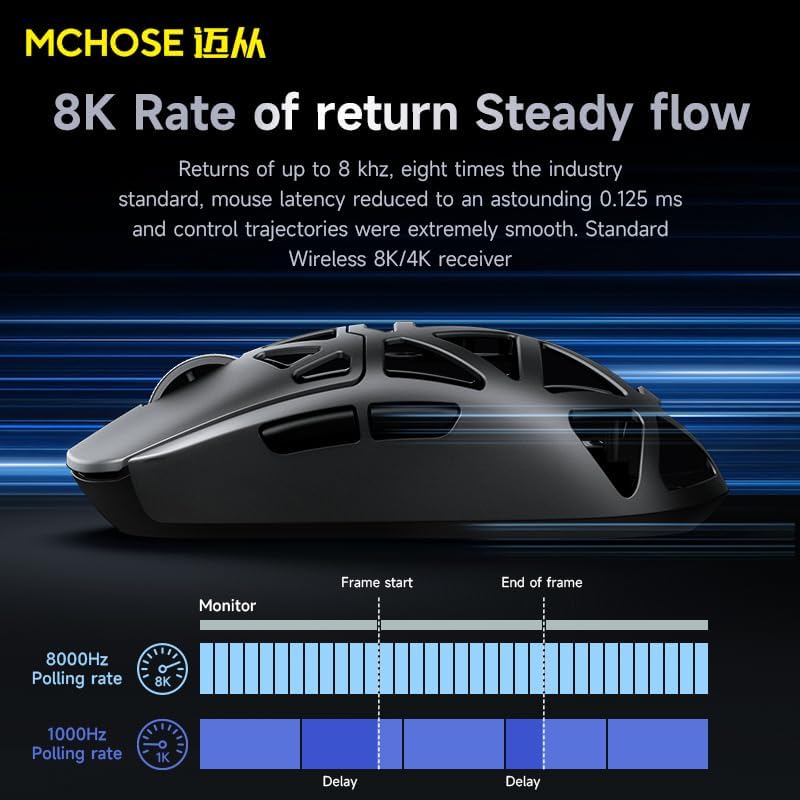
Figure 5: Diagram illustrating the difference between 8000Hz and 1000Hz polling rates and their impact on delay.
4. Lightweight Design Benefits
Weighing approximately 53g, the AX5 PRO MAX's ultra-lightweight design reduces fatigue during long gaming sessions and allows for quicker, more precise movements, especially beneficial in fast-paced games.

Figure 6: Visual representation of the mouse's 53g lightweight design, emphasizing its hollow structure.
Maintenance
1. Cleaning Your Mouse
To maintain optimal performance and hygiene, regularly clean your mouse. Use a soft, dry cloth to wipe down the surface. For dust in the hollow-out areas, use compressed air. Avoid using harsh chemicals or abrasive materials.
2. Battery Charging
The AX5 PRO MAX features a 500mAh battery. When the battery is low, connect the mouse to your computer using the provided USB-C cable. The mouse can be used in wired mode while charging. A full charge provides approximately 170 hours of battery life in Bluetooth mode and 100 hours in 2.4GHz wireless mode.
Video 2: MCHOSE Wireless Gaming Mouse charging and connectivity demonstration. This video shows how to connect the mouse for charging and highlights its multi-mode capabilities.
3. Mouse Skates
The mouse comes with high-quality PTFE skates for smooth gliding. If the skates show signs of wear, replacement skates can be purchased from authorized retailers. Ensure the mouse surface is clean before applying new skates.
Troubleshooting
- Mouse Not Responding:
- Check battery level and charge if necessary.
- Ensure the mode switch (2.4G/BT/OFF) on the bottom of the mouse is in the correct position.
- For 2.4GHz mode, ensure the nano receiver is securely plugged into a working USB port. Try a different USB port.
- For Bluetooth mode, ensure Bluetooth is enabled on your computer and the mouse is paired correctly. Try re-pairing the device.
- In wired mode, ensure the USB-C cable is securely connected to both the mouse and the computer.
- Cursor Stuttering/Lag:
- This can occur at higher polling rates (4KHz or 8KHz) on some systems. Try reducing the polling rate via the driver software to 2KHz or 1KHz.
- Ensure there are no obstructions between the mouse and the receiver (for wireless modes).
- Check for interference from other wireless devices.
- Driver/Software Issues:
- If experiencing issues with the driver software (e.g., freezing, wireless pairing problems), ensure you have downloaded the correct and latest version from the official MCHOSE website.
- Try uninstalling and reinstalling the driver software.
- Ensure your operating system is up to date.
Specifications
| Feature | Detail |
|---|---|
| Product Dimensions | 0.39 x 0.39 x 0.39 inches |
| Item Weight | 1.1 pounds (approx. 500g, note: product description states 53g, this might be shipping weight) |
| Item Model Number | AX5 |
| Brand | MCHOSE |
| Color | Pink |
| Connectivity Technology | USB (Wired), 2.4GHz Wireless, Bluetooth |
| Special Features | 8KHz Polling Rate, PAW 3395 Sensor, 3 Modes Connect Technology, Magnesium Alloy Mouse, 53g Ultra-Lightweight |
| Movement Detection Technology | Optical |
| DPI | Up to 26,000 |
| Battery Capacity | 500mAh |
| Battery Life (Bluetooth) | Approx. 170 hours |
| Battery Life (2.4GHz Wireless) | Approx. 100 hours |
Warranty & Support
MCHOSE products typically come with a standard manufacturer's warranty. For specific warranty terms, technical support, and customer service, please visit the official MCHOSE website or contact their customer support directly. Keep your proof of purchase for warranty claims.
For more information, visit the MCHOSE Store on Amazon.