
Introduction
Thank you for choosing the ANMEATE Non-Contact Forehead Thermometer. This device is designed for safe and accurate temperature measurement for individuals of all ages, including infants, children, and adults. Utilizing advanced infrared technology, it provides swift and reliable readings without physical contact, ensuring hygiene and convenience. Please read this manual thoroughly before use to ensure proper operation and to maintain the device's accuracy and longevity.
Safety Information
- Do not immerse the thermometer in water or other liquids.
- Keep the device away from direct sunlight and extreme temperatures.
- Avoid dropping the thermometer or subjecting it to strong impacts.
- Do not attempt to disassemble or repair the device yourself.
- Consult a medical professional for interpretation of temperature readings, especially for infants and young children.
- This thermometer is intended for household use and is not a substitute for professional medical advice.
Package Contents
Upon opening your ANMEATE Non-Contact Forehead Thermometer package, please verify that all the following items are included:
- 1 x ANMEATE Non-Contact Forehead Thermometer (Model: FC-IR202)
- 2 x AAA Batteries
- 1 x User Manual (this document)
- 1 x Quick User Guide
Product Overview
The ANMEATE FC-IR202 thermometer is designed for ease of use and accuracy. Key features include:
- Non-Contact Measurement: Measures temperature from a distance of 0.3-1.5 inches (1-4 cm).
- Fast 1-Second Result: Provides quick temperature readings.
- High Accuracy: Clinically tested with a tiny error margin.
- 3 Backlight Indicators: Green (normal), Yellow (moderate), Red (fever warning).
- 35 Sets of Memory Storage: Allows tracking of previous readings.
- One-Touch Mute: For silent operation, ideal for sleeping individuals.
- °F / °C Switchable: Easily switch between Fahrenheit and Celsius.
- Automatic Shutdown: Conserves battery life.
- Ergonomic Design: Light and portable for comfortable handling.
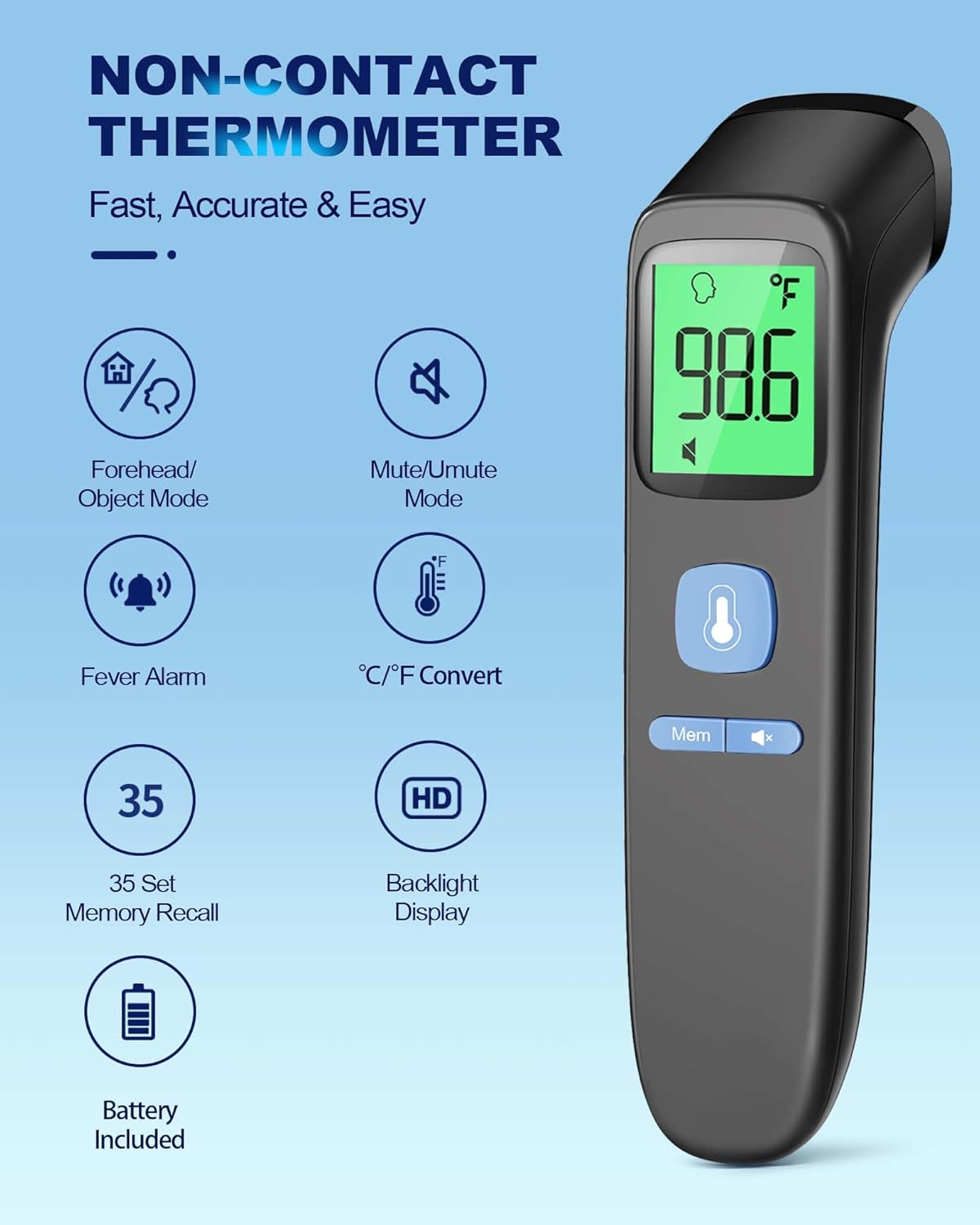
Image: The ANMEATE Non-Contact Forehead Thermometer displaying its key features and icons for forehead/object mode, mute/unmute, fever alarm, temperature unit conversion, 35-set memory recall, HD backlight display, and battery included status.

Image: A close-up view of the ANMEATE thermometer's digital display, highlighting its fast and accurate measurement capabilities, powered by a smart chip. Icons for 1s measurement, fever alert, automatic shutdown, high-precision infrared probe, smart calibration, and temperature compensation adjustment are visible.
Setup
Battery Installation
- Locate the battery compartment cover on the back of the thermometer.
- Slide the cover downwards to open the compartment.
- Insert the two AAA batteries, ensuring the positive (+) and negative (-) terminals align correctly with the indicators inside the compartment.
- Slide the battery cover back into place until it clicks securely.
The thermometer is now ready for use.
Operating Instructions
Taking a Forehead Temperature
- Ensure the thermometer is in Forehead Mode (indicated by a forehead icon on the display). If not, press the mode button to switch.
- Hold the thermometer approximately 0.3-1.5 inches (1-4 cm) from the center of the forehead.
- Press the measurement button (usually the large trigger button).
- The temperature reading will appear on the display within 1 second, accompanied by a backlight color indicator.

Image: The ANMEATE thermometer being used to measure a baby's forehead temperature, demonstrating its non-contact capability. The image also illustrates its versatility for measuring milk and room temperatures.
Measuring Object/Room Temperature
- Switch the thermometer to Object Mode (indicated by an object icon) by pressing the mode button.
- Point the thermometer at the object or area you wish to measure.
- Press the measurement button.
- The temperature reading will be displayed.
Understanding Backlight Indicators
The display backlight changes color to provide a quick visual indication of the temperature reading:
- Green: Normal temperature (e.g., 89.6°F - 99.2°F / 32.0°C - 37.3°C)
- Yellow/Orange: Moderate temperature (e.g., 99.3°F - 100.3°F / 37.4°C - 37.9°C)
- Red: Fever warning (e.g., 100.4°F - 109.2°F / 38.0°C - 42.9°C)

Image: The ANMEATE thermometer's display illustrating the intelligent color-coded backlight system: green for normal temperature, orange for moderate, and red for fever, with corresponding temperature ranges.
Switching Between Fahrenheit and Celsius
With the thermometer powered on, press and hold the 'Mem' button for a few seconds until the unit changes from °F to °C or vice versa.
Mute/Unmute Function
To mute or unmute the device's sound, press the speaker icon button. This is useful for taking temperatures without disturbing a sleeping individual.

Image: The ANMEATE thermometer in use on a sleeping child in a dark room, emphasizing its mute function, large backlit screen, intelligent color indicator, and auto-shutdown feature for discreet nighttime temperature checks.
Memory Recall
The thermometer stores up to 35 previous readings. To access these, press the 'Mem' button repeatedly to cycle through the stored temperatures.
Maintenance
Cleaning the Thermometer
- Use a soft, dry cloth to clean the body of the thermometer.
- For the probe, gently wipe with an alcohol swab (70% isopropyl alcohol) or a cotton swab moistened with alcohol. Allow it to air dry completely before next use.
- Do not use abrasive cleaners or immerse the device in water.
Storage
Store the thermometer in a cool, dry place, away from direct sunlight and out of reach of children.
Troubleshooting
| Problem | Possible Cause | Solution |
|---|---|---|
| No display after power on | Batteries are dead or incorrectly installed. | Replace batteries or ensure correct polarity. |
| Inaccurate readings | Measurement distance too far/close, dirty probe, or environmental factors. | Ensure correct distance (0.3-1.5 inches), clean the probe, avoid drafts. |
| "Lo" or "Hi" displayed | Temperature is outside the measurable range (89.6°F - 109.2°F). | Ensure measurement is within the specified range. |
| Thermometer beeps continuously | Fever alarm activated. | This indicates a high temperature. Consult a medical professional if concerned. |
Specifications
| Feature | Detail |
|---|---|
| Model | FC-IR202 |
| Measurement Method | Non-Contact Infrared |
| Measurement Range (Body) | 89.6°F - 109.2°F (32.0°C - 42.9°C) |
| Measurement Distance | 0.3 - 1.5 inches (1 - 4 cm) |
| Response Time | 1 second |
| Accuracy | ±0.2°C / ±0.4°F |
| Memory Storage | 35 sets |
| Display Type | Digital with Backlight (Green, Yellow, Red) |
| Power Source | 2 x AAA Batteries |
| Automatic Shutdown | Yes |
| Material | Acrylonitrile Butadiene Styrene |
| Item Weight | 66.8 g |
| Certifications | FDA / CE / HSA/FSA / ISO 13485 |
Warranty and Support
The ANMEATE Non-Contact Forehead Thermometer (Model: FC-IR202) comes with a 1 Year Manufacturer Warranty. This warranty covers defects in materials and workmanship under normal use.
Additionally, ANMEATE is committed to providing lifetime support for your product. If you encounter any issues or have questions regarding the operation, maintenance, or troubleshooting of your thermometer, please contact ANMEATE customer service for assistance.
For warranty claims or technical support, please refer to the contact information provided in your Quick User Guide or visit the official ANMEATE website.