
Introduction
This instruction manual provides detailed guidance for assembling your JEKCA Budgie 01S-M02 plastic building block set. JEKCA utilizes a patented locking technology to ensure sturdy construction without the need for glue. Please read all instructions carefully before beginning assembly.
Safety Information
- Age Recommendation: This product is recommended for individuals aged 14 years and above.
- Small Parts: The set contains small parts and screws which may pose a choking hazard. Keep out of reach of young children.
- Assembly Tools: A small screwdriver is required for assembly. Exercise caution when using tools.
- Material: The blocks are made of plastic. Do not expose to extreme heat.
Package Contents
Your JEKCA Budgie 01S-M02 set includes:
- Over 610 plastic building block pieces.
- Small screws for the locking mechanism.
- Detailed step-by-step instruction manual (this document).
Setup and Assembly Instructions
Follow these steps to assemble your JEKCA Budgie 01S-M02 model. It is crucial to follow the instructions precisely to ensure the model's stability.
1. Understand the Locking Mechanism
JEKCA blocks use a unique screw-locking system for enhanced stability. Each block has holes where small screws are inserted to connect adjacent blocks securely.
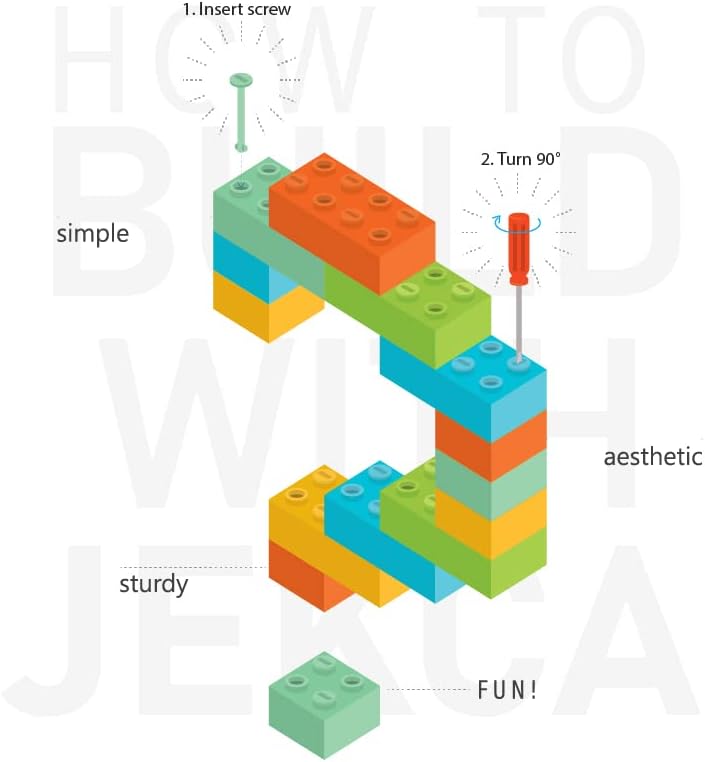
Image: Illustration demonstrating the JEKCA building method. A screw is inserted into a block, then turned 90 degrees to lock it into place, ensuring a sturdy connection.
- Insert Screw: Place a small screw into the designated hole on a block.
- Turn 90°: Using a small screwdriver, turn the screw 90 degrees. This action expands the screw within the block, creating a tight, secure connection with the adjacent block.
- Verify Connection: Ensure the blocks are firmly joined and do not easily separate.
2. Follow the Included Manual
A detailed, step-by-step visual manual is included in your package. This manual will guide you through the specific sequence of block placement and screw insertion for the Budgie 01S-M02 model. Pay close attention to the diagrams and instructions for each step.
- Organize Pieces: Before starting, sort your blocks by color and size to make the assembly process smoother.
- Patience is Key: The assembly involves many small pieces and precise connections. Take your time and avoid forcing pieces together.
- Review Steps: If a section seems difficult, re-read the instructions and examine the diagrams carefully.

Image: The completed JEKCA Budgie 01S-M02 model, showcasing the intricate detail of the blue and white budgerigar.

Image: Front view of the JEKCA Budgie 01S-M02 model, highlighting the detailed block construction of the bird's head and body.

Image: Rear view of the JEKCA Budgie 01S-M02 model, showing the block patterns on the back and tail.
Operating Instructions (Display and Handling)
Once assembled, your JEKCA Budgie 01S-M02 model is designed for display. While sturdy, it is not intended for rough play.
- Placement: Place the model on a stable, flat surface to prevent accidental falls.
- Handling: When moving the model, support it from the base or main body to avoid putting stress on individual block connections.
- Portability: The model is designed to be portable, allowing it to be moved between display locations.
Maintenance
To keep your JEKCA model in excellent condition:
- Cleaning: Dust the model regularly with a soft, dry cloth or a soft brush. For more stubborn dirt, a slightly damp cloth can be used, but avoid excessive moisture.
- Avoid Chemicals: Do not use harsh cleaning agents, solvents, or abrasive materials, as these can damage the plastic.
- Storage: If disassembling for storage, keep all pieces and screws organized to prevent loss.
Troubleshooting
- Model is not sturdy / pieces fall apart:
Ensure all screws are correctly inserted and turned 90 degrees to lock the blocks. Review the assembly steps in the manual to confirm proper connection techniques. Some reviewers noted difficulty with sturdiness if not assembled correctly.
- Difficulty understanding instructions:
The included manual provides visual, step-by-step guidance. If a particular step is unclear, try to visualize the connection from different angles or refer to online resources if available from JEKCA's official website.
- Missing pieces:
Carefully check all packaging materials. If pieces are genuinely missing, contact JEKCA customer support for assistance.
Specifications
| Feature | Detail |
|---|---|
| Brand | JEKCA |
| Model Name | Budgie 01S-M02 |
| Model Number | ST19MA27-M02 |
| Material | Plastic |
| Color | Blue/White |
| Number of Pieces | 610 |
| Assembled Dimensions (L x W x H) | 15 cm x 6.9 cm x 27.5 cm |
| Item Weight | 1.17 Pounds (approx. 0.53 kg) |
| Recommended Age | 14 years and above |
| Educational Objective | Concentration |
| Special Features | Portable, Interlocking Toy Building Block |
| Assembly Required | Yes |
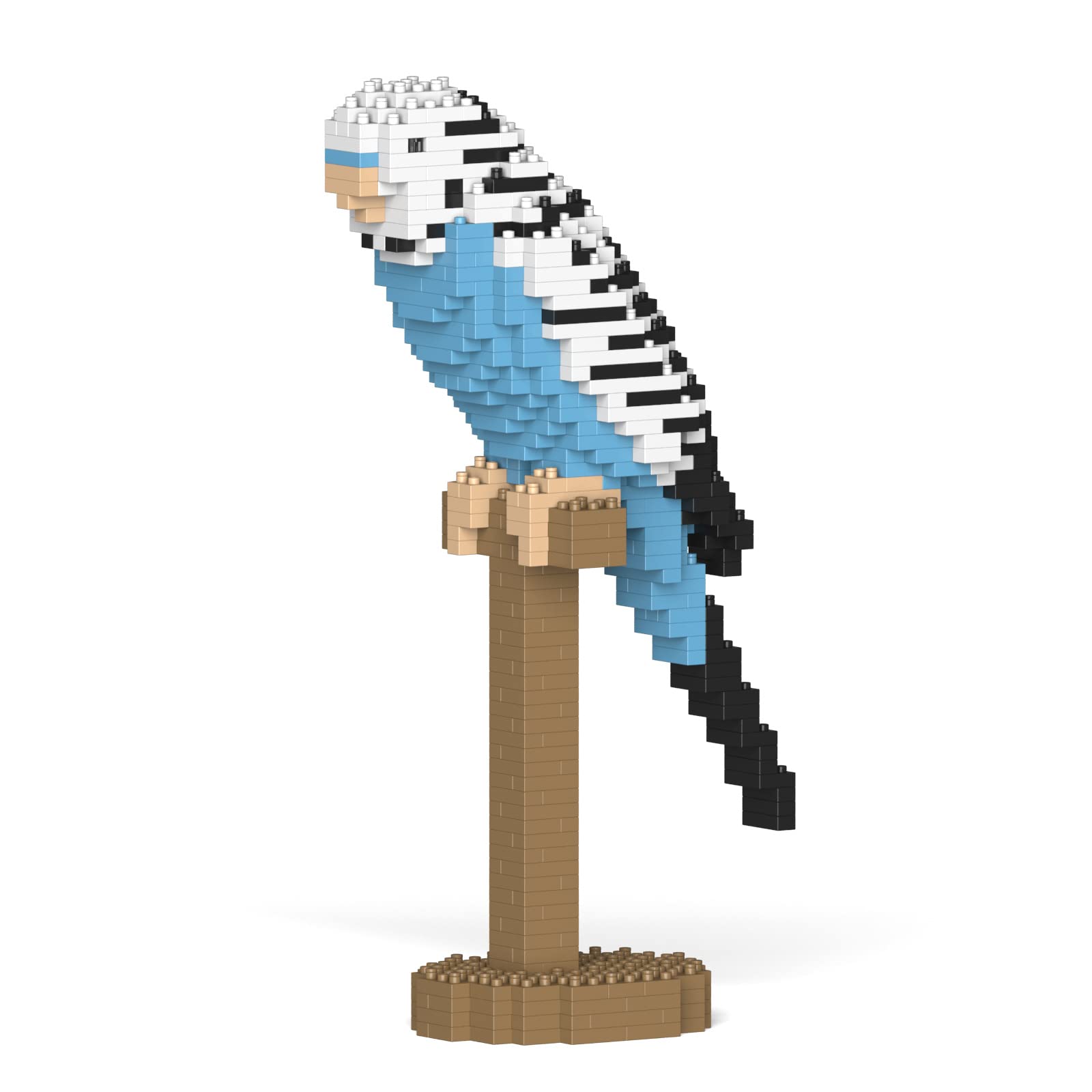
Image: Dimensional diagram of the JEKCA Budgie 01S-M02 model.
Warranty Information
Specific warranty details for the JEKCA Budgie 01S-M02 are not provided in the product information. For warranty inquiries, please contact JEKCA directly or refer to the warranty card that may be included in your product packaging.
Support and Contact Information
For further assistance, missing parts, or detailed inquiries regarding your JEKCA Budgie 01S-M02 building blocks, please contact the manufacturer:
- Manufacturer: JEKCA Limited
- Website: Please visit the official JEKCA website for contact details and support resources.