Welcome
Thank you for choosing the Pawfly 21W Aquarium LED Light. This manual provides detailed instructions for the safe and efficient use of your new aquarium lighting system. Please read this manual thoroughly before installation and operation, and retain it for future reference.
Important Safety Instructions
- Do not submerge the light in water. The light is IP67 waterproof rated, meaning it is resistant to splashes and moisture, but not designed for submersion.
- Ensure the power adapter is connected to a proper voltage outlet as specified on the adapter.
- Keep the light and power adapter out of reach of children and pets.
- Always unplug the light from the power source before performing any maintenance, cleaning, or installation.
- Do not operate the light if the cord or plug is damaged.
- Avoid looking directly into the LED lights for extended periods, as this may cause eye strain.
- Place the light securely on the aquarium to prevent accidental falls.
Package Contents
Verify that all items are present in your package:
- 1 x Pawfly 21W Aquarium LED Light
- 1 x ETL-certified Power Adapter
- 2 x Extendable Metal Brackets
Product Specifications
| Feature | Specification |
|---|---|
| Model Number | Pawfly-2503 |
| Wattage | 21 Watts |
| Brightness | 4000 LUX |
| PAR | 82 |
| CRI | 90 |
| Light Source Type | LED (White 6500K, Blue 450nm, Red 660nm) |
| Number of Light Sources | 63 |
| Material | Aluminum |
| Product Dimensions | 29.52"L x 3.14"W x 2.75"H |
| Extendable Bracket Length | Min 29" to Max 44" |
| Recommended Tank Size | 30 to 36 inches long |
| Waterproof Rating | IP67 |
| Power Source | Corded Electric |
The light features a thickened hard aluminum shell for efficient heat dissipation and impact resistance, ensuring long-lasting performance.
Setup Guide
1. Attaching the Brackets
The Pawfly Aquarium LED Light comes with two extendable metal brackets. These brackets slide into the ends of the light fixture.
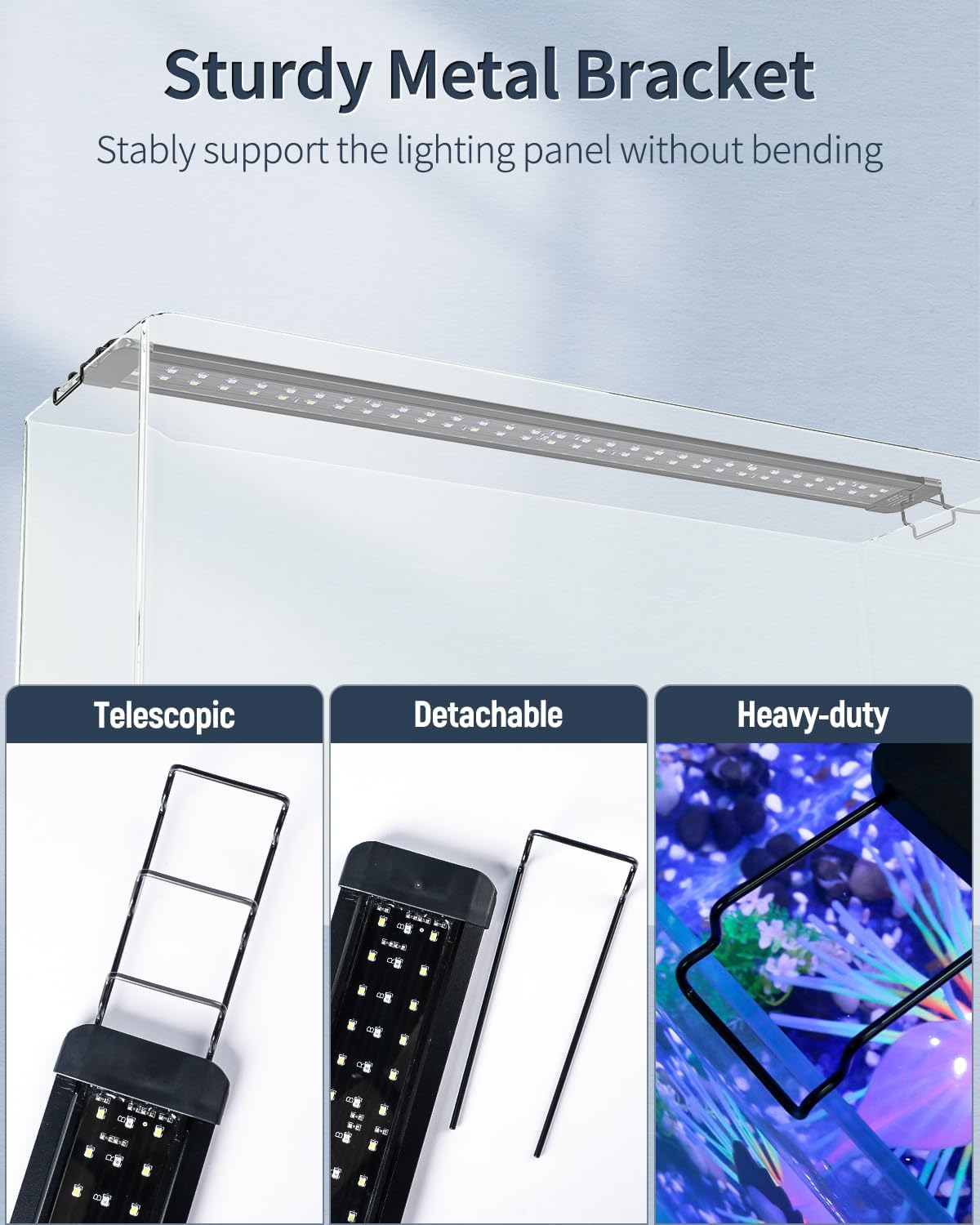
Image: Close-up view of the metal bracket being inserted into the end of the light fixture.

Image: Diagram illustrating the extendable nature of the brackets, allowing adjustment for different tank lengths.
2. Mounting the Light on Your Aquarium
Once the brackets are attached, place the light fixture securely on the rim of your fish tank. Adjust the extendable brackets to fit the length of your aquarium, ensuring the light is stable and centered.

Image: The Pawfly LED light positioned on top of an aquarium, demonstrating proper placement.
Image: Close-up of the metal bracket resting on the aquarium rim, highlighting its stable design.
Connect the ETL-certified power adapter to the light fixture and then plug it into a suitable power outlet.
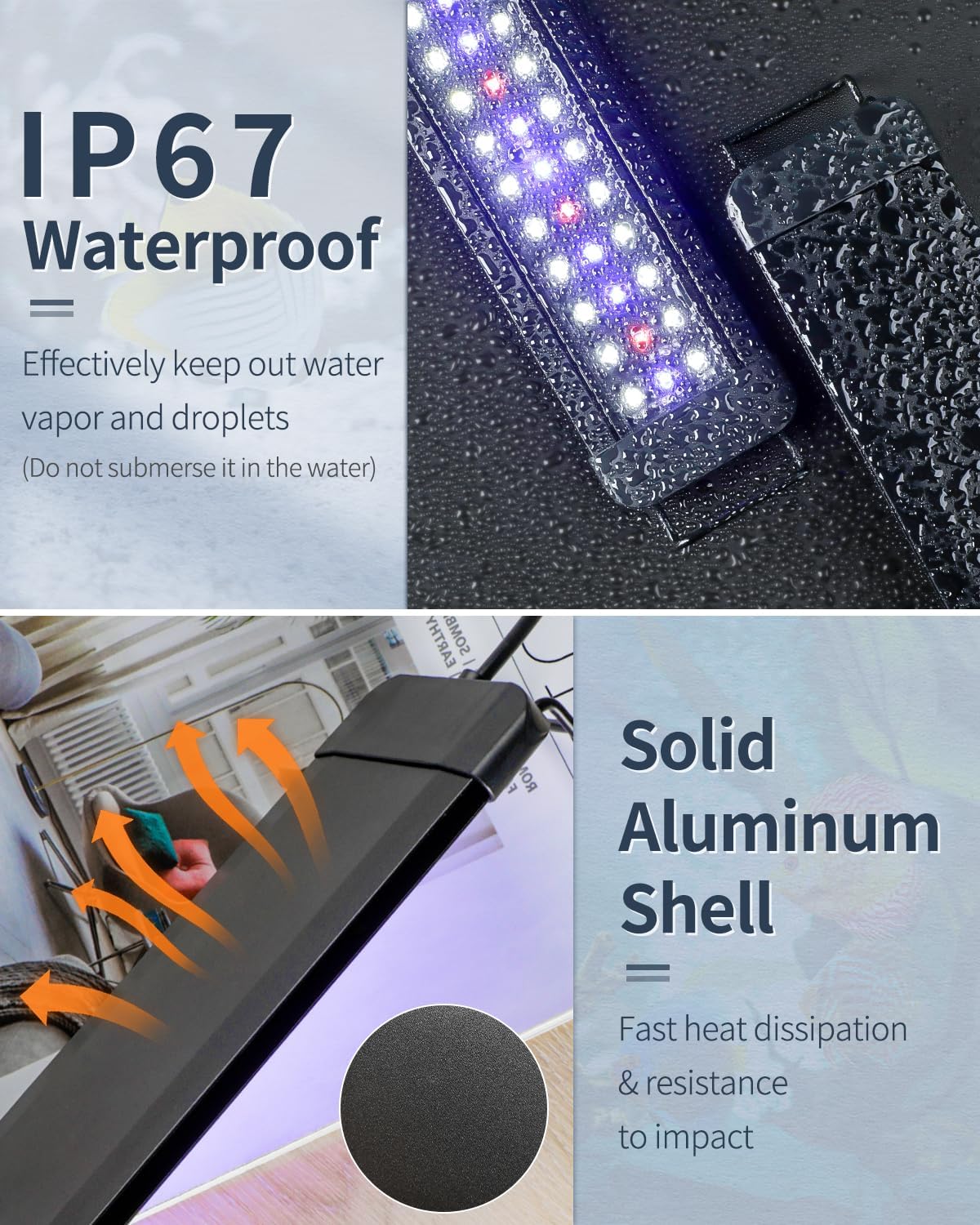
Image: The Pawfly Aquarium LED Light with its power adapter, ready for connection.
Operating Instructions
Control Panel Overview
The light features an inline control panel with three buttons: W, M, and B.
- W Button: Controls the brightness of the white and red lights.
- M Button: Functions as On/Off and Mode Switch.
- B Button: Controls the brightness of the blue light.
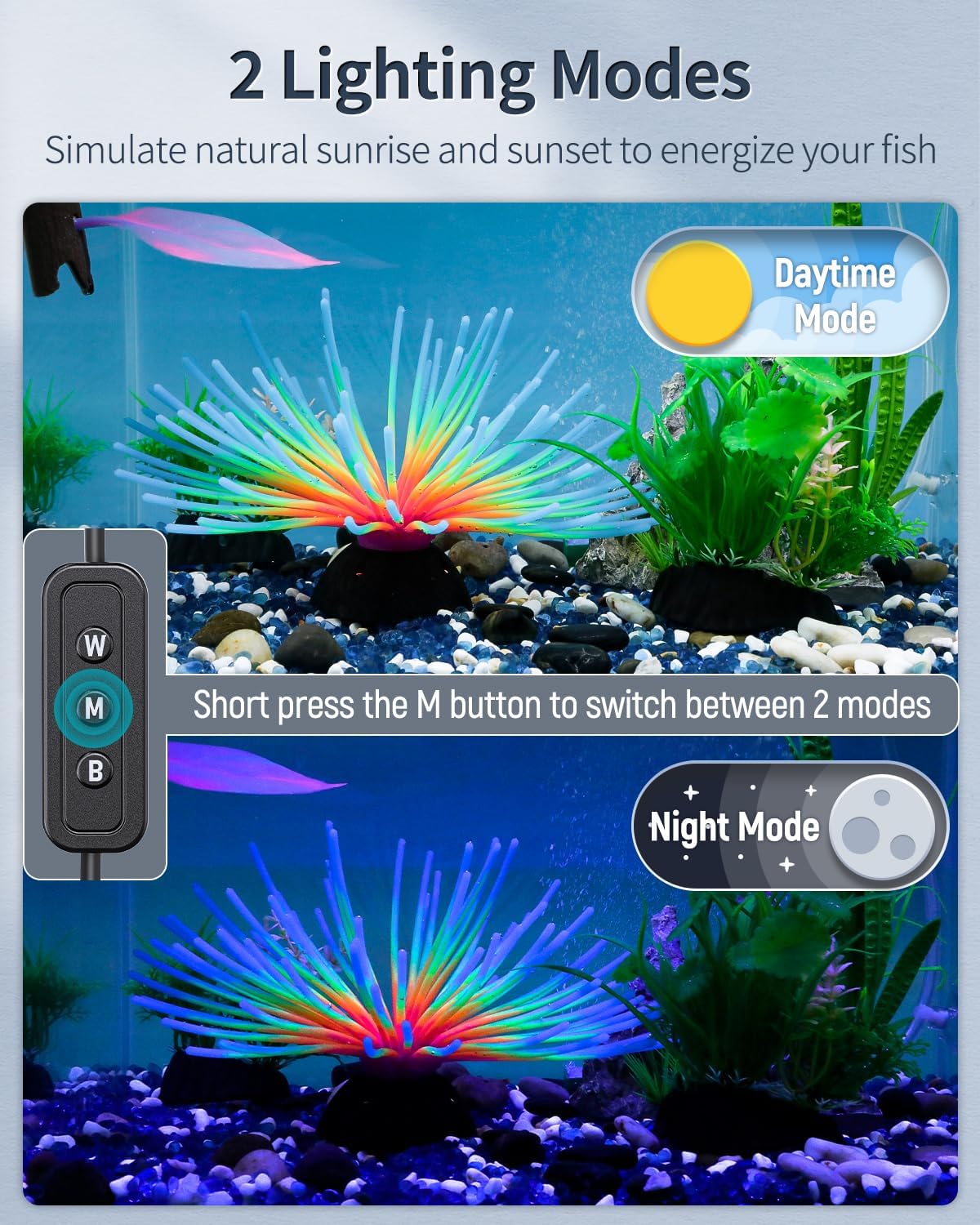
Image: Close-up of the control panel showing the W, M, and B buttons.
Image: Visual guide to the functions of the W, M, and B buttons.
Power On/Off
- To turn on all lights: Short press the M button.
- To turn off all lights: Hold the M button for 3 seconds.
- To return to the last setting: After turning off, short press the M button again.
Switching Lighting Modes
The light offers two primary modes: Daytime Mode and Night Mode.
- To switch between Daytime and Night Modes: Short press the M button repeatedly.
- Daytime Mode: All lights (white, blue, red) are on, simulating natural sunlight.
- Night Mode: Only blue lights are on, simulating moonlight.
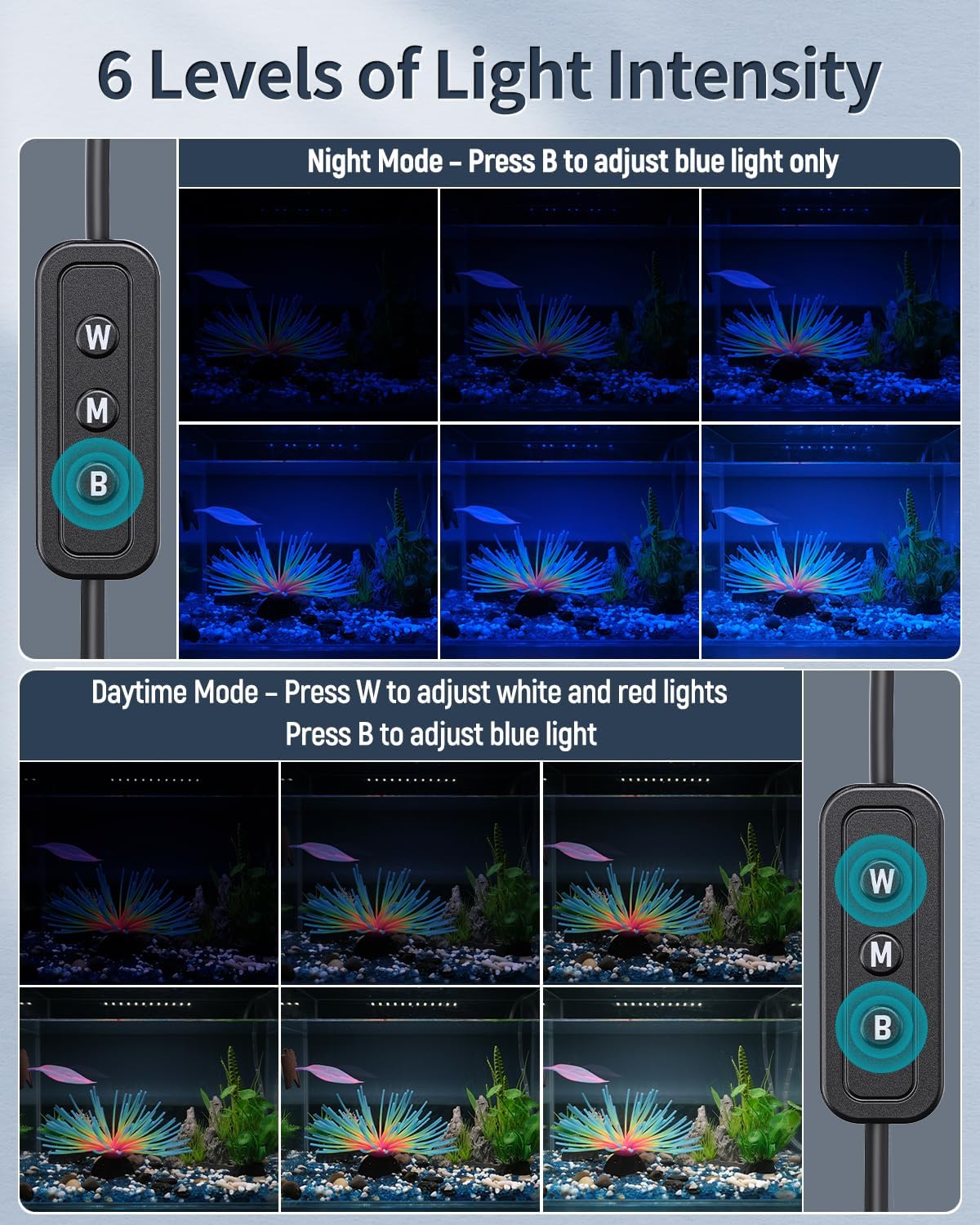
Image: An aquarium displaying the difference between daytime and nighttime lighting modes.

Image: Graphic illustrating the transition and appearance of Daytime and Night modes.
Adjusting Brightness (6 Intensity Levels)
- In Daytime Mode:
- Press the W button to control the brightness of the white and red lights.
- Press the B button to control the brightness of the blue light.
- In Night Mode:
- Press the B button to adjust the luminance of the blue light.

Image: Visual representation of the six adjustable intensity levels for the light.
Full Spectrum Lighting
The Pawfly LED light provides a full spectrum of light, including 6500K white light, 450nm blue light, and 660nm red light. This spectrum is designed to enhance the natural colors of your aquatic environment and support the healthy growth of plants and fish.

Image: Detailed diagram showing the spectral waveband and CIE chromaticity of the full spectrum light.
Video Demonstrations
Demonstration of Light Modes and Brightness Adjustment:
Video: A user demonstrates the compact design, brightness, dimmable features, and mode switching (daylight to blue light) of the Pawfly Aquarium LED Light on a fish tank.
Blue Light and LED Features:
Video: This clip highlights the blue light mode and overall LED performance of the Pawfly Aquarium LED Light, showcasing its effect on the aquarium.
Care and Maintenance
Cleaning the Light Fixture
- Always unplug the light before cleaning.
- Wipe the exterior of the light fixture with a soft, dry cloth.
- For stubborn spots, use a slightly damp cloth, then dry immediately.
- Do not use abrasive cleaners, solvents, or harsh chemicals, as these can damage the light's finish or internal components.
Waterproof Rating (IP67)
The light is designed with an IP67 waterproof rating, meaning its clear board is strictly sealed with silicone to effectively block water vapor and droplets. However, it is crucial to avoid submerging the light in water to prevent damage and ensure safety.

Image: Visual representation of the IP67 waterproof feature, emphasizing splash resistance and non-submersion.
Troubleshooting
If you encounter any issues with your Pawfly Aquarium LED Light, please refer to the following common problems and solutions:
- Light not turning on:
- Check if the power adapter is securely plugged into both the light and the power outlet.
- Ensure the power outlet is functional by testing it with another device.
- Verify that the M button has been pressed to turn the light on.
- Lights flickering or dim:
- Check for any loose connections between the light and the power adapter.
- Ensure the light is not exposed to excessive moisture or water damage.
- Adjust the brightness settings using the W and B buttons.
- Brackets not fitting the tank:
- Ensure the brackets are fully extended or retracted to match your tank's dimensions (suitable for 30-36 inch tanks).
- Confirm your tank size is within the recommended range for this model.
If the problem persists after trying these solutions, please contact customer support.
Warranty and Customer Support
Pawfly products are designed for quality and durability. For specific warranty information regarding your Pawfly 21W Aquarium LED Light, please refer to the product packaging or contact Pawfly customer service directly.
For technical assistance, troubleshooting, or any questions about your product, please visit the official Pawfly store or contact our customer support team:
- Online Support: Visit the Pawfly Store on Amazon
- Manufacturer: Pawfly


