
1. Product Overview
The MEIKEE 15W RGB Outdoor LED Spotlight is designed for landscape and garden illumination, offering color-changing capabilities and various operational modes. This product features a robust, waterproof design suitable for outdoor use and includes a remote control for convenient operation.
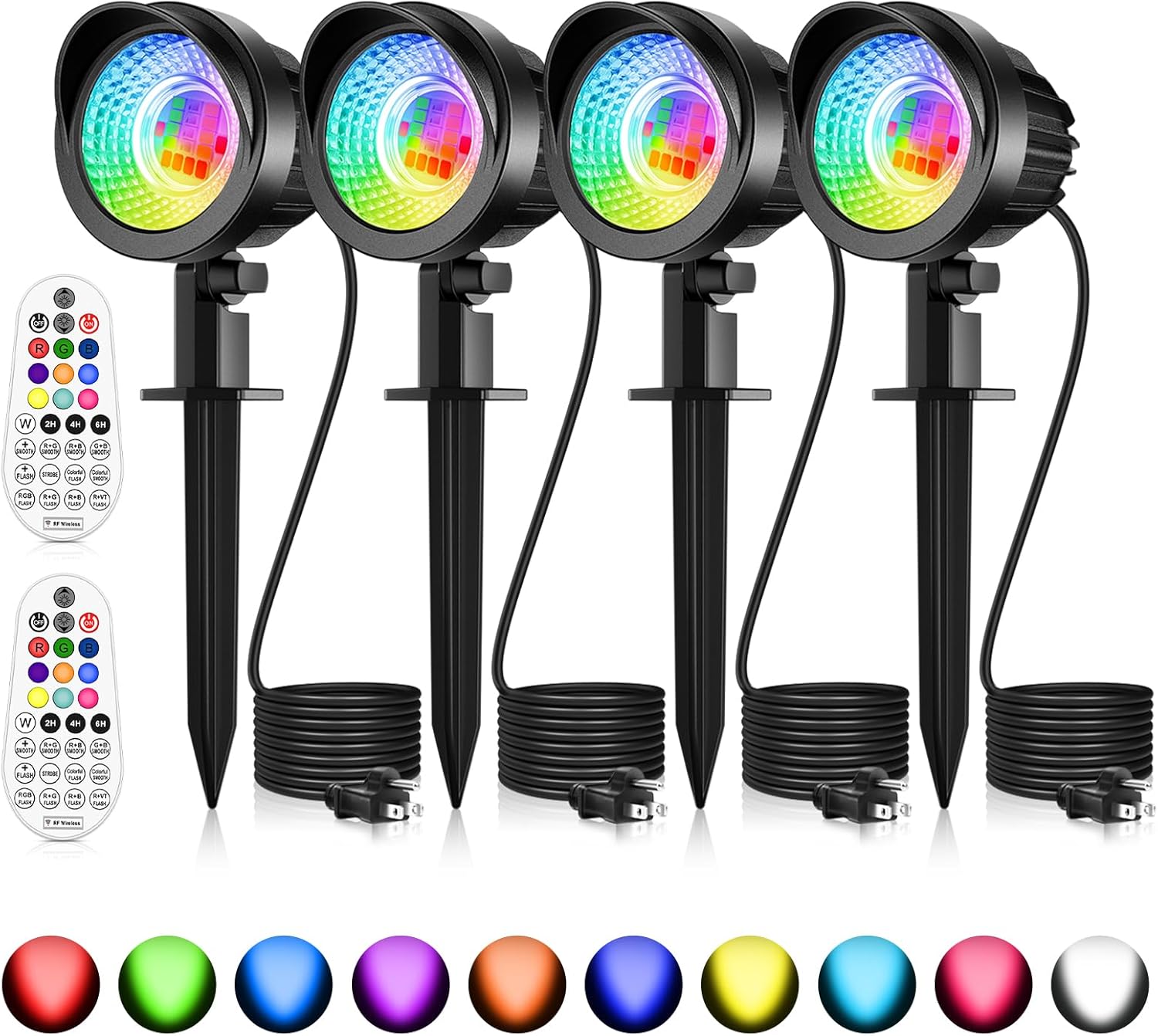
Image: Four MEIKEE 15W RGB outdoor LED spotlights, each with a ground stake and power cable, accompanied by two remote controls. Below them, a spectrum of individual light colors is displayed.
2. What's in the Box
- RGBW landscape lights (4 units)
- Remote controller (2 units)
- User manual (1 unit)
3. Specifications
- Brand:
- MEIKEE
- Model Name:
- landscape lights
- Item Model Number:
- ASTA15
- Color:
- RGBW
- Material:
- Aluminum, Polycarbonate
- Wattage:
- 15 watts
- Voltage:
- 120 Volts (AC)
- Power Source:
- Corded Electric (AC 110-120V with US 3-prong plug)
- Cable Length:
- 4.9 ft (1.5m)
- Water Resistance Level:
- IP66 Waterproof
- Control Method:
- Remote (RF Wireless)
- Max Control Distance:
- 12M / 39.3FT
- Adjustable Angle:
- 270°
- Special Features:
- 10 single colors, 12 working modes with adjustable speed, RGB color changing, timing (2/4/6H) and memory function
- Batteries for Remote:
- 2 AAA batteries required (included)
- Product Dimensions:
- 8"L x 3.15"W x 7"H
- Item Weight:
- 2.61 pounds
4. Setup and Installation
The MEIKEE LED Spotlights offer flexible installation options to suit various outdoor environments. Each light features a 270° adjustable head for precise light direction.
4.1 Installation Methods
There are two primary methods for installing your spotlights:
- Ground Inserted: Attach the provided ground stake to the spotlight. Insert the stake firmly into soft ground in your desired location. Ensure the light is stable and securely positioned.
- Wall Mounted: Use appropriate screws (not included) to mount the spotlight's base onto a wall or fence. Adjust the angle of the light head as needed.

Image: A single MEIKEE spotlight with a ground stake, emitting a blue-green light onto a grassy area, illustrating the ground-inserted installation method.

Image: A single MEIKEE spotlight mounted on a light-colored exterior wall, casting a pink light, demonstrating the wall-mounted installation method.
4.2 Power Connection
Connect the 4.9ft cable with the US 3-prong plug to a standard AC 110-120V outdoor power outlet. Ensure the outlet is protected from water exposure.

Image: A detailed diagram illustrating the components of the MEIKEE landscape spotlight, highlighting its dimensions, high lumen SMD LED chips, aluminum and polycarbonate construction, fast heat dissipation design, easy operation, and waterproof rubber ring.
5. Operating Instructions
The MEIKEE spotlights are controlled using the included 29-key RF wireless remote control. The remote has a maximum control distance of 12 meters (39.3 feet).

Image: A hand holding the remote control, pointing it towards a house and garden illuminated by multiple MEIKEE spotlights in various colors, indicating a maximum control distance of 12 meters (39.3 feet).
5.1 Remote Control Functions
- ON/OFF: Power the lights on or off.
- Color Selection: Choose from 10 single colors (Red, Green, Blue, Purple, Orange, Cyan, Yellow, Light Blue, Pink, White).
- Brightness Adjustment: Increase or decrease the brightness of the selected color.
- Dynamic Modes: Select from 10 multi-color changing modes (e.g., R+G Smooth, Strobe, Colorful Flash).
- Speed Adjustment: For dynamic modes, increase or decrease the speed of color transitions.
- Timing Function: Set the lights to automatically turn off after 2, 4, or 6 hours.

Image: A visual guide to the remote control's functions, showing 10 single colors and 10 automatic color-changing modes with adjustable speed, such as smooth transitions and flash effects.

Image: A visual representation of the 10 single color modes available and the adjustable brightness feature, showing light intensity from 100% down to 25% on green-lit bushes.
5.2 Memory Function
The spotlights are equipped with a memory function. This feature ensures that the lights will retain their last setting (color, brightness, mode) when turned off and then back on, eliminating the need to reset them each time.

Image: A diagram demonstrating the timing function, where lights automatically turn off after 2, 4, or 6 hours, and the memory function, which shows the lights returning to their last setting after being turned off and on again.
5.3 Setting Individual Light Colors
To set different colors for individual lights in a multi-pack:
- Plug in the first set of lights and use the remote to set your desired color or mode.
- Unplug the first set. Then, plug in the other set of lights and use the remote to set their desired color and modes.
- Plug both sets of lights back in. They will retain their individually set colors and modes. Avoid using the remote after this step if you wish for them to remain distinct, as the remote will control all lights within its range.

Image: A three-step diagram illustrating how to set individual colors for multiple MEIKEE spotlights. It shows plugging in one set to set its color, then unplugging it to set the second set's color, and finally plugging both in to maintain distinct colors.
6. Maintenance
The MEIKEE spotlights are designed for durability and outdoor resilience. To ensure optimal performance and longevity:
- Cleaning: Periodically wipe the light's surface with a soft, damp cloth to remove dirt and debris. Avoid abrasive cleaners.
- Waterproofing: The lights are IP66 waterproof, meaning they are protected against powerful water jets. However, ensure all connections, especially the power plug, are properly sealed and protected from direct water immersion.
- Heat Dissipation: The aluminum housing and fish fin heat sink are designed for efficient heat dissipation. Ensure the heat sink fins are not obstructed by debris or vegetation to maintain proper cooling.
- Cable Inspection: Regularly inspect the power cable for any signs of damage, fraying, or wear. Replace if necessary to prevent electrical hazards.

Image: A composite image highlighting the durability features of the MEIKEE spotlights: heat resistance under a sunny sky, IP66 waterproofing during rain, and frost resistance in a snowy environment.
7. Troubleshooting
If you encounter issues with your MEIKEE spotlights, refer to the following common problems and solutions:
- Light Not Turning On:
- Check if the power plug is securely connected to a working outlet.
- Ensure the remote control batteries (2 AAA) are correctly inserted and not depleted.
- Verify that the light is not set to a timer function that has already expired.
- Remote Control Not Responding:
- Replace the remote control batteries.
- Ensure there are no obstructions between the remote and the lights.
- Confirm you are within the maximum control distance (12 meters / 39.3 feet).
- Lights Not Changing Color/Mode:
- Ensure the remote is pointed directly at the lights and within range.
- If multiple lights are behaving differently, try resetting them by unplugging and replugging, then re-setting individual colors as described in Section 5.3.
- One Light Not Working in a Multi-Pack:
- Inspect the specific light's cable and connections for any visible damage.
- If the issue persists, contact customer support for assistance.
8. Warranty and Support
MEIKEE offers a Lifetime Warranty for this product. For any product inquiries, technical support, or warranty claims, please contact MEIKEE customer service through their official channels. Refer to the packaging or the MEIKEE brand store on Amazon for contact information.
MEIKEE Brand Store: Visit the MEIKEE Store on Amazon
