
Introduction
Thank you for purchasing the Kaiser KSW-3012 Bluetooth Speaker. This manual provides essential information for the safe and efficient operation of your device. Please read it thoroughly before use and retain it for future reference.
Safety Information
- Do not expose the speaker to water or excessive moisture.
- Avoid placing the speaker near heat sources or in direct sunlight.
- Do not attempt to disassemble or modify the speaker. Refer all servicing to qualified personnel.
- Use only the specified charging adapter.
- Keep out of reach of children.
Package Contents
Verify that all items are present in the package:
- 1 x Kaiser KSW-3012 Bluetooth Speaker
- 1 x Wireless Microphone
- 1 x User Manual
- 1 x Charging Cable (not explicitly listed but implied for a rechargeable device)
Product Overview

Figure 1: Front View. Shows the speaker grille, 12-inch woofer, and integrated LED flame-type lighting.

Figure 2: Rear View. Displays the control panel, power input, and retractable handle for portability.

Figure 3: Top Controls. Illustrates the various buttons and knobs for mode selection, volume, and effects.
Control Panel Functions:
- Power Button: Turns the speaker ON/OFF.
- Mode Button: Switches between Bluetooth, FM Radio, USB, Micro SD, and AUX modes.
- Volume Knob: Adjusts the master volume.
- Microphone Volume Knob: Adjusts the volume of the wireless microphone.
- Echo Knob: Controls the echo effect for the microphone.
- Play/Pause Button: Plays or pauses audio in Bluetooth, USB, or Micro SD modes.
- Previous/Next Track Buttons: Navigates between tracks or FM radio stations.
- Light Mode Button: Changes the LED lighting effects.
- KSR-Link Button: Initiates KSR-Link pairing for connecting multiple speakers.
- DSP Button: Activates or cycles through DSP sound enhancement modes.
- Battery Indicator LED: Shows the current battery level.
Setup
Initial Charging:
Before first use, fully charge the speaker. Connect the charging cable to the speaker's power input and a suitable power source. The battery indicator LED will show charging status.
Powering On/Off:
Press and hold the Power Button on the control panel to turn the speaker ON or OFF.
Operating Instructions
Bluetooth Mode:
- Turn on the speaker. It will automatically enter Bluetooth pairing mode, indicated by a flashing LED.
- Enable Bluetooth on your device (smartphone, tablet, etc.) and search for "KSW-3012".
- Select "KSW-3012" to pair. A confirmation sound will indicate successful pairing.
- You can now play audio from your device through the speaker. Use the Play/Pause and Previous/Next Track buttons on the speaker or your device to control playback.
FM Radio Mode:
- Press the Mode Button until FM Radio mode is selected.
- Press the Play/Pause Button to automatically scan and save available FM stations.
- Use the Previous/Next Track Buttons to navigate through the saved stations.
USB/Micro SD Card Mode:
- Insert a USB drive or Micro SD card into the corresponding slot.
- The speaker will automatically switch to USB or Micro SD mode and begin playing audio files. If not, press the Mode Button to select the correct input.
- Use the Play/Pause and Previous/Next Track buttons to control playback.
AUX Input Mode:
- Connect an external audio device (e.g., MP3 player) to the AUX input port using a 3.5mm audio cable (not included).
- Press the Mode Button until AUX mode is selected.
- Control audio playback from your connected device.
Wireless Microphone Usage:
- Ensure the wireless microphone is powered on.
- The microphone will automatically connect to the speaker.
- Adjust the microphone volume using the Microphone Volume Knob and add echo effects with the Echo Knob.
KSR-Link Function:
The KSR-Link feature allows you to connect two KSW-3012 speakers wirelessly for a stereo sound experience.
- Turn on both KSW-3012 speakers.
- Ensure both speakers are in Bluetooth mode.
- On one speaker, press the KSR-Link Button. It will search for the other speaker.
- Once connected, a confirmation sound will be heard. The first speaker will act as the master, and the second as the slave.
- Connect your Bluetooth device to the master speaker as described in the Bluetooth Mode section.
DSP High Quality and Sound Effects:
Press the DSP Button to cycle through various Digital Signal Processing (DSP) modes, enhancing audio quality and providing different sound effects.
LED Lighting:
Press the Light Mode Button to change the integrated LED lighting patterns or turn them off.
Charging
The speaker is equipped with a rechargeable battery. When the battery is low, the indicator LED will signal this. Connect the speaker to a power outlet using the provided charging cable. The LED indicator will show the charging status and turn off or change color when fully charged.
Maintenance
- Clean the speaker with a soft, dry cloth. Do not use abrasive cleaners or solvents.
- Store the speaker in a cool, dry place when not in use for extended periods.
- Avoid blocking the speaker's vents to ensure proper airflow.
Troubleshooting
| Problem | Possible Cause | Solution |
|---|---|---|
| No power | Battery is depleted. | Charge the speaker fully. |
| No sound | Volume is too low. Incorrect mode selected. | Increase volume. Press Mode button to select correct input. |
| Bluetooth not connecting | Speaker not in pairing mode. Device Bluetooth off. | Ensure speaker is in Bluetooth mode. Turn on device Bluetooth and search for "KSW-3012". |
| Microphone not working | Microphone not powered on. Microphone volume too low. | Ensure microphone is on. Adjust Microphone Volume knob. |
Specifications
| Feature | Specification |
|---|---|
| Model | KSW-3012 |
| Brand | Kaiser |
| Woofer Size | 12 inches |
| RMS Power Output | 40W RMS |
| Impedance | 3 Ohms |
| Connectivity Technology | Bluetooth, USB, Micro SD, AUX (XLR listed in specs, but product description implies 3.5mm for AUX) |
| Compatible Devices | Laptop, Smartphone |
| Power Source | Battery |
| Frequency Response | 40 KHz (This seems unusually high for a speaker's upper limit, often refers to the upper limit of human hearing or a specific component, but as per source) |
| Dimensions (L x W x H) | 38 x 35 x 58 cm |
| Special Features | KSR-Link, DSP High Quality, Sound Effects, Wireless Microphone, Flame-type LED Light, FM Radio, Rechargeable |
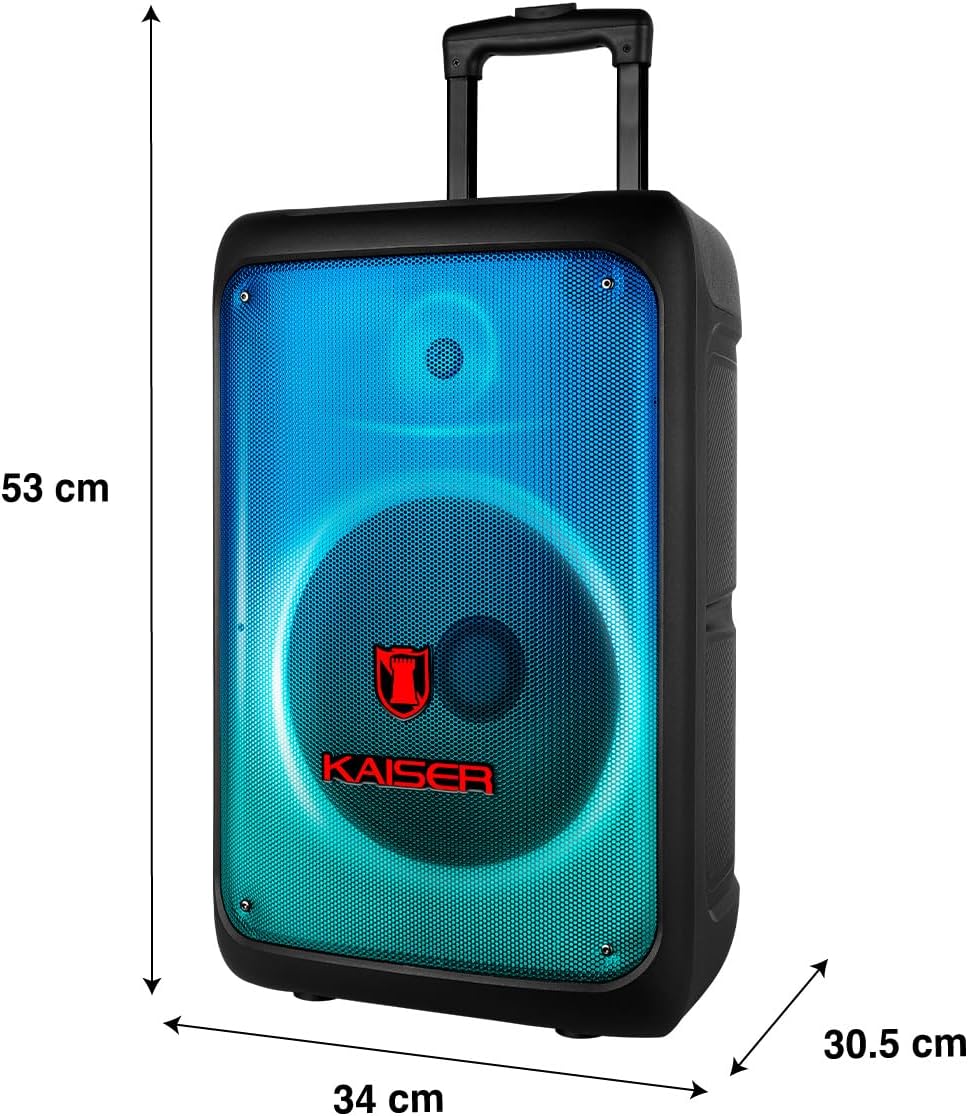
Figure 4: Speaker Dimensions. Visual representation of the speaker's height, width, and depth.
Warranty and Support
This product comes with a 1-year manufacturer's warranty. Please retain your proof of purchase for warranty claims. For technical support or service inquiries, please contact Kaiser customer service through their official channels.
For more information, visit the Kaiser Brand Store.


