
1. Important Safety Information
Before operating your ANCHEER Folding Walking Pad, please read and understand all safety instructions. Retain this manual for future reference.
- Consult a Physician: Always consult with a healthcare professional before starting any new exercise program.
- Weight Limit: Do not exceed the maximum user weight of 400 lbs (181 kg).
- Clearance Area: Ensure a minimum clearance of 2 feet (0.6 meters) around the treadmill during operation.
- Emergency Stop: Familiarize yourself with the safety key and emergency stop procedures. Always attach the safety key clip to your clothing during use.
- Children and Pets: Keep children and pets away from the treadmill at all times, especially during operation.
- Stable Surface: Place the treadmill on a flat, stable surface. Do not operate on uneven ground.
- Power Cord: Ensure the power cord is not pinched or damaged. Do not use extension cords.
- Proper Footwear: Always wear appropriate athletic footwear when using the treadmill.
- Hydration: Stay hydrated during your workout.
2. Product Overview
The ANCHEER Folding Walking Pad with Handle (Model TR6012) is a versatile fitness device designed for home and office use. It functions as a traditional running machine, an under-desk walking pad, and a workstation treadmill. Key features include a removable and height-adjustable desk, a powerful yet quiet 3.5HP motor, a 15% manual incline, and a 7-layer shock-absorbing running belt.
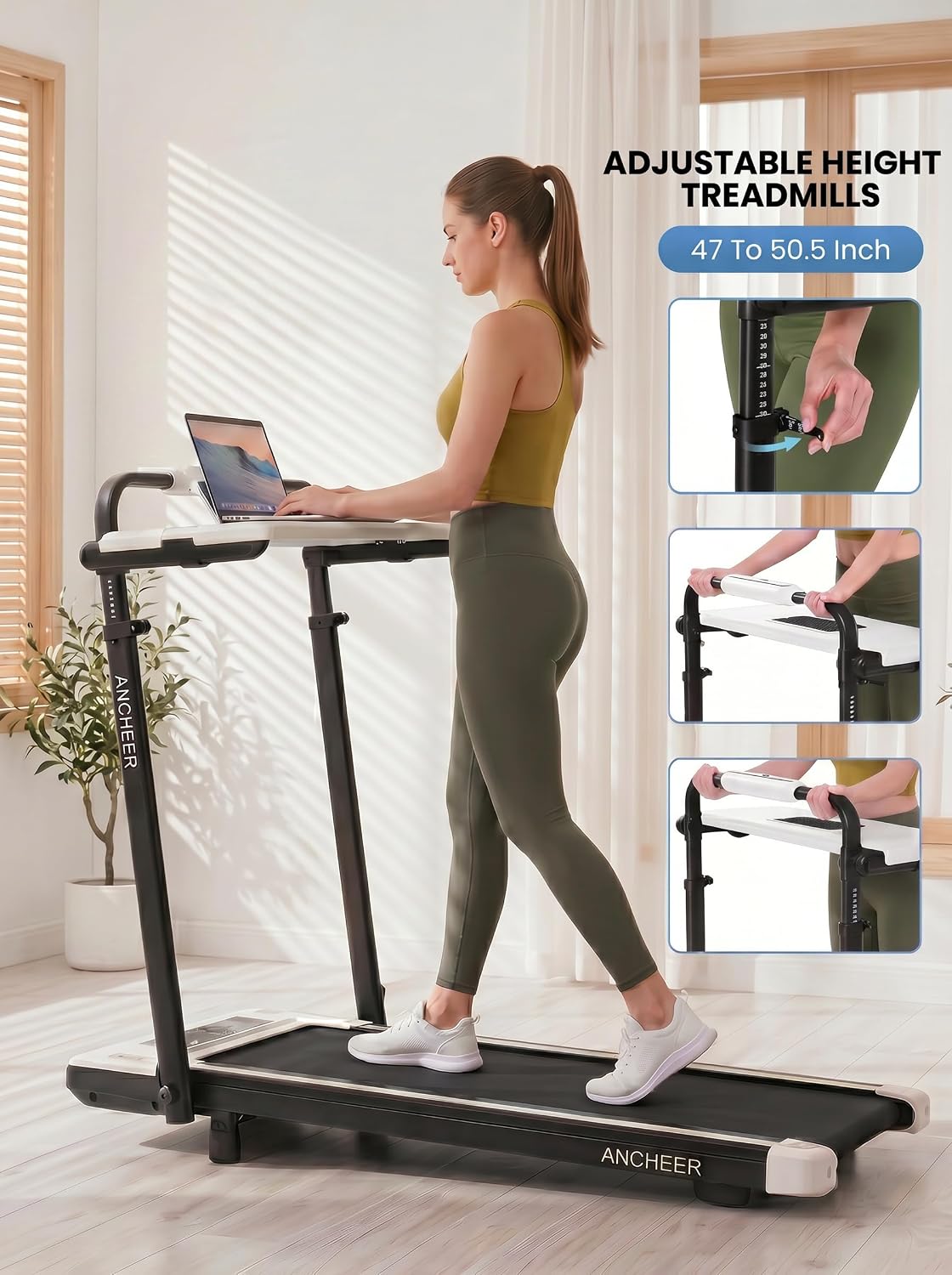
Image 2.1: The ANCHEER Folding Walking Pad with Handle, showcasing its compact design and integrated desk.
3. Setup and Assembly
Your ANCHEER Walking Pad is designed for minimal assembly. The main unit comes pre-assembled. The primary setup involves attaching the removable desk and ensuring proper placement.
3.1 Unpacking
- Carefully remove all components from the packaging.
- Verify that all included components are present: 1 x Treadmill with Desk, 1 x User Manual, 1 x Safety Key.
- Place the treadmill on a flat, stable surface.
3.2 Attaching the Removable Desk
The spacious 27.5" x 14" detachable desktop can be easily attached or removed as needed.
- Locate the desk attachment points on the handrail frame.
- Align the desk with these points and secure it firmly. Ensure it clicks into place or is fastened according to the design.
- To adjust the handrail height (from 47.24" to 50.5"), loosen the adjustment knobs on the vertical supports, slide the handrail to the desired height, and re-tighten the knobs securely.

Image 3.1: The adjustable height feature of the treadmill's handrail and desk, allowing customization for different user heights.

Image 3.2: Detailed view of the removable desk, highlighting the tablet holder and anti-slip slot for devices and cups.
3.3 Power Connection
- Plug the power cord into a grounded electrical outlet.
- Ensure the power switch on the treadmill is in the 'ON' position.
4. Operating Instructions
The ANCHEER Walking Pad offers multiple control methods and versatile workout options.
4.1 Control Methods
You can control the treadmill using three methods:
- Touch Control: Directly on the console display.
- Remote Control: Use the provided remote for convenient adjustments.
- Armrest Buttons: Tactile buttons located on the armrests for easy access during workstation mode.

Image 4.1: Illustration of the three control methods: button control on the handle, touch control on the console, and remote control.
4.2 Starting and Stopping
- Attach Safety Key: Always attach the safety key clip to your clothing. The treadmill will not operate without the safety key in place.
- Power On: Press the 'Start' button on the console, remote, or armrest. The belt will begin to move at a low speed.
- Stopping: Press the 'Stop' button or pull the safety key to immediately halt the treadmill.
4.3 Speed Adjustment
Adjust the speed using the '+' and '-' buttons on your chosen control method. The speed range is 0.6 to 7.5 Miles per Hour (MPH).
4.4 Incline Adjustment
The treadmill features a 15% manual incline. To adjust the incline, you will need to manually set the incline level at the rear of the treadmill before starting your workout. Refer to the physical manual for detailed instructions on manual incline adjustment.

Image 4.2: Visual representation of the 15% manual incline feature, designed to enhance calorie expenditure.
4.5 Workout Modes
The TR6012 offers three primary modes:
- Walking Mode: Ideal for light exercise or under-desk use.
- Running Mode: For more intense cardio workouts.
- Workstation Mode: Utilize the removable desk for walking while working.

Image 4.3: Demonstrating the versatility of the treadmill, showing both walking and running speeds.

Image 4.4: The treadmill in workstation mode, allowing users to walk while working on a laptop.
4.6 Display Information
The console display provides real-time workout data, typically cycling through every 5 seconds:
- Time: Duration of your workout.
- Speed: Current speed in MPH.
- Distance: Total distance covered.
- Calories: Estimated calories burned.

Image 4.5: The clear data display showing key workout metrics during use.
4.7 Official Product Video
Video 4.1: Official video demonstrating the ANCHEER TR6012 Treadmill with Desk Display, including features and usage.
5. Maintenance
Regular maintenance ensures the longevity and optimal performance of your treadmill.
5.1 Cleaning
- Daily: Wipe down the console and handrails with a damp cloth after each use to remove sweat and dust.
- Weekly: Clean the running belt and deck with a mild detergent and damp cloth. Ensure no moisture enters the motor compartment.
- Dust Removal: Periodically vacuum underneath the treadmill to prevent dust buildup.
5.2 Running Belt Lubrication
The running belt requires periodic lubrication to reduce friction and extend its lifespan. Refer to the specific instructions in your physical user manual for the recommended lubrication schedule and procedure. Typically, silicone-based lubricant is applied under the belt.
5.3 Running Belt Adjustment
If the running belt becomes off-center or slips, it may require adjustment. Consult your physical user manual for detailed instructions on how to center and tension the running belt using the adjustment bolts at the rear of the treadmill.

Image 5.1: Internal view highlighting the 7-layer running belt and the powerful 3.5HP quiet motor, which benefit from proper maintenance.
6. Troubleshooting
If you encounter issues with your ANCHEER Walking Pad, refer to the following common troubleshooting steps:
| Problem | Possible Cause | Solution |
|---|---|---|
| Treadmill does not start | 1. Power cord not plugged in 2. Safety key not in place 3. Power switch off 4. Circuit breaker tripped | 1. Ensure power cord is securely plugged into a grounded outlet. 2. Insert the safety key fully into its slot. 3. Turn the power switch to 'ON'. 4. Check your home's circuit breaker. |
| Running belt slips or hesitates | 1. Belt too loose 2. Belt needs lubrication | 1. Adjust belt tension (refer to manual). 2. Lubricate the running belt (refer to manual). |
| Unusual noise during operation | 1. Loose components 2. Belt friction 3. Motor issue | 1. Check and tighten all visible bolts and screws. 2. Lubricate the running belt. 3. If noise persists, contact customer support. |
| Console display not working | 1. Loose connection 2. Power issue | 1. Check all cable connections to the console. 2. Ensure the treadmill is properly powered. |
If these steps do not resolve the issue, please contact ANCHEER customer support for further assistance.
7. Specifications
Below are the technical specifications for the ANCHEER Folding Walking Pad with Handle (Model TR6012).
| Feature | Detail |
|---|---|
| Brand | ANCHEER |
| Model | TR6012 |
| Product Dimensions (D x W x H) | 47" x 28" x 47" |
| Folded Size | 54" x 29" x 6" |
| Item Weight | 65 Pounds |
| Material | Alloy Steel |
| Maximum Speed | 7.5 Miles per Hour |
| Minimum Speed | 0.6 Miles per Hour |
| Maximum Horsepower | 3.5 Horsepower |
| Maximum Incline Percentage | 15.0 (Manual) |
| Maximum Weight Recommendation | 400 Pounds |
| Power Source | Electric-powered |
| Special Feature | Portable, Removable Desk, Adjustable Height |
| Included Components | 1 x Treadmill with Desk, 1 x User Manual, 1 x Safety Key |
| Assembly Required | Yes (Minimal) |
8. Warranty and Support
ANCHEER is committed to providing quality products and customer satisfaction.
8.1 Product Warranty
Your ANCHEER Folding Walking Pad with Handle (Model TR6012) comes with a 2-Year Warranty covering the motor and frame from the date of purchase. This warranty covers manufacturing defects under normal use. Please retain your proof of purchase for warranty claims.
8.2 Customer Support
For any questions, concerns, or technical assistance, our professional service team is available to provide 24/7 lifetime customer support. Please contact us through the retailer's platform or the contact information provided in your product packaging. We aim to provide a reliable solution within 24 hours.