
1. Product Overview
The SUNWAYFOTO LS-80 is an 80mm universal rotating collar designed for DSLR and mirrorless cameras. Constructed from aerospace-grade aluminum and CNC machined with a hard-anodized finish, this lens support collar offers exceptional durability. It features an Arca-Swiss dovetail structure, ensuring compatibility with various tripod heads and ballheads from brands like Arca-Swiss, RRS, SIRUI, BENRO, FOTOPRO, and MARKINS.
This collar facilitates easy switching between horizontal and vertical camera orientations without removing the camera from the ballhead, enhancing stability and balance for your camera and lens setup.
2. Safety Information
- Ensure all knobs and screws are securely tightened before use to prevent accidental drops of your camera equipment.
- Avoid over-tightening screws, which may damage the collar or your camera gear.
- Keep the product away from extreme temperatures and corrosive substances.
- Do not attempt to disassemble the product beyond what is described in this manual.
- Regularly inspect the collar for any signs of wear or damage. Discontinue use if damage is observed.
3. Package Contents
The SUNWAYFOTO LS-80 package typically includes:
- One (1) SUNWAYFOTO LS-80 Universal Rotating Collar
- One (1) Allen Wrench (for adjustments, if applicable)
4. Setup and Installation
4.1 Understanding the Structure
The LS-80 collar consists of two main parts: an inner ring and an outer ring. The inner ring includes a camera plate for attachment to your camera body, while the outer ring features an Arca-Swiss plate at its base, equipped with both 1/4" and 3/8" threaded sockets for mounting on various tripod heads.

Figure 1: Components of the LS-80 collar. The image displays the inner ring with a camera plate and the outer ring with an Arca-Swiss plate, including 1/4 and 3/8 mounting sockets.
4.2 Attaching the Collar to Your Camera and Lens
- First, attach the camera body to the camera plate on the inner ring of the lens support. Ensure it is securely fastened.
- Next, attach your lens to the camera body.
- Finally, mount the entire camera and lens assembly onto your tripod. This can be done either via the Arca-Swiss QR plate on your ballhead or directly onto a tripod using the base thread socket on the outer ring.

Figure 2: Installation of the LS-80 collar. The image illustrates how to attach the camera to the collar and then mount the assembly onto a tripod.
The captive slot design on both the camera plate and the inner ring QR mount allows for better compatibility with various camera models, including Canon 5DIV, 5DIII, Nikon D850, D810, D750, Fujifilm XT4, XT5, XH2, and mirrorless cameras like Canon R, RP, R5, R6, R7, R8, R6II, Nikon Z, Z6, Z6II, Z7, Z7II, and Z8. The maximum outer diameter of any adapter used with mirrorless cameras should be less than 80mm.
5. Operating Instructions
5.1 Switching Between Horizontal and Vertical Orientation
The LS-80 allows for quick and easy switching between horizontal and vertical shooting positions without detaching your camera from the tripod ballhead.
- Loosen the lock-knob located on the side of the collar.
- Rotate the camera body to the desired position (0°, 90°, 180°, or 270° depending on the camera model and collar design).
- Once in the desired orientation, tighten the lock-knob securely to fix the camera in place.

Figure 3: Horizontal to Vertical Switching. The image shows a camera mounted on the LS-80, demonstrating a 90-degree rotation for orientation changes.

Figure 4: Rotation Capabilities. This image highlights the 360-degree rotation with stops at key angles for horizontal and vertical shooting.
5.2 Achieving Better Stability and Balance
By utilizing the lens collar, the center of gravity for your camera and lens kit is shifted to lie between the camera and lens, providing superior balancing and stability when mounted on a tripod. This is especially beneficial for heavier lenses.
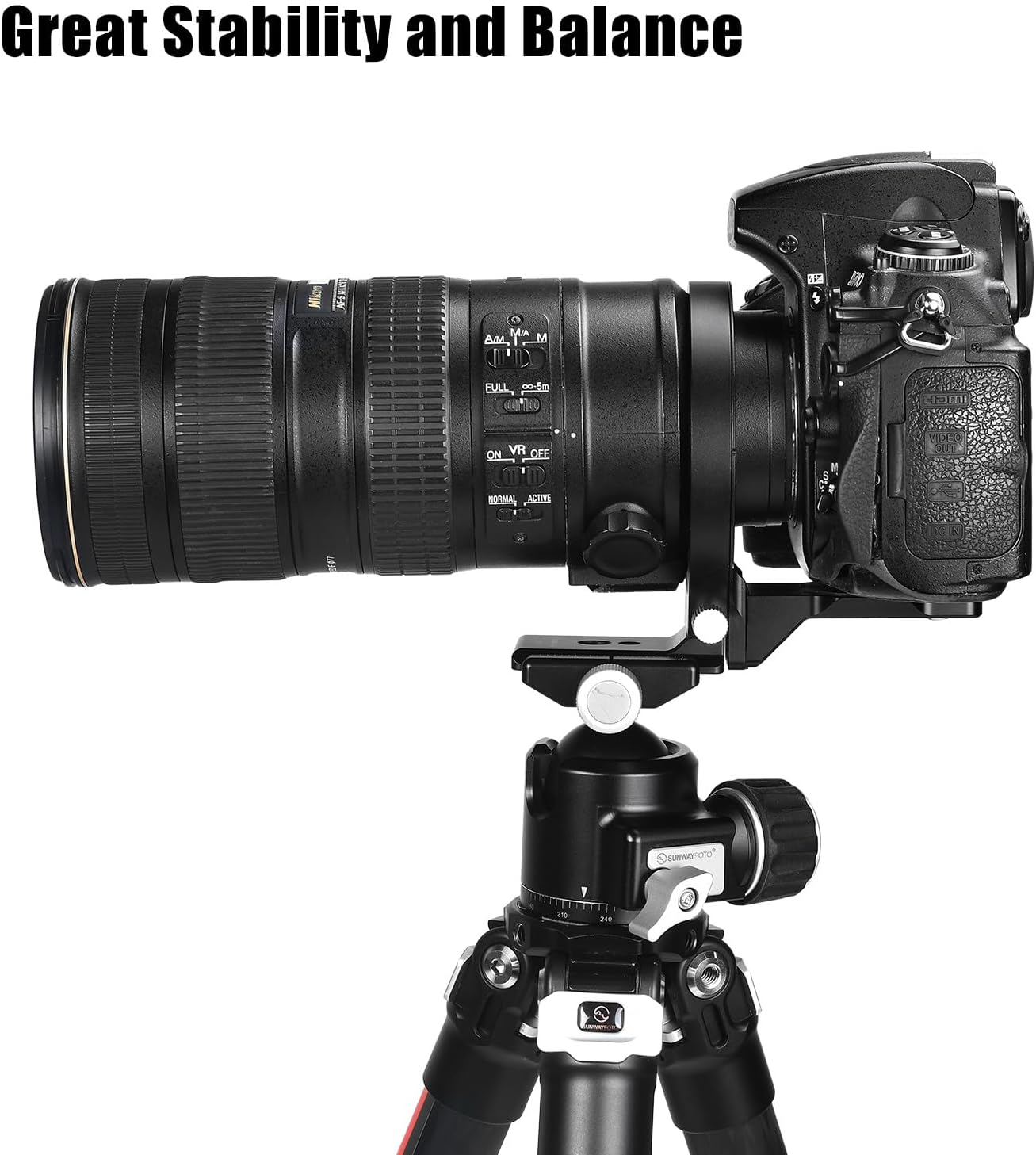
Figure 5: Enhanced Stability. The image shows a camera and lens assembly perfectly balanced on a tripod using the LS-80 collar.
6. Maintenance
- Cleaning: Wipe the collar with a soft, dry cloth to remove dust and dirt. For stubborn grime, use a slightly damp cloth and then dry thoroughly. Avoid harsh chemicals or abrasive materials.
- Lubrication: If the rotation mechanism feels stiff, a small amount of dry lubricant (e.g., silicone-based spray) can be applied to the rotating surfaces. Wipe off any excess.
- Storage: Store the collar in a clean, dry environment when not in use.
7. Troubleshooting
| Problem | Possible Cause | Solution |
|---|---|---|
| Collar feels too tight or difficult to rotate. | Lack of lubrication or new product stiffness. | Apply a small amount of dry lubricant to the rotating surfaces and work the mechanism. This may require repeated rotation for a short period to loosen. |
| Camera/lens assembly feels unstable. | Screws not fully tightened or incorrect lens fit. | Ensure all mounting screws (camera plate, lens collar, tripod mount) are securely tightened. Verify that your lens diameter is appropriate for the 80mm inner ring. |
| Camera cannot be rotated to desired angle. | Lock-knob not sufficiently loosened or obstruction. | Ensure the lock-knob is fully loosened. Check for any physical obstructions from the camera body or lens. |
8. Specifications
| Feature | Detail |
|---|---|
| Model Name | LS-80 |
| Inner Diameter of Inner Ring | 80mm |
| Length | 132mm |
| Height | 115mm |
| Weight | 170g |
| Mounting Sockets | 1/4 inch, 3/8 inch |
| Material | Aerospace-grade Aluminum |
| Finish | Hard-anodized |
| Arca-Swiss Compatible | Yes |
| Color | Black |
| Compatible Devices | DSLR Cameras, Mirrorless Cameras (with adapters, max 80mm outer diameter) |
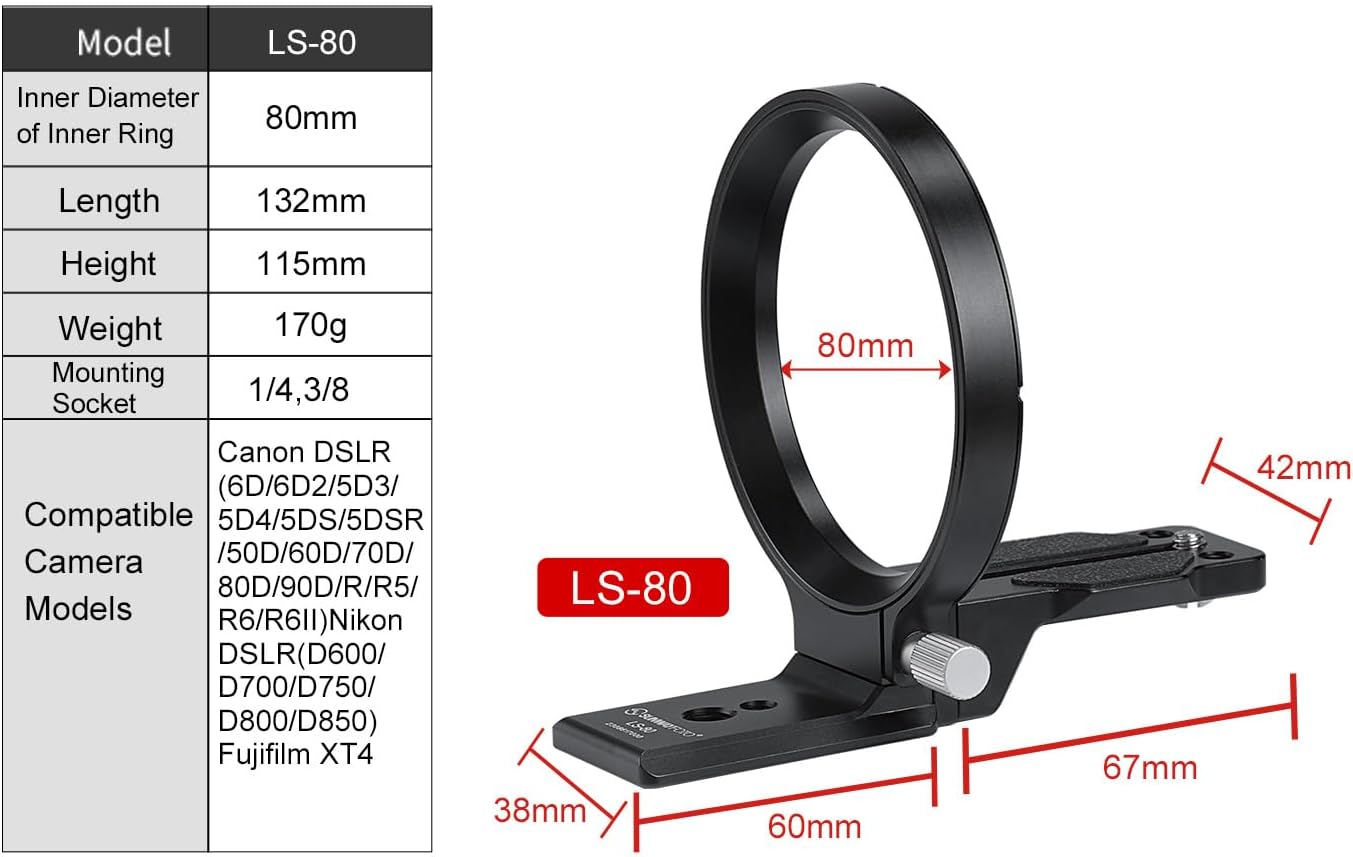
Figure 6: LS-80 Dimensions and Compatibility. This image provides a visual representation of the collar's measurements and lists compatible camera models.
9. Warranty and Support
The SUNWAYFOTO LS-80 Universal Rotating Collar comes with a 6-year warranty from the date of purchase, covering manufacturing defects. Please retain your proof of purchase for warranty claims.
For technical support, warranty service, or general inquiries, please contact SUNWAYFOTO customer service through their official website or the retailer from whom you purchased the product.