Introduction
Thank you for choosing the Newmowa Phone Remote Shutter Tripod. This versatile accessory is designed to enhance your mobile photography and videography experience, offering stability and remote control for your iPhone. It is compatible with iPhone 6.7 inch models running iOS 15 and above, including iPhone 12/13/14/15 Pro Max and iPhone 14/15 Plus. Please ensure your phone model and iOS version meet these requirements before use.
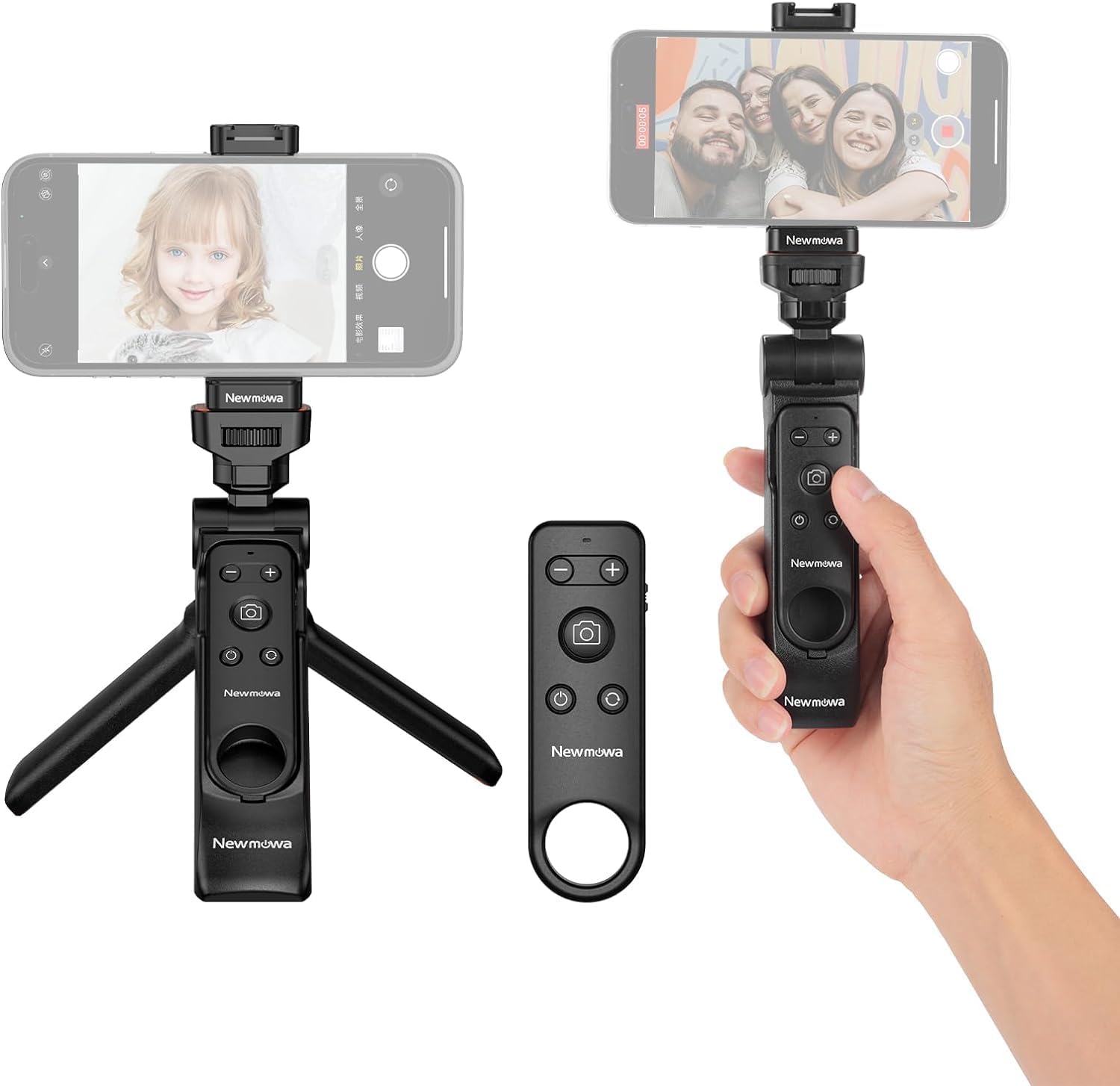
The Newmowa Phone Remote Shutter Tripod in its compact and extended forms, alongside its detachable remote control.
Setup Guide
1. Attaching Your Phone
- Gently pull open the phone holder at the top of the tripod. The holder is lined with non-slip silicone pads to securely grip your device.
- Carefully insert your iPhone into the holder, ensuring it is centered and stable.
- The phone holder supports both horizontal and vertical orientations. Adjust the phone's position as needed.
2. Pairing the Wireless Remote Control
The detachable remote control uses Bluetooth for fast and stable connection. No additional apps are required for basic functionality.
- Ensure the remote control is charged. It has a built-in rechargeable battery and can be charged via the Type-C cable.
- Press and hold the power ON/OFF button on the remote until the LED indicator light starts blinking, indicating it's in pairing mode.
- On your iPhone, go to Settings > Bluetooth.
- Select the Newmowa device from the list of available devices to pair. The LED indicator on the remote will turn solid blue once successfully paired.
- When not in use, the remote control can be inserted into its dedicated slot on the handle of the tripod for convenient storage.

Image showing compatible iPhone models and the detachable remote control.

A user demonstrating hands-free photo or video shooting with the remote control.
3. Transforming the Tripod
The tripod features a built-in umbrella-shaped structure that allows for quick transformation.
- Desktop Tripod: Simply spread the legs of the tripod to form a stable base for desktop use.
- Handheld Grip: Fold the legs together to use the device as a comfortable handheld grip for on-the-go shooting.
- Extended Stand: The tripod can also be extended to stand on the ground for full-body shots or group photos.
Operating Instructions
Remote Control Functions
The detachable wireless remote provides comprehensive control over your iPhone's camera functions:
- Shutter/Record Button: Press the camera icon button to take photos or start/stop video recording.
- Lens Zoom Buttons (+/-): Use the '+' and '-' buttons to zoom in and out of your shot.
- Lens Switch Button: Press the lens icon button to switch between different iPhone lenses (e.g., wide, ultra-wide, telephoto).
- Mode Switch Button: Use the circular arrow button to switch between front and rear cameras.

Detailed diagram showing the various buttons and features of the Newmowa Phone Remote Shutter Tripod.

Visual representation of the zoom capabilities (0.5x, 1x, 5x) controlled by the remote.
Adjusting Shooting Angle
The tripod allows for flexible adjustments to achieve your desired shooting angle:
- 180° Vertical Adjustment: The phone holder can be tilted 180 degrees vertically to capture shots from various elevations.
- 360° Horizontal Rotation: The head of the tripod can rotate a full 360 degrees horizontally, allowing for panoramic shots and easy switching between landscape and portrait modes.

Illustration of the tripod's flexible 180° vertical and 360° horizontal rotation capabilities.
Official Product Video: Usage Demonstration
This video, provided by Newmowa Digital, demonstrates the various features and usage scenarios of the Phone Remote Shutter Tripod, including its compatibility with iPhone and remote control functions.
Charging the Remote Control
The remote control has a built-in rechargeable Lithium Ion battery. To charge:
- Locate the Type-C charging interface on the side of the remote control.
- Connect the provided Type-C cable to the remote and plug the other end into a compatible USB power source (e.g., wall adapter, computer USB port).
- The red light on the remote will stay on during charging.
- Once fully charged (approximately 2.5 hours), the green light will illuminate. A full charge provides about 10 hours of usage time.

The remote control connected to a power source via its Type-C charging port.
Product Specifications
| Feature | Detail |
|---|---|
| Brand | Newmowa |
| Model Number | MPH1-NMW-6.7-US |
| Product Dimensions | 6.8 x 1.4 x 1.4 inches |
| Item Weight | 4.8 ounces |
| Material | Silicone |
| Compatible Devices | Smartphone (iPhone 6.7 inch, iOS 15 above) |
| Special Feature | Remote Control |
| Battery Type | 1 Lithium Ion battery (included) |
| Charging Time | About 2.5 Hours |
| Usage Time | About 10 Hours |
| Remote Control Range | Up to 49ft (15m) |
Package Contents
Upon opening your Newmowa Phone Remote Shutter Tripod package, you should find the following items:
- Newmowa Phone Remote Shutter Tripod
- Detachable Remote Shutter
- Type-C Charging Cable
- Instruction Manual (this document)

Visual representation of the complete package contents.
Troubleshooting
Remote Control Zoom/Lens Switching Not Working on iPhone
If you experience issues with the remote control's zoom or lens switching functions, particularly on iPhones running iOS 15 or above, please follow these steps:
- Go to your iPhone's Settings.
- Select Accessibility.
- Select Touch.
- Ensure AssistiveTouch is turned On.
- Go to your iPhone's Control Center (swipe down from the top-right corner on newer iPhones, or swipe up from the bottom on older models).
- Make sure Portrait Orientation Lock is On. This is crucial for the remote's advanced functions to operate correctly.
If the remote control is not connecting, ensure it is charged and within the 49ft range. Re-pair the device if necessary by turning Bluetooth off and on on your iPhone and repeating the pairing steps.
Warranty and Customer Support
Your Newmowa Phone Remote Shutter Tripod comes with a 12-month warranty from the date of purchase. If you encounter any issues with your product or have questions regarding its operation, please do not hesitate to contact our friendly customer service team. We are committed to resolving all problems within 10 hours to ensure your satisfaction.
For support, please refer to the contact information provided on the product packaging or visit the official Newmowa website.


