
WLIVE ACTG003DHS2
WLIVE 4 Drawer Dresser with Charging Station and LED Light Instruction Manual
Model: ACTG003DHS2 | Brand: WLIVE
Introduction
This manual provides detailed instructions for the assembly, operation, and maintenance of your WLIVE 4 Drawer Dresser. This versatile nightstand features a built-in charging station with USB ports and AC outlets, and integrated RGB LED lighting, designed to enhance the functionality and ambiance of your bedroom or living space. Please read this manual thoroughly before assembly and use to ensure safe and proper operation.
Important Safety Information
For your safety and to prevent damage to the product, please adhere to the following guidelines:
- Always use the provided anti-tip device to secure the dresser to a wall. This is crucial for preventing tipping, especially in households with children or pets.
- Exercise caution during assembly to avoid pinch points.
- Do not exceed the maximum weight limits:
- Table top and open shelf: 22 lbs (10 kg)
- Each fabric drawer: 5.5 lbs (2.5 kg)
- Ensure all connections for the charging station are secure and the power cord is not pinched or damaged.
- Keep liquids away from the charging station and electrical components.
- This product is designed for indoor use only.
Package Contents
Before beginning assembly, please verify that all components listed below are present and undamaged. If any parts are missing or damaged, please contact customer support.
- Metal Frame Components
- Wooden Shelves (Top and Middle)
- 4 Fabric Drawers with Handles
- Charging Station (2 USB ports, 2 AC outlets)
- RGB LED Light Strip
- Adjustable Feet (4)
- X-shaped Rods (for stability)
- Anti-tip Device
- Assembly Hardware (screws, bolts, etc.)
- Instruction Manual
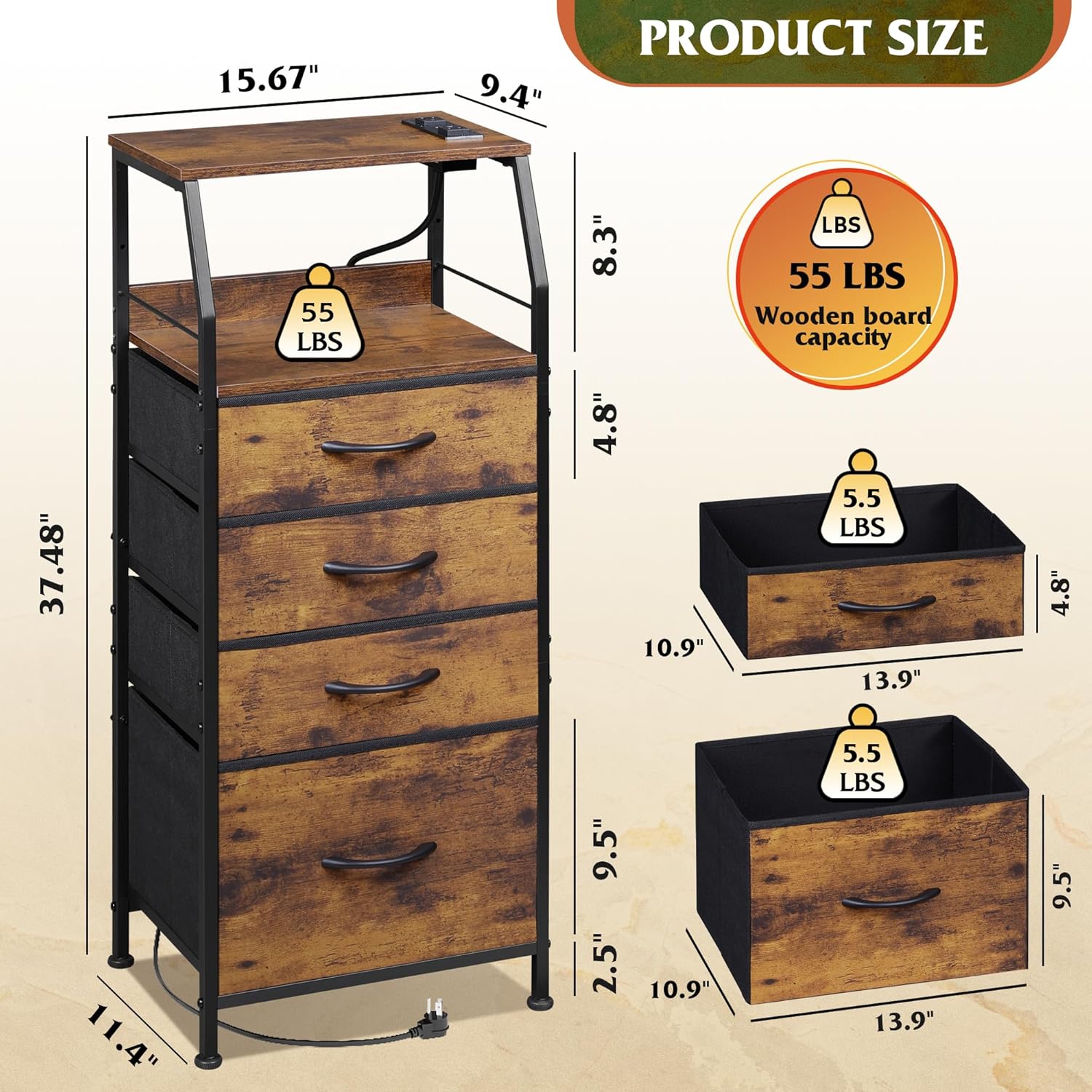
Figure 1: Product Dimensions and Weight Capacities. This image illustrates the overall dimensions of the dresser (11.41"D x 15.67"W x 37.48"H) and the weight limits for the wooden board (55 lbs) and individual fabric drawers (5.5 lbs).
Assembly Instructions
Assembly of the WLIVE 4 Drawer Dresser is designed to be straightforward. Please follow the detailed diagrams and instructions provided in the included assembly manual. A screwdriver is recommended for assembly.
- Unpack and Identify Parts: Lay out all components and hardware. Match them with the parts list in the separate assembly manual. Each part and hardware piece is typically labeled.
- Assemble the Metal Frame: Connect the vertical and horizontal metal frame pieces according to the diagrams. Ensure all screws are tightened securely.
- Install Wooden Shelves: Attach the top and middle wooden shelves to the designated sections of the metal frame.
- Attach X-shaped Rods: Secure the X-shaped rods to the back of the frame for enhanced stability.
- Install Adjustable Feet: Screw the adjustable feet into the bottom of the metal frame. These can be rotated 360° to level the dresser on uneven surfaces.
- Integrate Charging Station and LED Light: Install the charging station into its designated slot on the top wooden shelf. Affix the RGB LED light strip as indicated in the manual, typically along the underside of the top shelf or within the open compartment.
- Insert Fabric Drawers: Unfold the fabric drawers and insert the bottom panels. Place the assembled drawers into their respective slots in the frame. The fourth drawer is designed to be deeper.
- Secure with Anti-Tip Device: For safety, attach the anti-tip device to the back of the dresser and secure it to a wall stud using appropriate hardware.

Figure 2: Structural Features. This image highlights the robust metal frame, the X-shaped rods for enhanced stability, and the 360-degree adjustable feet that allow for leveling on various floor surfaces.
Operating Instructions
Charging Station
The integrated charging station provides convenient power access for your electronic devices. It is ETL certified for safety.
- Power Connection: Plug the dresser's power cord into a standard 120V AC wall outlet.
- USB Ports: Two USB ports (5V/2.1A) are available for charging smartphones, tablets, and other USB-powered devices.
- AC Outlets: Two standard AC outlets (125V/12A) are provided for plugging in lamps, laptops, or other small appliances.
- Cord Management: Utilize the 4.9-foot extension cord for flexible placement. Ensure the cord is not a tripping hazard.

Figure 3: Charging Station Details. This image shows the built-in charging station with its two USB ports and two AC outlets, designed for convenient device charging.
RGB LED Lights
The RGB LED lights offer customizable ambiance for your room. Control is typically via a remote or integrated button panel.
- Power On/Off: Locate the power button for the LED lights, usually on the light strip itself or a connected control unit.
- Color Selection: Cycle through various colors (RGB) to match your mood or decor.
- Brightness Adjustment: Adjust the light intensity to your preferred level.
- Dynamic Modes: Some models offer pre-programmed dynamic modes with changing light effects.
- Flashing Frequency: Adjust the speed of dynamic light changes if applicable.

Figure 4: RGB LED Light Features. This image demonstrates the LED lighting capabilities, including multi-color options, brightness control, dynamic mode selection, and flashing frequency adjustment.
Storage Drawers
The four fabric drawers provide ample storage space for various items.
- Organization: Use the drawers to store clothing, accessories, books, or other personal belongings.
- Drawer Capacity: The fourth (bottom) drawer is typically larger, offering more storage volume.
- Open Shelves: The two open wooden shelves are ideal for displaying decorative items, electronic devices, or frequently accessed items like clocks and coffee mugs.

Figure 5: Storage Capacity. This image illustrates the spacious fabric drawers, including the deeper fourth drawer, and the open wooden shelves, providing ample storage and display options.
Maintenance
Proper care will extend the life and appearance of your dresser.
- Cleaning: Wipe wooden surfaces with a soft, damp cloth. Avoid harsh chemicals. For fabric drawers, spot clean with a mild detergent and allow to air dry. Do not machine wash.
- Dusting: Regularly dust all surfaces to prevent buildup.
- Drawer Care: Ensure drawers are not overloaded to prevent sagging or damage to the fabric.
- Electrical Components: Keep the charging station clean and free of dust. Do not attempt to disassemble or repair electrical components yourself.
- Stability Check: Periodically check all screws and connections to ensure they remain tight. Re-tighten if necessary. Verify the anti-tip device is still securely fastened.
Troubleshooting
| Problem | Possible Cause | Solution |
|---|---|---|
| Dresser is wobbly/unstable. | Uneven floor; loose screws; adjustable feet not properly set. | Adjust the leveling feet at the bottom of the dresser. Ensure all assembly screws are tightened. Verify the anti-tip device is installed and secured. |
| Charging station not working. | Not plugged in; power outlet issue; damaged cord/station. | Ensure the dresser's power cord is securely plugged into a working wall outlet. Test the outlet with another device. Check for visible damage to the cord or charging station. If damaged, discontinue use and contact support. |
| LED lights not turning on or changing color. | Power issue; remote battery dead (if applicable); light strip malfunction. | Verify the dresser is plugged in and the charging station is receiving power. Check the LED light's power connection. If using a remote, replace its battery. Contact support if the issue persists. |
| Drawers are difficult to open/close. | Overloaded drawer; fabric misaligned; frame slightly warped. | Reduce the weight in the drawer. Ensure the fabric drawer is properly unfolded and seated within the frame. Check the frame for any bending or misalignment. |
Specifications
| Feature | Detail |
|---|---|
| Model Name | ACTG003DHS2 |
| Brand | WLIVE |
| Product Dimensions (D x W x H) | 11.41" x 15.67" x 37.48" (29cm x 39.8cm x 95.2cm) |
| Item Weight | 14.56 pounds (6.6 kg) |
| Material | MDF board, Non-woven fabric, Steel frame |
| Number of Drawers | 4 (fabric) |
| Charging Station | 2 USB ports (5V/2.1A), 2 AC outlets (125V/12A) |
| Power Cord Length | 4.9 feet (1.5 meters) |
| LED Lights | RGB, adjustable brightness and modes |
| Maximum Weight Recommendation (Top/Shelf) | 22 lbs (10 kg) |
| Maximum Weight Recommendation (Drawer) | 5.5 lbs (2.5 kg) per drawer |
| Included Components | 4 fabric drawers, 2 open wooden shelves, charging station, LED light, anti-tip device |
| Tools Recommended For Assembly | Screwdriver |
Warranty and Support
WLIVE products are designed for quality and durability. For specific warranty information regarding your dresser, please refer to the warranty card included in your package or visit the official WLIVE website. If you encounter any issues, require replacement parts, or have questions not covered in this manual, please contact WLIVE customer support through their official channels. Keep your purchase receipt for warranty claims.
You can find more information and contact details on the WLIVE Store on Amazon.
Related documentsACTG003DHS2


Ask a question about this manual
Ask about setup, troubleshooting, compatibility, parts, safety, or missing instructions. Manuals+ will review the question and use this page’s manual context to help answer it.