
1. Product Overview
The SUNWAYFOTO LS-75 Universal Rotating Collar is designed to provide stable support and easy orientation switching for DSLR cameras when mounted on a tripod. Constructed from aero-space grade aluminum with a hard-anodized finish, this collar ensures durability and reliability. It facilitates quick transitions between horizontal and vertical shooting positions without detaching the camera from the tripod head, enhancing workflow efficiency and stability.

Image 1.1: The SUNWAYFOTO LS-75 Universal Rotating Collar, showcasing its all-metal construction and design as a lens collar and tripod mount ring.
2. Key Features
- Easy Switching: Allows rotation of the camera body to switch between horizontal and vertical positions by loosening and tightening a lock-knob, without removing the camera from the ballhead.
- Clean Structure: Composed of an inner ring for camera attachment and an outer ring with an Arca-Swiss plate for tripod mounting.
- Simple Installation: Designed for straightforward attachment of the camera and mounting onto a tripod via the Arca-Swiss QR plate or direct thread sockets.
- Enhanced Stability: Positions the center of gravity between the camera and lens, providing improved balance and stability for the entire setup.
- Broad Compatibility: Features a 75mm inner diameter and adjustable height, ensuring compatibility with various DSLR and mirrorless camera models from different brands.
- Adjustable Camera Plates: Includes two camera plates of different lengths to accommodate varying camera body thicknesses.
3. Components and Structure
The LS-75 collar consists of two primary rings and a mounting plate. The inner ring secures to the camera body, while the outer ring provides the interface for tripod mounting. The base features an Arca-Swiss dovetail plate and multiple mounting sockets for versatility.
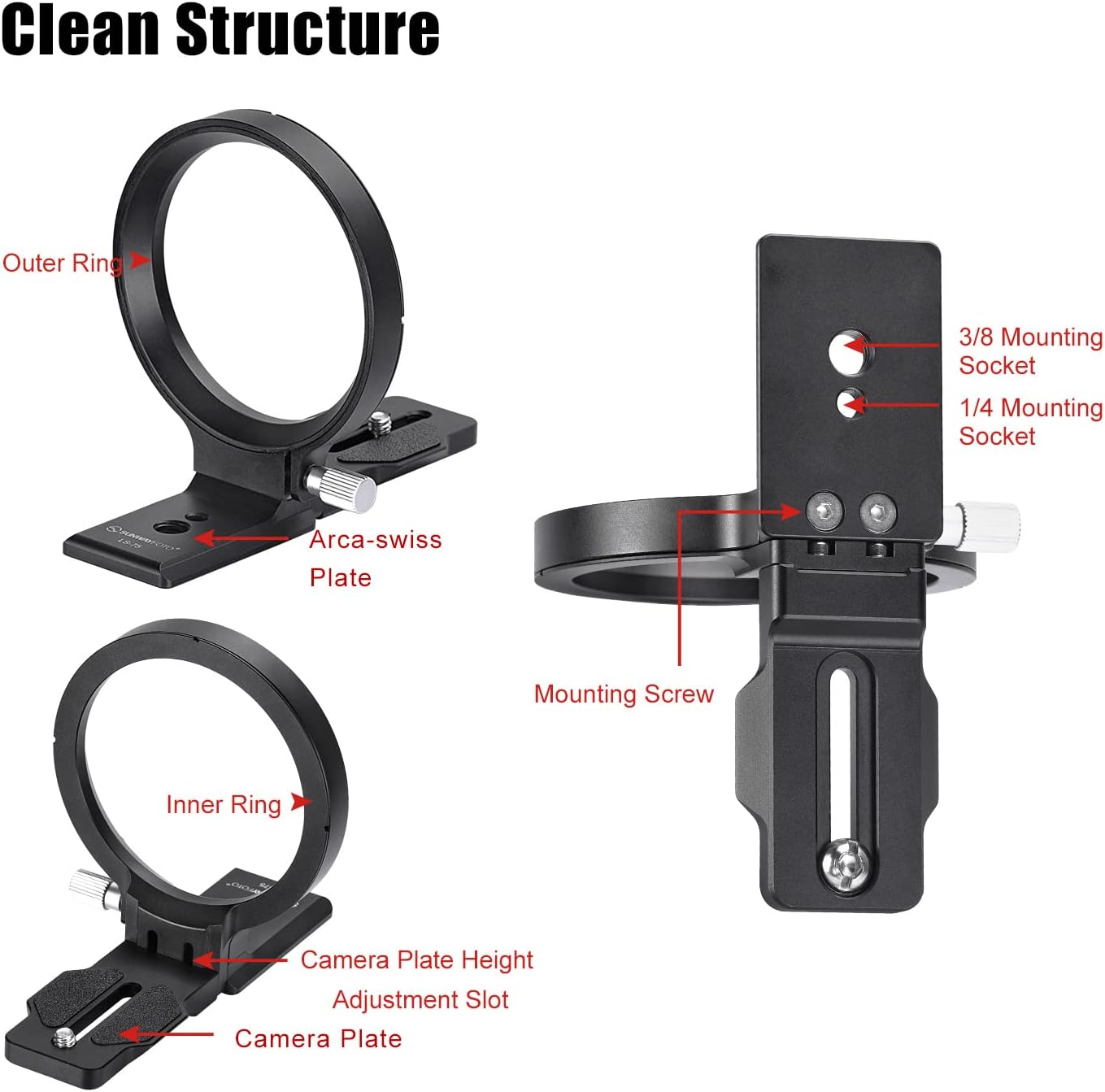
Image 3.1: Detailed view of the LS-75's clean structure, highlighting the inner ring, outer ring, Arca-Swiss plate, mounting screw, and various mounting sockets.
4. Installation Guide
- Attach Camera to Inner Ring: Secure your camera body onto the camera plate of the inner ring. Ensure the camera is firmly attached.
- Attach Lens: Mount your lens onto the camera body.
- Mount to Tripod: The entire camera and lens assembly can then be mounted onto a tripod. You have two options:
- Via Arca-Swiss Plate: Attach the Arca-Swiss QR plate on the base of the LS-75 to a compatible ballhead or tripod clamp.
- Via Thread Sockets: Directly mount the LS-75 onto a tripod using the 1/4-inch or 3/8-inch thread sockets located on its base.
- Adjust Camera Plate Height: Utilize the adjustable height slot on the camera plate of the inner ring to achieve optimal positioning and balance for your specific camera and lens combination.

Image 4.1: Illustration of the two primary installation methods for the LS-75, demonstrating mounting via the Arca-Swiss plate and via the mounting socket, along with the adjustable camera plate height.
5. Operating Instructions: Horizontal to Vertical Switching
The LS-75 allows for quick and easy switching between horizontal and vertical camera orientations without dismounting your equipment.
- Loosen Lock-Knob: Locate the lock-knob on the side of the rotating collar. Gently loosen it to allow the inner ring (and thus your camera) to rotate.
- Rotate Camera: Carefully rotate your camera body to the desired horizontal or vertical position. The collar is designed to stop at 0° and 90° for precise alignment. Some camera models may also stop at 180° and 270°.
- Tighten Lock-Knob: Once the camera is in the desired orientation, firmly tighten the lock-knob to secure it in place. Ensure it is snug to prevent accidental rotation.

Image 5.1: Demonstration of the easy switching mechanism, showing the camera rotating 90 degrees between horizontal and vertical positions by adjusting the lock-knob.
6. Achieving Stability and Balance
The design of the LS-75 collar significantly contributes to the stability and balance of your camera and lens setup on a tripod. By supporting the lens directly, it shifts the center of gravity closer to the tripod's axis, reducing strain on the camera's lens mount and improving overall stability, especially with heavier lenses.
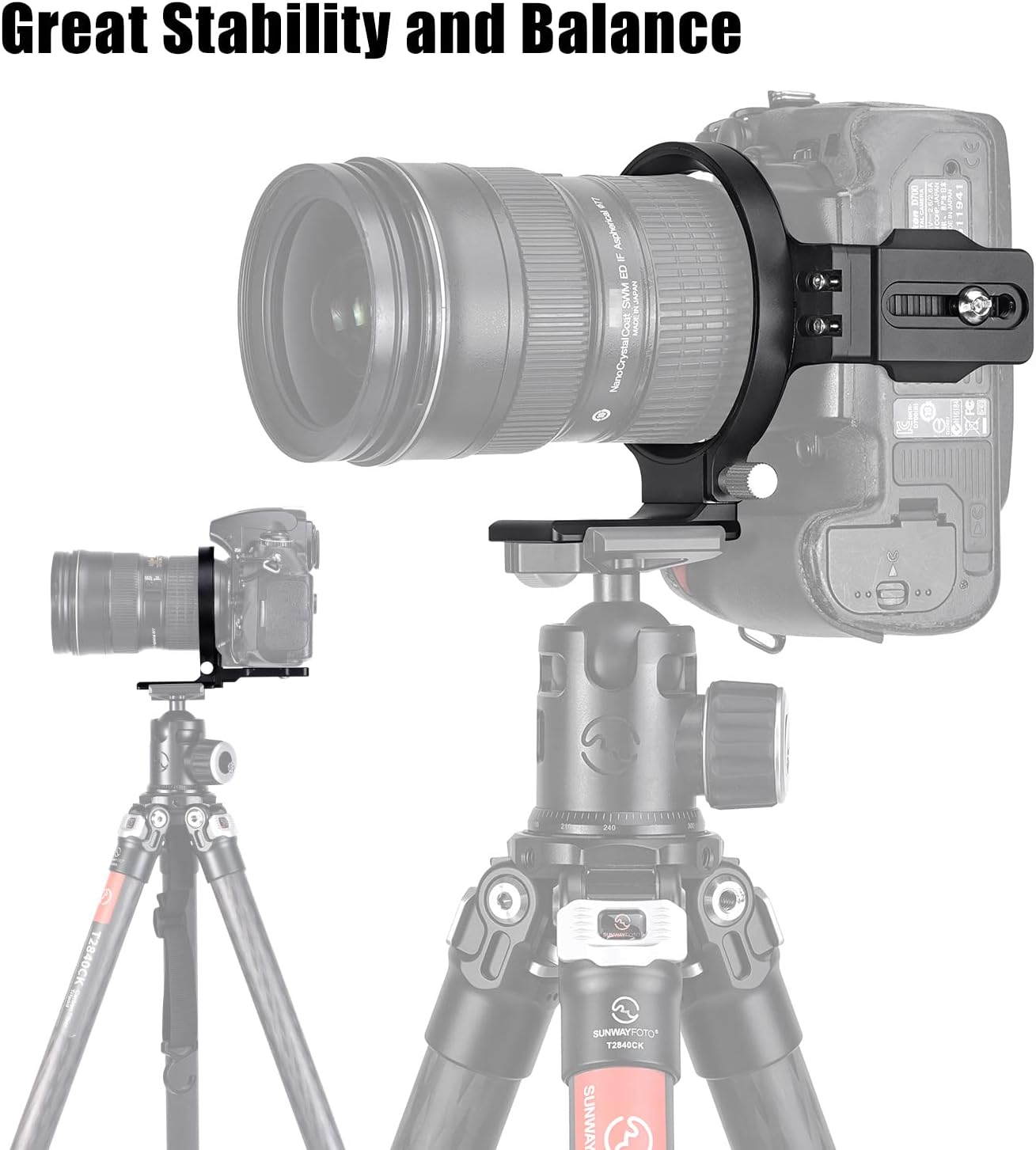
Image 6.1: Visual representation of the enhanced stability and balance provided by the LS-75 when supporting a camera and lens on a tripod.
7. Compatibility
The LS-75 is designed for broad compatibility with various DSLR and mirrorless camera models. Its inner ring has a diameter of 75mm, and the adjustable camera plate ensures a secure fit for different camera body thicknesses.
Compatible Camera Models Include:
- Canon DSLR: EOS 6DII, 5DIV, 5DIII, 5DII, 5D, 5DS, 5DSR, 50D, 60D, 70D, 80D, 90D
- Nikon DSLR: D850, D810, D800, D750, D700, D600
- Mirrorless Cameras: Canon R5, R6, R6II, R7, R8, R, RP, Fujifilm X-T4, X-T5

Image 7.1: The LS-75 shown with a mounted camera, highlighting its 75mm inner diameter and listing compatible camera brands and models.
8. Product Specifications

Image 8.1: Detailed specifications for the LS-75, including dimensions, weight, and mounting options.
| Specification | Value |
|---|---|
| Model Number | LS-75 |
| Inner Diameter of Inner Ring | 75mm |
| Length | 132mm |
| Height | 110mm |
| Weight | 160g (5.6 ounces) |
| Mounting Sockets | 1/4 inch, 3/8 inch |
| Material | Aero-space grade aluminum |
| Finish | Hard-anodized |
| Color | Black |
| Special Feature | Adjustable |
9. Care and Maintenance
To ensure the longevity and optimal performance of your SUNWAYFOTO LS-75 Universal Rotating Collar, follow these care guidelines:
- Cleaning: Wipe the collar with a soft, dry cloth after each use to remove dust and debris. For stubborn dirt, use a slightly damp cloth and then dry thoroughly. Avoid harsh chemicals or abrasive cleaners.
- Storage: Store the collar in a clean, dry environment away from extreme temperatures and humidity.
- Inspection: Periodically check all screws and moving parts for tightness. If any part feels loose, gently tighten it. Do not overtighten.
- Avoid Impact: Protect the collar from drops or impacts, which can damage its precision components and finish.
10. Troubleshooting
If you encounter any issues with your LS-75 collar, consider the following common solutions:
- Camera Not Rotating Smoothly: Ensure the lock-knob is sufficiently loosened. Check for any obstructions or debris in the rotating mechanism.
- Camera Feels Loose: Verify that the camera is securely attached to the inner ring's camera plate and that the lock-knob for rotation is fully tightened. Also, ensure the collar itself is firmly mounted to the tripod.
- Difficulty Achieving Balance: Adjust the height of the camera plate on the inner ring to find the optimal center of gravity for your specific camera and lens combination.
- Collar Not Fitting Tripod: Confirm that your tripod head or quick release plate is Arca-Swiss compatible, or that you are using the correct 1/4-inch or 3/8-inch thread for direct mounting.
11. Customer Support and Warranty
For technical assistance, warranty information, or any other inquiries regarding your SUNWAYFOTO LS-75 Universal Rotating Collar, please contact SUNWAYFOTO customer support through their official website or the retailer from whom you purchased the product. Please retain your proof of purchase for warranty claims.