
BAOFENG UV-17R
Contents
BAOFENG UV-17R Dual-Band Ham Radio User Manual
Model: UV-17R
1. Introduction
The BAOFENG UV-17R is a versatile 5W dual-band ham radio designed for reliable communication. It features 999 programmable channels, USB-C charging for convenience, and an 1800mAh battery for extended operation. This manual provides detailed instructions for setting up, operating, and maintaining your UV-17R radio.
2. Package Contents
Please check the package carefully to ensure all items are present:
- Dual Band Portable Radio (UV-17R)
- 1800mAh Battery
- High Gain Antenna
- Charger Base
- Belt Clip
- Hand Strap
- User's Manual
- Type-C Cable
- 771 Antenna
- Headset

Figure 2.1: The BAOFENG UV-17R radio with its complete set of accessories, including the radio unit, battery, antennas, charger, belt clip, hand strap, Type-C cable, and headset.
3. Product Overview
Familiarize yourself with the various parts and controls of your BAOFENG UV-17R radio.
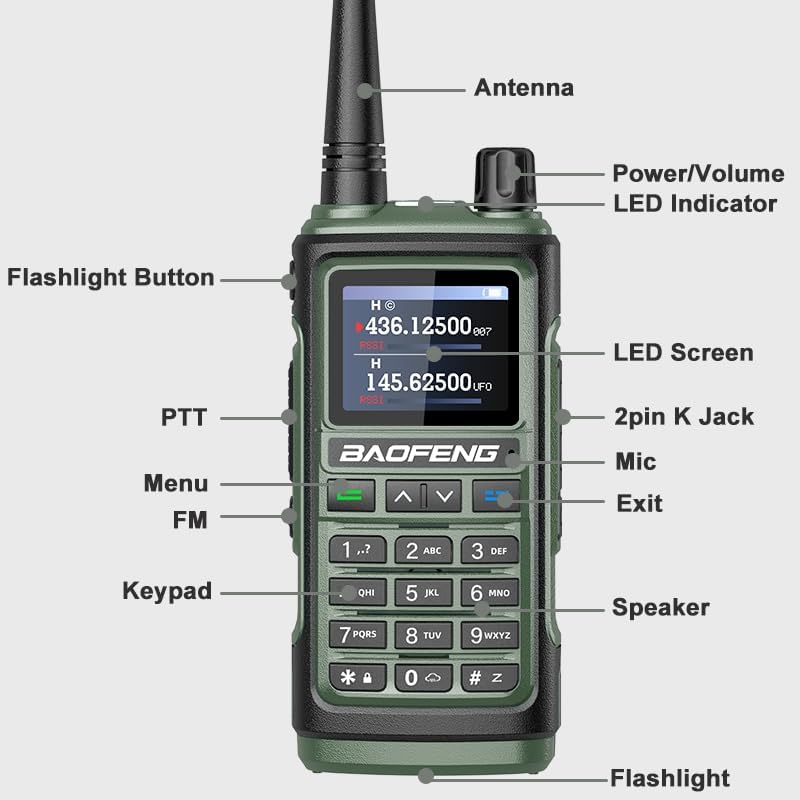
Figure 3.1: Labeled diagram of the BAOFENG UV-17R radio, indicating the Antenna, Power/Volume knob, LED Indicator, Flashlight Button, PTT (Push-To-Talk) button, Menu button, FM button, Keypad, Speaker, Flashlight, LED Screen, 2pin K Jack, Mic, and Exit button.
Key Components:
- Antenna: For transmitting and receiving signals.
- Power/Volume Knob: Rotates to turn the radio on/off and adjust volume.
- LED Indicator: Shows radio status (e.g., transmitting, receiving, charging).
- Flashlight Button: Activates the built-in LED flashlight.
- PTT (Push-To-Talk) Button: Press and hold to transmit, release to receive.
- Menu Button: Accesses the radio's menu settings.
- FM Button: Toggles FM radio mode.
- Keypad: For entering frequencies, channel numbers, and menu selections.
- Speaker: Outputs received audio.
- Flashlight: Integrated LED light for illumination.
- LED Screen: Displays frequency, channel, and other operational information.
- 2pin K Jack: For connecting external audio accessories like the included headset.
- Mic: Built-in microphone for voice transmission.
- Exit Button: Used to exit menus or cancel operations.
4. Setup
4.1 Battery Installation
- Align the 1800mAh battery with the battery compartment on the back of the radio.
- Slide the battery into place until it clicks securely.
- Ensure the fixing screw is tightened to prevent the battery from detaching.
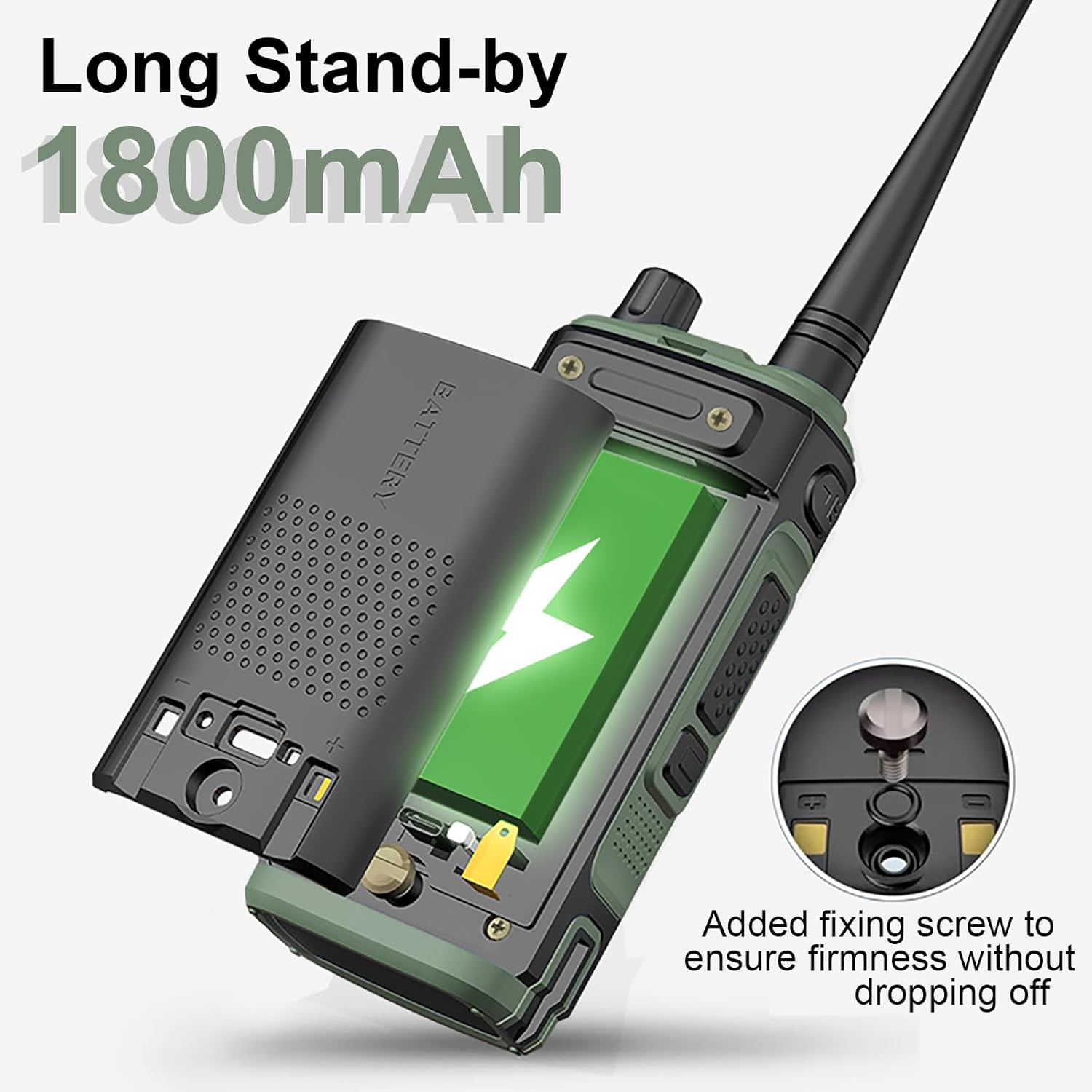
Figure 4.1: The BAOFENG UV-17R radio with its 1800mAh battery being installed, showing the open battery compartment and the fixing screw for secure attachment.
4.2 Antenna Attachment
- Screw the provided high-gain antenna clockwise onto the antenna connector on top of the radio until it is finger-tight. Do not overtighten.
4.3 Charging the Battery
The UV-17R offers flexible charging options:
- USB-C Charging: Connect the Type-C cable directly to the radio's USB-C port and a compatible power source (e.g., car charger, PC USB port, power bank).
- Charger Base: Place the radio into the provided charger base. Ensure the charging contacts align.
A full charge typically takes approximately 3 hours. The LED indicator will show charging status.

Figure 4.2: The BAOFENG UV-17R radio connected for USB-C charging, illustrating compatibility with car chargers, PC USB ports, and power banks. The image also indicates approximate battery life of 5 days and standby time of 10 days.
5. Operating Instructions
5.1 Power On/Off and Volume
Rotate the Power/Volume knob clockwise to turn the radio on and increase volume. Rotate counter-clockwise to decrease volume and turn the radio off.
5.2 Channel and Frequency Selection
Use the keypad to directly enter frequencies or channel numbers. The up/down arrow buttons can also be used to navigate through channels or adjust frequencies in VFO (Variable Frequency Oscillator) mode.
5.3 Frequency Copy Function
The UV-17R supports direct frequency copying from one radio to another without the need for a computer or programming cable. Refer to the on-screen prompts or the detailed menu guide for specific steps to initiate this function.

Figure 5.1: Two BAOFENG UV-17R radios illustrating the 'One Key Copy Frequency' feature, which allows direct frequency transfer between devices, eliminating the need for programming cables.
5.4 Dual-Band Operation
The radio operates on UHF (420-450MHz), VHF (144-148MHz), and FM broadcast bands. It features anti-interference and noise-canceling capabilities for clear communication.

Figure 5.2: The BAOFENG UV-17R radio screen showing active UHF (436.12500 MHz) and VHF (145.62500 MHz) frequencies, highlighting its dual-band capability for UHF, VHF, and FM operation.
5.5 NOAA Weather Alert
The UV-17R includes a NOAA function, providing access to 10 U.S.A. NOAA weather forecast channels. This feature allows users to receive weather warnings, which can be beneficial for outdoor activities and planning.
5.6 VOX Mode
VOX (Voice Operated Exchange) mode allows for hands-free transmission. When activated, the radio will automatically transmit when it detects your voice, eliminating the need to press the PTT button.
5.7 Flashlight Function
Press the dedicated Flashlight Button to activate the built-in LED flashlight. This feature provides illumination in low-light conditions.
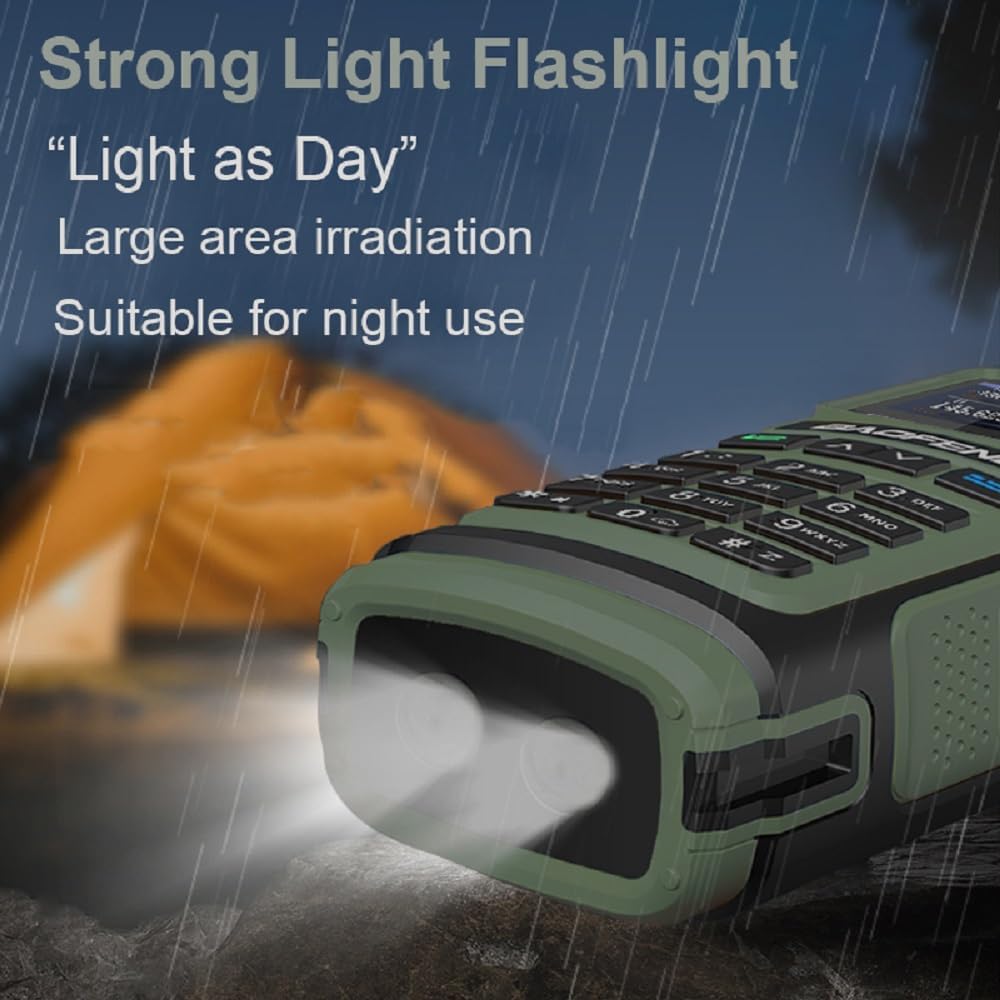
Figure 5.3: The BAOFENG UV-17R radio with its strong LED flashlight activated, illuminating a dark outdoor setting, demonstrating its utility for night use.
6. Maintenance
6.1 General Care
- Keep the radio dry. Avoid exposure to rain, moisture, or corrosive liquids.
- Do not expose the radio to extreme temperatures.
- Clean the radio's surface with a soft, damp cloth. Do not use harsh chemicals or solvents.
6.2 Battery Care
- Charge the battery fully before initial use.
- Avoid overcharging or completely draining the battery to prolong its lifespan.
- If storing the radio for an extended period, remove the battery and store it in a cool, dry place.
7. Troubleshooting
If you encounter issues with your UV-17R radio, refer to the following common problems and solutions:
| Problem | Possible Cause | Solution |
|---|---|---|
| Radio does not power on | Low or dead battery; improperly installed battery | Charge the battery; ensure battery is correctly installed and secured. |
| Cannot transmit or receive | Incorrect frequency/channel; antenna not attached; low battery; out of range | Verify frequency/channel settings; attach antenna securely; charge battery; move closer to other radios. |
| Poor audio quality | Low volume; interference; damaged speaker/mic | Adjust volume; move away from sources of interference; contact support if hardware is damaged. |
| Battery not charging | Faulty cable/charger; improper connection | Check cable and charger for damage; ensure secure connection to radio and power source. |
8. Specifications
| Feature | Specification |
|---|---|
| Brand | BAOFENG |
| Model Number | UV-17R |
| Number of Channels | 999 |
| Frequency Range | 144-148MHz (VHF), 420-450MHz (UHF), FM Broadcast |
| Battery Capacity | 1800mAh Lithium Ion |
| Input Voltage | DC 7.4V |
| Max Range | 3 Miles (approximate, terrain dependent) |
| Operating Temperature | -10°C to 60°C |
| Antenna Impedance | 50 Ω |
| Water Resistance Level | Water Repellent (IP54) |
| Item Weight | 1.52 pounds (approx. 24.33 ounces) |
| Package Dimensions | 7.99 x 4.64 x 4.13 inches |
| Special Features | 999 Channels, Dual Band, FM, NOAA, USB-C Charging, VOX, CTCSS/DCS |
9. Warranty and Support
9.1 Warranty Information
A 1-year warranty is provided for the BAOFENG UV-17R radio. This warranty is exclusively offered through "Shiqun Electronics Co., Ltd." Please retain your proof of purchase for warranty claims.
9.2 Customer Support
For technical assistance, troubleshooting beyond this manual, or warranty inquiries, please contact the seller or manufacturer's authorized support channels. Refer to your purchase documentation for specific contact information.
Documents and downloads
Ask a question about this manual
Ask about setup, troubleshooting, compatibility, parts, safety, or missing instructions. Manuals+ will review the question and use this page’s manual context to help answer it.