1. Introduction
This manual provides essential information for the safe and efficient use of your 100 BALANCE DALY BMS 60A 4S-8S Smart Active Balance Battery Management System. Please read this manual thoroughly before installation and operation to ensure proper functionality and to prevent damage to the device or battery pack. This BMS is designed for 4S to 8S LiFePO4, Li-ion, and LTO battery packs, offering comprehensive protection and active cell balancing.

Image 1.1: Overview of the DALY BMS 60A 4S-8S unit, highlighting its 4S-8S compatibility, 60A current rating, and BT+RS485+CAN communication features.
2. Safety Information
Always observe the following safety precautions to prevent injury or damage:
- Installation should only be performed by qualified personnel.
- Ensure all connections are correct and secure before applying power. Incorrect wiring can cause severe damage to the BMS and battery.
- Verify battery pack voltage and cell count compatibility with the BMS model. This model supports 4S, 6S, and 8S configurations.
- Avoid short circuits during installation and operation.
- Do not expose the BMS to water, excessive heat, or corrosive environments.
- Always disconnect the battery pack before performing any maintenance or adjustments.
- The BMS provides protection against overcharging, over-discharging, overcurrent, short circuits, and extreme temperatures. However, it is crucial to follow all installation guidelines to ensure these protections function correctly.
- Ensure cell voltages are balanced to within 1 volt difference before connecting the BMS to prevent triggering short circuit protection by high current during initial connection.
3. Product Features
- Active Cell Balancing: Features 1A active cell balancing to maintain cell voltage consistency, enhancing battery life and performance.
- Comprehensive Protection: Includes protection against overcharging, over-discharging, overcurrent, short circuits, and extreme temperatures.
- Additional Safety Features: Pre-charge protection, wrong connection/missing connection detection for wires, parallel connection current limiting, and continuous cell balancing.
- Smart Management: Integrated Bluetooth for monitoring and control via Android or iOS mobile application.
- Communication Interfaces: Supports RS485 and CAN communication protocols for advanced system integration.
- Voltage Compatibility: Compatible with 4S, 6S, and 8S battery packs (12V, 24V) for LiFePO4, Li-ion, and LTO chemistries.
- Versatile Applications: Suitable for RVs, portable power stations, trolling motors, electric vehicles, energy storage systems, and backup power supplies.
4. Package Contents
Upon opening the package, verify that all items listed below are present and undamaged:
- 60A Smart Active Balance BMS (1 unit)
- Sampling Cable (1 unit)
- P- & B- Cable (1 unit)
- B+ Cable (1 unit)
- NTC Temperature Sensor (1 unit)
- Screws (2 units)
- Operation Manual (1 unit)
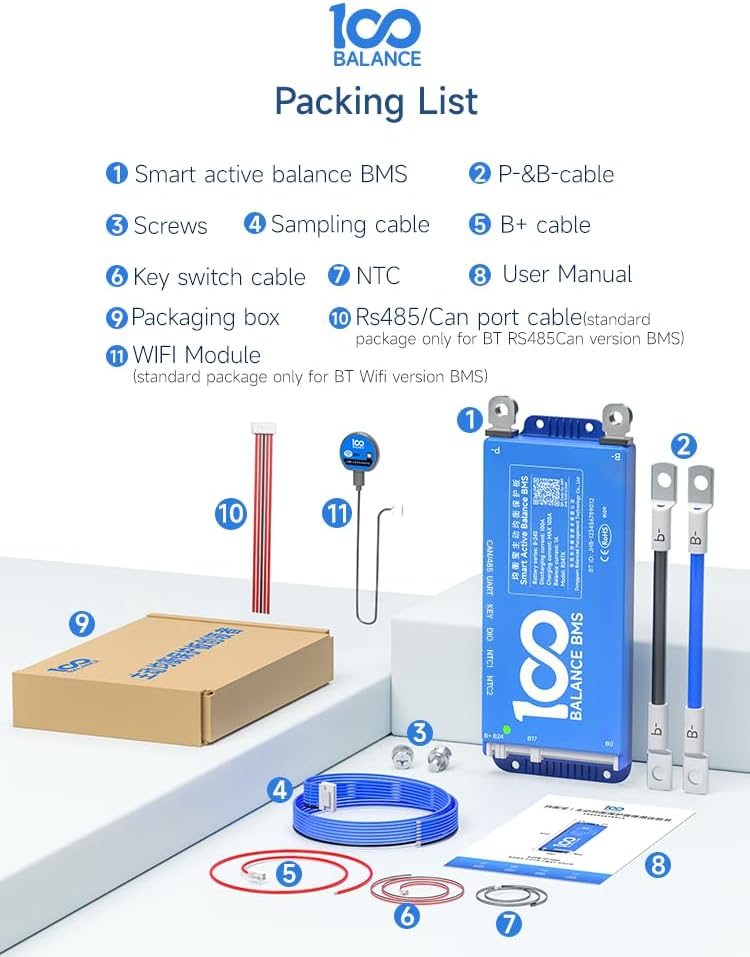
Image 4.1: Illustration of the DALY BMS 60A 4S-8S package contents, including the BMS unit, various cables, NTC sensor, screws, and the user manual.
5. Specifications
| Feature | Detail |
|---|---|
| Model | 60A 4-8S CAN |
| Battery Series Compatibility | 4S, 6S, 8S (12V, 24V) |
| Battery Chemistry Compatibility | LiFePO4, Li-ion, LTO |
| Continuous Discharge Current | 60A |
| Active Balancing Current | 1A |
| Communication Interfaces | Bluetooth, RS485, CAN |
| Dimensions (L x W x H) | Approx. 167mm x 65mm x 15mm |
| Item Weight | 15.9 ounces |
| Manufacturer | Dongguan Balanced Management Technology Co., Ltd |
| Warranty | 1 Year |

Image 5.1: Physical dimensions of the DALY BMS 60A 4S-8S unit, showing its compact size and key measurements.
6. Installation
6.1. Pre-Installation Checks
- Ensure all battery cells are balanced to within 0.1V before connecting the BMS. Significant voltage differences can cause high balancing currents upon initial connection, potentially triggering protection.
- Confirm the battery pack's series configuration (4S, 6S, or 8S) matches the BMS model.
- Prepare all necessary tools and ensure a clean, dry working environment.
6.2. Wiring Diagram and Connection
Follow the wiring diagram carefully. Incorrect wiring is the most common cause of BMS failure.
- Connect the B- (negative) terminal of the BMS to the main negative terminal of the battery pack.
- Connect the P- (load negative) terminal of the BMS to the negative terminal of your load/charger.
- Connect the B+ (positive) terminal of the BMS to the main positive terminal of the battery pack.
- Connect the individual cell sampling wires from the battery pack to the corresponding ports on the BMS. Start from B0 (main negative) and proceed sequentially to B1, B2, up to B8, ensuring each wire connects to the correct cell tap.
- Connect the NTC temperature sensor to the battery pack, ideally near the center cells, and plug it into the NTC port on the BMS.
- If using RS485 or CAN communication, connect the respective cables to the BMS and your external device (e.g., PC host, display).
Video 6.1: This video demonstrates the process of connecting the BMS to a battery pack, including wiring and initial voltage checks to ensure proper setup and prevent protection triggers.

Image 6.2: Diagram illustrating the various multi-channel communication options supported by the BMS, including PC Host (CAN/RS485/UART), Mobile APP, IoT Cloud, WiFi module, GPS module, Key switch, Buzzer, Heating Module, and Temperature control.
7. Operation
7.1. Mobile App Connection and Monitoring
The DALY BMS features built-in Bluetooth for wireless monitoring and control via a dedicated mobile application (Android/iOS).
- Download the official DALY BMS app from your device's app store.
- Ensure Bluetooth is enabled on your mobile device.
- Open the app and search for available BMS devices. Select your BMS from the list.
- Once connected, you can monitor real-time battery status, individual cell voltages, temperature, current, and adjust various protection parameters.

Image 7.1: The DALY BMS connected via Bluetooth to a mobile application, displaying monitoring options and settings.
7.2. PC Host Connection (UART Communication Example)
For advanced configuration and data logging, the BMS can be connected to a PC via a UART cable (sold separately).
- Connect one end of the UART cable to the UART port on the BMS.
- Connect the other end of the UART cable (USB connector) to your PC.
- Install the necessary PC Host software and drivers (available from the manufacturer's website).
- Open the PC Host software to access detailed monitoring, parameter settings, and firmware updates.
Video 7.2: This video provides a guide on connecting the BMS to a PC host using a UART cable for advanced monitoring and configuration.
8. Protection Features
The DALY BMS incorporates multiple protection mechanisms to safeguard your battery pack:
- Overcharge Protection: Prevents cells from being charged beyond their safe voltage limit.
- Over-discharge Protection: Stops discharge when cell voltages drop below a safe minimum, preventing irreversible damage.
- Overcurrent Protection: Disconnects the load if the discharge current exceeds the rated limit.
- Short Circuit Protection: Immediately cuts off current in case of a short circuit.
- Temperature Protection: Monitors battery temperature and disconnects if temperatures exceed safe operating ranges (both high and low).
- Pre-charge Protection: Manages initial charging to prevent sudden current surges.
- Misconnection Protection: Designed to mitigate damage from incorrect wiring.
- Parallel Protection: Ensures safe operation when multiple battery packs with BMS are connected in parallel.

Image 8.1: Visual representation of the quadruple extra protection features: Parallel protection, Pre-charge protection, Misconnection protection, and All-in protection.
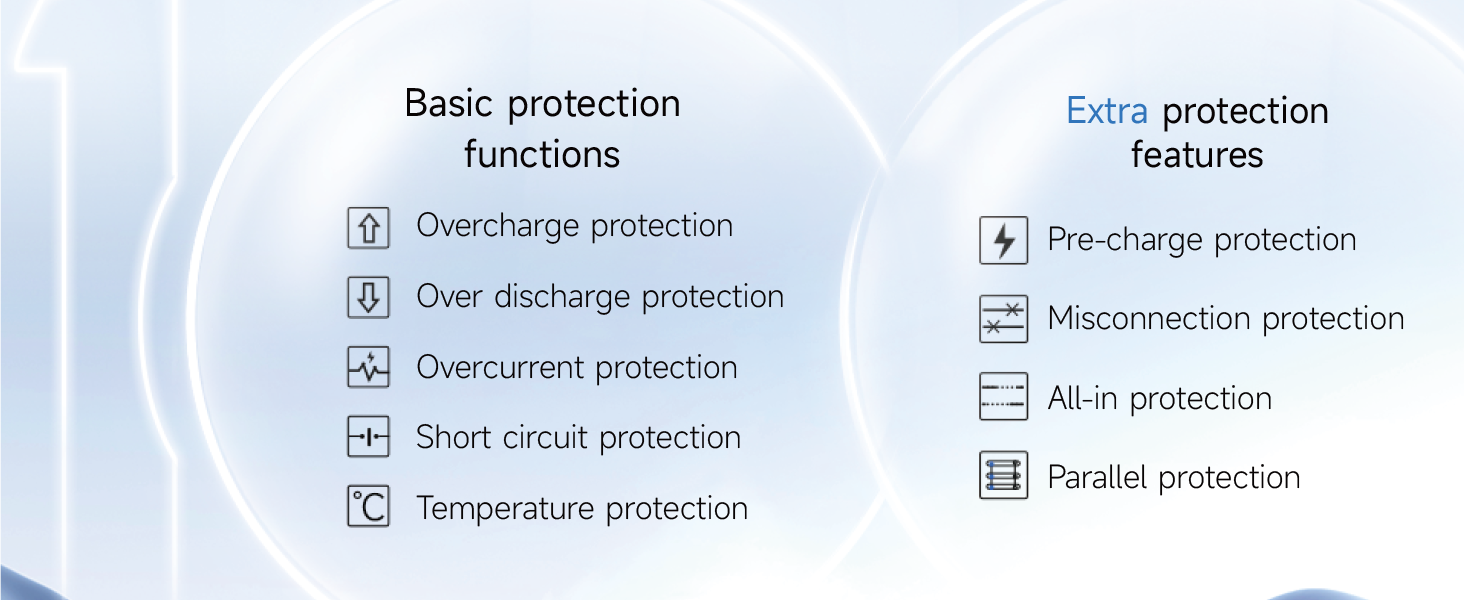
Image 8.2: Diagram detailing both basic protection functions (Overcharge, Over discharge, Overcurrent, Short circuit, Temperature protection) and extra protection features (Pre-charge, Misconnection, All-in, Parallel protection).
9. Troubleshooting
This section addresses common issues you might encounter with your DALY BMS.
| Problem | Possible Cause | Solution |
|---|---|---|
| BMS not powering on / No output | Incorrect wiring, low battery voltage, BMS in protection mode. | Verify all wiring connections. Check battery pack voltage. If in protection, identify and resolve the trigger (e.g., over-discharge, short circuit) and attempt to reset the BMS (e.g., by connecting a charger). |
| Bluetooth connection issues | Bluetooth not enabled, app issues, BMS too far from device, BMS in sleep mode. | Ensure Bluetooth is on. Restart the app. Move closer to the BMS. Check BMS settings for sleep waiting time (if configurable via PC software). |
| Cells out of balance | Initial cell imbalance, high current draw, prolonged inactivity. | Allow the active balancing feature to work over time. For severe imbalances, consider external balancing or a full charge/discharge cycle. Verify sampling wire connections. |
| BMS frequently triggers protection | Parameters set too aggressively, faulty cells, excessive load, high/low temperature. | Review and adjust protection parameters via the app or PC software. Inspect battery cells for damage. Reduce load. Ensure operating within temperature limits. |
10. Maintenance
Regular maintenance ensures the longevity and optimal performance of your DALY BMS and battery pack:
- Regular Monitoring: Periodically check cell voltages, temperature, and overall battery health via the mobile app or PC software.
- Connection Checks: Annually inspect all wiring connections for tightness and corrosion. Re-tighten if necessary.
- Cleanliness: Keep the BMS unit clean and free from dust and debris. Use a dry, soft cloth for cleaning.
- Firmware Updates: Check the manufacturer's website for any available firmware updates for your BMS model to ensure you have the latest features and bug fixes.
- Environmental Conditions: Ensure the BMS operates within its specified temperature and humidity ranges.
11. Warranty and Support
The DALY BMS 60A 4S-8S comes with a 1-year warranty from the date of purchase, covering manufacturing defects. This warranty does not cover damage caused by improper installation, misuse, unauthorized modifications, or external factors such as water damage or extreme temperatures.
For technical support, warranty claims, or further inquiries, please contact your retailer or the manufacturer directly. Refer to the contact information provided on the product packaging or the official 100 BALANCE website.
Manufacturer: Dongguan Balanced Management Technology Co., Ltd


