
DURACELL 1654528
Contents
Duracell 2000 Lumen Tri-Power Lantern Instruction Manual
Brand: DURACELL | Model: 1654528
Product Overview
The Duracell 2000 Lumen Tri-Power Lantern is designed to provide versatile illumination and power in various settings, from outdoor adventures like camping and fishing to emergency situations. Its robust design and multiple power options ensure reliability when you need it most.

Figure 1: Duracell 2000 Lumen Tri-Power Lantern, showcasing its compact and portable design.
Key Features
- High Brightness: Delivers up to 2000 lumens of LED illumination.
- Versatile Illumination: Offers 360° and 180° lighting options.
- Multiple Light Modes: Features 6 distinct light modes, including a red flashing light for emergencies.
- Tri-Power Options: Can be powered by a built-in rechargeable battery, solar panel, or D-cell batteries (not included).
- Integrated Charging Ports: Equipped with built-in USB and USB-C ports for charging external devices.
- Durable Design: IPX4/IPX7 waterproof rating and tested for 1-meter drop resistance.
- Portable: Includes a sturdy handle for easy carrying and hanging.
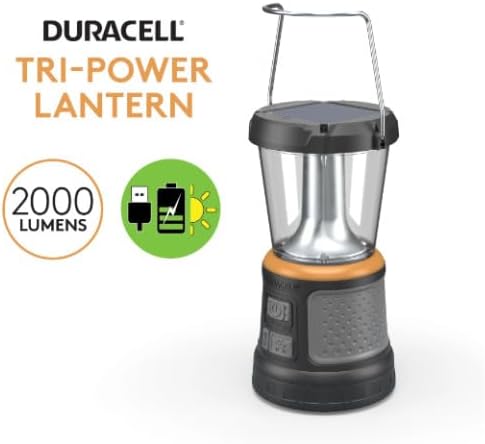
Figure 2: Visual representation of the lantern's 2000 lumens output and its three power options: USB, internal battery, and solar.
Setup and Charging
Initial Setup:
Upon unboxing, ensure all components are present, including the Duracell Tri-Power Lantern and the included charging cable. It is recommended to fully charge the lantern before first use.
Charging Options:
- USB/USB-C Charging: Connect the included charging cable to the appropriate USB or USB-C port on the lantern and to a compatible power source (e.g., wall adapter, power bank). The charging indicator lights will show charging status.
- Solar Charging: Place the lantern with its solar panel facing direct sunlight. The solar panel is located on the top of the lantern. This method is ideal for maintaining charge during outdoor use.
- D-Cell Battery Power: For extended use or when other charging methods are unavailable, the lantern supports D-cell batteries. To install, twist off the bottom cap of the lantern, insert the required D-cell batteries (not included) according to polarity markings, and securely reattach the cap.

Figure 3: Top view of the lantern, highlighting the integrated solar panel for convenient outdoor charging.

Figure 4: Bottom section of the lantern, illustrating the twist-off compartment for D-cell battery installation.
Operating Instructions
Powering On/Off and Light Modes:
Locate the power button on the front of the lantern. Press the button repeatedly to cycle through the available light modes:
- High Brightness (2000 Lumens): Provides maximum illumination for large areas.
- Medium Brightness (250 Lumens): Suitable for general lighting needs.
- Low Brightness (65 Lumens): Ideal for extended battery life or subtle lighting.
- Red Flashing Light: For emergency signaling or increased visibility.
- Additional modes may include 360° and 180° illumination options, activated by subsequent presses.
Using as a Power Bank:
The lantern can charge external devices. Connect your smartphone or other USB-powered device to the USB or USB-C output port on the lantern using your device's charging cable. The lantern's internal battery will then supply power to your device.

Figure 5: The lantern providing ample illumination in an outdoor setting, demonstrating its practical use.
Maintenance and Care
- Cleaning: Wipe the lantern with a soft, damp cloth. Do not use abrasive cleaners or solvents.
- Water Resistance: The lantern has an IPX4/IPX7 waterproof rating, meaning it is protected against splashing water from any direction (IPX4) and can withstand immersion in water up to 1 meter for 30 minutes (IPX7). Ensure all ports are securely closed when exposed to water.
- Storage: Store the lantern in a cool, dry place when not in use. If storing for extended periods, ensure the internal battery is partially charged (around 50%) to prolong its lifespan.
- Battery Replacement: If using D-cell batteries, replace them when the light output diminishes significantly. Always use fresh, high-quality batteries.
Troubleshooting
- Lantern not turning on:
- Check if the internal battery is charged.
- If using D-cell batteries, ensure they are correctly inserted and not depleted.
- External device not charging:
- Verify the charging cable is securely connected to both the lantern and the device.
- Ensure the lantern's internal battery has sufficient charge.
- Dim light output:
- The battery may be low. Recharge the lantern or replace D-cell batteries.
- Ensure the light surface is clean and free from obstructions.
Specifications
| Attribute | Detail |
|---|---|
| Model Number | 1654528 |
| Light Source Type | LED |
| Brightness | 2000 Lumens (Max) |
| Power Source | Battery Powered (Internal Lithium-Ion, Solar, D-Cell) |
| Battery Life (Internal) | Up to 5 hours (High), 20 hours (Medium), 50 hours (Low) |
| Water Resistance | IPX4 / IPX7 |
| Drop Test | 1 Meter |
| Dimensions (L x W x H) | 5.51 x 5.51 x 10.24 inches |
| Weight | 2.16 pounds |
| Included Components | Charging Cable |

Figure 6: Comprehensive specifications and performance data for the lantern, including battery life at different lumen settings.
Warranty and Support
For warranty information, technical support, or service inquiries, please refer to the official Duracell website or contact their customer service department. Keep your purchase receipt as proof of purchase.
For more information, visit the DURACELL Store on Amazon.
Documents and downloads
Ask a question about this manual
Ask about setup, troubleshooting, compatibility, parts, safety, or missing instructions. Manuals+ will review the question and use this page’s manual context to help answer it.