
Introduction
Welcome to the world of Maverick RC! This manual provides essential information for the setup, operation, maintenance, and troubleshooting of your new Maverick Quantum2 MT Flux Brushless 1/10 RTR Monster Truck. Please read this manual thoroughly before operating your vehicle to ensure safe and optimal performance. Keep this manual for future reference.

Image: The Maverick Quantum2 MT Flux Brushless 1/10 RTR Monster Truck, showcasing its red, white, and black livery from a front three-quarter perspective.
Package Contents
Your Maverick Quantum2 MT Flux Brushless 1/10 RTR Monster Truck package includes the following items:
- One (1) Maverick Quantum2 MT Flux Brushless 1/10 RTR Monster Truck (Red)
- Pre-installed Tredz wheels and tires
- Functional front and rear lights with brake lights
- One (1) Maverick controller/transmitter

Image: The Maverick Quantum2 MT Flux Monster Truck, its remote control, and included documentation, displayed alongside the product packaging.
Needed To Complete
To operate your Maverick Quantum2 MT Flux Monster Truck, you will need the following items, which are not included in the package:
- One (1) 2-3S LiPo Battery with XT60 Connectors
- One (1) Compatible LiPo Charger
- Four (4) AA Batteries for the Transmitter
Specifications
Detailed specifications for the Maverick Quantum2 MT Flux Brushless 1/10 RTR Monster Truck:
| Feature | Specification |
|---|---|
| Scale | 1/10 |
| Length | 475mm (18.7 inches) |
| Width | 355mm (14 inches) |
| Height | 195mm |
| Wheelbase | 285mm (11.2 inches) |
| Drive | 4WD |
| Hex Size | 14mm |
| Power Source | Electric |
| Input Voltage | 2-3S (7.4-11.1V) LiPo |
| Completion Level | Ready-To-Run (RTR) |
| Item Weight | 9.02 pounds |
| Model Number | 150405 |
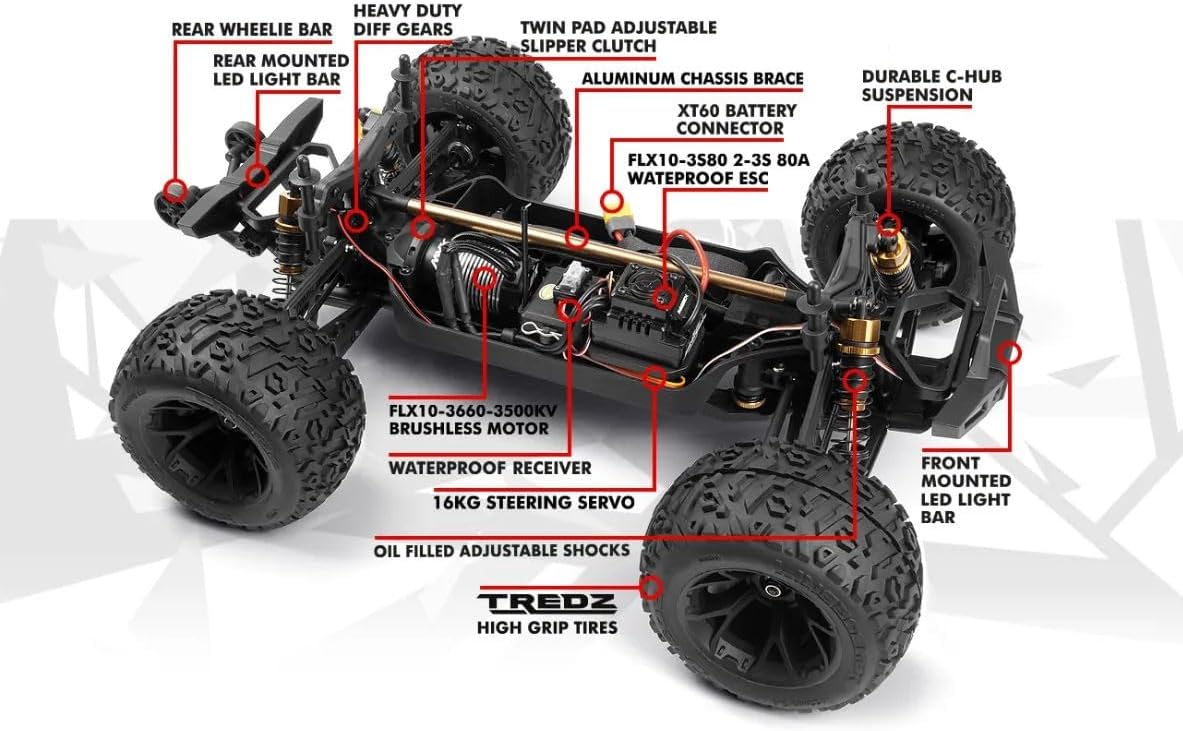
Image: An overhead view of the Maverick Quantum2 MT Flux chassis with key components labeled, including the motor, ESC, servo, shocks, and battery connector.
Setup
- Charge the LiPo Battery: Before first use, fully charge your 2S or 3S LiPo battery using a compatible LiPo charger. Always follow the charger manufacturer's instructions and safety guidelines for LiPo battery charging.
- Install Transmitter Batteries: Open the battery compartment on the back of the transmitter and insert four (4) AA batteries, observing the correct polarity. Close the compartment securely.
- Install Vehicle Battery: Securely place the charged LiPo battery into the battery tray of the monster truck. Connect the XT60 connector from the battery to the Electronic Speed Controller (ESC). Ensure all connections are firm.
- Power On: First, turn on the transmitter. Then, turn on the vehicle's power switch, typically located on the ESC. The vehicle's lights should illuminate, and the ESC will emit a series of beeps indicating successful power-up and battery cell count.
- Function Check: With the vehicle's wheels off the ground, gently test the steering and throttle. Ensure the steering responds correctly to transmitter inputs (left/right) and the throttle provides forward and reverse movement. Adjust steering trim on the transmitter if the wheels are not straight when the steering wheel is centered.
Important Safety Note: While the vehicle supports 2S and 3S LiPo batteries, operating consistently with a 3S LiPo battery may place excessive stress on the differentials, potentially leading to premature wear or failure, particularly in the front differential. For extended durability, especially during aggressive driving, consider primarily using 2S LiPo batteries or performing regular differential inspections and maintenance when using 3S.
Operating
Operating your Maverick Quantum2 MT Flux Monster Truck requires practice and adherence to safety guidelines. Always operate in a safe, open area away from people, pets, and obstacles.
- Throttle Control: The trigger on the transmitter controls the throttle. Pull the trigger back for forward motion and push it forward for reverse/brake. Practice smooth acceleration and braking.
- Steering Control: The steering wheel on the transmitter controls the direction. Turn the wheel left to steer left and right to steer right.
- Driving Environment: Choose a suitable environment for driving, such as dirt tracks, grass, or paved surfaces. Avoid water, deep mud, or extremely dusty conditions unless the vehicle is specifically designed and sealed for such use. While the ESC is waterproof, other components may not be.
- Battery Management: Monitor your battery's charge. When the vehicle starts to slow down significantly or the ESC's low voltage cutoff activates, stop operating immediately to prevent over-discharging the LiPo battery.
- Post-Operation: After use, always turn off the vehicle first, then the transmitter. Disconnect the LiPo battery from the vehicle and store it safely according to LiPo battery guidelines.

Image: The Maverick Quantum2 MT Flux Monster Truck positioned on a concrete ramp, demonstrating its suspension travel.
Maintenance
Regular maintenance is crucial for the longevity and performance of your monster truck.
- Cleaning: After each use, especially in dirty or dusty conditions, clean the vehicle. Use a soft brush or compressed air to remove dirt and debris from the chassis, suspension, and drivetrain. Avoid using water directly on electronics unless they are specifically rated as fully waterproof.
- Inspection: Regularly inspect all screws, nuts, and bolts for tightness. Check the suspension components (shocks, arms) for damage or wear. Ensure the wheels are securely attached.
- Drivetrain Check: Inspect the gears (spur, pinion, differentials) for wear or damage. Pay particular attention to the differentials, especially if operating with 3S LiPo batteries, as they can experience increased stress. Lubricate moving parts as recommended by Maverick.
- Motor and ESC: Keep the motor and ESC free from debris. Ensure proper airflow around the ESC for cooling.
- Tires: Check tires for punctures or excessive wear. Ensure they are properly glued to the wheels.

Image: An overhead view of the Maverick Quantum2 MT Flux chassis, revealing the internal layout of the motor, ESC, battery tray, and drivetrain components.
Troubleshooting
This section addresses common issues you might encounter with your Maverick Quantum2 MT Flux Monster Truck.
- Vehicle Not Responding:
- Check if the vehicle's LiPo battery is charged and properly connected.
- Ensure the transmitter has fresh AA batteries and is turned on.
- Verify that the vehicle's power switch is in the 'ON' position.
- Confirm that the transmitter and receiver are properly bound. Refer to the transmitter's specific manual for binding procedures if necessary.
- Motor Not Running / Weak Performance:
- The LiPo battery may be low on charge. Recharge it.
- Check motor and ESC connections for looseness.
- Inspect the motor for any obstructions or debris.
- If the ESC is hot, it might be in thermal shutdown. Allow it to cool down.
- Steering Issues:
- Check the servo connection to the receiver.
- Ensure the servo horn and steering linkages are not damaged or obstructed.
- Adjust the steering trim on the transmitter if the vehicle pulls to one side.
- Unusual Noises:
- Grinding noises often indicate issues with gears (spur, pinion, or differentials). Inspect for worn or damaged teeth.
- Clicking sounds can point to universal joints or dogbones.
If you encounter persistent issues not covered here, please contact Maverick customer support for assistance.
Warranty and Support
Maverick products are manufactured to high standards. For information regarding warranty coverage, terms, and conditions, please refer to the documentation included with your product or visit the official Maverick RC website. For technical support, spare parts, or further assistance, please contact your local Maverick dealer or the Maverick customer support team.
You can often find additional resources, FAQs, and community forums online by searching for "Maverick RC support" or visiting the manufacturer's website directly.


