Introduction
This manual provides essential information for the proper use and maintenance of your BRINKS 30mm Solid Brass 4-Dial Resettable Combination Padlock. Please read these instructions carefully before using the product to ensure optimal security and longevity.

Image: Two BRINKS 30mm Solid Brass 4-Dial Resettable Combination Padlocks, showing the brass body and chrome-plated shackle with four numerical dials set to '0000'.
Product Features
- 30mm Solid Brass Body: Provides durability and corrosion resistance, suitable for indoor and outdoor use.
- Chrome Plated Hardened Steel Shackle: Offers enhanced cut resistance, with a cut strength up to 1200 lbs.
- 4-Dial Resettable Combination: Allows for a personalized and easily changeable code.
- Weather Resistant: Designed to withstand various environmental conditions.
- Versatile Application: Ideal for securing lockers, toolboxes, small storage containers, and backpacks.
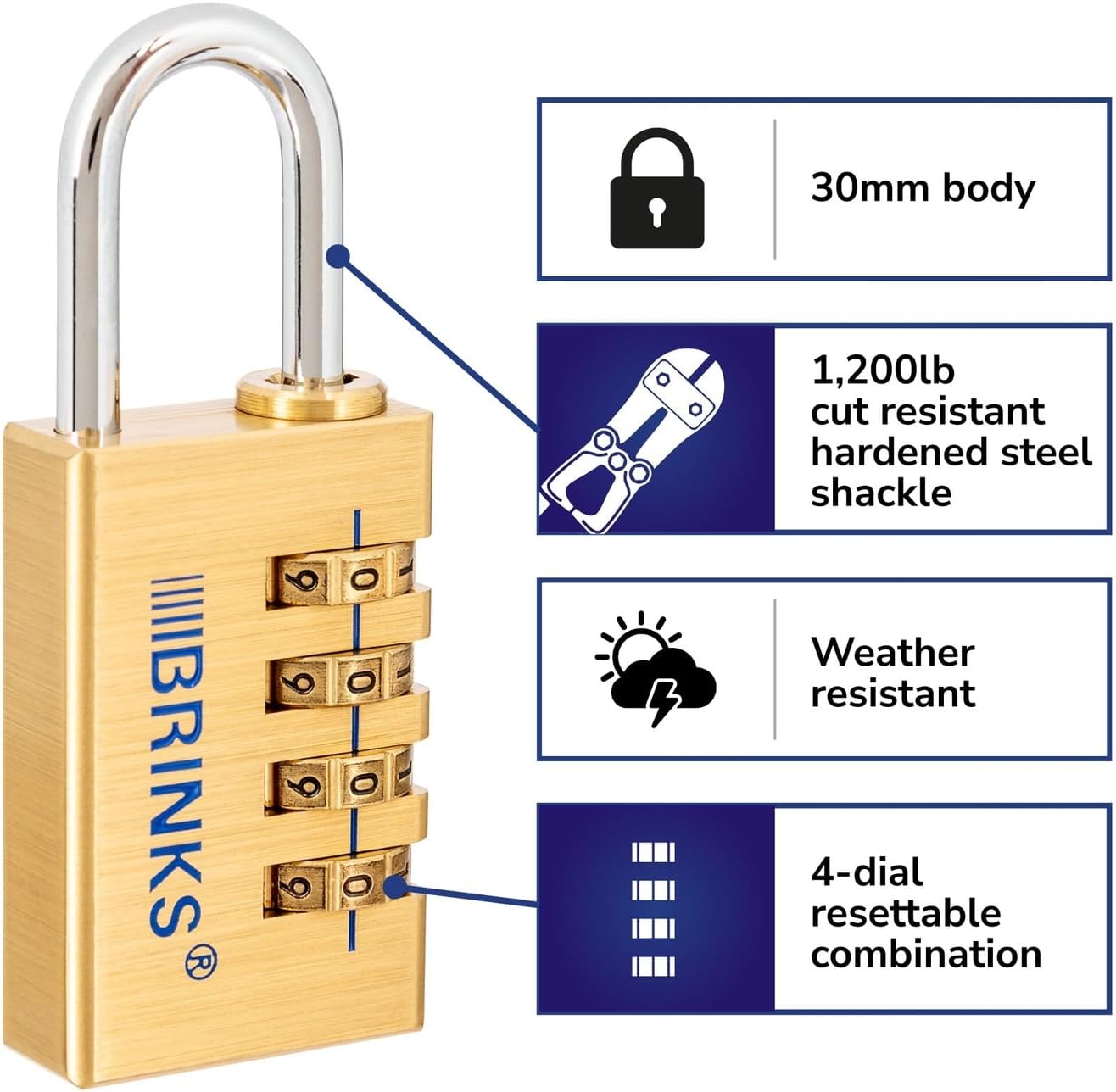
Image: A diagram illustrating the key features of the BRINKS padlock, including its 30mm body, 1,200lb cut-resistant hardened steel shackle, weather resistance, and 4-dial resettable combination.
Setting Your Combination
Your padlock is factory preset to 0-0-0-0. To set your personal combination, follow these steps:
- Open the padlock by aligning the factory preset code (0-0-0-0) with the indicator line and pulling up the shackle.
- With the shackle in the open position, rotate it 90 degrees counter-clockwise until it aligns with the notch on the lock body.
- Press the shackle down firmly into the lock body. While holding it down, set your desired 4-digit combination by rotating the dials. Ensure the numbers are clearly aligned with the indicator line.
- Once your new combination is set, pull the shackle up to release it from the pressed-down position.
- Rotate the shackle back 90 degrees clockwise to its original open position.
- Close the shackle by pushing it down. Scramble the dials to lock the padlock.
Important: Remember your new combination. There is no master key or override for this lock. If you forget your combination, the lock cannot be opened without knowing the code.

Image: A close-up view of the BRINKS padlock's four numerical dials, showing the alignment line for setting the combination.
Operating the Padlock
To Open:
- Align your personal 4-digit combination with the indicator line on the front of the padlock.
- Pull the shackle upwards to release it from the lock body.
To Close and Secure:
- Insert the shackle back into the lock body.
- Scramble the dials to a random set of numbers. This will secure the padlock.
Ensure the shackle is fully seated and the dials are scrambled after closing to prevent accidental opening.

Image: A BRINKS padlock securing the latch of a metal toolbox, demonstrating a common application.

Image: A BRINKS padlock attached to the handle of a gray locker, illustrating its use for personal storage.
Maintenance
To ensure the smooth operation and longevity of your BRINKS padlock, consider the following maintenance tips:
- Cleaning: Wipe the padlock body and shackle with a soft, dry cloth to remove dirt and grime. Avoid abrasive cleaners.
- Lubrication: Periodically apply a small amount of graphite lubricant or a silicone-based spray to the shackle mechanism and dials to maintain smooth movement, especially if used in dusty or outdoor environments.
- Inspection: Regularly inspect the padlock for any signs of wear or damage. If the shackle or dials become stiff, apply lubricant.
Troubleshooting
Padlock will not open with the correct combination:
- Ensure all four dials are perfectly aligned with the indicator line. Sometimes a dial might be slightly off.
- Verify that you are using the correct combination. If you recently reset it, try the new code.
- Apply a lubricant to the shackle and dials, then try again.
Difficulty setting a new combination:
- Ensure the shackle is rotated exactly 90 degrees counter-clockwise and pressed down firmly into the lock body before attempting to set the new code.
- Make sure the dials are aligned with the indicator line when setting the new combination.
Shackle is stiff or difficult to move:
- Apply a suitable lubricant (e.g., graphite or silicone spray) to the shackle entry points and around the base of the shackle.
- Work the shackle open and closed several times after lubrication to distribute the product.
Specifications
| Brand | BRINKS |
| Model Name | Brass Padlock |
| Item Model Number | 171-30051-2A |
| Lock Type | Combination Lock |
| Special Feature | Weather Resistant |
| Material | Brass |
| Shackle Material | Hardened Steel (Chrome Plated) |
| Cut Strength | Up to 1200 lbs |
| Item Dimensions (L x W x H) | 3.25 x 1.5 x 6.38 inches |
| Item Weight | 0.634 ounces |
| Recommended Uses | Indoor and outdoor use, securing small storage containers, lockers, and backpacks. |
Warranty and Support
For warranty information or technical support regarding your BRINKS padlock, please refer to the official BRINKS website or contact their customer service directly. Contact details are typically available on the product packaging or the manufacturer's official website.
You can visit the official BRINKS store for more information: BRINKS Store on Amazon


