
JoySpark T5
JoySpark Kids Bluetooth Headphones User Manual
Model: T5
Introduction
Thank you for choosing JoySpark Kids Bluetooth Headphones. These headphones are designed to provide a safe, comfortable, and enjoyable audio experience for children, featuring volume limiting technology and long battery life. Please read this manual carefully before use to ensure proper operation and maintenance.

Image: JoySpark Kids Bluetooth Headphones, showcasing the blue color and over-ear design.
Safety Information
To ensure the safety and well-being of your child, please observe the following guidelines:
- Volume Limiting: These headphones feature an 85/94dB volume limit to protect children's hearing. Always use the appropriate volume mode.
- Supervision: Adult supervision is recommended, especially for younger children, to ensure proper use and prevent entanglement with cables.
- Cleaning: Clean the headphones with a soft, dry cloth. Do not use liquid cleaners or immerse in water.
- Choking Hazard: Keep small parts and cables away from infants and young children.
- Storage: Store headphones in a cool, dry place away from direct sunlight and extreme temperatures.

Image: A child wearing JoySpark headphones, illustrating the safe volume mode feature with a frequency response graph.
Package Contents
Please check the box for the following items:
- JoySpark Kids Bluetooth Headphones (Model T5)
- USB-C Charging Cable
- 3.5mm Audio Cable
- User Manual

Image: Contents of the JoySpark headphone package, including the headphones, charging cable, audio cable, and manual.
Product Overview
Familiarize yourself with the different parts and controls of your JoySpark headphones.

Image: Detailed view of the headphones highlighting the adjustable headband, soft earmuffs, and foldable design for portability.
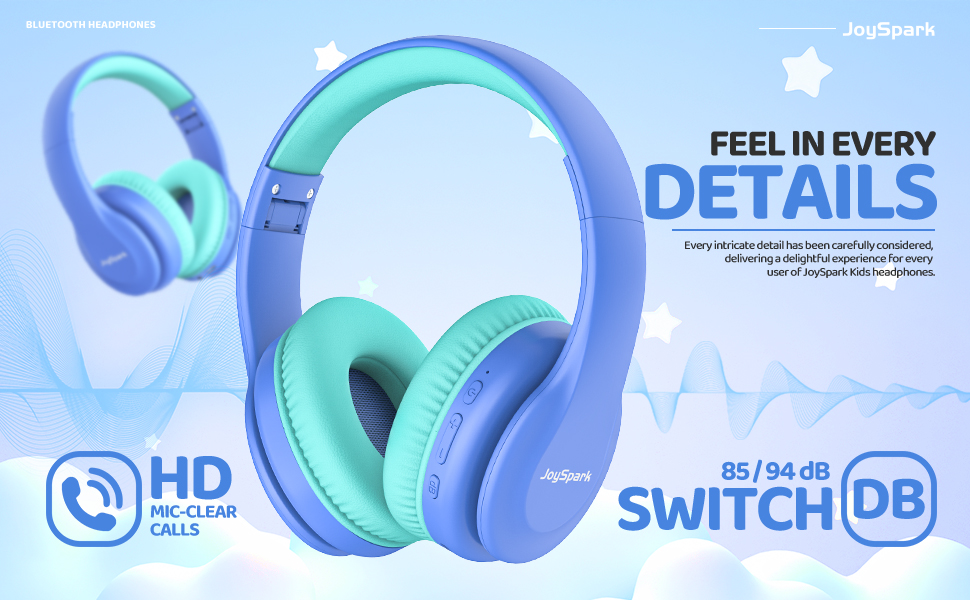
Image: Close-up of the right earcup showing the control buttons, including the volume up/down, multi-function button, and the 85/94dB switch.
Setup
1. Charging the Headphones
Before first use, fully charge the headphones. A full charge provides up to 60 hours of playtime.
- Connect the provided USB-C charging cable to the charging port on the headphones.
- Connect the other end of the cable to a USB power adapter (not included) or a computer's USB port.
- The LED indicator will show charging status (e.g., red for charging, blue for fully charged).

Image: Visual representation of the 60-hour battery life, USB-C charging port, and the flexibility of both wireless and wired connections.
2. Bluetooth Pairing
Pair your headphones with a Bluetooth-enabled device (e.g., smartphone, tablet, computer).
- Ensure the headphones are charged and turned off.
- Press and hold the Power/Multi-function button until the LED indicator flashes blue and red, indicating pairing mode.
- On your device, go to Bluetooth settings and turn on Bluetooth.
- Select "JoySpark T5" from the list of available devices.
- Once connected, the LED indicator will flash blue slowly or turn solid blue.

Image: Illustration of the headphones' broad compatibility with devices like smartphones, tablets, gaming consoles, and laptops, powered by Bluetooth 5.3.
3. Wired Connection
For devices without Bluetooth or when the battery is low, use the 3.5mm audio cable.
- Plug one end of the 3.5mm audio cable into the audio jack on the headphones.
- Plug the other end into the 3.5mm audio output of your device.
- The headphones will automatically switch to wired mode.
Operating Instructions
Power On/Off
- Power On: Press and hold the Power/Multi-function button for 2-3 seconds until the LED indicator lights up.
- Power Off: Press and hold the Power/Multi-function button for 3-4 seconds until the LED indicator turns off.
Volume Control and dB Modes
- Volume Up: Press the "+" button.
- Volume Down: Press the "-" button.
- Switch dB Mode: Use the dedicated dB switch button to toggle between 85dB (Limited) and 94dB (Outdoor) volume limits.
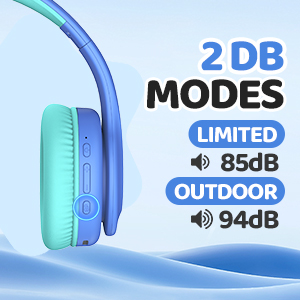
Image: A detailed view of the headphone's side panel, highlighting the switch for 85dB (Limited) and 94dB (Outdoor) volume modes.
Music Playback
- Play/Pause: Short press the Power/Multi-function button.
- Next Track: Long press the "+" button.
- Previous Track: Long press the "-" button.
Call Functions (with Built-in Mic)
- Answer/End Call: Short press the Power/Multi-function button.
- Reject Call: Long press the Power/Multi-function button.
Maintenance
Cleaning
- Wipe the headphones with a soft, dry, lint-free cloth.
- Do not use abrasive cleaners, alcohol, or chemical solvents.
- Avoid getting moisture into any openings.
Storage
- When not in use, store the headphones in a cool, dry place.
- The foldable design allows for compact storage, protecting them from damage.
Troubleshooting
| Problem | Possible Cause | Solution |
|---|---|---|
| Headphones won't turn on | Low battery | Charge the headphones fully. |
| Cannot pair via Bluetooth | Headphones not in pairing mode; device Bluetooth off; too far from device | Ensure headphones are in pairing mode (flashing red/blue). Turn on device Bluetooth. Move headphones closer to device (within 30 feet). |
| No sound in wireless mode | Not connected; volume too low; wrong audio output selected on device | Check Bluetooth connection. Increase headphone and device volume. Select "JoySpark T5" as audio output on your device. |
| No sound in wired mode | Cable not fully inserted; faulty cable | Ensure 3.5mm cable is fully inserted into both headphone and device jacks. Try a different 3.5mm cable if available. |
| Poor sound quality | Weak Bluetooth signal; audio source quality; dirty earcups | Move closer to the Bluetooth device. Try a different audio source. Clean the earcups. |
Specifications
| Feature | Detail |
|---|---|
| Model Name | JoySpark-T5 |
| Connectivity Technology | Wireless (Bluetooth 5.3) & Wired (3.5mm Jack) |
| Bluetooth Version | 5.3 |
| Bluetooth Range | Up to 30 meters (100 feet) |
| Audio Driver Size | 40 mm |
| Volume Limit | 85dB / 94dB (Switchable) |
| Battery Life | Up to 60 Hours |
| Charging Port | USB-C |
| Built-in Microphone | Yes |
| Ear Placement | Over-Ear |
| Material | Acrylonitrile Butadiene Styrene (ABS) |
| Item Weight | 170 Grams (6 ounces) |
| Noise Control | Passive Noise Cancellation |
Warranty and Support
JoySpark stands behind the quality of its products. If you encounter any issues with your headphones, please contact our customer service team.
- Customer Service: For support, please reach out to us via email. We aim to resolve issues within 24 hours.
- Warranty Information: Please refer to the product packaging or our official website for specific warranty terms and conditions.
For more information and FAQs, visit the official JoySpark store on Amazon: JoySpark Store
Related documentsT5

Ask a question about this manual
Ask about setup, troubleshooting, compatibility, parts, safety, or missing instructions. Manuals+ will review the question and use this page’s manual context to help answer it.