
TESMEN Hound-200-GR
TESMEN Hound-200 EMF Meter User Manual
Model: Hound-200-GR
1. Introduction
The TESMEN Hound-200 EMF Meter is a versatile 3-in-1 device designed for detecting electromagnetic fields. It accurately measures radiofrequency (RF), electric field (EF), and magnetic field (MF) strengths, making it suitable for various applications including home inspections, outdoor activities, and even ghost hunting.

Image: The TESMEN Hound-200 EMF Meter, showcasing its green and grey design, alongside three AAA batteries and a black storage case. This image illustrates the complete product package.
2. What's in the Box
Upon opening your TESMEN Hound-200 package, you should find the following items:
- 1x HOUND-200 EMF Detector
- 1x User Manual (this document)
- 1x Storage Case
- 3x AAA Batteries
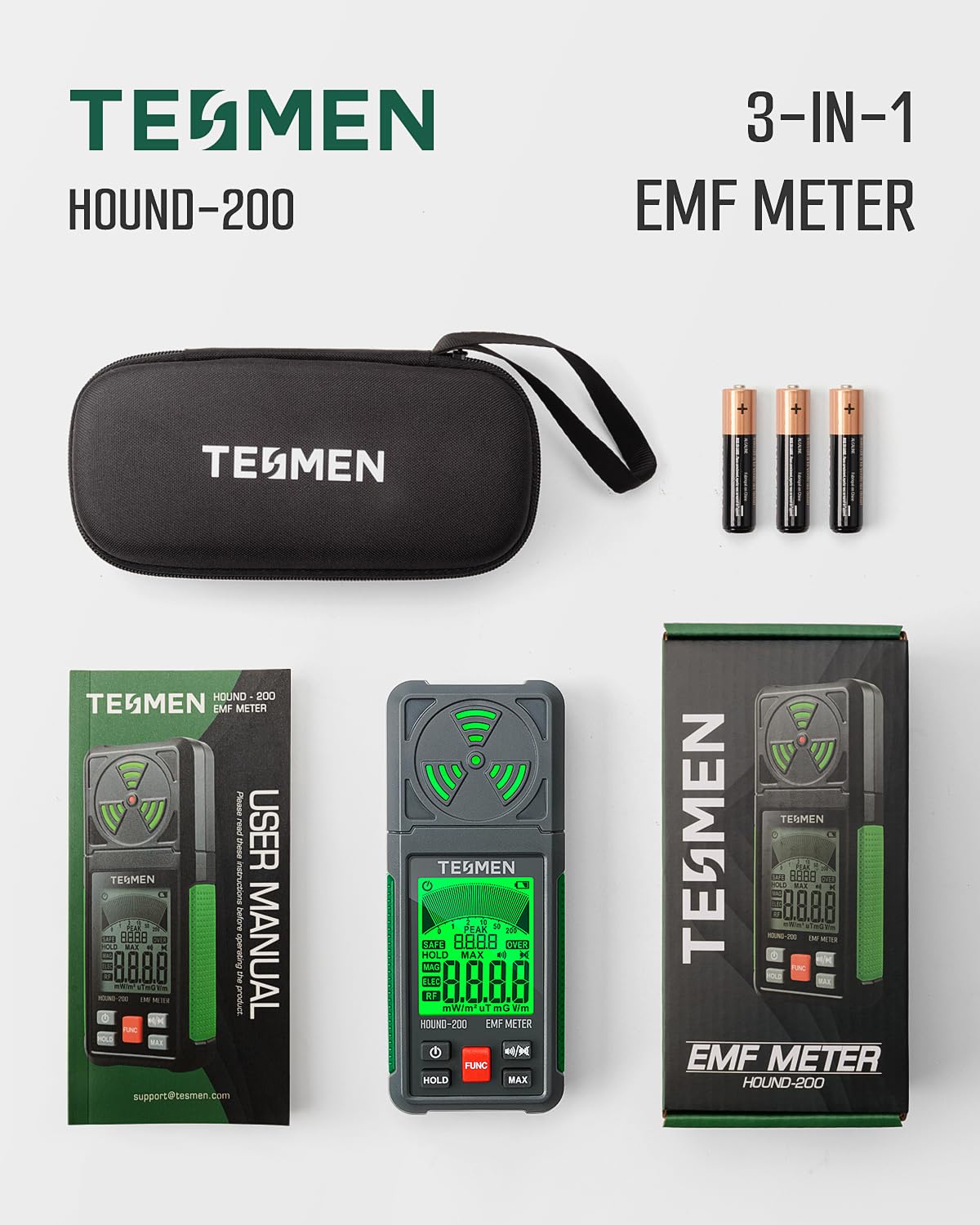
Image: A visual representation of the items included in the TESMEN Hound-200 package: the EMF meter, its user manual, a storage bag, and three AAA batteries.
3. Key Features
- 3-in-1 Multifunctional Detection: Measures Radiofrequency (RF), Electric Field (EF), and Magnetic Field (MF) strengths.
- Visual and Audible Alarms: Features a three-color backlight display (green, yellow, red) and an audible alarm that changes intensity and frequency based on measured values. The audible alarm can be turned off.
- User-Friendly Design: Equipped with MAX measurement, Peak measurement, and Data Hold functions for comprehensive data analysis.
- Clear Display: A 2.26-inch LCD screen provides easy-to-read numerical readings and trend graphs.
- Power Management: Includes Automatic Shutdown and a Low Battery Indicator to conserve energy.

Image: An overview graphic highlighting the TESMEN Hound-200 as a 3-in-1 EMF meter capable of detecting AC Magnetic Field, AC Electric Field, and RF and Microwave Field, along with features like Max Measurement, Speaker On/Off, and Peak Measurement.

Image: This graphic illustrates the Hound-200's 3-color changing display, indicating 'Good' (green), 'Slight' (yellow), and 'Severe' (red) radiation levels, along with an icon for the audible alarm feature.
4. Setup
4.1 Battery Installation
- Locate the battery compartment cover on the back of the device.
- Slide the cover open in the direction indicated by the arrow.
- Insert three (3) AAA batteries, ensuring correct polarity (+/-).
- Close the battery compartment cover securely.
5. Operating Instructions
5.1 Power On/Off
Press the Power button (⏻) to turn the device on or off.
5.2 Mode Selection (FUNC Button)
The Hound-200 features three detection modes: RF (Radiofrequency), EF (Electric Field), and MF (Magnetic Field). Press the FUNC button to cycle through these modes. The active mode will be indicated on the LCD screen.

Image: The TESMEN Hound-200 display showing the measurement ranges for RF (0.001-200m/W²), MF (0.01-200uT, 0.1-2000mG), and EF (1-2000V/m), illustrating its multi-field detection capability.
5.3 Data Hold (HOLD Button)
Press the HOLD button to freeze the current reading on the display. Press it again to release and resume live measurement.
5.4 Maximum Measurement (MAX Button)
Press the MAX button to display the maximum value recorded since the device was powered on or the MAX function was reset. This is useful for identifying peak radiation levels.
5.5 Audible Alarm On/Off
The device emits an audible alarm when radiation levels exceed certain thresholds. To toggle the audible alarm on or off, press the speaker icon button (🔊).
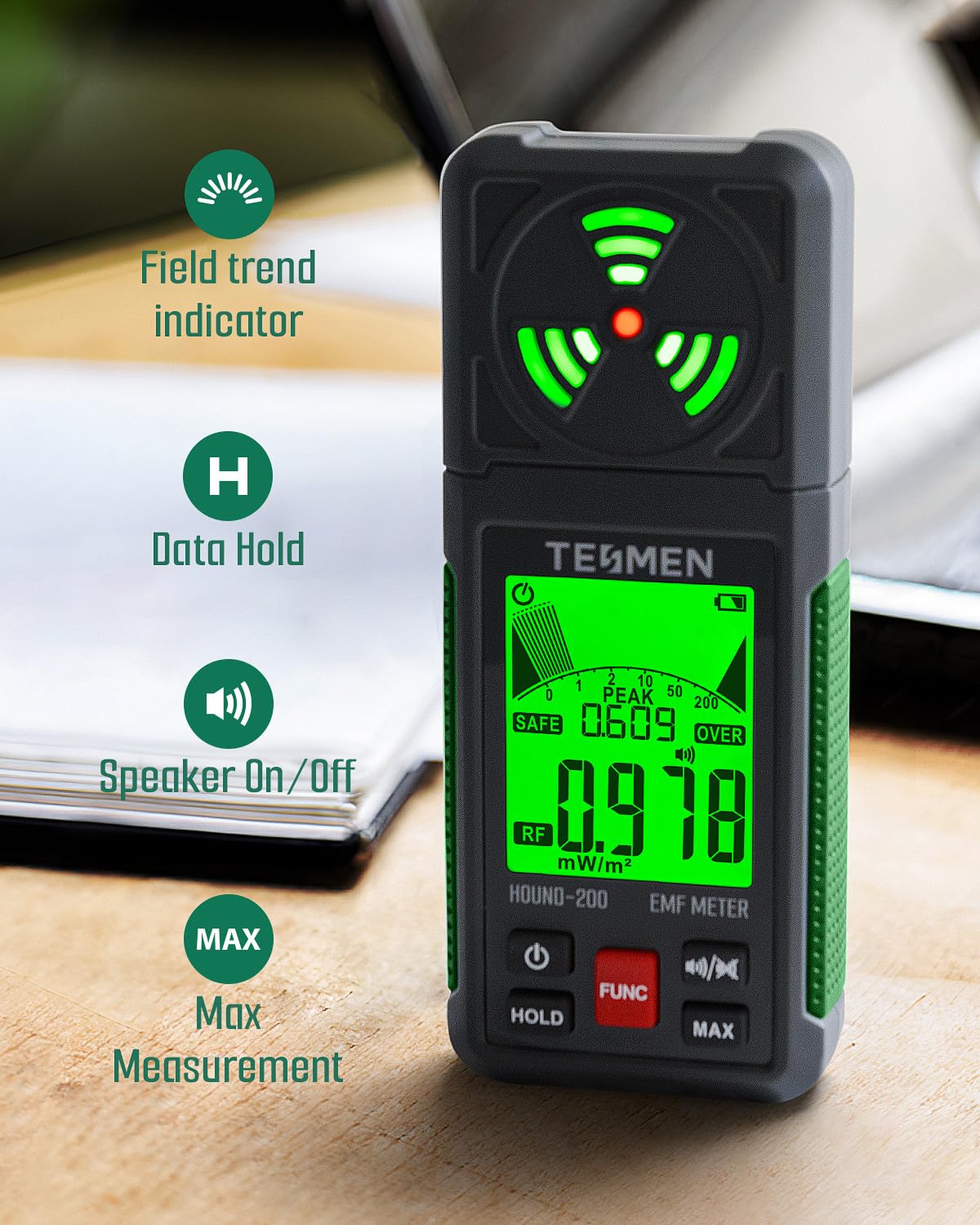
Image: The TESMEN Hound-200 EMF Meter highlighting its user-friendly features: Field trend indicator, Data Hold (H), Speaker On/Off, and Max Measurement (MAX).
6. Applications
The TESMEN Hound-200 EMF Meter can be used in various environments to assess electromagnetic radiation:
- Home & Office: Detect radiation from household appliances such as televisions, induction cookers, rice cookers, refrigerators, computers, and power lines. Helps in optimizing room layout to avoid high-radiation areas.
- Wireless Devices: RF mode can detect WiFi signals, 5G signals (below 3.5GHz), and microwave radiation from appliances like microwave ovens, routers, and cell phones.
- Outdoor & Specialized Use: Suitable for general field detection in outdoor environments and for specialized applications like ghost hunting.

Image: The TESMEN Hound-200 EMF Meter shown in use near common household items such as a router, cell phone, television, laptop, fan, and microwave oven, demonstrating its ability to detect radiation from these sources.

Image: The TESMEN Hound-200 EMF Meter depicted in a dark, eerie setting with a ghostly figure in the background, suggesting its use for exploring paranormal phenomena.
7. Maintenance
- Keep the device clean and dry. Use a soft, damp cloth for cleaning; do not use abrasive cleaners or solvents.
- Store the device in its provided storage case when not in use to protect it from dust and physical damage.
- Remove batteries if the device will not be used for an extended period to prevent battery leakage.
- Avoid exposing the device to extreme temperatures, high humidity, or direct sunlight.
8. Troubleshooting
8.1 Device Does Not Power On
- Check if the batteries are inserted correctly with the correct polarity.
- Replace the batteries with new ones if they are depleted.
8.2 Inaccurate Readings
- Ensure there are no strong interfering electromagnetic sources nearby that could affect readings.
- Verify that the correct measurement mode (RF, EF, MF) is selected for the type of field you are trying to detect.
8.3 Display is Dim or Flickering
- This may indicate low battery. Replace the batteries.
9. Specifications
| Specification | Value |
|---|---|
| Product Dimensions | 2.17 x 1.18 x 5.51 inches |
| Item Weight | 10.76 ounces |
| Model Number | Hound-200-GR |
| Batteries Required | 3 AAA batteries (included) |
| Manufacturer | TESMEN |
| Date First Available | November 10, 2023 |
10. Warranty and Support
TESMEN products are designed for reliability and performance. For any questions, technical support, or warranty claims, please refer to the contact information provided on the TESMEN official website or the contact details included with your product packaging.
Please retain your purchase receipt as proof of purchase for warranty purposes.
Ask a question about this manual
Ask about setup, troubleshooting, compatibility, parts, safety, or missing instructions. Manuals+ will review the question and use this page’s manual context to help answer it.