
1. Product Overview
The AKY-710S Motorcycle Camera is designed to capture high-quality video footage of your rides and outdoor activities. It features a Starvis IMX335 sensor, enabling clear 2K resolution at 55 frames per second (FPS) or upscaled 4K at 28 FPS. The 142-degree wide-angle lens ensures comprehensive coverage, even in low-light conditions.
Key functionalities include loop recording for continuous operation, emergency recording triggered by a G-sensor to secure critical footage, and a parking monitor for 24-hour surveillance. The device is rated IP66 for dust and water resistance, ensuring reliable performance in various weather conditions. A built-in 1800mAh battery provides over 5.5 hours of 1080P video recording, and it can be recharged via a power bank for extended use.
For convenience, the camera supports 2.4GHz Wi-Fi connectivity, allowing seamless integration with a dedicated smartphone application. This app facilitates real-time previews, video playback, editing, and sharing, along with over-the-air (OTA) firmware updates. The AKY-710S comes with a 64GB high-performance storage card and a variety of mounting options to suit different installation needs on motorcycles, bicycles, or for general outdoor sports use.

Figure 1.1: Internal Components and Key Features of the AKY-710S Camera
2. What's in the Box
Please verify that all items listed below are included in your package:
- AKY-710S Motorcycle/Bike camera
- Adapter, Rubber sheet for adapter, Screws and screwdriver for adapter
- Mounting buckle, Curved mount and double-sided tape, Screwdriver and Screws
- 64GB SD card (already inserted in the unit)
- Motorcycle rearview mirror bracket
- Handle Mount
- 1/4 adapter
- AEE Adapter
- Screw
- Face mount and double-sided tape
- Waterproof Charging Cable

Figure 2.1: Contents of the AKY-710S Product Package
3. Setup & Installation
The AKY-710S camera offers versatile mounting options to suit various needs. Ensure the camera is securely attached before operation.
3.1 Mounting Options
The camera can be mounted on handlebars, helmets, or rearview mirrors using the provided accessories. Refer to the video below for detailed installation steps for each option.
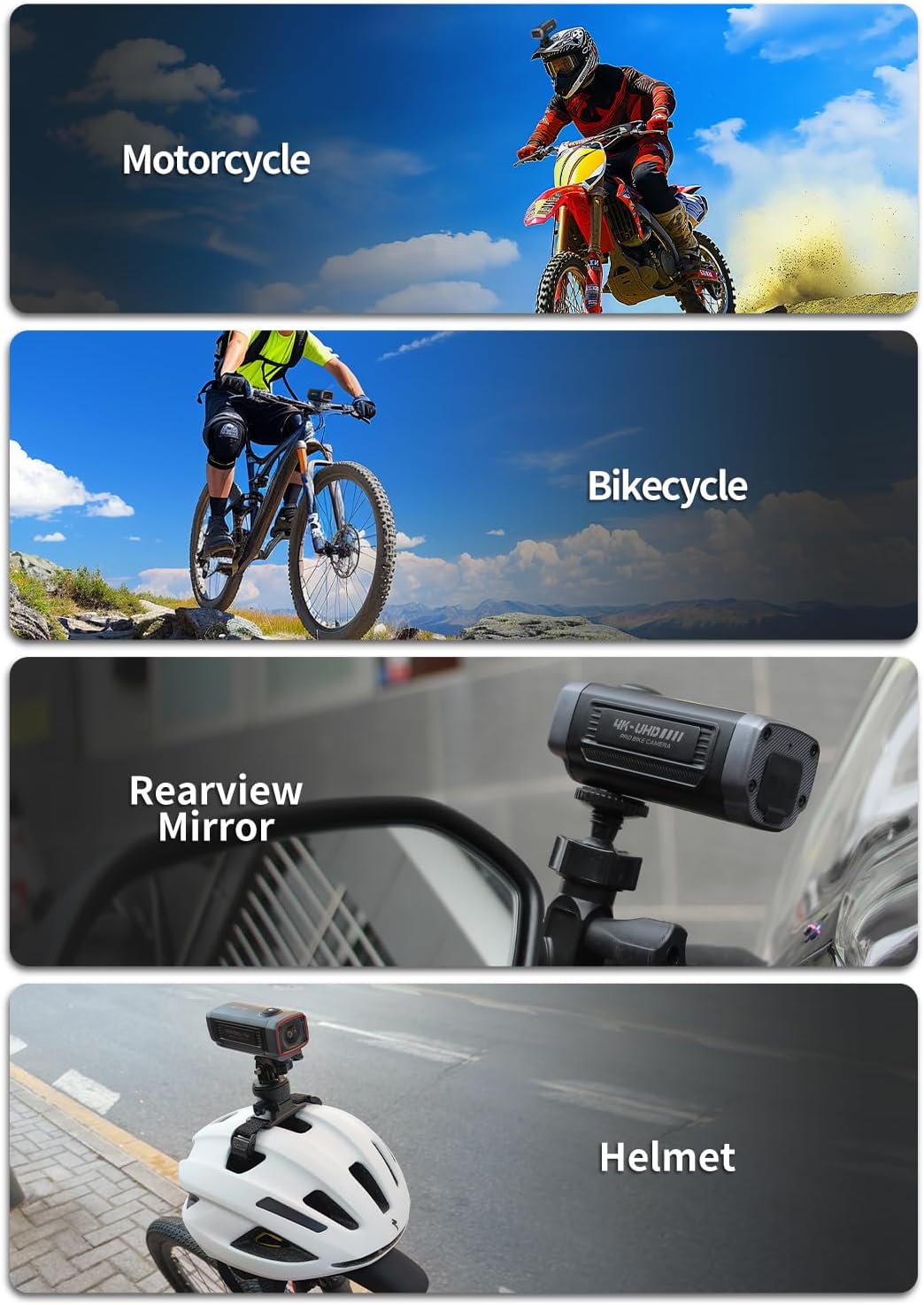
Figure 3.1: Various Mounting Scenarios for the AKY-710S Camera
Video 3.1: Demonstrates different mounting options for the AKY-710S camera, including handlebar, helmet, and rearview mirror installations.
Handlebar Mount:
Attach the camera to your bicycle or motorcycle handlebars using the Handle Mount. Ensure the mount is tightened securely to prevent movement during your ride. (Refer to Video 3.1, 0:00-0:16)
Helmet Mount:
Utilize the curved mount and double-sided tape to attach the camera to your helmet. Position it for optimal field of view. (Refer to Video 3.1, 0:32-0:40)
Rearview Mirror Mount:
The motorcycle rearview mirror bracket allows for secure attachment to your mirror stem, providing a clear view of the road behind. (Refer to Video 3.1, 1:08-1:16)
3.2 Initial Setup
The 64GB SD card is pre-inserted into the unit. No additional setup is required for storage. Ensure the camera is fully charged before first use by connecting it to a power source using the provided waterproof charging cable.
4. Operating Instructions
4.1 Power On/Off
- To power on: Press and hold the power button until the indicator light illuminates.
- To power off: Press and hold the power button until the indicator light turns off.
4.2 Recording Modes
- Loop Recording: The camera continuously records video in segments. When the storage card is full, the oldest files are automatically overwritten to make space for new recordings.
- Emergency Recording (G-sensor): In the event of a sudden impact or collision, the built-in G-sensor automatically detects the event and locks the current video segment, preventing it from being overwritten by loop recording.
- Parking Monitor: When enabled, the camera can detect motion or impact while parked and automatically begin recording, providing 24-hour surveillance for your vehicle.
4.3 Wi-Fi Connectivity & Dedicated App
The AKY-710S features 2.4GHz Wi-Fi for seamless connection to your smartphone via the dedicated AKEEYO app. This allows for convenient control and management of your camera.
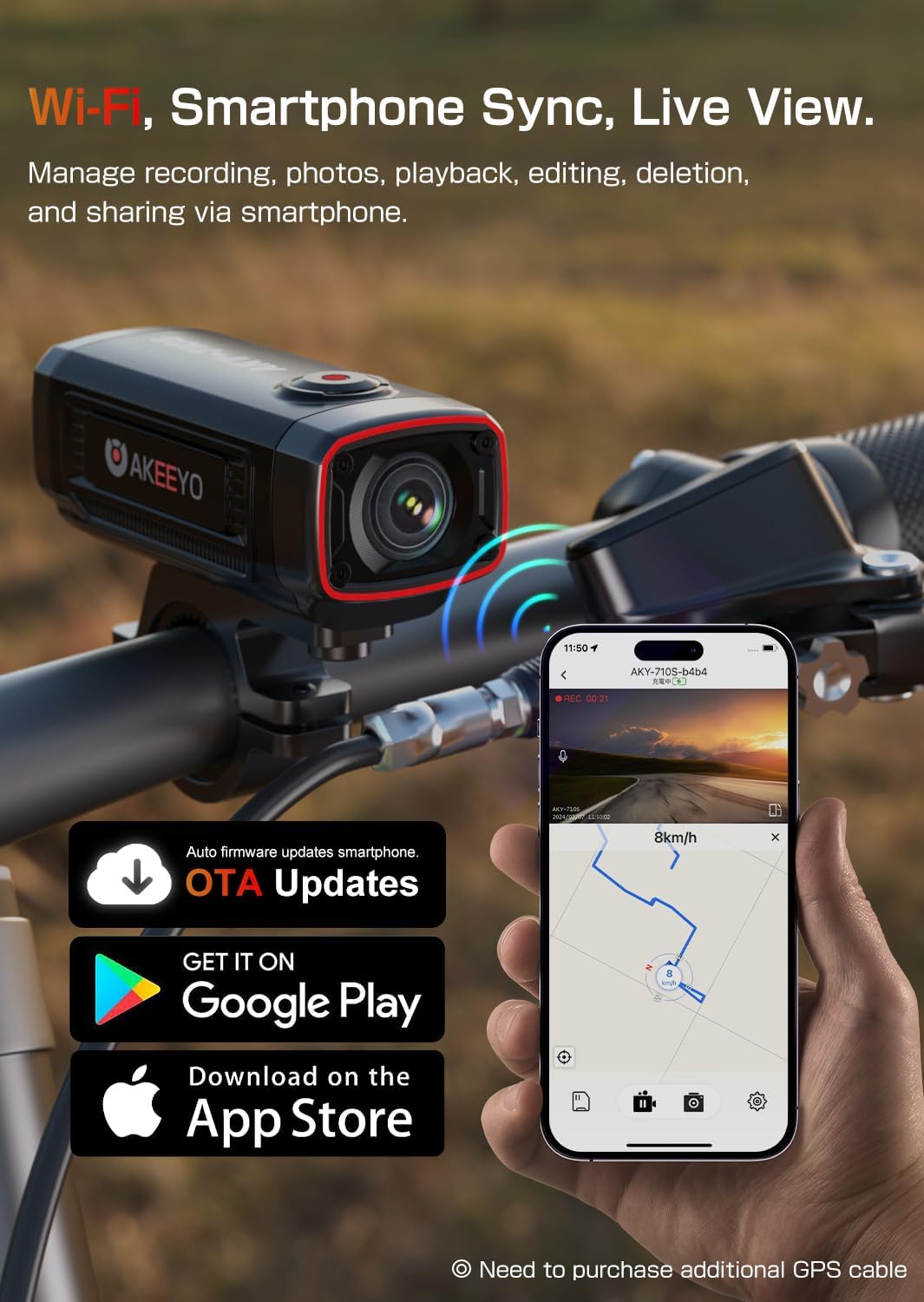
Figure 4.1: Smartphone App Interface for AKY-710S
- Connecting to Wi-Fi: Download the AKEEYO app from the App Store or Google Play. Follow the in-app instructions to connect your smartphone to the camera's Wi-Fi network. Important: Ensure you check the "Privacy Consent" option during the setup process within the app to establish a successful connection.
- Real-time Preview: View live footage from your camera directly on your smartphone screen.
- Video Playback & Management: Access recorded videos and photos, play them back, and manage files (e.g., delete, download) without needing to remove the SD card.
- Sharing: Easily share your recorded adventures directly from the app.
- OTA Updates: The app supports over-the-air firmware updates, ensuring your camera always has the latest features and improvements.
5. Maintenance
Proper maintenance ensures the longevity and optimal performance of your AKY-710S camera.
- Cleaning: Use a soft, dry cloth to clean the camera body. For the lens, use a specialized lens cleaning cloth and solution to avoid scratches. Do not use harsh chemicals or abrasive materials.
- Water and Dust Resistance: The camera is rated IP66, meaning it is protected against strong jets of water and is dust-tight. While it can withstand rain and splashes, avoid submerging the camera in water. Ensure all ports are securely closed when exposed to moisture or dust.
- Storage: When not in use for extended periods, store the camera in a cool, dry place away from direct sunlight and extreme temperatures.
- Battery Care: To maintain battery health, avoid fully discharging the battery frequently. If storing for a long time, charge the battery to about 50% every few months.

Figure 5.1: AKY-710S Camera Demonstrating IP66 Rating
6. Troubleshooting
This section addresses common issues you might encounter with your AKY-710S camera.
- Camera not powering on:
- Ensure the battery is charged. Connect the camera to a power source using the provided USB cable.
- Press and hold the power button for at least 3-5 seconds.
- Wi-Fi connection issues:
- Verify that the "Privacy Consent" option was checked during the initial app setup. This is crucial for establishing a connection.
- Ensure your smartphone's Wi-Fi is enabled and connected to the camera's Wi-Fi network.
- Restart both the camera and your smartphone.
- Ensure the camera's firmware is up to date via the app.
- Video quality is poor or blurry:
- Clean the camera lens with a soft, lint-free cloth.
- Ensure the protective film (if any) has been removed from the lens.
- Check the recording resolution settings in the app.
- Camera not recording or saving files:
- Ensure the 64GB SD card is properly inserted.
- Check if the SD card is full. If so, loop recording should overwrite old files, but you can also manually format the card via the app (this will delete all data).
- Ensure the camera has sufficient battery charge.
7. Specifications
| Feature | Specification |
|---|---|
| Model Number | 710-P |
| Product Dimensions | 3.93 x 1.57 x 0.89 inches |
| Item Weight | 1.06 pounds |
| Photo Sensor Technology | CMOS (Starvis IMX335) |
| Video Capture Resolution | 4K (28fps), 2K (55fps), 1080p |
| Wide-Angle Lens | 142° |
| Maximum Aperture | 2 f |
| Battery | 1800mAh Lithium Polymer (included) |
| Battery Life (1080P) | Over 5.5 hours |
| Water/Dust Resistance | IP66 equivalent |
| Flash Memory Type | Micro SD (64GB card included) |
| Connectivity Technology | USB, Wi-Fi (2.4GHz) |
| Video Capture Format | MP4 |
| Supported Audio Format | AAC, MP3, PCM |
8. Warranty and Support
The AKY-710S Motorcycle Camera comes with a one-year warranty, providing peace of mind for your purchase.
For technical assistance, warranty claims, or any product-related inquiries, please contact AKEEYO customer support through the official website or your purchase platform. Please have your product model number and purchase details ready when contacting support.
We appreciate your understanding and cooperation in ensuring a smooth experience with your AKY-710S camera.

