1. Introduction
This manual provides essential information for setting up, operating, and maintaining your Samsung Galaxy S22 SM-S901 5G smartphone. The Galaxy S22 features a vibrant 120Hz Dynamic AMOLED display, advanced camera capabilities, and a powerful 4nm processor for a smooth user experience. This device is a renewed product, ensuring full functionality with generic or original accessories.
2. What's in the Box
Verify that your package contains the following items:
- Samsung Galaxy S22 SM-S901 5G Device
- Standard Battery (STD Battery)
- Data Cable
- Cling (Protective film)
Note: Specific accessories may vary based on the renewed product supplier.
3. Setup
3.1 Device Overview

Figure 3.1: Front view of the Samsung Galaxy S22 SM-S901 5G.
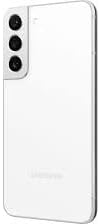
Figure 3.2: Back view of the Samsung Galaxy S22 SM-S901 5G, highlighting the camera system.
3.2 Initial Power On
- Press and hold the Power/Side key located on the right side of the device until the Samsung logo appears.
- Follow the on-screen prompts to select your language, connect to a Wi-Fi network, and set up your Google account.
3.3 SIM Card Installation
- Locate the SIM card tray on the bottom edge of the device.
- Insert the SIM ejection tool (not included with renewed products, use a paperclip) into the small hole next to the tray to eject it.
- Place your Nano-SIM card into the tray with the gold contacts facing down.
- Gently push the tray back into the slot until it clicks into place.
4. Operating Your Device
4.1 Basic Navigation
- Touch and Hold: Press and hold an item to move it or access additional options.
- Swipe: Move your finger across the screen to navigate between pages or scroll through content.
- Pinch: Use two fingers to zoom in or out on photos and web pages.
4.2 Making Calls and Sending Messages
- To make a call, tap the Phone icon, enter the number, and tap the call button.
- To send a message, tap the Messages icon, tap the new message icon, enter the recipient and your message.
4.3 Camera Features
The Galaxy S22 features advanced camera technology designed for various lighting conditions.
- Nightography: This feature enhances low-light photography by pulling in more light and reducing lens flare through the Super Clear Glass, supported by fast-acting AI processing.
- Linear Camera System: The rear camera housing integrates a linear camera system for a sleek design and optimized performance.
4.4 Display Features
Experience clear and vibrant visuals with the Galaxy S22's display.
- 120Hz Dynamic AMOLED Display: Provides smooth scrolling and responsive touch interactions.
- Vision Booster Technology: Enhances outdoor visibility by optimizing brightness and color contrast, making the screen clear even in bright sunlight.
4.5 Battery and Charging
The device is equipped with a battery that intelligently adapts to your usage patterns to optimize battery life, often lasting more than 24 hours under normal use. Use the provided data cable and a compatible charging adapter (sold separately or included with renewed product) for optimal charging.
4.6 Connectivity
- Wi-Fi: Connect to wireless networks for internet access.
- Bluetooth: Pair with wireless headphones, speakers, and other Bluetooth-enabled devices.
- Smart View: Stream your phone's screen to a compatible TV. Access this feature from the Quick Panel by swiping down from the top of the screen.
5. Maintenance
5.1 Cleaning Your Device
To clean your device, gently wipe it with a soft, lint-free cloth. Avoid using harsh chemicals or abrasive materials.
5.2 Software Updates
Regularly check for and install software updates to ensure optimal performance, security, and access to new features. Go to Settings > Software update > Download and install.
6. Troubleshooting
If you encounter issues with your device, try the following common troubleshooting steps:
- Device Not Responding: Press and hold the Power/Side key and Volume Down key simultaneously for more than 7 seconds to restart the device.
- Battery Draining Quickly: Check background app usage in Settings > Battery and device care > Battery. Reduce screen brightness or disable unnecessary features like GPS or Wi-Fi when not in use.
- Connectivity Issues: Restart your device. For Wi-Fi, try forgetting the network and reconnecting. For cellular data, ensure your SIM card is properly inserted and your mobile data is enabled.
- App Crashing: Clear the app's cache and data in Settings > Apps > [App Name] > Storage. If the issue persists, uninstall and reinstall the app.
For more complex issues, refer to Samsung's official support resources or contact your renewed product seller.
7. Specifications
| Feature | Specification |
|---|---|
| Model Name | Galaxy S22 |
| Item Model Number | SM-S901 |
| Brand | Samsung |
| Operating System | Android 12.0 |
| Screen Size | 6.1 Inches |
| Resolution | 1080 x 2340 |
| Refresh Rate | 120 Hz |
| CPU Speed | 2.3 GHz |
| RAM Memory Installed Size | 8 GB |
| Memory Storage Capacity | 128 GB (Internal, specific to this renewed model) |
| Item Weight | 5.9 ounces (167 grams) |
| Wireless Communication Technologies | Bluetooth, Cellular, Wi-Fi |
| Wireless Carrier | Unlocked for All Carriers |
| Phone Talk Time | 24 Hours (approximate) |
| Color | Phantom White (specific to this renewed model) |
8. Renewed Product Condition Guidelines
As a renewed product, your Samsung Galaxy S22 SM-S901 5G is fully functional and comes with generic or original accessories and packaging. The condition of renewed products is categorized to provide transparency:

Figure 8.1: Amazon Renewed product condition guidelines.
Please refer to the specific condition description provided at the time of purchase for details regarding your device.
9. Warranty and Support
9.1 Return Policy
This renewed product typically includes a 90-day return policy for refund or replacement. Please consult your seller's specific return policy for detailed terms and conditions.
9.2 Technical Support
For technical assistance, software issues, or hardware malfunctions, please contact the seller from whom you purchased this renewed device. You may also find general support resources on the official Samsung website.