
Nikon 2185
User Manual
Nikon AF-S NIKKOR 70-200mm f/2.8G ED VR II Telephoto Zoom Lens
Model: 2185
1. Introduction
The Nikon AF-S NIKKOR 70-200mm f/2.8G ED VR II Lens is a high-performance telephoto zoom lens designed for professional photographers and enthusiasts. It features a fast, constant maximum aperture of f/2.8, making it ideal for low-light conditions and achieving shallow depth of field. This lens is equipped with Nikon's advanced Vibration Reduction (VR II) system to minimize camera shake and ensure sharp images.
This manual provides detailed instructions on how to set up, operate, maintain, and troubleshoot your Nikon AF-S NIKKOR 70-200mm f/2.8G ED VR II lens and its accompanying accessories.
2. Product Overview
2.1 Key Features
- Versatile Telephoto Zoom: 70-200mm focal length range suitable for various photography styles including photojournalism, sports, wildlife, and portraiture.
- Fast f/2.8 Constant Aperture: Excellent performance in low light and for creating beautiful background blur (bokeh).
- Vibration Reduction (VR II): Provides up to 3.5 stops of image stabilization, reducing blur from camera shake.
- Silent Wave Motor (SWM): Ensures fast, accurate, and quiet autofocus operation.
- Internal Focusing (IF): Maintains the lens's physical length during focusing.
- ED Glass Elements: Seven Extra-low Dispersion (ED) glass elements minimize chromatic aberration for superior sharpness and color correction.
- Nano Crystal Coat: Reduces ghosting and flare for clearer images, especially in backlit conditions.
- Weather-Sealed Construction: Durable design with rubber mount seal for resistance against dust and moisture.
2.2 Included Components
Your product package includes the following items:
- Nikon AF-S NIKKOR 70-200mm f/2.8G ED VR II Lens
- Nikon 77mm Snap-On Lens Cap (Front)
- Nikon LF-4 Rear Lens Cap
- Nikon HB-48 Bayonet Lens Hood
- Nikon CL-M2 Lens Case (Black)
- Removable Tripod Foot
- Sandisk 64GB Ultra Memory Card
- 3 Piece Filter Kit
- Pro Sling Backpack
- Memory Card Reader
- Corel Photo Software (Download Code)
- 12-inch Flexible Tripod
- Memory Card Wallet
- Lens Cap Keeper
- Cleaning Kit

Figure 2.1: Nikon AF-S NIKKOR 70-200mm f/2.8G ED VR II Lens and complete accessory bundle.

Figure 2.2: The Nikon AF-S NIKKOR 70-200mm f/2.8G ED VR II Lens.
3. Setup
3.1 Attaching the Lens to Your Camera
- Ensure both the camera and lens are turned off.
- Remove the body cap from the camera and the rear lens cap (LF-4) from the lens.
- Align the mounting mark on the lens with the mounting mark on the camera body.
- Rotate the lens counter-clockwise until it clicks into place. Do not force the lens.
3.2 Attaching the Lens Hood (HB-48)

Figure 3.1: The Nikon HB-48 Bayonet Lens Hood.
- Align the lens hood's mounting mark with the mark on the front of the lens.
- Rotate the hood clockwise until it clicks into place. The hood should be firmly attached and oriented correctly to block stray light.
- To remove, press the release button on the hood and rotate counter-clockwise.
3.3 Attaching the Tripod Foot
The removable tripod foot allows for better balance when mounting the lens and camera on a tripod, especially given the lens's weight.
- Loosen the locking knob on the tripod collar.
- Slide the tripod foot onto the lens's tripod collar until it is securely in place.
- Tighten the locking knob to secure the tripod foot.
3.4 Inserting Memory Card
The included 64GB Sandisk Ultra Memory Card is essential for storing your photos and videos.
- Locate the memory card slot on your camera body.
- Insert the Sandisk 64GB Ultra Memory Card into the slot with the label facing the correct direction (refer to your camera's manual for specific orientation).
- Push the card in until it clicks into place.
- Format the memory card using your camera's menu system before first use to ensure optimal performance and compatibility.
4. Operating the Lens
4.1 Focus Modes (M/A, M)
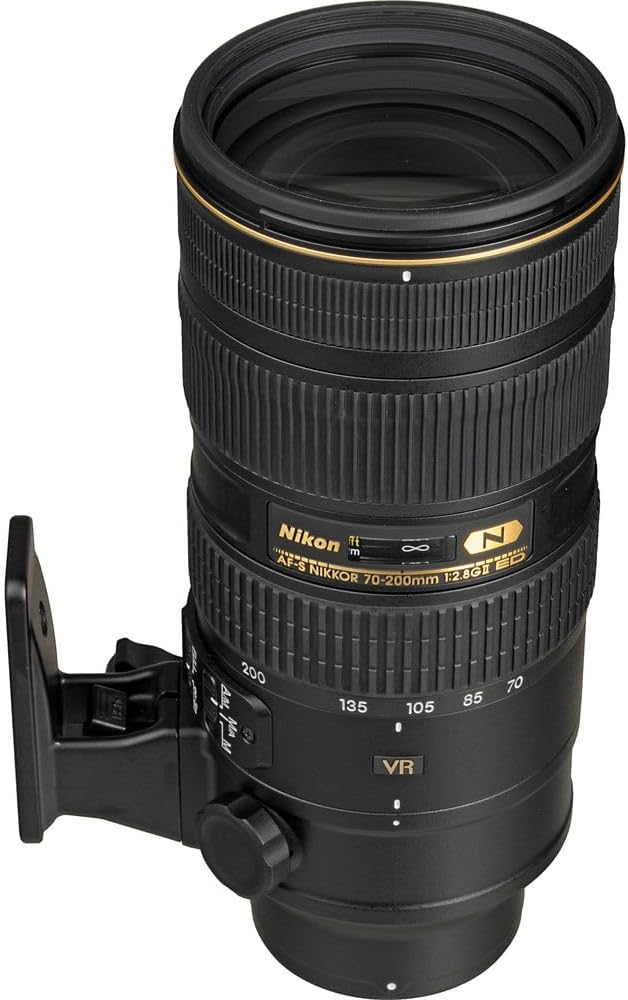
Figure 4.1: Lens showing focus mode switch (M/A, M).
The lens features a focus mode switch with two settings:
- M/A (Autofocus with Manual Override): This is the default mode. It allows the lens to autofocus, but you can instantly switch to manual focus by rotating the focus ring, even when autofocus is active. This is useful for fine-tuning focus after the camera has acquired it.
- M (Manual Focus): In this mode, you must manually adjust the focus by rotating the focus ring on the lens. Autofocus will not operate.
4.2 Vibration Reduction (VR II)
The VR II system helps to reduce blur caused by camera shake, allowing for sharper images, especially in low light or when shooting handheld at slower shutter speeds.
- VR ON/OFF Switch: Located on the side of the lens. Set to ON to activate Vibration Reduction.
- VR Mode Switch (Normal/Active):
- Normal: Recommended for general photography, including panning shots.
- Active: Use when shooting from unstable platforms, such as a moving vehicle, or when following fast-moving subjects.
Note: When using a tripod, it is generally recommended to turn VR OFF to prevent potential interference with image stability, although the VR II system is designed to detect tripod use and adjust accordingly.
4.3 Zooming
To change the focal length, rotate the zoom ring on the lens. The focal length markings (70, 85, 105, 135, 200mm) are indicated on the lens barrel.
4.4 Using Filters
The lens has a 77mm filter thread. The included 3-piece filter kit (UV, CPL, FLD) can be screwed onto the front of the lens.
- UV Filter: Protects the front lens element and reduces haze.
- CPL (Circular Polarizer) Filter: Reduces reflections from non-metallic surfaces and enhances color saturation.
- FLD (Fluorescent Light Correction) Filter: Corrects color cast under fluorescent lighting.
5. Maintenance and Care
5.1 Cleaning the Lens

Figure 5.1: Example of a lens cleaning kit.
Regular cleaning helps maintain the optical performance of your lens. Use the included cleaning kit for best results.
- Remove Dust: Use a blower brush to gently remove dust and loose particles from the lens surfaces. Avoid wiping dry.
- Clean Smudges: For smudges or fingerprints, apply a small amount of lens cleaning solution to a clean microfiber cloth (never directly to the lens) and gently wipe the lens surface in a circular motion from the center outwards.
- Body Cleaning: Wipe the lens barrel with a soft, dry cloth.
Caution: Never use abrasive materials, solvents, or harsh chemicals to clean the lens. Avoid touching the glass elements with your fingers.
5.2 Storage
When not in use, store the lens with both front and rear caps attached in a cool, dry place away from direct sunlight and extreme temperatures. The included CL-M2 lens case provides excellent protection during storage and transport.

Figure 5.2: The Nikon CL-M2 Lens Case.
5.3 Weather Sealing
The Nikon AF-S NIKKOR 70-200mm f/2.8G ED VR II lens features weather-sealed construction with a rubber mount seal to provide resistance against dust and moisture. While this offers enhanced durability, it is not fully waterproof. Avoid exposing the lens to heavy rain or submerging it in water.
6. Troubleshooting
This section addresses common issues you might encounter with your lens.
| Problem | Possible Cause | Solution |
|---|---|---|
| Lens not focusing (autofocus) | Lens focus mode set to M (Manual Focus). Poor lighting conditions. Subject lacks contrast. | Set lens focus mode switch to M/A. Use a brighter light source or flash. Focus on an area with more contrast. |
| Images are blurry despite VR being ON | Shutter speed too slow for conditions. VR mode incorrect (e.g., Active for stationary subject). Excessive camera movement. | Increase shutter speed. Switch VR mode to Normal for general shooting. Ensure stable grip or use a tripod. |
| Lens not attaching to camera | Misalignment of mounting marks. Obstruction on mount. | Re-align mounting marks carefully. Check for any debris on the lens or camera mount. |
| Dust or smudges on images | Dust on front/rear lens element. Dust on camera sensor. | Clean lens elements using a blower brush and microfiber cloth. If dust persists, clean camera sensor (refer to camera manual or professional service). |
7. Technical Specifications
| Specification | Detail |
|---|---|
| Model Number | 2185 |
| Focal Length | 70-200mm |
| Maximum Aperture | f/2.8 |
| Minimum Aperture | f/22 |
| Lens Type | Telephoto Zoom Lens |
| Compatible Mountings | Nikon F |
| Vibration Reduction (VR) | VR II (approx. 3.5 stops) |
| Autofocus Motor | Silent Wave Motor (SWM) |
| Filter Size | 77mm |
| Product Dimensions | 7.97 x 3.4 x 7.97 inches |
| Item Weight | 7.6 pounds |
| Date First Available | January 23, 2024 |
8. Warranty and Support
8.1 Warranty Information
Nikon products are manufactured to the highest standards and are guaranteed against defects in material and workmanship. The specific warranty period and terms for your Nikon AF-S NIKKOR 70-200mm f/2.8G ED VR II lens are typically outlined in the warranty card included with your purchase. Please retain your proof of purchase for warranty claims.
For detailed warranty terms and conditions, please refer to the official Nikon website or the warranty documentation provided with your product.
8.2 Customer Support
If you require technical assistance, have questions about your product, or need to arrange for service, please contact Nikon customer support.
- Online Support: Visit the official Nikon support website for FAQs, downloads, and service information.
- Contact Information: Refer to the Nikon website or your product packaging for regional contact numbers and email support.
When contacting support, please have your lens model number (2185) and serial number ready.
Related documents2185


Ask a question about this manual
Ask about setup, troubleshooting, compatibility, parts, safety, or missing instructions. Manuals+ will review the question and use this page’s manual context to help answer it.