1. Introduction
Thank you for choosing the WantJoin WZ-9003 Professional Plus Blender. This versatile appliance is designed to provide a powerful blending experience for a wide range of ingredients, from smoothies to various food preparations. It incorporates advanced features such as Auto-iQ two-way blade technology, noise reduction, automatic power adjustment, and a dual-speed pulse function for efficient and consistent results. This manual provides essential information for safe operation, setup, maintenance, and troubleshooting to ensure optimal performance and longevity of your blender.
2. Important Safety Instructions
To reduce the risk of fire, electric shock, or injury, always follow these basic safety precautions when using your blender:
- Read all instructions thoroughly before operating the appliance.
- Keep the appliance and its cord out of reach of children.
- Do not immerse the motor base, cord, or plug in water or other liquids.
- Unplug from the outlet when not in use, before assembling or disassembling parts, and before cleaning.
- Always operate the blender on a stable, flat, and dry surface.
- Avoid contact with moving parts. Ensure the lid is securely in place before operating.
- Do not operate any appliance with a damaged cord or plug, or after the appliance malfunctions or has been dropped or damaged in any manner. Contact customer support for assistance.
- Do not use attachments not recommended or sold by the manufacturer, as this may cause fire, electric shock, or injury.
- Do not use outdoors.
- Do not let the cord hang over the edge of a table or counter, or touch hot surfaces.
- Exercise extreme caution when handling the sharp blades.
- Never add ingredients while the blender is operating.
3. Product Overview
The WantJoin WZ-9003 Professional Plus Blender is engineered for efficiency and quiet operation. Key components include a robust motor base, a large capacity blending jar with Auto-iQ two-way blade technology, a secure lid, and a sound-insulating enclosure to minimize operational noise. The intuitive touchscreen control panel allows for easy selection of various blending modes and settings.
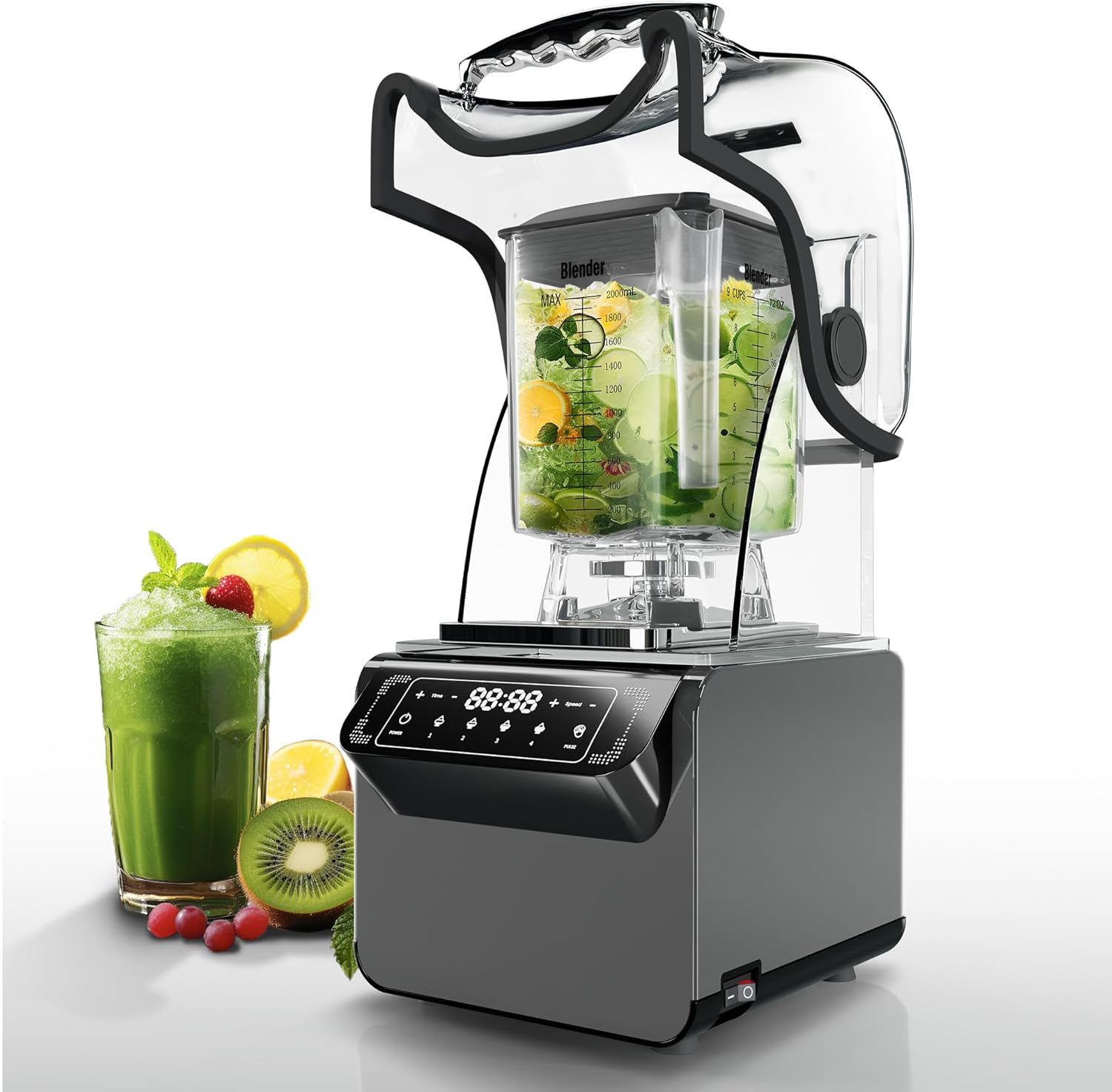
Image 3.1: The WantJoin WZ-9003 Professional Plus Blender, showcasing its main components and a prepared green smoothie.

Image 3.2: The blender with its noise-insulating shield, shock-proof rubber pad, and soundproofing foam, designed for quiet operation.
4. Setup
Follow these steps to set up your blender for first use:
- Unpack Components: Carefully remove all parts from the packaging. Ensure all components listed in the packing list are present and undamaged.
- Position the Motor Base: Place the motor base on a clean, dry, stable, and level surface. Ensure there is adequate space around the unit for ventilation.
- Assemble the Blending Jar: Place the blending jar securely onto the motor base. It should click into place or sit firmly.
- Add Ingredients: Place your desired ingredients into the blending jar. Do not exceed the maximum fill line indicated on the jar.
- Secure Lid and Sound Enclosure: Place the lid firmly onto the blending jar. Then, lower the sound-insulating enclosure over the jar until it is properly seated.
- Connect Power: Plug the power cord into a grounded electrical outlet. The control panel should illuminate, indicating the unit is ready for operation.
5. Operating Instructions
The WantJoin WZ-9003 features an intuitive touchscreen control panel for easy operation. It offers both manual control and pre-set programs for various blending tasks.

Image 5.1: Detailed view of the blender's touchscreen control panel, showing manual mode power adjustment, one-button select function, and one-touch automatic cleaning.
5.1 Control Panel Functions
- Power Button: Turns the blender on or off.
- Time Adjustment (+/-): Adjusts the blending duration in manual mode.
- Speed Adjustment (+/-): Adjusts the blending speed in manual mode.
- Pre-set Modes (1, 2, 3, 4): Four dedicated touchscreen modes optimized for different food types, such as smoothies, juices, or other preparations.
- Pulse Function: Provides short bursts of high-speed blending for controlled chopping or quick mixing.
5.2 Blending Operation
- Ensure the blender is properly set up with ingredients, lid, and sound enclosure in place.
- Press the Power button to activate the control panel.
- For Pre-set Modes: Select one of the four pre-set modes (1, 2, 3, or 4) corresponding to your desired preparation. The blender will automatically adjust speed and time.
- For Manual Operation: Use the 'Time' and 'Speed' buttons to set your desired blending duration and intensity.
- For Pulse Function: Press and hold the 'Pulse' button for short, controlled bursts. Release to stop.
- The blender features Automatic Power Adjustment, which intelligently adapts to the specific needs of the ingredients, providing optimal speed and mixing performance.
- Once blending is complete, the unit will stop automatically (in pre-set modes) or when you press the Power button.
- Carefully remove the sound enclosure and lid before pouring out the contents.

Image 5.2: The blender demonstrating its versatility for preparing various items such as soup, smoothies, baby food, soy milk, coffee, and juice.
6. Cleaning and Maintenance
Regular cleaning and proper maintenance will ensure the longevity and hygienic operation of your WantJoin WZ-9003 Blender.
6.1 Automatic Cleaning Function
The blender features a convenient one-button automatic cleaning function:
- After use, rinse the blending jar to remove large food particles.
- Fill the jar with warm water and a small amount of dish soap.
- Secure the lid and sound enclosure.
- Select the automatic cleaning function on the control panel (refer to Image 5.1 for location).
- Once the cycle is complete, unplug the blender, remove the jar, and rinse thoroughly with clean water.
6.2 Manual Cleaning
For a more thorough cleaning or if the automatic function is insufficient:
- Always unplug the blender before cleaning.
- Disassemble the blending jar, lid, and sound enclosure.
- Wash the blending jar, lid, and sound enclosure with warm, soapy water. The blending jar is also dishwasher safe.
- Use a brush to clean around the blades carefully. Exercise extreme caution as blades are sharp.
- Wipe the motor base with a damp cloth. Never immerse the motor base in water or any other liquid.
- Ensure all parts are completely dry before reassembling and storing the blender.
7. Troubleshooting
If you encounter issues with your WantJoin WZ-9003 Blender, please refer to the following common troubleshooting tips:
- Blender does not turn on:
- Ensure the power cord is securely plugged into a functional electrical outlet.
- Check if the power button on the control panel has been pressed.
- Verify that the blending jar and sound enclosure are correctly assembled and seated on the motor base.
- Ingredients are not blending smoothly:
- Ensure there is sufficient liquid in the jar to allow ingredients to circulate.
- Try using the Pulse function for short bursts to break down larger pieces.
- Increase the blending speed or duration.
- Cut larger ingredients into smaller pieces before blending.
- Loud noise during operation:
- While the blender is designed for quiet operation, ensure the sound enclosure is properly closed.
- Check for any foreign objects in the blending jar.
- Ensure the blender is on a stable, flat surface.
If the problem persists after attempting these steps, please contact WantJoin customer support for further assistance.
8. Specifications
Below are the technical specifications for the WantJoin WZ-9003 Professional Plus Blender:

Image 8.1: Diagram illustrating the product dimensions of the WantJoin WZ-9003 Blender.
| Feature | Specification |
|---|---|
| Model Number | WZ-9003 |
| Brand | WantJoin |
| Product Dimensions | 32 x 28.5 x 52.5 cm (12.6 x 11.2 x 20.7 inches) |
| Weight | 9.14 kg (20.15 lbs) |
| Capacity | 72 Ounces (approx. 2.1 Liters) |
| Material | Steel Alloy |
| Power Source | Corded Electric |
| Special Features | Multiple Speeds, Automatic Power Adjustment, Noise Reduction |
| Dishwasher Safe | Yes (for blending jar and removable parts) |
| Included Components | Blending Jar |
9. Warranty and Support
For information regarding the warranty period and terms for your WantJoin WZ-9003 Professional Plus Blender, please refer to the documentation provided at the time of purchase. If you require technical support, have questions about operation, or need to report a defect, please contact WantJoin customer service. Contact details can typically be found on the manufacturer's official website or on your purchase receipt.


