
T4TREAM FPSC48VDWM-SWT
Contents
T4TREAM 48" Fluted Makeup Vanity Desk with Large 36" Mirror and Lights
Model: FPSC48VDWM-SWT
Brand: T4TREAM
1. Introduction
Thank you for choosing the T4TREAM 48" Fluted Makeup Vanity Desk. This manual provides essential information for the safe and efficient assembly, operation, and maintenance of your new vanity desk. Please read it thoroughly before beginning assembly or use, and retain it for future reference.

Figure 1.1: T4TREAM 48" Fluted Makeup Vanity Desk
2. Important Safety Information
To ensure safe operation and prevent damage, please adhere to the following guidelines:
- Stable Placement: Ensure the vanity is placed on a stable, level surface to prevent tipping.
- Moisture Avoidance: Avoid exposure to moisture and keep electrical components away from water to prevent hazards.
- Electrical Safety: Do not overload the power outlets. Ensure all plugs are fully inserted. Disconnect power before cleaning or if any electrical issue arises.
- Child Safety: Keep small parts and packaging materials away from children. Do not allow children to climb on or play with the vanity.
- Weight Limits: Do not place excessively heavy items on shelves or drawers. Refer to specifications for weight capacities.
3. Product Components
Your T4TREAM vanity desk includes the following main components:
- Main Vanity Unit: The primary desk structure with integrated mirror.
- 36-inch Lighted Mirror: Features adjustable light modes and brightness.
- Side Cabinet: Includes adjustable shelves and a dustproof glass door.
- Drawers: Two large drawers with removable dividers and three smaller drawers for organized storage.
- Transparent Toughened Glass Tabletop: Provides visibility into the main drawers.
- Built-in Charging Station: Located within the side cabinet, offering 2 AC power outlets and 2 USB ports.
- Fluted Panel Design: Distinctive wave-like texture on drawer fronts and cabinet side.

Figure 3.1: Overview of Vanity Storage Components
4. Setup and Assembly
The T4TREAM vanity desk requires assembly. Detailed installation instructions are included in the product packaging. Each component and accessory is labeled with corresponding numbers to facilitate the assembly process.
- Preparation: Clear a spacious area for assembly. Lay out all components and hardware, verifying against the parts list in the included manual.
- Follow Instructions: Adhere strictly to the step-by-step diagrams and instructions provided in the separate assembly guide.
- Tool Requirements: Ensure you have the necessary tools as specified in the assembly manual (e.g., screwdriver, hammer).
- Assistance: While assembly is designed to be straightforward, having a second person may be beneficial for certain steps, especially when handling larger components like the mirror.
For visual guidance on the product's features and setup, please refer to the video below:
Video 4.1: T4TREAM 48" Makeup Vanity Desk with Large Lighted Mirror (Seller Overview)
This video provides a general overview of the vanity desk, highlighting its features and design.
5. Operating Instructions
5.1 Mirror Lights Operation
The large 36-inch mirror features high-quality LED lights with adjustable settings:
- Power On/Off: Lightly touch the power button icon on the mirror surface to turn the lights on or off.
- Change Light Color: With the lights on, short-press the power button to cycle through three color modes: Natural Light, Warm Light, and Cool Light.
- Adjust Brightness: Long-press the power button to continuously adjust the brightness level. Release when the desired brightness is achieved.

Figure 5.1: Mirror Light Controls

Figure 5.2: Three Color Lighting Effects
5.2 Charging Station Usage
The built-in charging station provides convenient power access:
- Power Outlets: Plug in hair tools, beauty devices, or other electronics into the 2 AC power outlets.
- USB Ports: Use the 2 USB ports to charge your smartphone, tablet, or other USB-powered devices.

Figure 5.3: Built-in Charging Station
5.3 Storage Features
The vanity offers generous and versatile storage options:
- Transparent Glass Tabletop: The toughened glass tabletop allows for a clear view of items stored in the two large drawers below, enabling quick access to cosmetics and accessories.
- Large Drawers with Dividers: Utilize the removable dividers in the large drawers to categorize and organize smaller items like jewelry or makeup tools.
- Small Drawers: The three smaller drawers provide additional space for various cosmetic and personal items.
- Side Cabinet: The closed cabinet with adjustable shelves is ideal for storing frequently used cosmetics or taller bottles, keeping them dust-free and organized. The door opens with a push-to-open mechanism.

Figure 5.4: Transparent Glass Tabletop for Visible Storage

Figure 5.5: Adjustable Shelves and Dustproof Glass Door
6. Maintenance
Proper care will extend the life and appearance of your vanity desk:
- Cleaning: Wipe surfaces with a dry, soft cloth. For stubborn marks, a slightly damp cloth with mild soap can be used, followed immediately by a dry cloth.
- Glass Care: Clean the glass tabletop and cabinet door with a glass cleaner and a lint-free cloth. Avoid abrasive cleaners.
- Avoid Harsh Chemicals: Do not use harsh chemicals, abrasive cleaners, or polishes that may damage the finish.
- Spill Management: Promptly wipe up any spills to prevent staining or damage to the wood and marble-look surfaces.
7. Troubleshooting
If you encounter any issues with your vanity desk, refer to the following common solutions:
- Mirror Lights Not Working:
- Ensure the vanity is properly plugged into a working power outlet.
- Check if the power button on the mirror is illuminated or responsive.
- If issues persist, contact customer support.
- Drawers Sticking or Not Sliding Smoothly:
- Check for any obstructions or items blocking the drawer slides.
- Ensure the drawer is correctly aligned on its runners.
- Verify that the vanity is on a level surface.
- Charging Station Not Providing Power:
- Confirm the main power cord of the vanity is securely plugged in.
- Test the outlets/USB ports with a different device to rule out device issues.
- If still no power, contact customer support.
8. Specifications
| Model Number | FPSC48VDWM-SWT |
| Brand | T4TREAM |
| Product Dimensions (D x W x H) | 15.6"D x 48"W x 53.6"H |
| Item Weight | 121 pounds |
| Material | Engineered Wood |
| Color | Solid White |
| Assembly Required | Yes |
| Power Outlets | 2 AC (125V/12A) |
| USB Ports | 2 USB (5V/2.1A) |
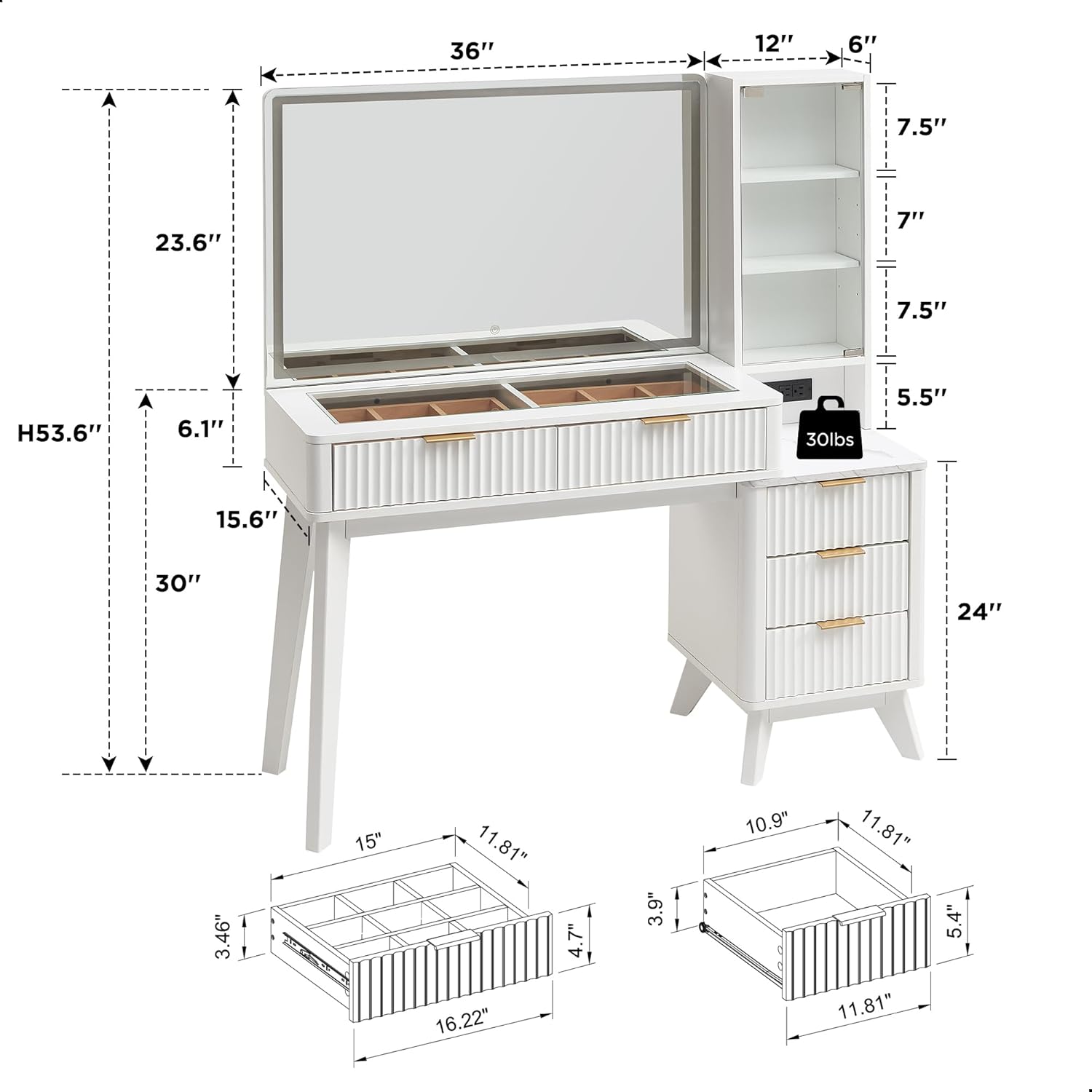
Figure 8.1: Product Dimensions
9. Warranty and Support
This product comes with a standard manufacturer's warranty. For specific warranty details, please refer to the documentation included with your purchase or contact the seller directly.
In case of packaging damage during transportation, missing components, or the need for installation guidance or technical assistance, feel free to reach out to our dedicated seller support team for professional assistance.
Contact Information: Please refer to your purchase receipt or the product packaging for the most up-to-date contact details for T4TREAM customer support.
Documents and downloads
Ask a question about this manual
Ask about setup, troubleshooting, compatibility, parts, safety, or missing instructions. Manuals+ will review the question and use this page’s manual context to help answer it.