
1. Important Safety Information
Please read all instructions carefully before operating the dehumidifier. Retain this manual for future reference.
- Always place the unit on a stable, level surface.
- Ensure the power supply matches the voltage specified on the unit's rating label.
- Do not operate the dehumidifier with a damaged power cord or plug.
- Keep the air inlet and outlet grilles clear of obstructions.
- Do not insert objects into the unit's openings.
- Unplug the unit before cleaning or performing any maintenance.
- Do not use the unit in areas where flammable gases or liquids are present.
- Allow the unit to stand upright for 24 hours before initial use after transportation.
2. Product Overview
The WANAI 50 Pint Portable Dehumidifier is designed to efficiently remove excess moisture from your indoor environment, covering areas up to 4500 sq. ft. It features a 6-liter water tank, multiple operating modes, and convenient drainage options.

Figure 2.1: Front view of the WANAI 50 Pint Portable Dehumidifier.
Key Features:
- High Capacity: Removes up to 50 pints of moisture per day (under 95°F, 90% RH conditions) for spaces up to 4500 sq. ft.
- Flexible Drainage: Features a 6L water tank with automatic shut-off when full, and a continuous drain hose outlet for uninterrupted operation.
- Versatile Modes: Offers three operating modes: Dehumidification, Drying, and Air circulation.
- User-Friendly Design: Includes built-in handles and 360° universal wheels for easy portability.
- Easy Maintenance: Equipped with a removable water tank and a washable air filter.
- Quiet Operation: Operates at a low noise level (approx. 40dB) for minimal disturbance.
- 24-Hour Timer: Allows for scheduled operation.

Figure 2.2: Dehumidifier dimensions and humidity range.
3. Setup Instructions
3.1 Unpacking and Placement
- Carefully remove the dehumidifier from its packaging.
- Place the unit upright on a firm, level surface in the desired location. Ensure there is at least 8 inches (20 cm) of space around the unit for proper airflow.
- Allow the unit to stand upright for at least 24 hours before plugging it in to ensure the refrigerant settles.
3.2 Drainage Options
Your WANAI dehumidifier offers two drainage methods:
- Manual Drainage: Water collects in the 6-liter water tank. The unit will automatically shut off when the tank is full, and an indicator light will illuminate. Empty the tank by pulling it out, discarding the water, and reinserting it.
- Continuous Drainage: For extended operation without manual emptying, connect the included drain hose to the continuous drainage outlet on the back of the unit. Route the hose to a suitable drain (e.g., floor drain, sink) ensuring it is sloped downwards for gravity drainage.
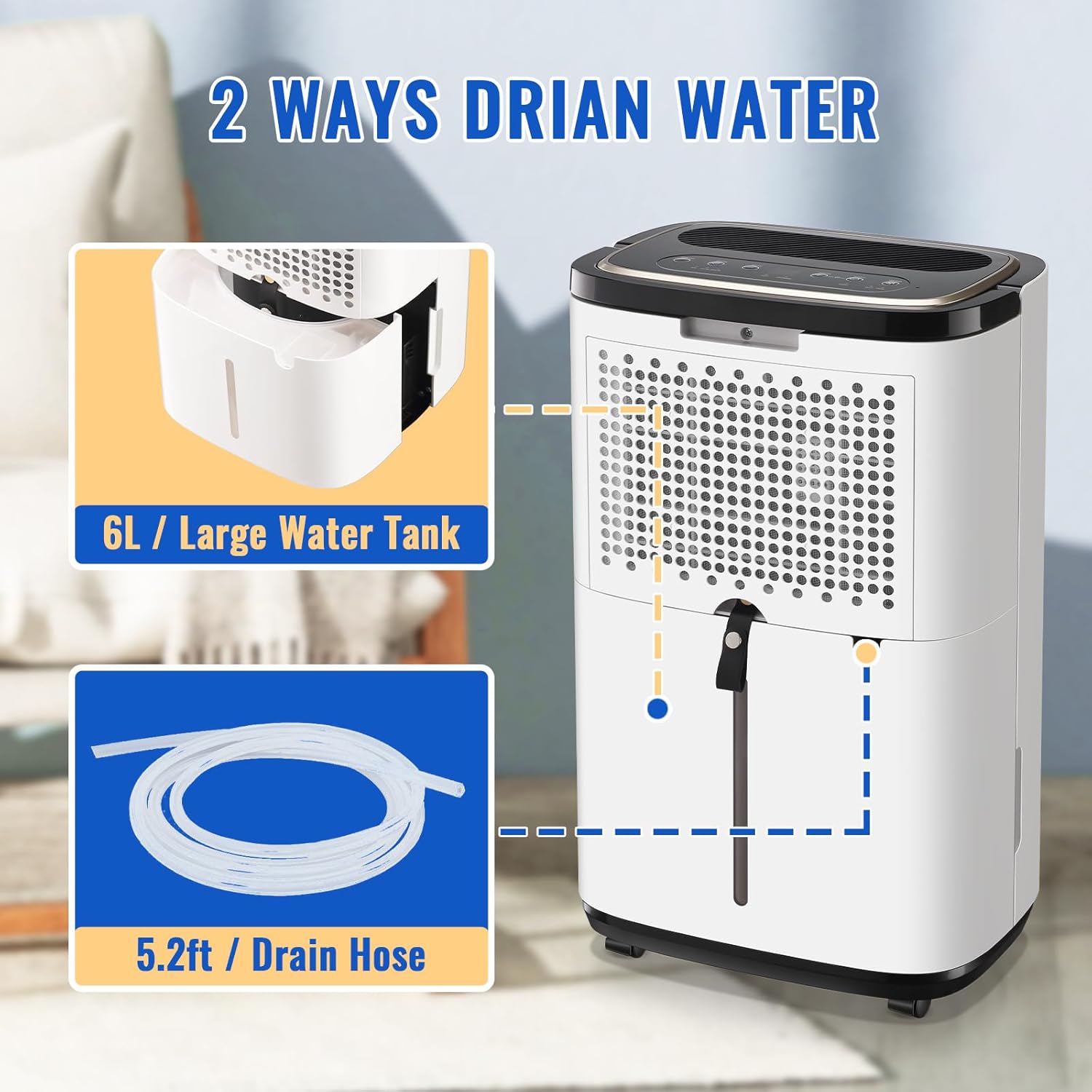
Figure 3.1: Manual and Continuous Drainage options.
Video 3.1: Optional Drainage - Auto Drain or Manual Drainage. This video explains the flexible drainage options, including manual emptying of the 6L water tank and setting up the continuous auto-drain function with the provided hose.
4. Operating Instructions
4.1 Control Panel Overview
The dehumidifier features an intuitive LED intelligent touch control panel.

Figure 4.1: LED Intelligent Touch Control Panel.
- Power Button: Turns the unit on or off.
- Mode Button: Cycles through Dehumidify, Dryer, and Air modes.
- Humidity Adjustment (HUMI+/-): Sets the desired relative humidity (30%-80% RH).
- Speed Button: Adjusts fan speed (High/Low).
- Timer Button: Sets the 24-hour on/off timer.
- Indicators: Lights for 'Defrost' (auto defrost) and 'Full' (water tank full).
4.2 Selecting Operating Modes
Press the 'Mode' button to cycle through the following options:
- Dehumidify Mode: The primary mode for removing moisture from the air. Use the HUMI+/- buttons to set your desired humidity level.
- Dryer Mode: Designed for faster moisture removal, often used for drying clothes or in very damp conditions.
- Air Mode: Functions as a fan, circulating air without actively removing moisture.
Video 4.2: 3 Modes to Meet All Your Needs. This video demonstrates the three operating modes of the WANAI dehumidifier: Dehumidify, Dry, and Air, explaining how each mode functions to suit different environmental needs.
5. Maintenance
Regular maintenance ensures optimal performance and longevity of your dehumidifier.
5.1 Emptying the Water Tank
- When the 'Full' indicator light illuminates, the water tank needs to be emptied.
- Gently pull out the water tank from the front of the unit.
- Carefully carry the tank to a sink or drain and empty the collected water.
- Slide the empty water tank back into the unit until it clicks into place. The unit will resume operation.

Figure 5.1: Removable Water Tank.
5.2 Cleaning the Air Filter
The air filter should be cleaned regularly (approximately every two weeks, or more often depending on usage and air quality).
- Turn off and unplug the dehumidifier.
- Locate the air filter cover on the back of the unit.
- Remove the filter cover and gently pull out the washable air filter.
- Clean the filter with a vacuum cleaner or wash it with warm, soapy water. Rinse thoroughly and allow it to air dry completely before reinserting.
- Replace the dry filter and secure the filter cover.

Figure 5.2: Detachable and Washable Filter.
Video 5.3: Handle and Removable Filter. This video illustrates the ease of use with the built-in handle and shows how to remove and clean the washable air filter for routine maintenance.
5.3 Storage
If storing the unit for an extended period, ensure the water tank is empty and the filter is clean and dry. Store the unit in an upright position in a cool, dry place.
6. Troubleshooting
Before contacting customer support, please refer to the following troubleshooting guide for common issues:
| Problem | Possible Cause | Solution |
|---|---|---|
| Unit does not turn on | No power; Power cord not plugged in; Water tank full or incorrectly installed. | Check power connection; Empty and re-install water tank correctly. |
| No water collected | Humidity level too low; Room temperature too low; Air filter clogged. | Adjust desired humidity; Ensure room temperature is above 41°F (5°C); Clean air filter. |
| Unit is noisy | Unit not on a level surface; Air filter clogged. | Place on a level surface; Clean air filter. |
| Poor dehumidification | Doors/windows open; Room size too large; Air filter clogged. | Close doors/windows; Ensure unit is suitable for room size; Clean air filter. |
7. Specifications
| Feature | Specification |
|---|---|
| Brand | WANAI |
| Model Name | WANAI 50 Pint Portable Dehumidifier |
| Dehumidification Capacity | 50 Pints per Day (under 95°F, 90% RH) |
| Coverage Area | Up to 4500 Sq. Ft. |
| Water Tank Volume | 6 Liters |
| Product Dimensions (D x W x H) | 13.3"D x 9.5"W x 22.3"H |
| Special Feature | Quiet Operation |
| Material | Plastic |
| Included Components | Dehumidifier, Drain Hose, User Manual |
8. Warranty and Support
WANAI provides a One-Year Warranty for this product, covering manufacturing defects from the date of purchase.
For technical assistance, troubleshooting, or warranty claims, please contact WANAI customer service. We offer 24 Hours Online Service to assist you with any inquiries.
- Customer Service: Please refer to the contact information provided on the WANAI official website or your purchase documentation.
- Online Support: Visit the WANAI brand store on Amazon for FAQs and additional resources: WANAI Store