
1. Product Overview
The FavorCOOL FC-RC-6188 is a universal air conditioner remote control designed for broad compatibility with various AC units. It features an extra-large backlit LCD screen, ergonomic design, and an integrated LED light. This remote control is engineered to replace lost or damaged AC remote controls and consolidate multiple remotes into one device.
Key features include:
- Universal compatibility with over 292 brands of home air conditioners (not for window or portable AC units).
- Large, easy-to-read backlit LCD display.
- Ergonomic design with comfortable silicone buttons.
- Automatic power-off memory, retaining settings after battery replacement.
- Integrated LED flashlight function.
- Infrared connectivity with a maximum range of 12 meters.
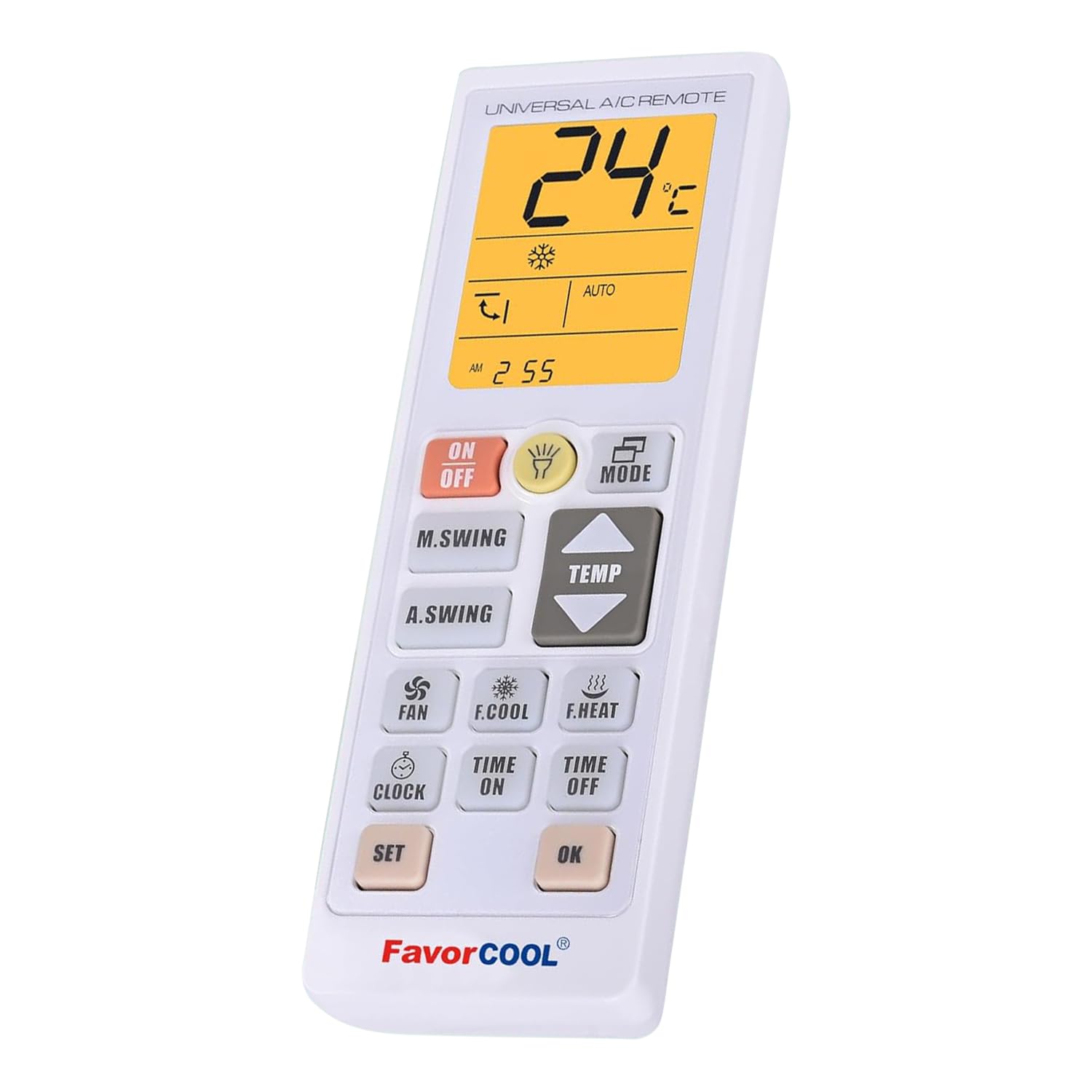
Image 1: FavorCOOL Universal AC Remote Control showing its dimensions (17.5 cm / 6.89 in length, 5.9 cm / 2.3 in width, 2.5 cm / 1 in thickness) and the battery compartment for 2x AAA batteries.
2. Setup Instructions
2.1. Battery Installation
- Open the battery compartment cover on the back of the remote control.
- Insert two (2) AAA batteries, ensuring correct polarity (+/-). Batteries are not included.
- Close the battery compartment cover.
2.2. Pairing with Your Air Conditioner
The remote control can be paired with your air conditioner using a direct code input or an automatic search method.
Method 1: Manual Code Setup
- Turn on your air conditioner manually.
- Refer to the comprehensive code list (Image 2) to find the 3-digit code(s) corresponding to your air conditioner brand.
- Press and hold the SET button on the remote control for approximately 3 seconds. The 3-digit code on the LCD screen will start flashing.
- Use the TEMP+ or TEMP- buttons to adjust the flashing code until it matches one of the codes for your AC brand.
- Point the remote control at your air conditioner and press the OK button to confirm the code. The AC unit should respond (e.g., turn on/off, change mode).
- If the AC does not respond, repeat steps 3-5, trying other codes listed for your brand until a working code is found.
Method 2: Automatic Code Search
- Turn on your air conditioner manually.
- Press and hold the SET button on the remote control for approximately 6 seconds. The 3-digit code on the LCD screen will start flashing and automatically cycle through codes.
- Point the remote control at your air conditioner. When the AC unit responds (e.g., turns on/off, beeps), immediately press the OK button to confirm the code.
- Test the remote control's functions (e.g., ON/OFF, TEMP+, MODE). If all functions work correctly, the setup is complete. If not, repeat the automatic search process.

Image 2: Comprehensive list of 3-digit codes for various air conditioner brands. Users should refer to this list for manual code setup.
3. Operating Instructions
Once paired, the remote control provides access to various air conditioner functions.
- ON/OFF: Powers the air conditioner on or off.
- MODE: Cycles through operating modes such as Cool, Heat, Fan, Dry, Auto.
- TEMP+/TEMP-: Adjusts the temperature setting.
- FAN: Adjusts fan speed (e.g., Low, Medium, High, Auto).
- M.SWING/A.SWING: Controls the horizontal or vertical swing of the air deflector.
- CLOCK: Sets the current time.
- TIME ON/TIME OFF: Sets a timer for the AC to turn on or off automatically.
- F.COOL/F.HEAT: Activates fast cooling or fast heating modes.
- LED Flashlight: Press the dedicated button to activate the built-in LED flashlight for use in low-light conditions.
- Sleep Mode: Activates a power-saving mode that adjusts temperature gradually for comfortable sleep and reduced energy consumption.

Image 3: The remote control demonstrating its night LED flashlight function, highlighting features like heating/cooling, timing, sweeping air, sleep mode, energy reduction, and environmental protection.

Image 4: Close-up of the FavorCOOL remote control, emphasizing its large backlit LCD display for clear readability, comfortable silicone buttons, and durable ABS environmentally friendly material.
4. Maintenance
4.1. Battery Replacement
When the remote control's display becomes dim or its range decreases, it is time to replace the batteries. Use two new AAA batteries. Thanks to the automatic power-off memory feature, you do not need to reset the remote control after replacing batteries.
4.2. Cleaning
To clean the remote control, wipe it with a soft, dry cloth. Do not use liquid cleaners, abrasive materials, or chemical solvents, as these may damage the surface or internal components.
5. Troubleshooting
- Remote control does not work:
- Check if the batteries are inserted correctly and have sufficient charge. Replace with new AAA batteries if necessary.
- Ensure there is a clear line of sight between the remote control and the air conditioner's infrared receiver. Remove any obstructions.
- Verify that the correct code for your air conditioner brand has been successfully programmed. If unsure, repeat the setup process (Section 2.2).
- Limited range or intermittent response:
- Replace the batteries.
- Ensure no strong light sources (e.g., direct sunlight, fluorescent lights) are interfering with the infrared signal.
- Confirm you are within the maximum operating range of 12 meters.
- Specific functions do not work:
- Some advanced functions may not be supported by all air conditioner models, even if the basic functions work.
- Re-program the remote control using a different code for your AC brand, if available, as some codes may offer better compatibility with specific functions.
6. Specifications
| Feature | Specification |
|---|---|
| Brand | FavorCOOL |
| Model Number | FC-RC-6188 |
| Connectivity Technology | Infrared |
| Max Supported Devices | 1 |
| Compatible Devices | Air Conditioner (Home AC units, not Window/Portable) |
| Special Features | Backlit, Digital Display, Ergonomic, Universal, LED Flashlight |
| Colour | White |
| Number of Buttons | 14 |
| Controller Type | Touch Control (referring to button interaction) |
| Maximum Range | 12 Meters |
| Battery Type | 2 x AAA (not included) |
| Dimensions (L x W x H) | 17.5 cm x 5.9 cm x 2.5 cm (approx. 6.89 in x 2.3 in x 1 in) |
| Material | ABS Plastic |
7. Customer Support
If you encounter any issues or have questions regarding your FavorCOOL Universal AC Remote Control FC-RC-6188, please contact FavorCOOL customer support. We aim to respond to inquiries within 12 hours on business days.
Please have your model number (FC-RC-6188) and any relevant details about your air conditioner brand and model ready when contacting support.