
Introduction
Thank you for purchasing the NEEWER Z2-N Round Head TTL Flash Speedlite. This manual provides detailed instructions for the safe and effective use of your flash unit. Please read this manual thoroughly before use to ensure optimal performance and to prevent damage to the product.
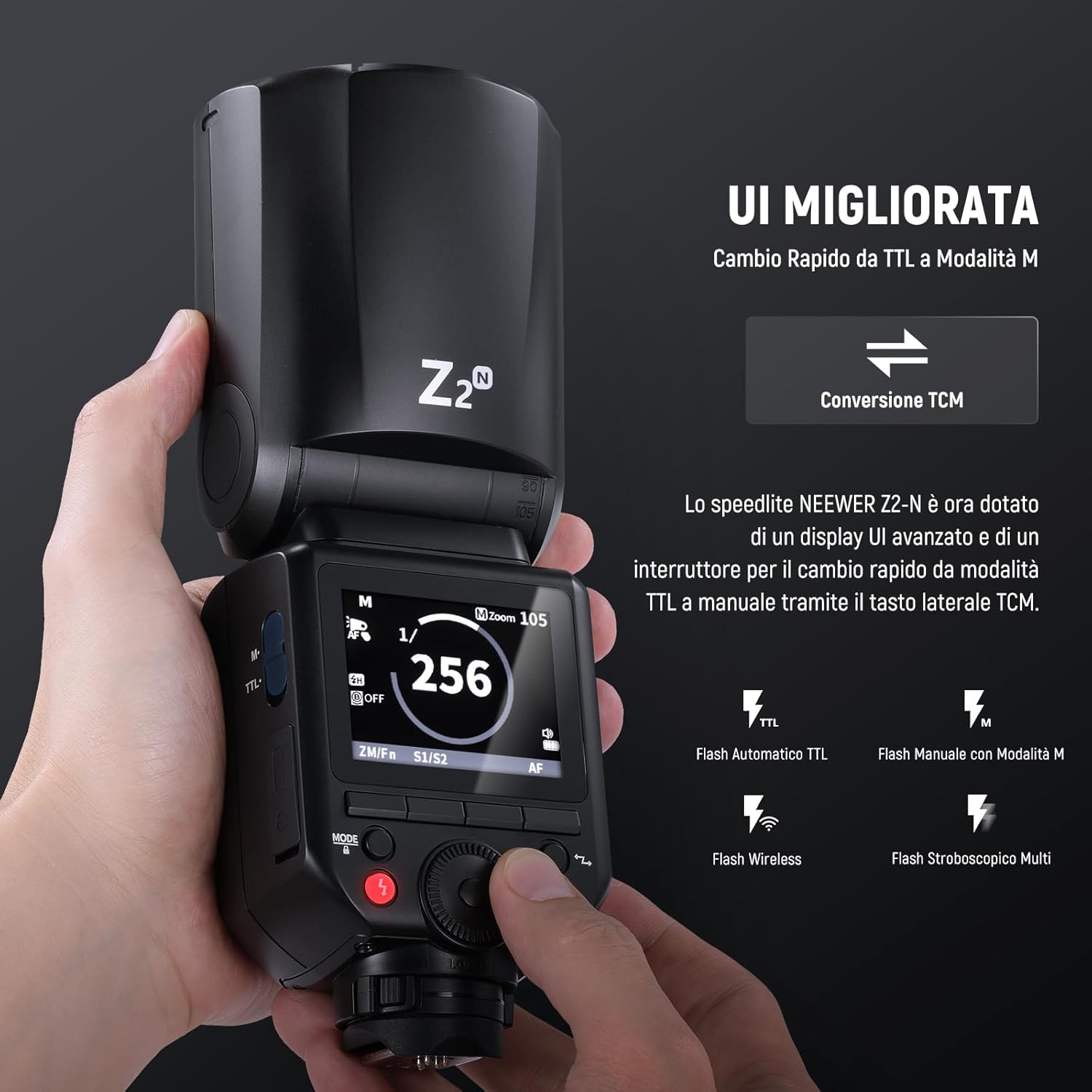
Image: The NEEWER Z2-N Round Head TTL Flash Speedlite, showcasing its compact design and round flash head.
Safety Information
Please observe the following safety precautions to prevent injury or damage to the product:
- Do not disassemble or modify the flash unit. This may cause electric shock or malfunction.
- Keep the unit dry. Do not expose it to rain, moisture, or high humidity.
- Avoid direct eye exposure to the flash. The intense light can cause temporary vision impairment.
- Keep out of reach of children.
- Use only the specified battery and charger. Improper use may lead to fire or explosion.
- Do not operate the flash in the presence of flammable gases or liquids.
Package Contents
Verify that all items are present in your package:
- 1 x Z2-N Speedlite Flash
- 1 x M12 Dome Diffuser
- 1 x Lithium Battery (7.4V/2600mAh)
- 1 x USB Charging Base
- 1 x USB Cable
- 1 x Wall Charger
- 1 x Mini Tripod
- 1 x Protective Case
- 1 x Instruction Manual

Image: The NEEWER Z2-N flash unit displayed alongside its various included accessories, such as the dome diffuser, battery, charger, and protective case.
Product Overview
The NEEWER Z2-N is a high-performance TTL flash speedlite designed for Nikon cameras, featuring a round flash head for soft, natural light distribution. It includes an improved user interface and versatile control options.
Key Features:
- Improved UI and Quick TTL/M Switching: The Z2-N features an enhanced user interface and a dedicated side button for quick switching between TTL automatic metering and Manual flash modes. It offers manual adjustment from 1/1 to 1/256 power and supports focal lengths from 28mm-105mm.
- Powerful Output and Modeling Lights: With a maximum power of 76Ws and a stable color temperature of 5600K (±200K), this flash uses a circular Fresnel head for even light. It has flexible bounce angles (0° to 330° horizontal, -7° to 120° vertical). Two improved 2W LED modeling lights (3300K±200K) offer 10 adjustable brightness levels.
- Integrated 2.4G Q Wireless System: Features 4 wireless control groups (M/A/B/C), 32 channels (1-32), and 99 IDs (1-99). Compatible with QPRO-N TTL transmitters (not included). Can function as a Master/Slave flash within a 100m (328') transmission range.
- High Capacity Battery and Fast Recycle: The 7.4V/2600mAh lithium battery provides approximately 480 full-power flashes with a fast 1.5s recycle time. Flash duration ranges from 1/180s to 1/20000s. The battery fully charges in about 3.5 hours.
- Magnetic Flash Head and Wide Compatibility: The magnetic flash head allows for easy attachment of accessories like the included M12 Dome Diffuser. It is compatible with various Nikon cameras (Z9, Z8, Zfc, Z50, Z30, Z5, Z6, Z7, Z6II, Z7II, D4, D5, D6, D60, D70S, D90, D100, D200, D300, D610, D700, D750, D780, D800, D850, D3100, D3200, D3300, D3400, D3500, D5000, D5100, D5200, D5300, D7100, D7500). Note: Not compatible with Nikon D810.

Image: A close-up of the NEEWER Z2-N flash unit, highlighting its improved user interface display and the dedicated button for quick switching between TTL and Manual modes.

Image: A technical diagram illustrating various configurations and settings of the NEEWER Z2-N flash, including LCD screen displays and different mounting positions.
Setup
1. Charging the Battery
Before first use, fully charge the lithium battery. Insert the battery into the USB charging base and connect the base to the wall charger using the provided USB cable. A full charge takes approximately 3.5 hours.

Image: The 7.4V/2600mAh lithium battery for the NEEWER Z2-N flash unit.

Image: The USB charging base and wall charger included with the NEEWER Z2-N flash.
2. Installing the Battery
Once charged, insert the battery into the battery compartment on the side of the flash unit, ensuring correct orientation. Close the battery compartment securely.
3. Mounting the Flash on Camera
Slide the flash's hot shoe mount onto your Nikon camera's hot shoe. Secure it in place using the locking mechanism on the flash unit. Ensure it is firmly attached to prevent accidental detachment.

Image: The NEEWER Z2-N flash unit securely mounted on the hot shoe of a Nikon DSLR camera.
4. Attaching the Dome Diffuser
The magnetic flash head allows for easy attachment of the M12 Dome Diffuser. Simply align the diffuser with the flash head and it will snap into place magnetically. This helps to soften the light output.
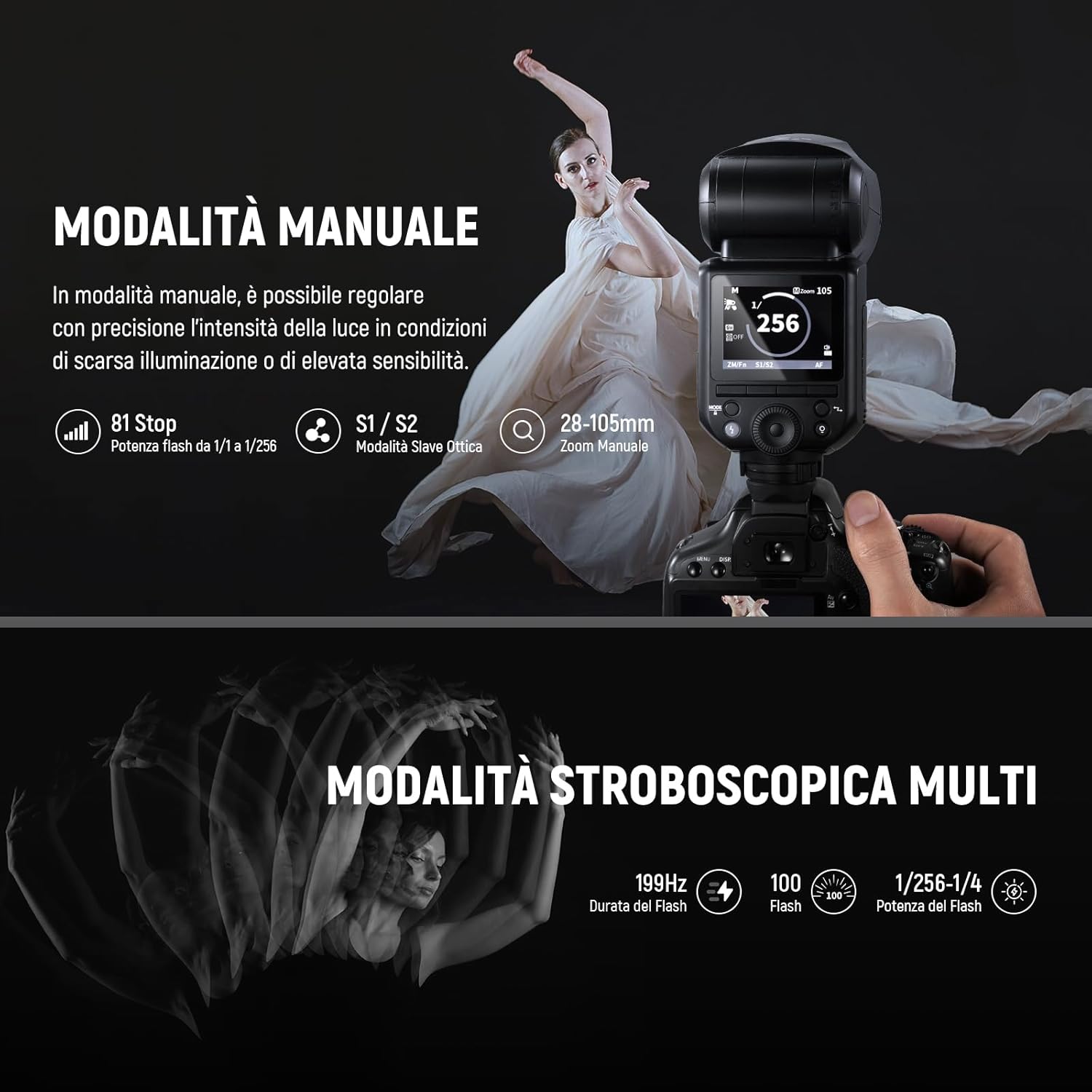
Image: The NEEWER Z2-N flash unit with the M12 Dome Diffuser magnetically attached to its round head, designed to soften light.
Operating Instructions
Power On/Off
Press and hold the power button to turn the flash unit on or off. The LCD screen will illuminate upon power-on.
Mode Selection (TTL/Manual)
Use the dedicated TCM (TTL-to-Manual Conversion) button on the side of the flash to quickly switch between TTL (Through-The-Lens) automatic flash mode and Manual flash mode. In TTL mode, the flash automatically adjusts output for correct exposure. In Manual mode, you can set the flash power from 1/1 to 1/256.

Image: A demonstration of the NEEWER Z2-N's TTL automatic flash function, showing how it ensures precise exposure even with complex lighting variations.
Adjusting Flash Head Angle
The flash head can be rotated horizontally from 0° to 330° and tilted vertically from -7° to 120°. This flexibility allows for bounce flash techniques to create softer, more diffused lighting.
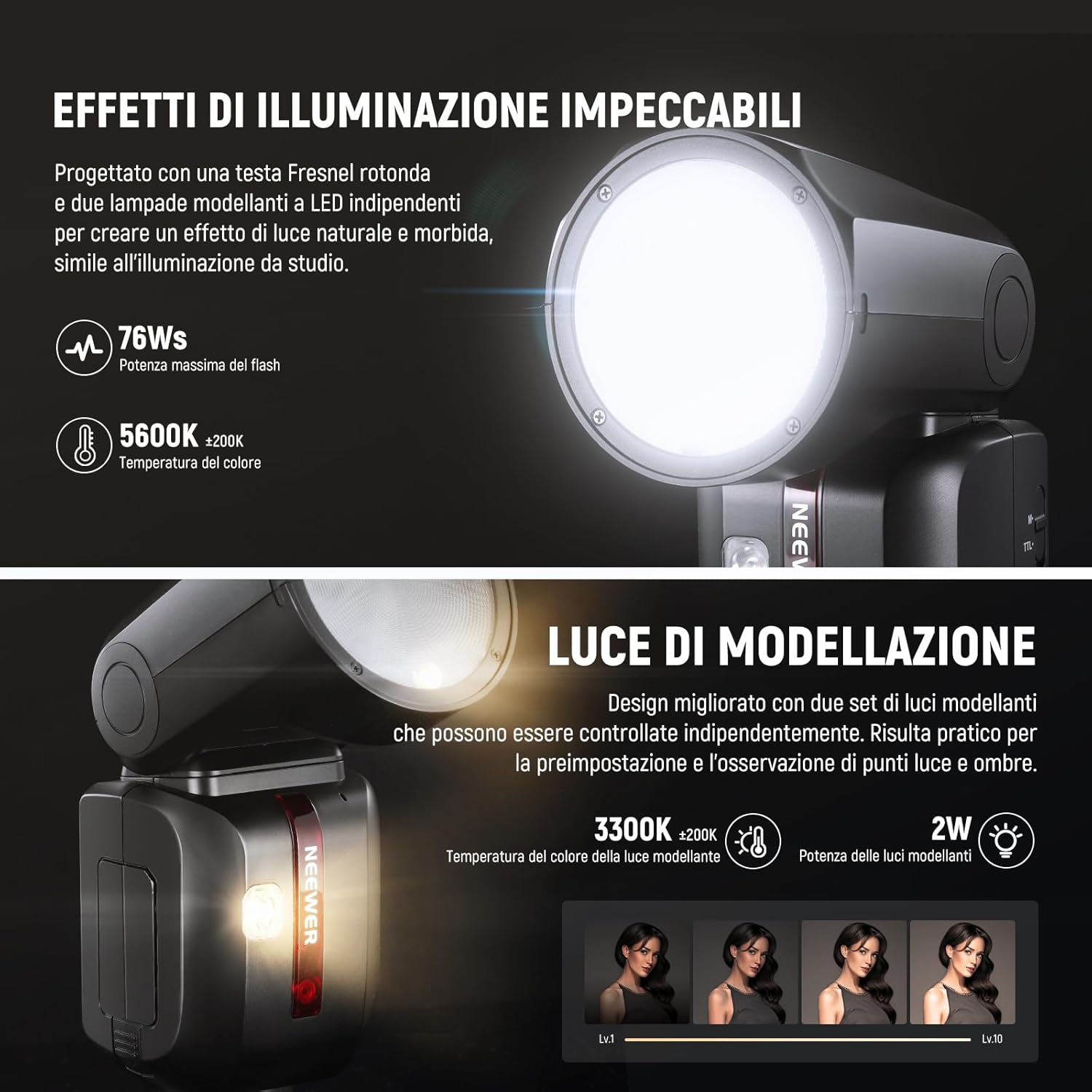
Image: The NEEWER Z2-N flash head demonstrating its ability to tilt and rotate, providing flexible lighting angles for various shooting scenarios.
Modeling Lights
The Z2-N features two 2W LED modeling lights. These can be adjusted through 10 brightness levels (1-10) to help visualize lighting effects before taking a shot.
2.4G Wireless System
The integrated 2.4G wireless system allows the Z2-N to function as a master or slave unit with other NEEWER Q system flashes. Set the flash to the desired group (M/A/B/C), channel (1-32), and ID (1-99) to establish wireless communication. For master control, use a compatible QPRO-N TTL transmitter (sold separately).
High-Speed Sync (HSS)
The flash supports High-Speed Sync up to 1/8000s, allowing you to use wider apertures in bright conditions or to freeze fast motion with flash.

Image: A visual representation of High-Speed Sync (HSS) capability, demonstrating its use for supplementary lighting in bright outdoor conditions.
Other Functions
The Z2-N also supports Multi Strobe, 1st/2nd curtain sync, FEC/FEB/FEL (Flash Exposure Compensation/Bracketing/Lock), and optical slave modes (S1/S2).
Maintenance
- Clean the flash unit regularly with a soft, dry cloth. Do not use solvents or abrasive cleaners.
- Keep the hot shoe contacts clean to ensure proper communication with the camera.
- Store the flash in its protective case when not in use to prevent dust and scratches.
- Remove the battery if the flash will not be used for an extended period.
- Firmware updates can be performed via the USB Type-C port. Check the NEEWER website for the latest firmware.

Image: The protective carrying case provided for the NEEWER Z2-N flash, designed for safe storage and transport.
Troubleshooting
| Problem | Possible Cause | Solution |
|---|---|---|
| Flash does not fire. | Battery low or not inserted correctly. Flash not securely mounted on camera. Flash in sleep mode. | Charge or reinsert battery. Re-mount flash on hot shoe. Press any button to wake flash. |
| Flash output is too dark/bright. | Incorrect flash mode or power setting. FEC (Flash Exposure Compensation) incorrectly set. | Adjust flash power in Manual mode or check camera/flash FEC settings in TTL mode. |
| Wireless trigger not working. | Incorrect group, channel, or ID settings. Distance too far or obstacles present. | Ensure master and slave units have matching group, channel, and ID. Reduce distance or clear line of sight. |
| Flash recycle time is slow. | Battery is low. High power output setting. | Recharge battery. Use lower power settings if possible. |
If you encounter issues not listed here, please refer to the full instruction manual or contact NEEWER customer support.
Specifications
| Model | Z2-N |
| Brand | NEEWER |
| Compatible Mounts | Nikon hot shoe mount |
| Flash Camera Type | Hotshoe |
| Flash Sync Speed | 1/8000s (High-Speed Sync) |
| Connectivity Technology | Wireless (2.4G radio RF) |
| Guide Number | 38 |
| Color Temperature | 5600K (±200K) |
| Modeling Light Power | 2W (3300K±200K, 10 levels) |
| Exposure Control Type | Automatic (TTL) |
| Battery | 7.4V/2600mAh Lithium |
| Full Power Flashes | Approx. 480 |
| Recycle Time | 1.5s |
| Flash Duration | 1/180s - 1/20000s |
| Wireless Transmission Range | 100m / 328ft (without obstacles) |
| Dimensions | 7.6 x 7.6 x 20.6 cm (2.9" x 2.9" x 8.1") |
| Weight (with battery) | 580g (1.27lb) |

Image: A detailed table outlining the technical specifications and parameters of the NEEWER Z2-N flash unit.
Warranty and Support
NEEWER products typically come with a limited warranty. Please refer to the warranty card included in your package or visit the official NEEWER website for specific warranty terms and conditions.
For technical support, troubleshooting assistance, or inquiries about replacement parts, please contact NEEWER customer service through their official website or the contact information provided in your product documentation.
Official NEEWER Website: www.neewer.com


