
1. Introduction
This manual provides detailed instructions for the proper setup, operation, and maintenance of your NEEWER TH15 3-Way Geared Tripod Head. Designed for precision and versatility, this geared head offers fine-tuned adjustments for various photographic applications. Please read this manual thoroughly before use to ensure optimal performance and longevity of your product.

Figure 1: NEEWER TH15 3-Way Geared Tripod Head
2. Product Overview and Features
The NEEWER TH15 is a robust and lightweight aluminum alloy geared head, featuring precise adjustment capabilities and a built-in bubble level for accurate positioning. It is designed to provide stable support and flexible camera angles for professional photography and videography.
Key Features:
- 3-Axis Pan & Tilt: Offers -45° to 90° frontal tilt, -90° to 90° lateral tilt, and 360° pan for comprehensive camera positioning.
- Precise Fine Tuning: Retractable mode control switches allow for both approximate and precise adjustments along scale markings.
- 360° Panoramic Arca-Type QR Plate: Standard Arca-type dovetails with a round quick release plate and 360° horizontal rotation scale for panoramic shooting.
- Wide Compatibility: Features a 1/4" screw for cameras (DSLR, mirrorless, cinema, telescopes) and a 3/8" tripod socket for tripods, monopods, sliders, and camera dollies.
- High Load Capacity: Supports devices up to 13.2lb (6kg).
- Short Center Column: Includes a φ25mm x 50mm short center column for increased height and unobstructed adjustments.

Figure 2: 3-Way Adjustment Capabilities

Figure 3: Detail of Mode Control Knob (Note: Metal block is decorative)
Video 1: Overview of the NEEWER TH15 Geared Head's features and adjustments.
3. Package Contents
Verify that all items listed below are included in your package:
- 1 x 3-Way Geared Head (TH15)
- 1 x Short Center Column
- 1 x L-Shaped Hex Key
- 1 x User Manual
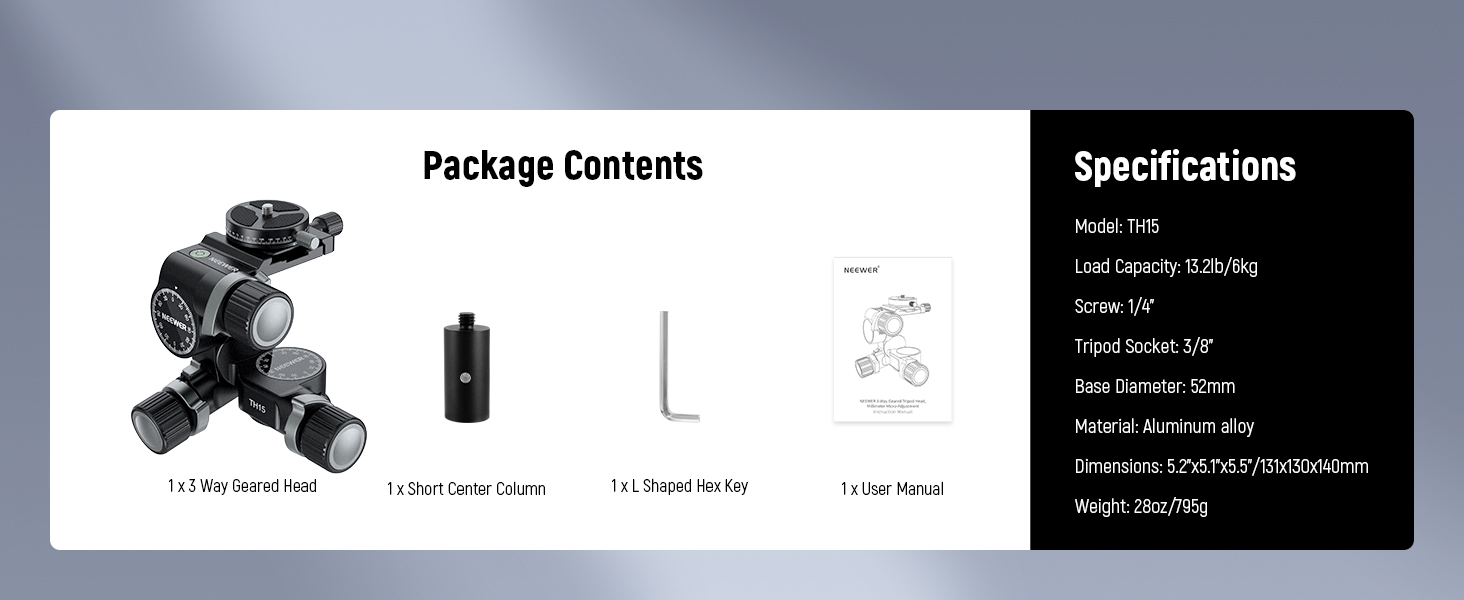
Figure 4: Package Contents
4. Setup
4.1 Attaching to a Tripod
- Align the 3/8" screw on your tripod's top mounting plate with the 3/8" screw hole on the base of the geared head.
- Tighten it clockwise until secure.
- If your tripod has a 1/4" screw, use the included short center column to adapt it, ensuring the 3/8" screw on the column connects to the geared head.

Figure 5: Attaching the Short Center Column
4.2 Mounting Your Camera
- Turn the "Quick Release Plate Locking Knob" counter-clockwise to loosen and remove the panoramic quick-release plate from the geared head.
- Attach your camera to the quick-release plate using the 1/4" screw. Ensure it is securely tightened.
- Slide the quick-release plate with your camera back into the geared head's clamp.
- Tighten the "Quick Release Plate Locking Knob" clockwise until the camera is firmly secured.

Figure 6: Quick Release Plate Mechanism
5. Operating Instructions
The NEEWER TH15 offers two primary control modes for adjusting your camera's position: Large Adjustment Mode and Precise Adjustment Mode.
5.1 Large Adjustment Mode
- To make significant adjustments to the camera's angle, hold the "Mode Control Knob" and rotate it to switch to the Large Adjustment Mode.
- Manually set the desired angle.
- Release the mode control knob to secure the bracket in place.
5.2 Precise Adjustment Mode
- When the mode control switches are retracted, you are in Precise Adjustment Mode.
- Rotate the fine-tune knobs to make small, precise adjustments to the head's position along the scale markings.
Note: If you switch from Large Adjustment Mode back to Fine Adjustment Mode, the fine adjustment knob may vibrate for a short time. This is normal due to the gear reset.
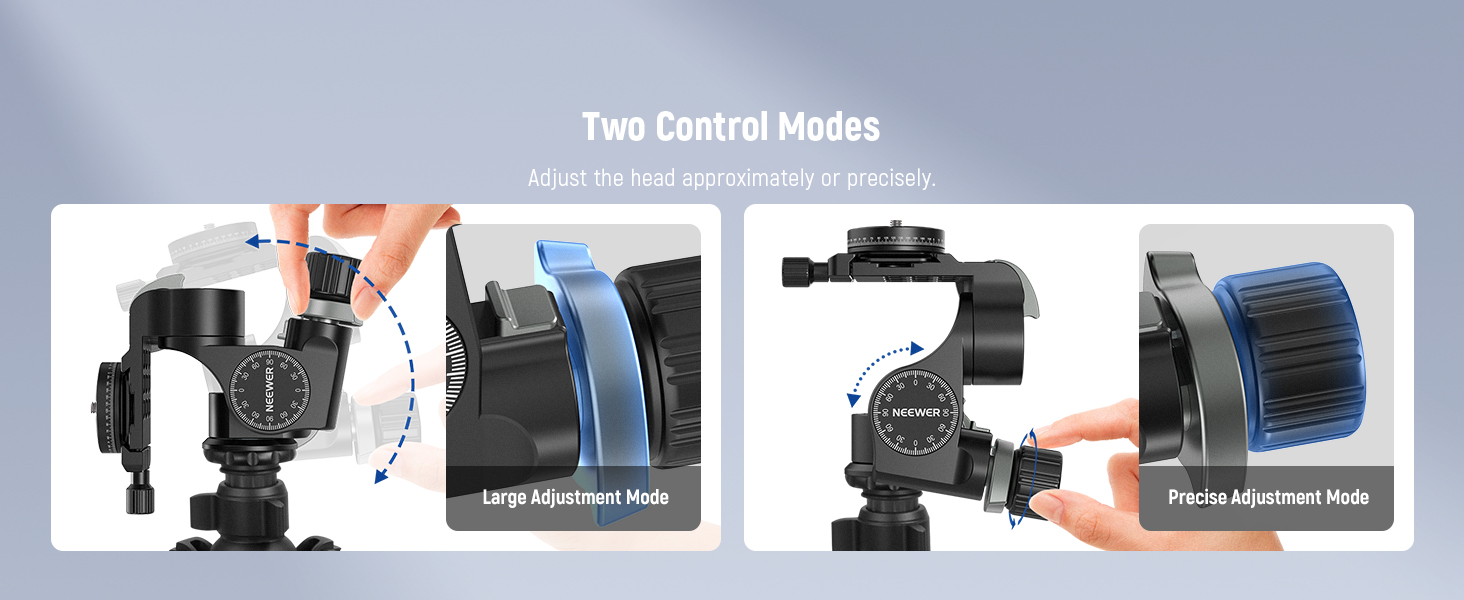
Figure 7: Two Control Modes for Adjustment
5.3 Panoramic Shooting
The geared head features a 360° panoramic scale on the quick-release plate for smooth panoramic shooting. Use the side knob to securely lock the plate in place after setting your desired panoramic angle.

Figure 8: Dual Panorama Shooting
Video 2: Demonstration of the geared head's precise adjustments and smooth panning.
6. Maintenance
- Please refrain from disassembling the product, except for mentioned replaceable components.
- Use the product on stable surfaces to prevent damage.
- Always ensure that knobs are securely locked during use to prevent accidental movement.
- Exercise caution when handling to prevent accidents.
- Store the product appropriately during extended periods of non-use.
- After use, clean it gently with a soft cloth and mild detergent, then dry it carefully.
7. Troubleshooting
If you encounter any issues with your NEEWER TH15 Geared Tripod Head, please consider the following general advice:
- Difficulty in Adjustment: Ensure all locking knobs are sufficiently loosened before attempting to adjust the head. If a knob feels stiff, apply gentle, even pressure.
- Camera Instability: Verify that the quick-release plate is correctly attached to your camera and securely clamped onto the geared head. Also, ensure your tripod is stable and capable of supporting the combined weight of the geared head and camera.
- Unusual Noise: If you hear grinding or unusual noises during adjustment, stop immediately. Check for any obstructions or loose components. Do not force any movements.
- Leveling Issues: Utilize the built-in bubble levels to ensure your setup is perfectly level. Adjust tripod legs or the geared head's base as needed.
For persistent issues not resolved by these steps, please contact NEEWER customer support for assistance.
8. Specifications
| Feature | Specification |
|---|---|
| Model | TH15 |
| Load Capacity | 13.2lb / 6kg |
| Camera Screw | 1/4" |
| Tripod Socket | 3/8" |
| Base Diameter | 52mm |
| Material | Aluminum Alloy |
| Dimensions | 5.2"D x 5.5"W x 5"H (130x140x140mm) |
| Item Weight | 2 pounds / 905g |
| Color | Black |
9. Warranty and Support
NEEWER products are manufactured to high-quality standards. For warranty information, technical support, or service inquiries, please refer to the warranty card included with your product or visit the official NEEWER website. Keep your purchase receipt as proof of purchase for warranty claims.


